

Mandatory Product Attributes
06/12/2025
This policy applies to products listed on TikTok Shop by Tokopedia. For products listed on Tokopedia, please refer to the Pusat Edukasi Seller Tokopedia.
What are Mandatory Product Attributes?
We strive to build a safe and positive shopping environment for all users. To promote user safety, sellers will now be required to submit Mandatory Product Attributes for certain categories of products before they can be listed on our platform.Mandatory Product Attributes are product features or attributes that help customers make an informed decision before purchasing.
This process requires sellers to submit documents including but not limited to certifications, testing reports, product/package images, other government-issued documentation and aid in:
- Describing a product's properties or functions
- Providing proof of a product's regulatory compliance
- Informing customers of any potential safety risks related to a product's functionality and use
Product Categories that Require Mandatory Product Attributes
In order to adhere to local law and Indonesian product compliance requirements, specific product categories will now require sellers to provide/upload Mandatory Product Attributes before listing such products on our platform.The mandatory product attribute requirement applies to the following product categories:
| Product Category | Required Mandatory Product Attribute(s) |
| Food and Beverages |
|
Consumer Health
|
|
Beauty and Personal Care
|
|
Where Can Sellers Find a Product's Registration Number?
There are several ways to find a product's registration number:- From Product Certificates
- Brand owners, producers, official importers are generally issued product certificates by related government agencies to sell such items. The registration number can be found on the certificate.
- From Product Packaging
- Registration numbers can usually be found on a product's packaging. Numbers can be in the form of text or a scannable QR code.
- From the BPOM Database
- Registration numbers can also be found on the BPOM website by searching for the specific product or brand name.
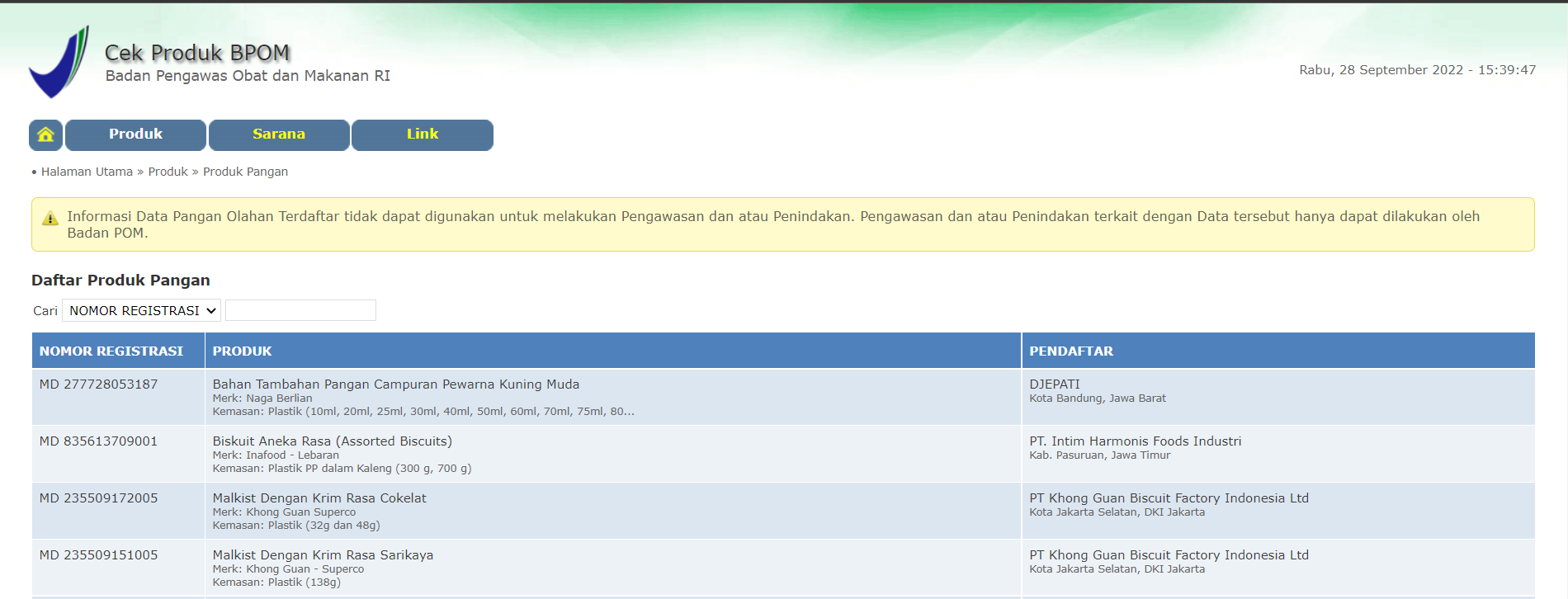
- Registration numbers can also be found on the BPOM website by searching for the specific product or brand name.
What Does This Mean For Sellers?
Sellers who wish to list products in the categories above must fill in the requested Mandatory Product Attributes of their product on the Seller Center listing page. If the attributes are not included, the products will not be listed on our platform.Subject to internal screening criteria, sellers may also be requested to update their existing listings with the necessary product attributes if they offer products in the mentioned categories above.
How Can Sellers Upload Mandatory Attributes For New Product Listings?
To fill in the Mandatory Product Attributes for a new product listing, sellers can:- Go to the Seller Center home page and select "Products" > "Manage Products".
- Click "Add new product" and fill in the mandatory attributes included under the "Product Attributes" tab. Mandatory attributes will be labelled as "Mandatory" to differentiate the existing optional attributes.
- Fill in the mandatory attributes fields by:
- Choosing from the available options in the drop-down list; or
- Manually entering the information as free text.
- Click "Publish".
How Can Sellers Upload Mandatory Attributes For Products That Are Already Listed?
To fill in the Mandatory Product Attributes for products that have been previously listed, sellers can:- Go to Seller Center home page and select "Products" > "Manage Products".
- Click "Edit".
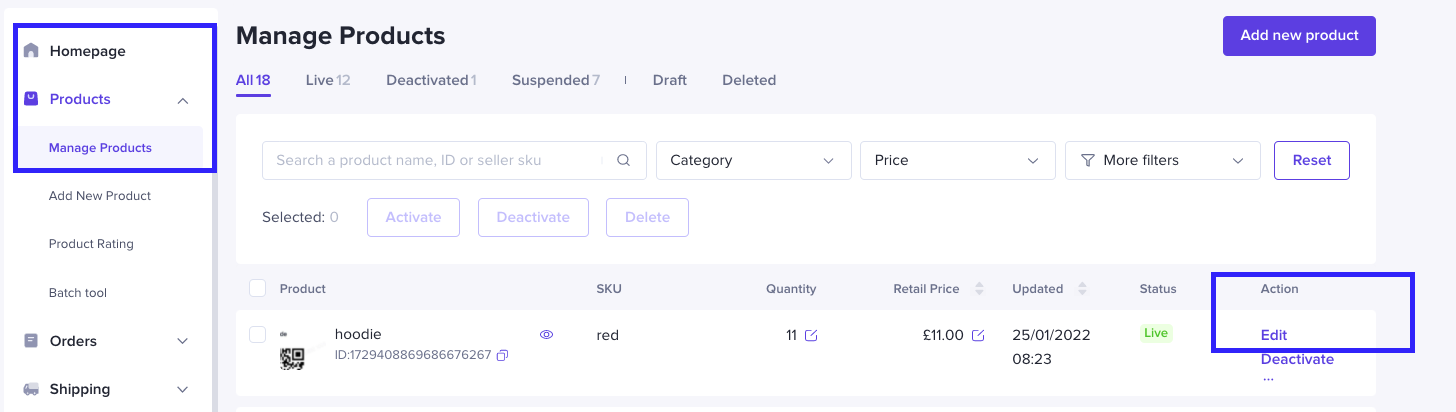
- Populate the requested product mandatory attributes under the ''Product Attributes'' heading
- Click "Update".
You may also be interested in
- 2 lessons
Understanding Product Policy
Familiarize yourself with TikTok Shop by Tokopedia’s product policies to avoid violations and build…
Product Recalls and Unsafe Products
What are Product Recalls? A product recall is an action taken to remove a product from the market du…

What are Prohibited Products?
👋 We've moved! For more information, please click here.
Counterfeits and Knockoffs
Counterfeit and Knockoff products are strictly prohibited for sale on TikTok Shop by Tokopedia. What…
How do I apply to sell Invite-Only products?
This policy applies to products listed on TikTok Shop by Tokopedia. For products listed on Tokopedia…
Misleading Product Listings
What Are Misleading Product Listings? Shop aims to create a shopping environment that inspires confi…
How to Report IP Infringements
How do I report an infringement of my Intellectual Property (IP) rights? IPR owners or their represe…
Copyright Infringement
What is a copyright? Copyright is a legal right that protects original works and stops others from u…
Patent and Design Infringement
What are patents and designs? Patents protect inventions and give the owner the right to prevent oth…
Sensational or Shocking Content for Seller
We expect our sellers to be respectful and responsible when listing your products; this includes avo…