

Seller-Fault Cancellation Rate (SFCR)
11/18/2025
What is the Seller-fault Cancellation Rate
(SFCR)?The Seller-fault Cancellation Rate is the percentage of all orders (over a period of 7 calendar days) that are cancelled by the seller or due to the fault of the seller.
- The SFCR includes all:
- Seller-initiated cancellations due to the seller's fault (e.g. no stock, wrong pricing)
- Auto-cancellations due to the seller's failure to prepare/hand over the parcel to logistics providers within the platform's auto-cancellation Service Level Agreement (SLA).
- 100 orders were placed
- 20 orders were cancelled due to the seller's fault
- 5 orders were automatically cancelled
- The seller's SFCR is 25%.
Where can I find my SFCR?
You can find your SFCR in the Shop Health section of the Seller Center.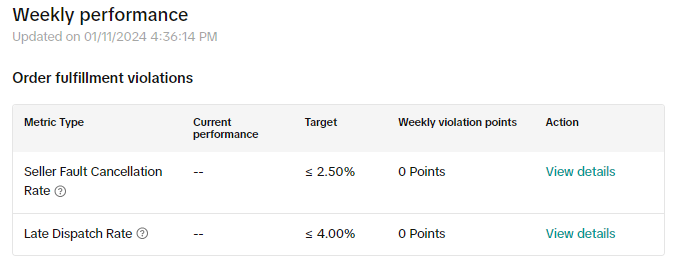
What would happen if I do not meet the target above?
Enforcement actions may be taken depending on how high your SFCR is.Order Volume Limits may be applied as follows:
- SFCR is ≥10% but <30% -> You will only be able to sell up to 75% of your average daily order volume
- SFCR is ≥30% but <50% -> You will only be able to sell up to 50% of your average daily order volume
- SFCR is ≥50% but <75% -> You will only be able to sell up to 25% of your average daily order volume
- SFCR is ≥75% -> You will not be able to sell your products temporarily
- Shop level SFCR >= 5%; And
- Product Level SFCR >= 10%
What happens if I breach these guidelines?
If you are found to violate these guidelines, you may have enforcement actions taken against your account. You should note that repeated offenses will result in more significant penalties.Please see our Violation Reasons, Points & Enforcement Actions for Sellers article and Seller Terms of Service for more information. If you think an enforcement action has been taken against you in error, please raise an appeal via the Seller Center. Please read our Seller Appeal Guidelines article for more information.
For more information, please see the TikTok Shop by Tokopedia Seller Performance Evaluation Policy.
You may also be interested in
- 3 lessons
Webinar Replays: Shop Performance
Watch full replays of our Shop performance webinars and learn how to maximize your shop on Tokopedia…
- 3 lessons
Shop Health
Key metrics and strategies to maintain the quality and performance of your shop, ensuring long-term…
- 4 lessons
Shop Health
Key metrics and strategies to maintain the quality and performance of your shop, ensuring long-term…
What is "Store Rating"?
The Store Rating is a score that helps sellers better understand their shop's performance, and ident…
Customer Review Policy
Why is customer feedback (i.e., Ratings and Reviews) so important? Ratings and reviews of products/s…
Seller-Fault Return/Refund Rate
What is the Seller-Fault Return/Refund Rate? The Seller-Fault Return/Refund Rate is the percentage…

Late Dispatch Rate (LDR)
Note: Orders with Instant, Sameday, and Sameday 8-hour delivery are only available via Tokopedia. Cl…
What is the Seller Performance Evaluation Policy?
TikTok Shop by Tokopedia Seller Performance Evaluation At TikTok Shop by Tokopedia, we value safety,…

Violation Reasons, Points & Enforcement Actions for Sellers
Violation Reasons and Points Below are non-exhaustive Violation Reasons and their corresponding rang…

Customer Service Communication Requirements
Upcoming Updates From 15th July 2025 12-Hour Response Rate will be added to your Shop Health page. N…