

Exporting Orders
04/09/2025
You can start using our new Export Orders function on Seller Center today to streamline your order management process.

Benefits of Exporting Orders

How to Export Orders
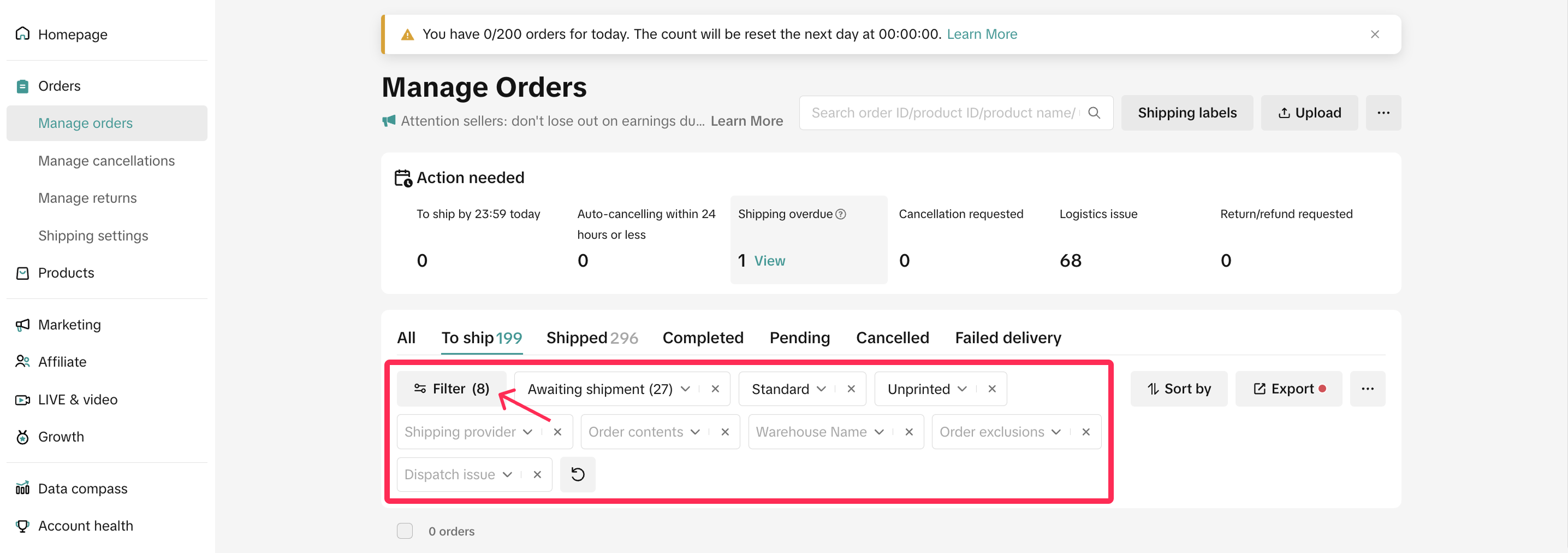
- Access the Orders section on Seller Center, where you can export orders from the Manage Orders modules. You can customise your criteria by selecting your preferred filters.
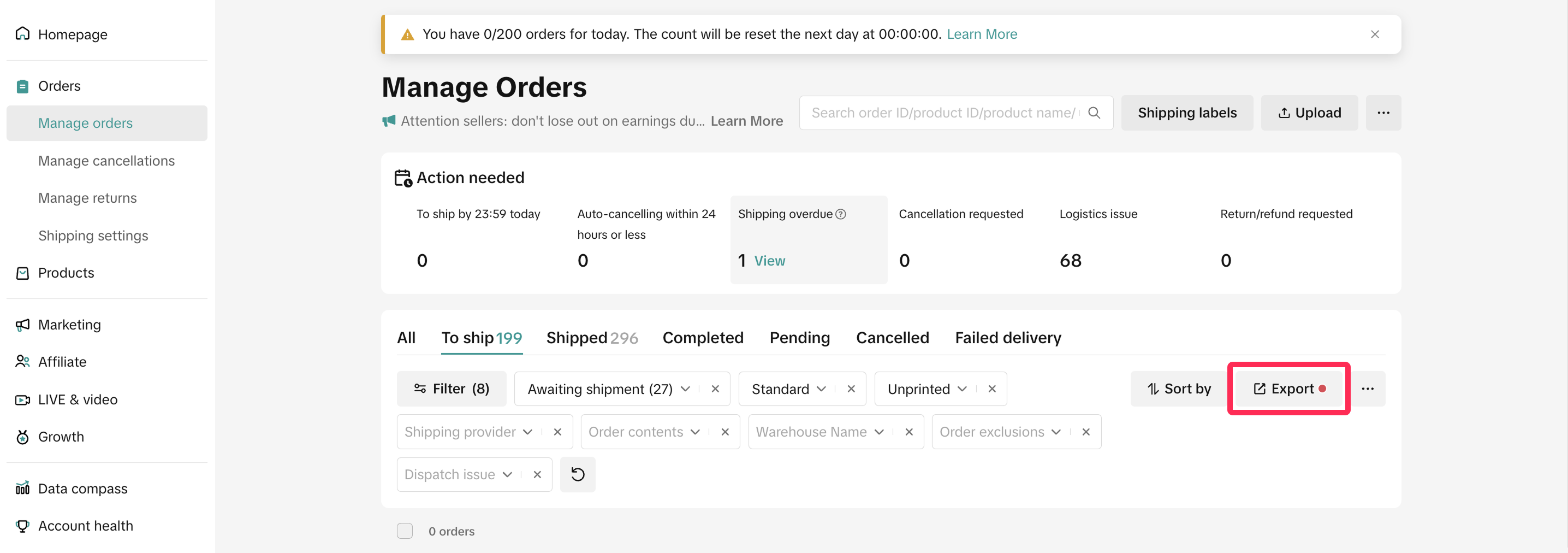
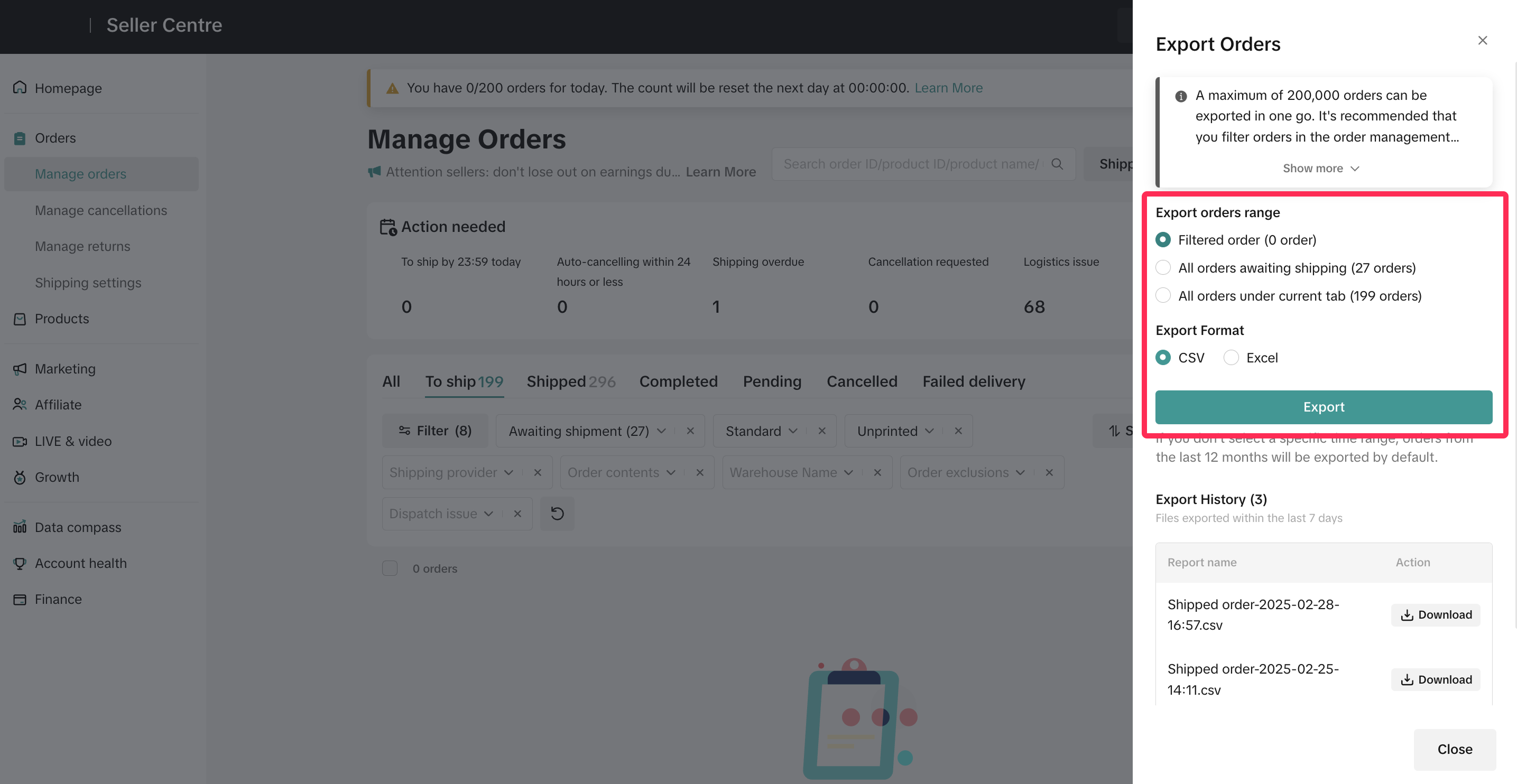
- Click on 'Export Orders' and choose your desired export order range and format. Then, click 'Export' to initiate the order export process. On this page, you will be able to view your Export History and also have the option to redownload the exported files.

Understanding Dimensions in Exported Data
When exporting orders into a CSV or Excel file, you'll come across various dimensions in the data. These dimensions help you analyse and understand the details of your orders more effectively. Below is a list of the most frequently used dimensions, along with their definitions, to help you interpret the data with ease.| Dimension | Definition |
| Order ID | A unique identifier assigned to each order, allowing you to track and reference it. |
| Order Status | Indicates the current stage of the order, such as 'To Ship,' 'Shipped,' or 'Completed.' |
| Order Substatus | Indicates the sub-status of the order, such as 'Awaiting collection,' 'In transit,' or 'Delivered.' |
| Cancellation/Return Type | This field shows whether the order has any cancellation or aftersales requests. |
| SKU ID | The Stock Keeping Unit (SKU) identifier, which is a unique code for each product. |
| SKU Unit Original Price | The original price of a single unit of the product before any discounts or adjustments. |
| SKU Subtotal Before Discount | The total price of the product(s) in the order before any discounts are applied. |
| SKU Platform Discount | The discount amount applied to the product by the platform |
| SKU Seller Discount | The discount amount applied to the product by the seller. |
| SKU Subtotal After Discount | The total price of the product(s) after all applicable discounts have been deducted. |
| Shipping Fee After Discount | The final shipping fee charged to the buyer after any shipping discounts. |
| Original Shipping Fee | The initial shipping fee before any discounts or promotions are applied. |
| Shipping Fee Seller Discount | The discount on shipping fees provided by the seller. |
| Shipping Fee Platform Discount | The discount on shipping fees provided by the platform. |
| Order Amount | The total amount paid by the buyer for the order, including products and shipping fees. |
| Order Refund Amount | The amount refunded to the buyer in case of cancellations or returns. |
| Fulfilment Type | Indicates whether the order is fulfilled by the seller or by the platform. |
| Warehouse Name | The name of the warehouse from which the order was dispatched. |
| Tracking ID | A unique identifier used to track the shipment of the order. |
| Delivery Option | Shows the delivery option chosen by the buyer, such as regular, instant, or same-day delivery. |
| Payment Method | Indicates the payment method used by the buyer, such as credit card, e-wallet, or bank transfer. |
| Package ID | A unique identifier for the package associated with the order. |
| Purchase Channel | Indicates the platform or channel through which the order was placed, such as TikTok Shop or Tokopedia. |
You may also be interested in

Managing Orders on Seller Center App
In this article, we will introduce you to the new Orders page on the Seller Center app and how you c…

Managing Failed Delivery Orders
In this article, we will guide you on how to manage and keep track of failed delivery orders. You wi…

What should I do if wrong information is printed on the ship…
Unfortunately, if you made a mistake on your pickup/return warehouse address on the shipping label,…

Can I switch between the "Ship by Platform" and "Ship by Sel…
Currently, we don't support switching the shipping method for existing orders. Please proceed with…

When is an order status considered "Abnormal"?
It is likely that the order is still in transit for seven (7) days or more. If the order is still wi…

What do I do if my order is lost or damaged?
Only Shipped via Platform orders are eligible for reimbursement. You will be reimbursed under the fo…

What if a buyer rejects my order?
If a buyer rejects your order, the course of action you take depends on whether the order is Cash on…

Managing Orders
This article will guide you through our new Manage Orders page to help you become familiar with the…

Combining Orders into a Single Package
This article provides a simple guideline on combining multiple orders into a single package, giving…

Late Dispatch Rate (LDR)
Note: Orders with Instant, Sameday, and Sameday 8-hour delivery are only available via Tokopedia. Cl…