

Shop Ownership Change Process
06/12/2025
Eligibility Criteria
Before you can change the ownership of your shop, you will have to fulfill the following criteria- Shop Status is "normal" - this means that your shop is not deactivated and you have not requested for shop closure.
- No ongoing withdrawal requests
Required documentation & Information
Please prepare the following documentation and information for submission:Required Documentation | Individual to Corporate | Corporate to Corporate | ||
Current Owner | New Owner | Current Owner | New Owner | |
ID Documentation | ✔️ | ❌ | ❌ | ❌ |
Business Registration Certificate | ❌ | ✔️ | ✔️ | ✔️ |
Tax Information | ❌ | ✔️ | ❌ | ✔️ |
Novation Agreement | ✔️ - One document | ✔️ - One document | ||
Submission Requirements
- Be clear. Please provide a high-quality scan/image that clearly displays all the details.
- Be in colour. Black & White submissions will be rejected.
- Capture the entire document, ensuring no part is cut off.
- Include no additional watermark/logo of your addition.
- Be untampered. Please provide original documentation without any edits or amendments.
- Be physically undamaged. If it has been damaged, you may need to replace it before resubmitting.
- Be unexpired and valid. If it is expired or invalid, you may need to renew/reapply before submitting.
- Be consistent with information submitted upon registration (e.g., names must be an exact match in documentation & in the Seller Center).
Ownership Change Process
Follow the steps below to switch your shop ownership:STEP 1 - Confirm Eligibility
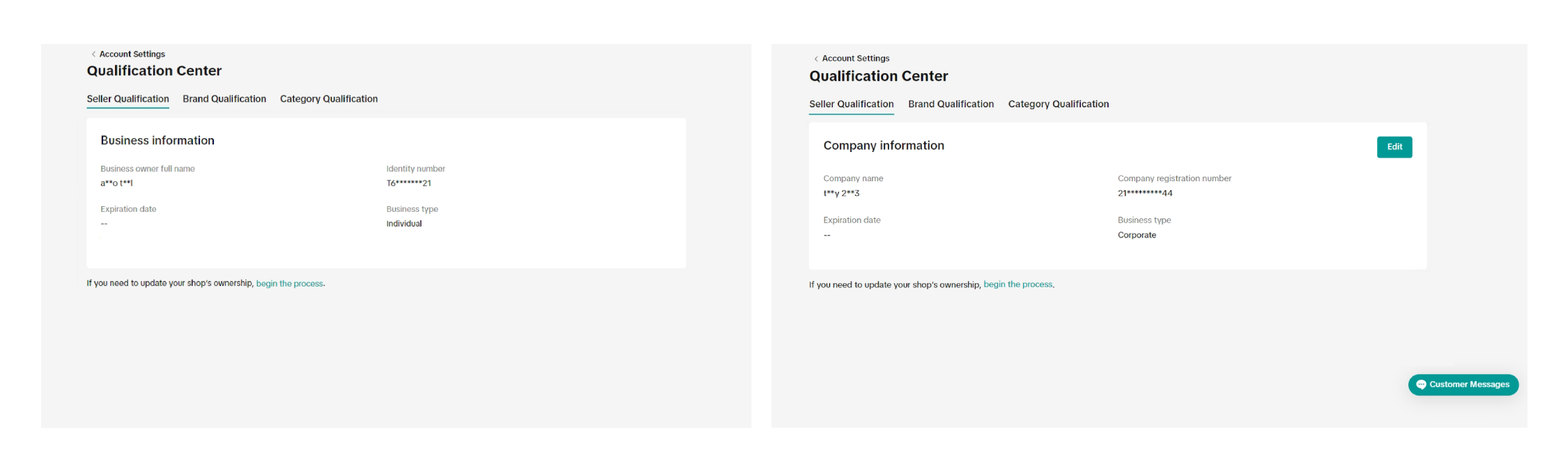
- Go to Seller Center -> Account Settings -> Qualification Center -> Seller Qualification -> Begin The Process
- Confirm that you fulfill the eligibility criteria, and carry out the One-Time Password Verification process.
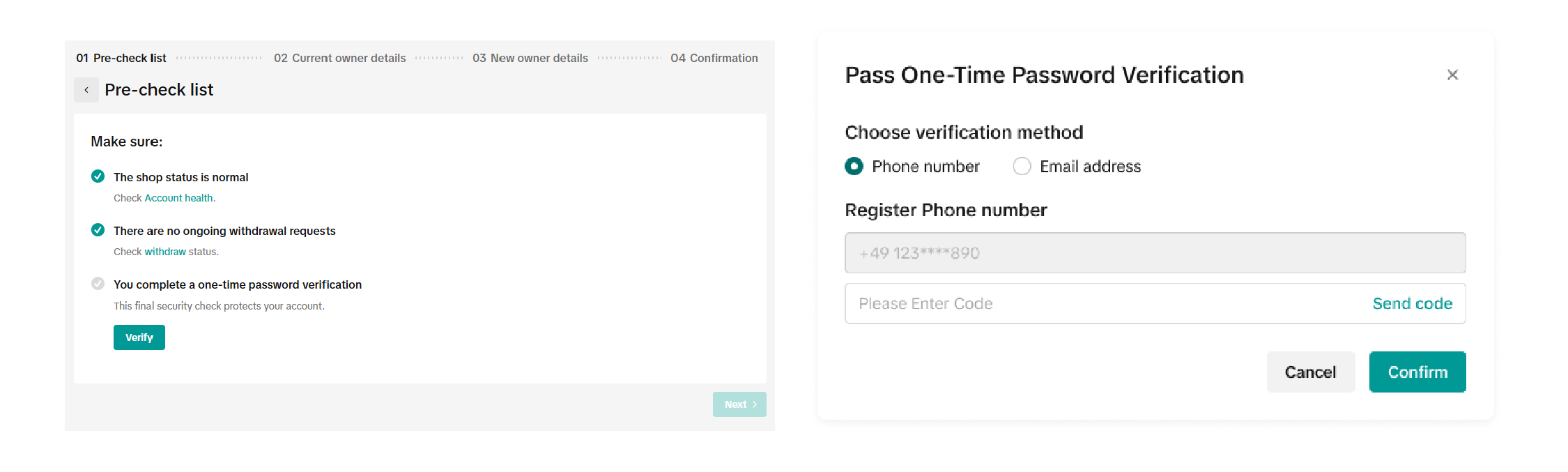
STEP 2 - Submission Checklist
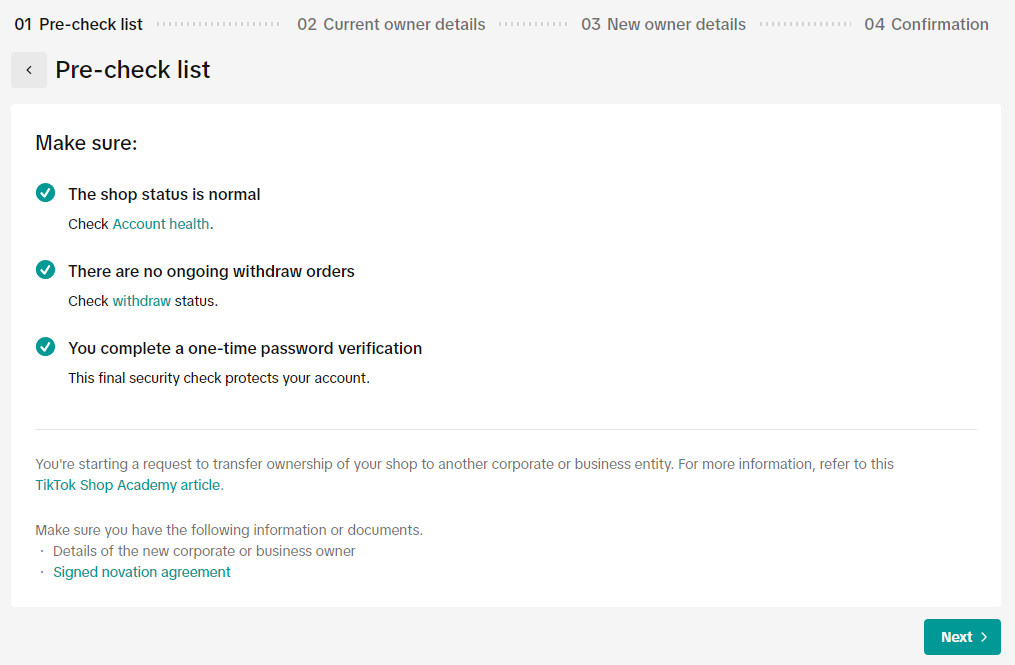
- Once you have completed the one-time verification, you'll be shown a helpful checklist on what you'd need to prepare for submission. After preparing your documentation, click "Next".
STEP 3 - Information Submission
The information you will need to submit will differ depending on the type of shop you are registered under (e.g. individual or corporate).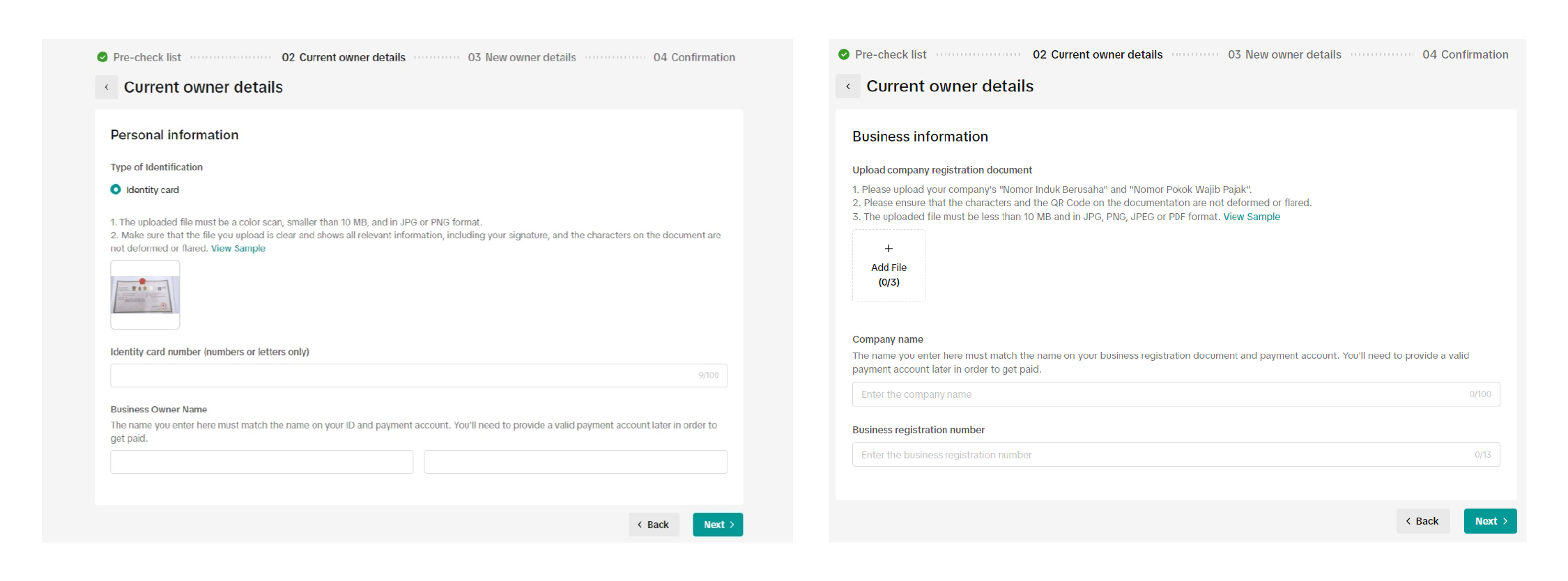
- Fill in the Current Owner's information. Once done, click "Next".
STEP 4 - New Owner Information Submission
- Please select the type of corporation that you wish to transfer to. The required information will differ depending on the options you choose.
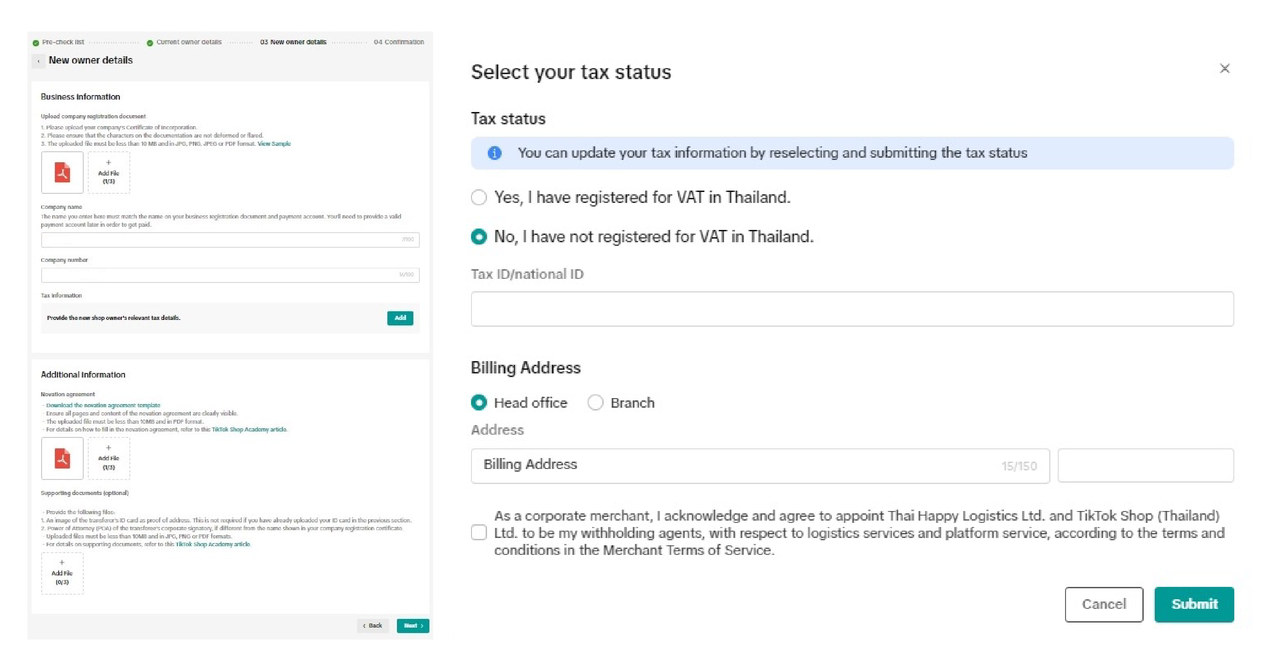
- Fill in the information of the New Owner (Note: You will need to download and fill in the Novation Agreement - see below for more information on how to fill this in).
- Do ensure that you submit the following relevant Tax Information of the New Owner:
- Taxpayer Identification Number (NPWP) - 16-digit format
- You may add a "0" in front of their 15-digit NPWP
- VAT Number (PKP; Pengusaha Kena Pajak) (Optional, if you have registered for VAT)
- Billing Address
- Please ensure that the name and address in your NPWP is consistent with the name and address registered in TikTok Shop by Tokopedia.
- Taxpayer Identification Number (NPWP) - 16-digit format
STEP 5 - Review your submission
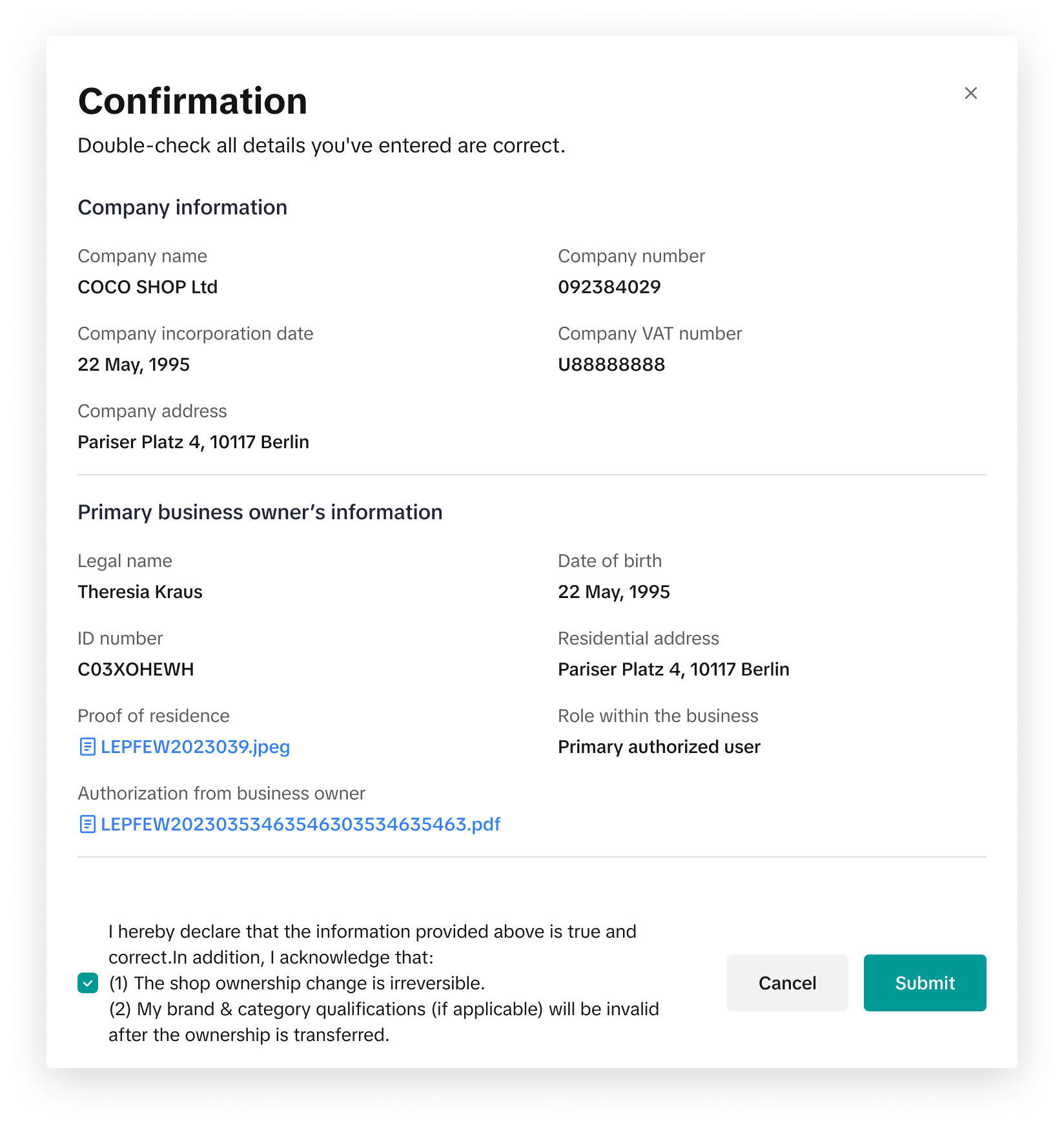
- Review and confirm your information prior to submission
- We will review your application and get back to you within 2 weeks.
Next Steps for Successful Applications
Following the completion of the ownership change, you may encounter a few limitations as you await the approval of your submission.- Withdrawal Restrictions: After changing ownership, you cannot make withdrawals for 24 hours for security reasons.
- Bank Account Binding: All previous bank accounts will be unbound. Please bind a new bank account under the new owner's name.
- Brand Authorisation: Previous Brand Authorisations will be invalid. These products will be deactivated. If you want to re-list products that need these authorisations, please apply for them again.
- Category Qualifications: For certain product categories, Category Qualifications will be invalid. These products will be deactivated. To re-list them, you need to apply for Category Qualifications again.
- Future Ownership Change Restrictions: After successfully changing ownership, you cannot request another ownership change for a period of time.
- Restrictions for Individual Sellers: Once you transfer ownership of your shop, you cannot use your ID numbers to register a new shop for a period of time.
Novation Agreement - Submission Requirements
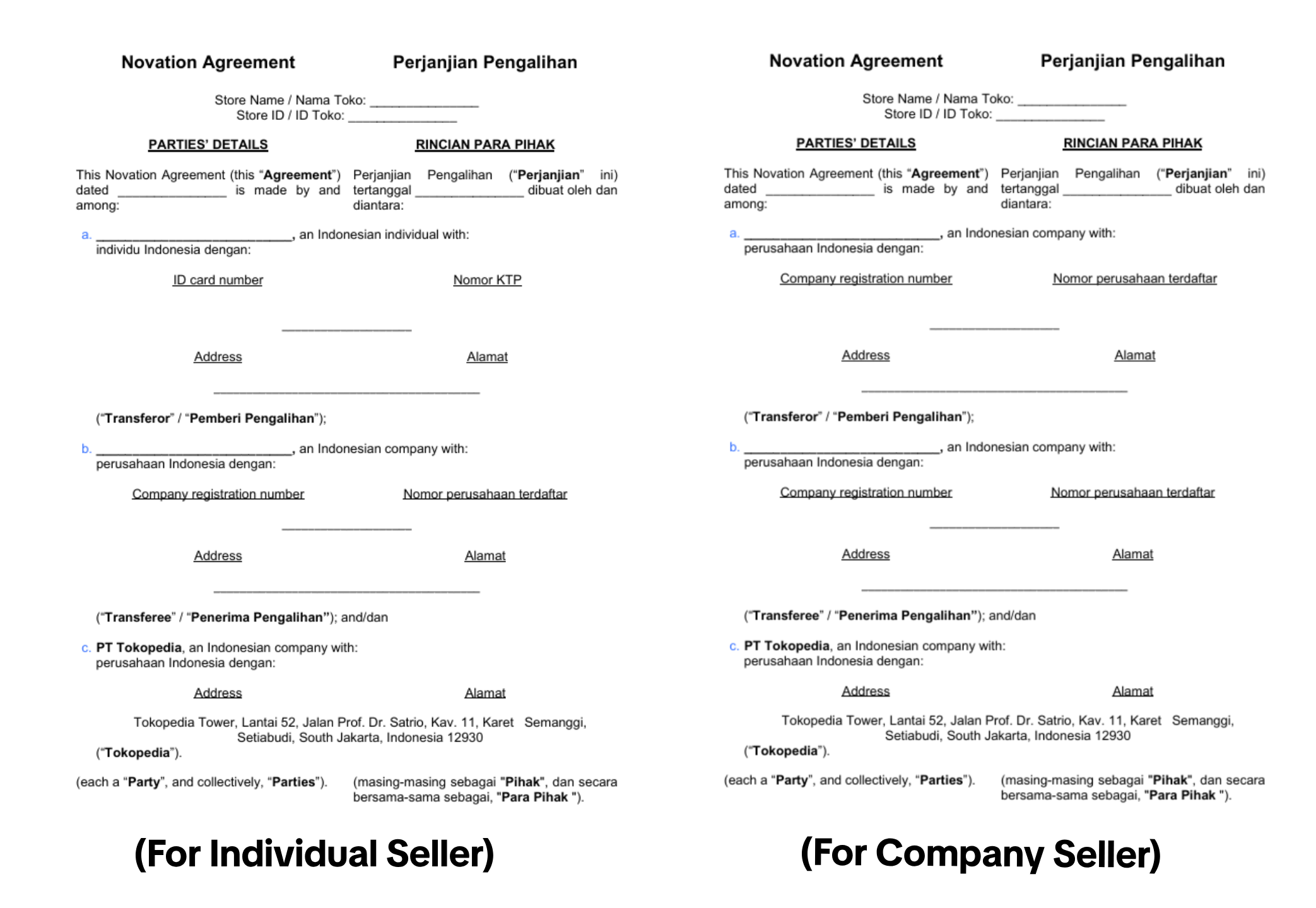
- Templates can be downloaded from the submission page. Please download the form, reupload as part of their shop ownership change submission.
- Please adhere to the Submission Requirements listed above.
- The Transferor refers to the previous owner who is initiating the transfer.
- The Transferee refers to the new owner who is taking ownership of the shop.
- Individual transferors' addresses should be an exact match of the information on your ID cards. If you registered using a passport, you would need to provide their ID card in the supporting document section.
- Do not change/edit any other part of the novation agreement.
- Novation agreement should be signed by an authorised signatory
- Individual sellers -> Signatory should be the owner of that shop account
- Corporate sellers -> Signatory should be the owner of the business/corporate entity.
- Novation agreements should be signed within the past 3 months prior to submission.
Frequently Asked Questions (FAQs)
When will I hear back regarding my application?
- Within 2 weeks.
Can I transfer ownership to another Individual Seller?
- No. Only transfers to Corporate Sellers are supported.
Why did my application get rejected?
- There are various reasons why your application may have been rejected. Please refer to the message on the Qualification Center for more details. Most common reasons for rejections include issues with submitted supporting documents. Please refer to the Submission Requirements section for more details.
Why did so many products get delisted upon the transfer?
- Some products require either Category Qualification or Brand Authorisation to be listed. As these qualifications are tied to the previous owner, you will need to reapply for qualification/authorisation before you can re-list these items.
Why can't I initiate a shop ownership change if I have an existing Toko Kapital loan?
Before you can make any changes to your shop ownership, you must first pay off any outstanding balance on your Toko Kapital loan. Do note that once you have paid off your balance and completed the ownership change to a corporate entity, you will no longer be able to access Toko Kapital as it is currently designed exclusively for individual borrowers.You may also be interested in
- 5 lessons
Account Management
Learn how to maintain your account performance, understand key metrics, and ensure long-term shop he…
- 6 lessons
Getting Started & Registration
Step-by-step guidance to help you create a TikTok Shop by Tokopedia account, complete registration,…

Tokopedia & TikTok Shop Commitment for Your Integration Expe…
Thank you for the trust and constructive feedback you've shared with us. We’ve heard your feedback a…

Integration to Tokopedia App
This feature guide is intended for TikTok Shop by Tokopedia sellers, both who don't have and already…

What should I do if my account has been compromised?
If you are unable to sign in to your account or can no longer have access to the registered email or…

Late Dispatch Rate (LDR)
Note: Orders with Instant, Sameday, and Sameday 8-hour delivery are only available via Tokopedia. Cl…
New Shop Adjustment Period
All new shops on TikTok Shop by Tokopedia start in the Shop Adjustment Period. During this period, y…
What is the Seller Performance Evaluation Policy?
TikTok Shop by Tokopedia Seller Performance Evaluation At TikTok Shop by Tokopedia, we value safety,…
Inactive Seller Accounts
When will I be considered an Inactive Seller? Sellers that do not interact with their TikTok Shop by…

How long will it take to review my payment account?
Payment review may take approximately 1-3 working days after you bind your Payment account. However…