

Integration Guide for Sellers Using Third-Party Enablers
03/21/2025
Two groups of sellers will be affected:
- Sellers using third-party enablers: Those using third-party apps via the Tokopedia Open Platform or TikTok Shop Partner Centre.
- Seller Developers: Sellers who develop their own apps and APIs to facilitate their shop operations.

Integration Guide for Sellers Using Third-Party Enablers
For sellers using third-party enablers, the integration process requires confirming that their third-party enabler providers have updated their applications and APIs to the latest version. This is critical to ensure seamless compatibility with the new Tokopedia & TikTok Shop platform. Sellers should proactively verify with their third-party enabler providers to avoid any disruptions. If a third-party enabler's application is not updated in time, the seller's account will not be considered integration-ready, potentially impacting their operations during the transition period.Actions Required if Your Enabler Is Not Ready
If the third-party enabler is not yet prepared for integration but the seller is already included in the batch rollout schedule, several solutions are available to mitigate disruptions:- Solution 1: Using the Seller Centre Platform Directly Sellers can continue managing their store operations, such as product and order management, through the new Seller Centre independently. This allows them to maintain core functionality while waiting for their third-party enabler to complete the necessary updates.
- Solution 2: Postponing the Shop Binding or Merging Process Sellers have the option to delay the binding of their shop until their third-party enabler has fully adopted the new API. This approach ensures that the binding process is performed seamlessly without risking errors or partial integration.
- Solution 3: Switching to a Stable Third-Party Enabler Temporarily Sellers can consider transitioning to alternative third-party services or enablers that have already adopted the latest functionality and are stable. Each of these third-party enablers has been confirmed to support the updated APIs and can serve as a temporary solution to maintain operations during the interim.

Integration Guide for Seller Developers
Seller developers, responsible for their own apps and APIs, must prepare for integration by binding their accounts and apps across Tokopedia and TikTok Shop and upgrading to the latest API version. This ensures compatibility with the new platform and continued access to its features. Unlike sellers using third-party enablers, who rely on providers for their technological needs, seller developers bear the direct responsibility of making their systems compatible with the updated platform.Steps for Seller Developers
To prepare for integration and maintain uninterrupted operations, seller developers need to undertake several key actions:- Bind Accounts: Link developer accounts on both platforms via TikTok Shop Partner Center > My account > Link Tokopedia Account. Note: Account binding is one-to-one.
- Bind Apps: Link Tokopedia Open Platform apps with TikTok Shop Partner Centre apps. Multiple Tokopedia apps can link to a single TikTok Shop app.
- Integrate APIs: Integrate with TikTok Shop APIs for seller operations. After integration:
- All newly generated data will only be accessible via TikTok Shop APIs.
- Some historical data (e.g., seller profiles) will be migrated, while others (e.g., orders, bills) will remain in Tokopedia.

FAQs
General
- What resources are available to help with the API integration and migration?
- What happens if my third-party enabler's API is not updated by the rollout phase?
- How can I confirm that my third-party enabler supports the latest API version?
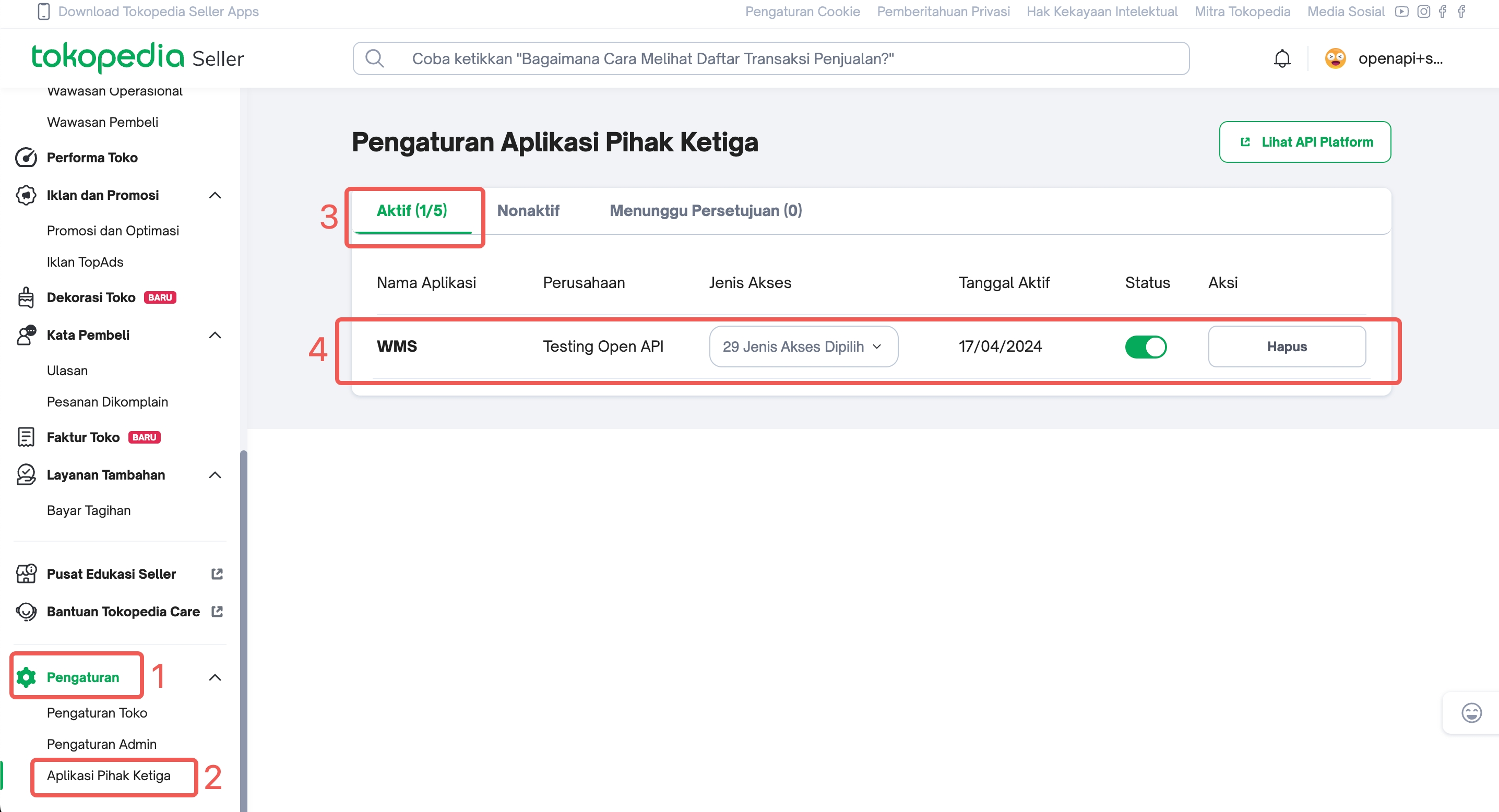
- How can I check which third-party enablers are connected to my Tokopedia seller account?
- Log in to Tokopedia Seller Center.
- Click on Settings (Pengaturan) in the left sidebar.
- Select Third-Party Applications (Aplikasi Pihak Ketiga).
- You will see a list of third-party enablers that have access to your store with their authorisation status (Active/Inactive).
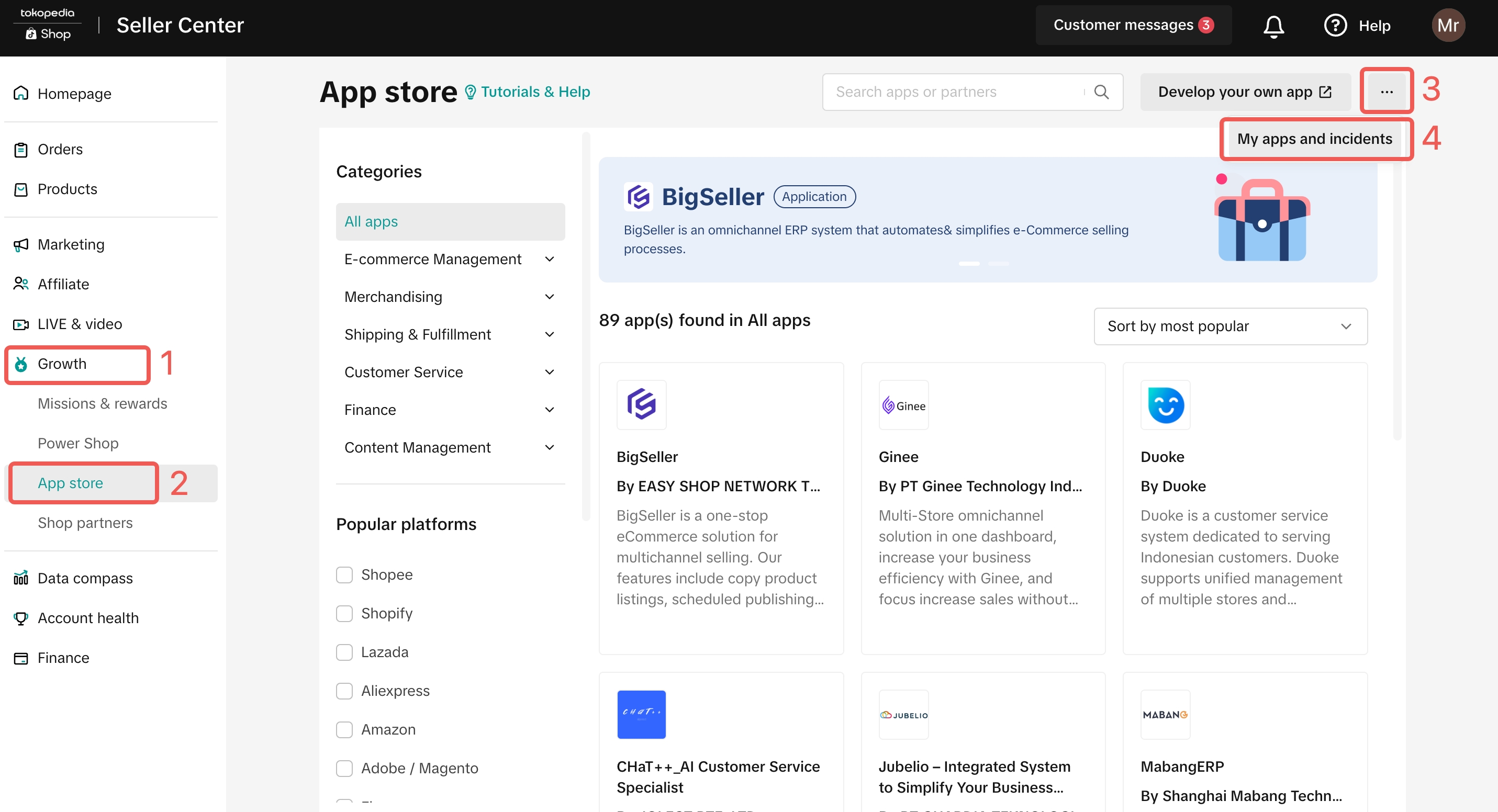
- How do I check which third-party enablers are connected to my TikTok Shop account?
- Log in to TikTok Shop Seller Center.
- Navigate to App Store in the left sidebar.
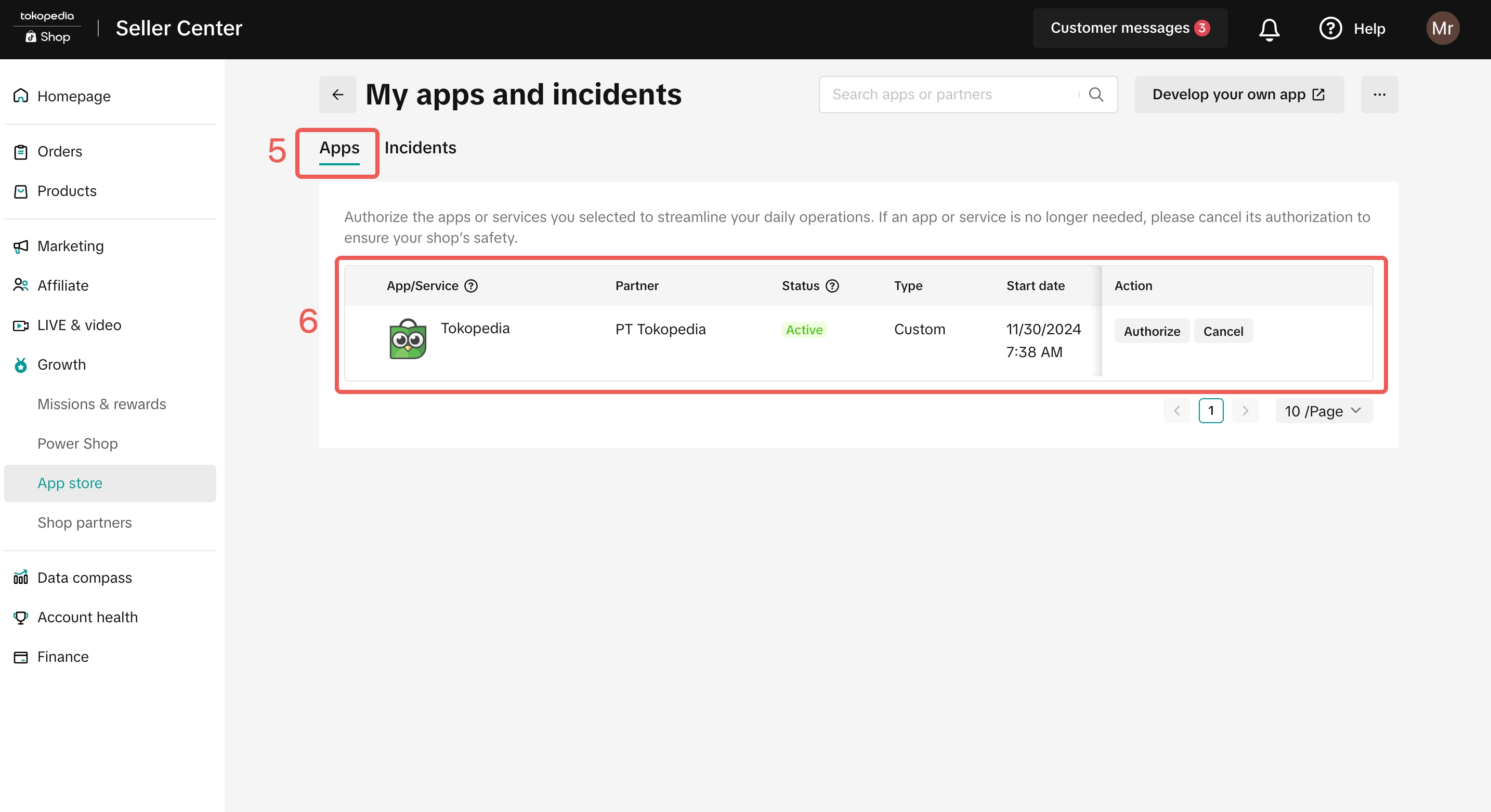
- Click on My Apps and Incidents (top right corner).
- Under the Apps tab, you will see the enablers authorised for your shop.
- Why do some third-party enablers appear in Tokopedia but not in TikTok Shop (or vice versa)?
- Can I switch to a different third-party enabler during the integration period?
- Can I begin API updates even if my shop is not included in whitelist phases?
Product & Inventory
- How can I identify whether a product belongs to Tokopedia or TikTok Shop in my third-party enabler app?
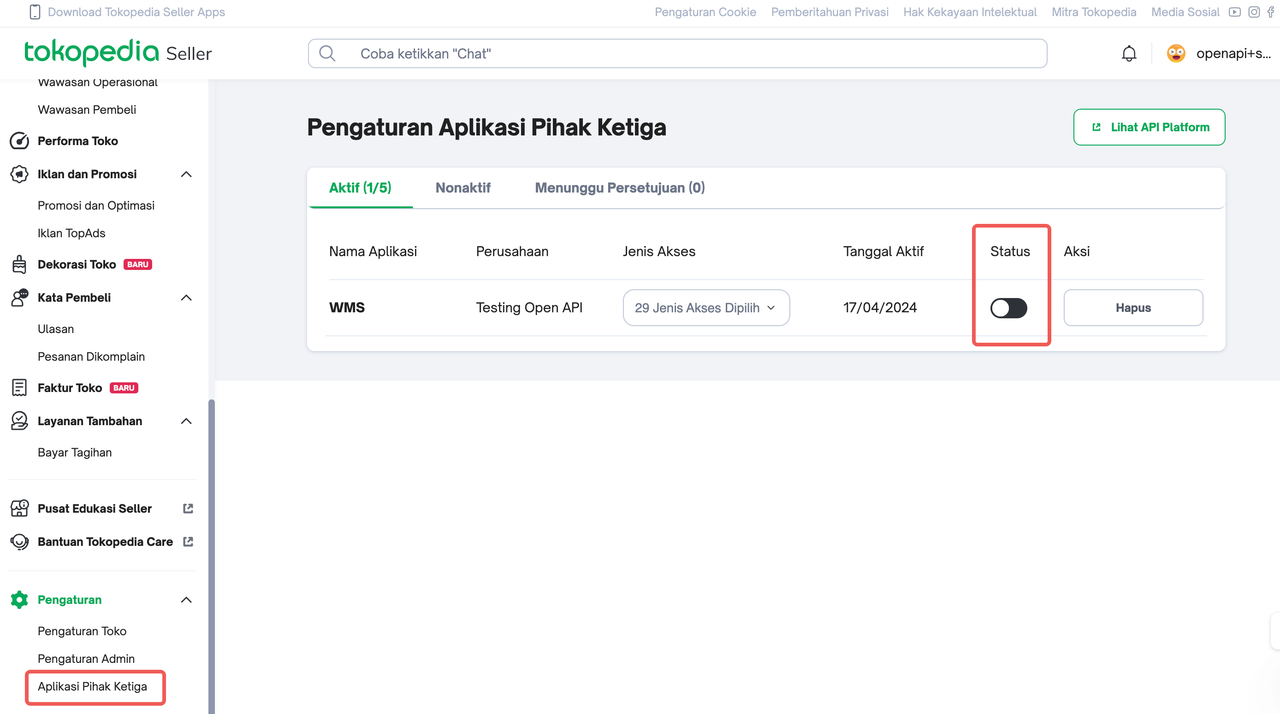
- Why are my products unexpectedly active/inactive?
- How can I resolve duplicate products/SKUs after migration?
- Merge Products/SKUs Manually: This combines duplicate records into a single SKU while preserving inventory and sales history. This can be done in the Seller Centre or during the shop binding process.
- Delete Duplicate Products/SKUs: If merging isn't feasible, manually delete duplicate records via the Seller Centre or an enabler app. Ensure the correct SKU is deleted to avoid data loss.
Order & Aftersales
- How are orders differentiated between platforms in the third-party enabler interface?
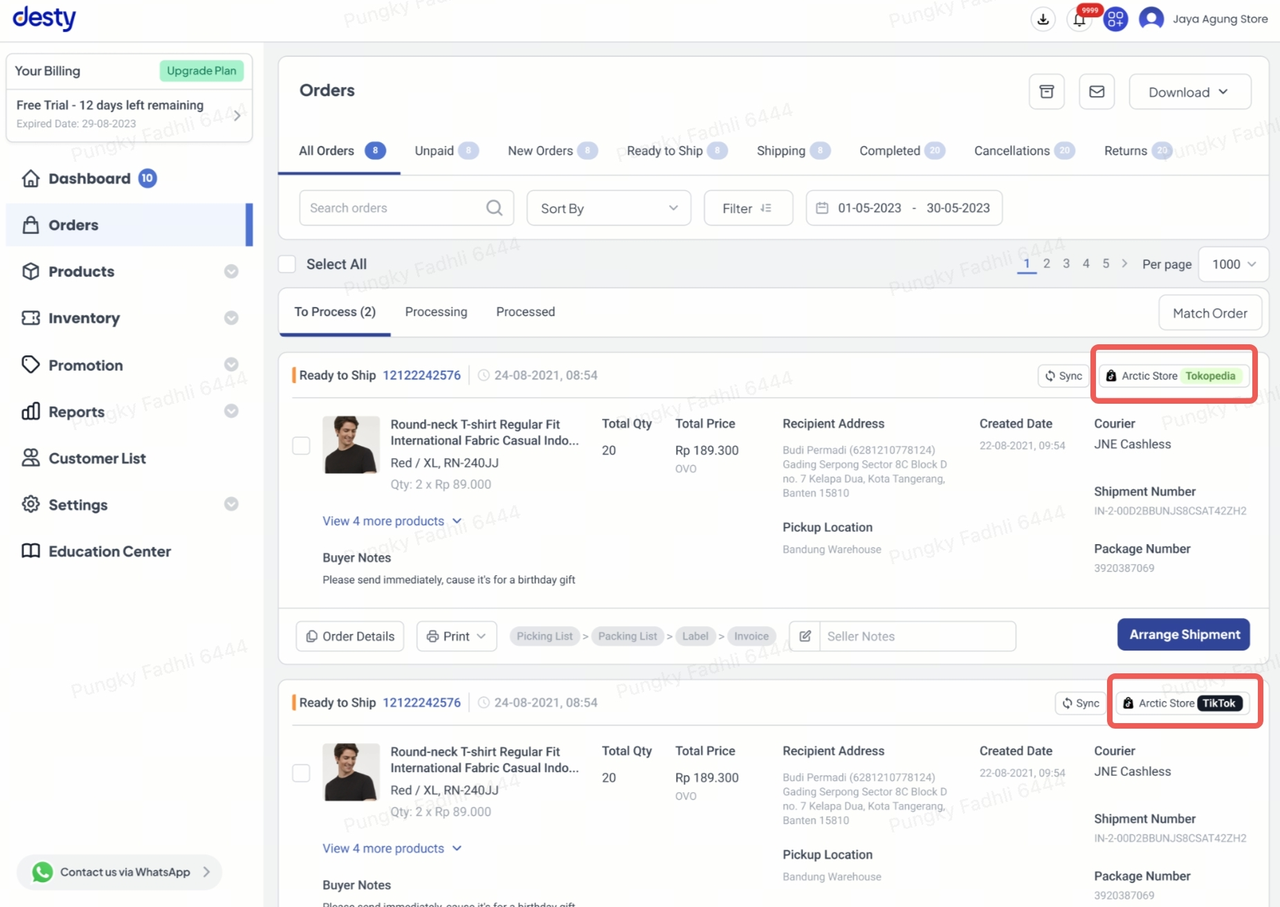
- What if my orders do not sync properly after integration?
- Can sellers still process returns and refunds through their third-party enabler platform?
Authorization & App Store
- Will my previously used apps on Tokopedia automatically reconnect?
- If I use multiple third-party enablers and my shop is integrated with both Tokopedia and TikTok Shop, will my data sync automatically across enablers?
- Can one third-party enabler access data from another if my shop is integrated?
- Can I test the new API before switching?
Anda mungkin juga tertarik
Registering to be a Seller
Your seller journey with TikTok Shop by Tokopedia begins with account registration. You can register…
Can I link my TikTok account with another social media accou…
Click on the Profile page, and click Edit Profile. Select either of the options under Social to link…
Why was my brand authorisation application rejected?
All submitted trademark information will be verified against the World Intellectual Property Organis…
What will happen to my existing orders while on "Holiday Mod…
"Holiday Mode" does not apply to existing orders. All existing orders, made prior to Holiday Mode be…
Which types of brand authorisation are accepted within the T…
There are 6 accepted types of brand authorisation: Trademark ownership National exclusive 1st level…
Why am I unable to sell the products of a particular brand?
The platform is committed to protecting the intellectual property rights of both organisations and i…
How to Create your Commission Account
After your successful Creator Account creation, you will need to set up your Commission Account to d…
How to register?
To become a platform seller, you need to create a Shop | Tokopedia account. Please follow the steps…
New Shop Adjustment Period
All new shops on TikTok Shop by Tokopedia start in the Shop Adjustment Period. During this period, y…
Setting Up Your Shop Profile and Name
Setting Up Your Shop/Seller Profile Setting up your TikTok Shop by Tokopedia profile is an important…