

Complete Guide: Product Upload on TikTok Shop by Tokopedia
09/22/2025
Having great products isn’t enough—if your listings look messy or incomplete, buyers may get confused and move on. A clean and professional upload makes your products easier to discover, trust, and purchase. Let’s learn how to upload products on TikTok Shop by Tokopedia—whether one by one or in bulk!

Choose Your Upload Method
Before you start uploading, choose the method that fits your product volume:| Upload Method | Suitable For | Advantages |
| Single Upload | New sellers or those with only a few products | Fast and easy, directly input into the system |
| Bulk Upload | Uploading many products at once | Fast and efficient, using Excel template |

How to upload: Single Upload
When your product volume is small, use Single Upload to go live faster.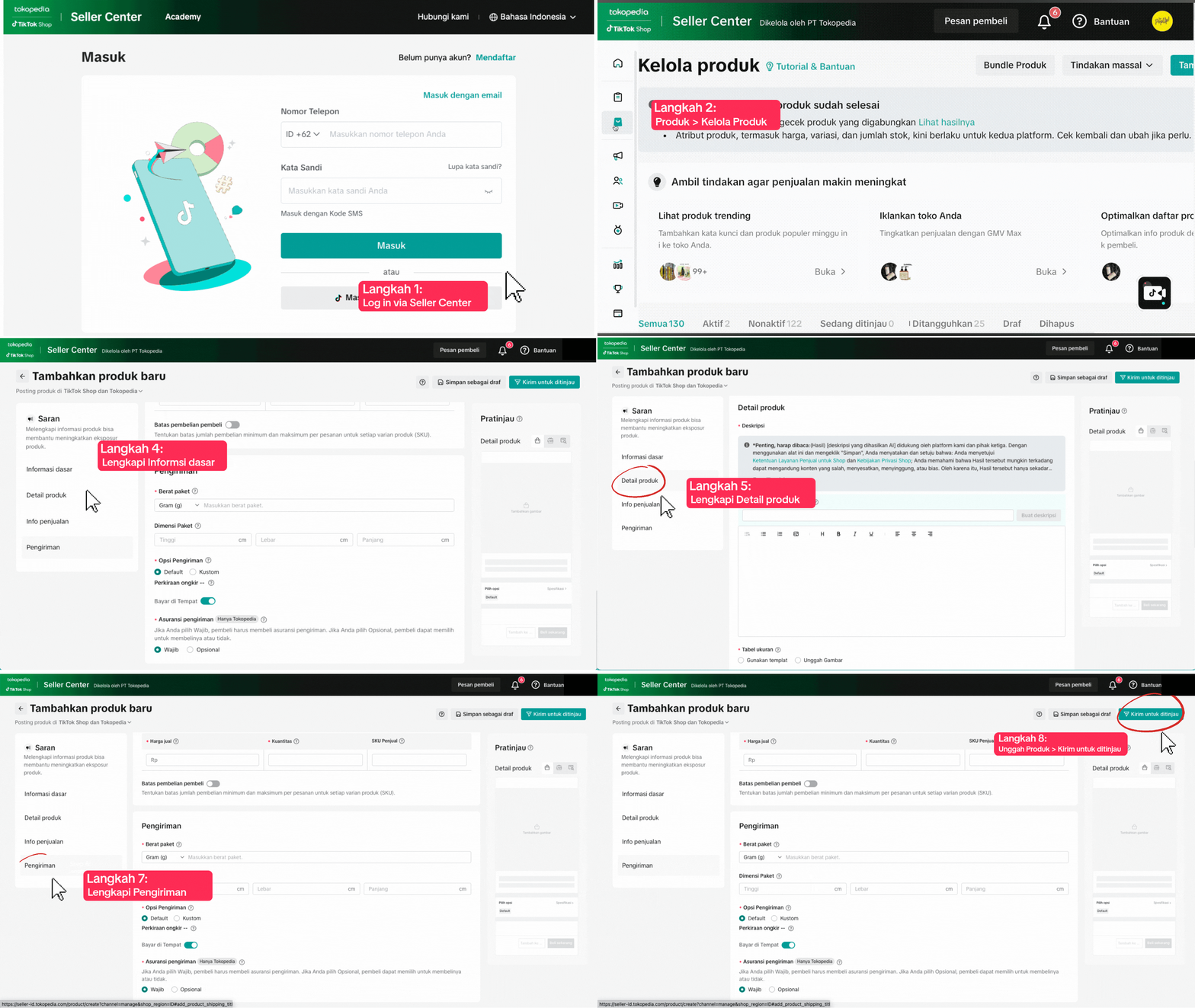
| Step | Description | |
| 1 | Access Seller Center | Log in via Seller Center TikTok Shop by Tokopedia App or go to Seller Center Website |
| 2 | Add New Product | Click Add New Product on your dashboard |
| 3 | Fill in Product Details | Enter product name, category, description, price, stock, image, shipping, etc. |
| 4 | Save & Publish | Click Save to keep as draft or Publish when ready |
How to upload: Bulk Upload
When your shop handles many SKUs, use Bulk Upload to save time.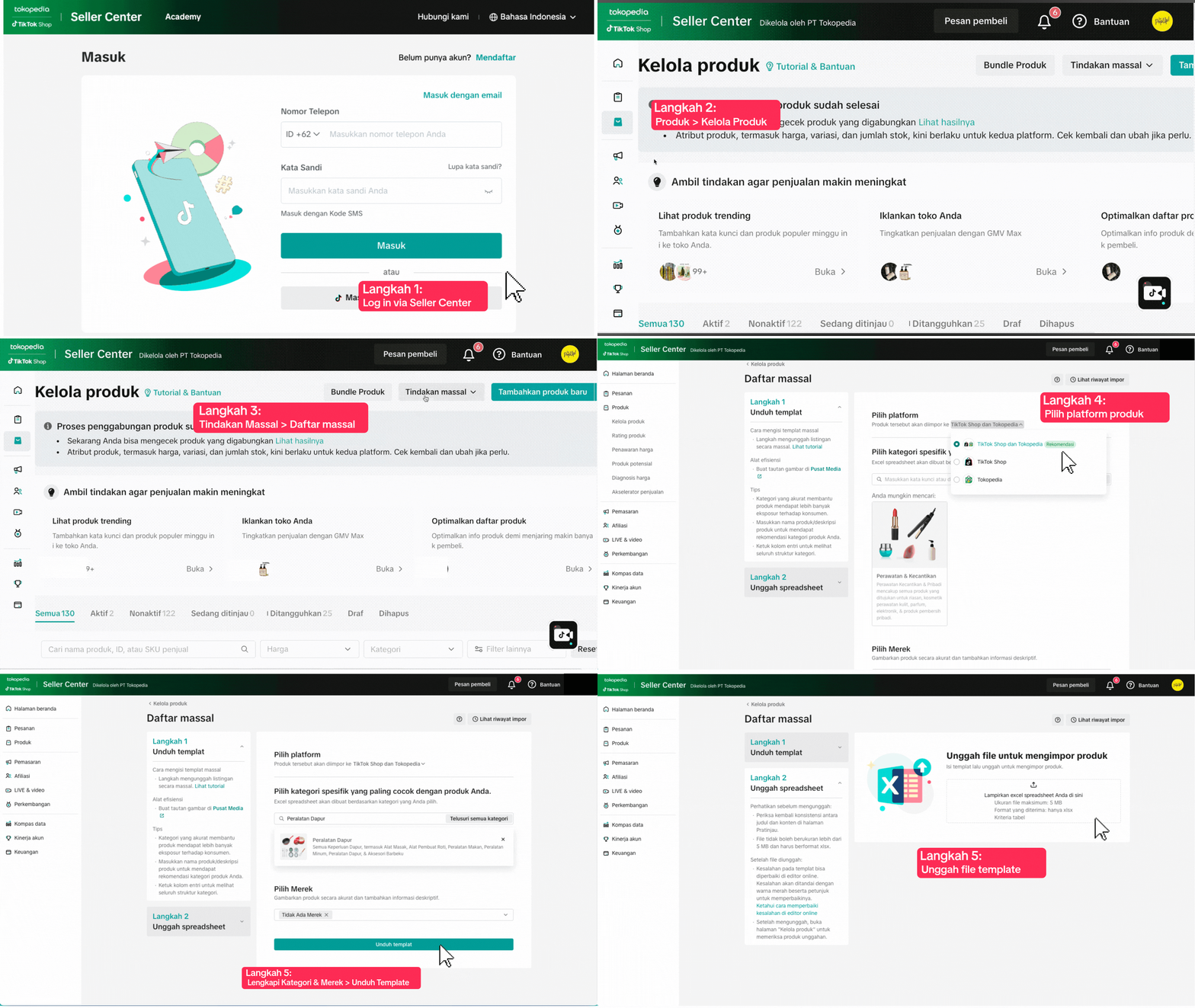
| Step | Description | |
1 | Access Batch Tool | Go to the Batch Tool section in the Seller Center |
2 | Download Excel Template | Click "Download Template" and fill it out with your product data |
3 | Upload to Seller Center | Re-Upload the completed Excel file |
4 | Check Upload Result | Make sure products appear correctly with no errors |

Common Upload Issues & How to Fix Them
Running into issues during upload? Don’t worry—it's common and easy to fix!❌ Common Issue | 😕 Why It Happens | ✅ How to Fix |
| File Won’t Upload | Wrong file format or missing fields | Use the latest template from Seller Center and ensure all required formats are correctly filled |
| Image Doesn’t Appear | Image is too small | Upload images at least 1024x1024 px (JPEG or PNG) |
| Weak Descriptions | Too short or generic | Highlight product benefits and unique features |
| Wrong Price/Stock | Data entry mistake | Review carefully before clicking “Publish” |

You may also be interested in

Tokopedia & TikTok Shop Commitment for Your Integration Expe…
Thank you for the trust and constructive feedback you've shared with us. We’ve heard your feedback a…

Integration to Tokopedia App
This feature guide is intended for TikTok Shop by Tokopedia sellers, both who don't have and already…
Shop Ownership Change Process
Note: You will only be able to change ownership to corporate sellers (individual to corporate, or co…

What should I do if my account has been compromised?
If you are unable to sign in to your account or can no longer have access to the registered email or…

Late Dispatch Rate (LDR)
Note: Orders with Instant, Sameday, and Sameday 8-hour delivery are only available via Tokopedia. Cl…

What is the Seller Performance Evaluation Policy?
TikTok Shop by Tokopedia Seller Performance Evaluation At TikTok Shop by Tokopedia, we value safety,…
Inactive Seller Accounts
When will I be considered an Inactive Seller? Sellers that do not interact with their TikTok Shop by…

Access Management on Seller Center
As a shop owner, you can add sub-accounts for your employees to help manage and operate your shop. I…

Shop Marketing Account
This article will introduce a marketing account for your Shop. Shop Marketing account is TikTok acco…

Shop Official account
The TikTok account that represents the official identity of the TikTok Shop by Tokopedia official ac…