

Take a Break with Holiday Mode: How to Manage Your ShopTokopedia Store During Time Off
09/24/2024
What is Holiday Mode?
 Holiday Mode is a feature that allows sellers to temporarily pause new orders while away, without negatively impacting their store performance metrics. When enabled, buyers will be notified that your store is on vacation, and products will be marked as "sold out." However, for products stored in FBT (Fulfilled by ShopTokopedia) warehouses, the system will continue processing orders to ensure a positive shopping experience for customers.
When Should You Enable Holiday Mode?
You should enable Holiday Mode if you’re unable to manage new orders due to:- Holidays
- Unforeseen events
- Bad weather
- Pandemic restrictions
- Other personal reasons
What Happens When You Enable Holiday Mode?
- New Orders Paused:
- Automatic IM Replies:
- Changes in Performance Assessment:
- Reduced Traffic:
- Note: Holiday Mode does not apply to current orders. You must still ship any pending orders on time and provide after-sales services. If after-sales requests are not processed within 48 hours, they will be automatically approved. It’s essential to monitor messages and fulfill orders to avoid negative ratings or comments.
How to Enable Holiday Mode
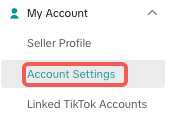
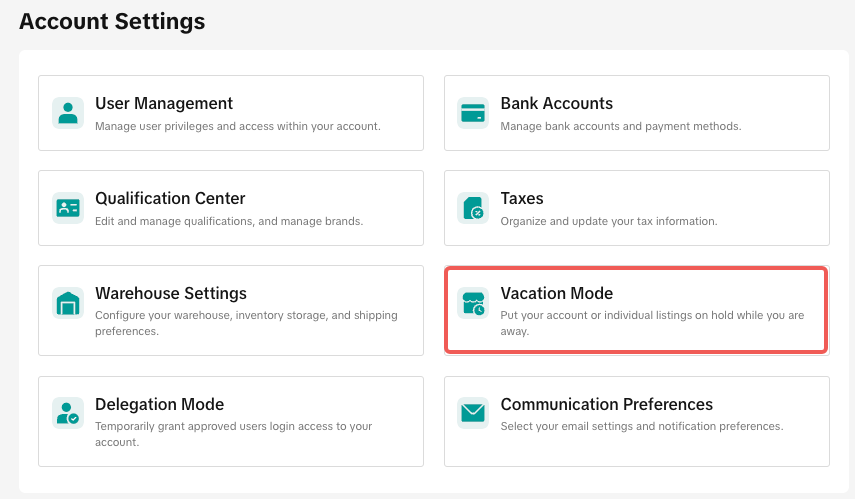
Follow these simple steps to turn on Holiday Mode in Seller Center:Step 1:
 |  |
Step 2:
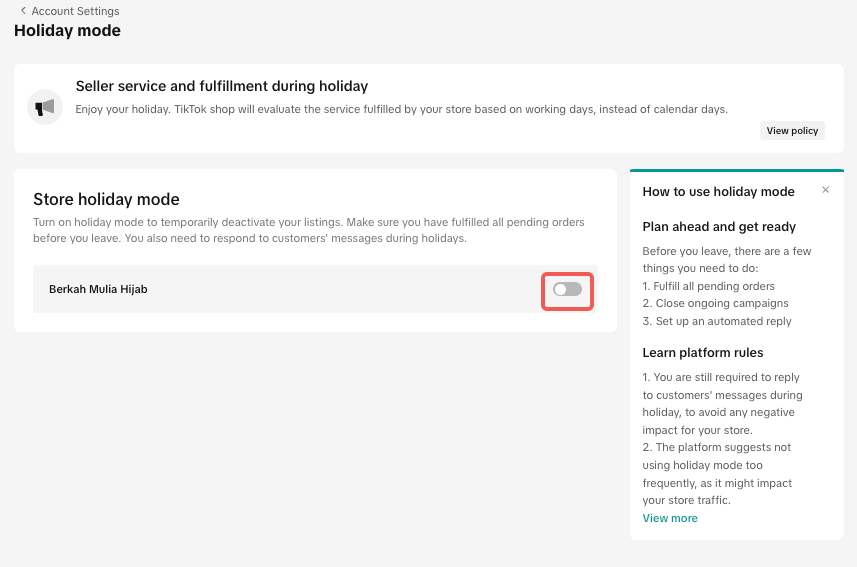 Turn on Holiday Mode and set the date range for your holiday. You can also turn on the IM Automatic Reply feature to inform buyers about your holiday period and when they can expect a response.
Sample Reply: Dear customer, thank you for your interest in our products. We will be away from 1st Feb to 15th Feb. Messages will be replied to within 48 hours during this period. Thank you for your patience, and we will get back to you as soon as we can.
Tips for Managing Multiple Warehouses
If you have multiple warehouses, you can either apply Holiday Mode to all warehouses at once or choose specific warehouses to enable Holiday Mode.To configure Holiday Mode for individual warehouses, go to More, select the targeted warehouses from the list, and turn on Holiday Mode.
How to Turn Off Holiday Mode
If you’re ready to resume operations:- Toggle the Holiday Mode button to turn it off.
- Within 1 hour, your inventory will return to its previous levels, and customers will be able to place new orders again.
- The platform will also resume performance assessment for all store metrics.
Conclusion
Holiday Mode is an essential feature to maintain your store’s performance and manage customer expectations while you’re away. It allows you to pause new orders temporarily, ensuring that your store metrics are not negatively impacted. Make sure to set up automatic replies and manage existing orders before activating Holiday Mode. Start using Holiday Mode today and take a worry-free break! 🌴⏳Let me know if you need any adjustments or further details!
You may also be interested in
- 5 lessons
Account Management
Learn how to maintain your account performance, understand key metrics, and ensure long-term shop he…
- 6 lessons
Getting Started & Registration
Step-by-step guidance to help you create a TikTok Shop by Tokopedia account, complete registration,…

Tokopedia & TikTok Shop Commitment for Your Integration Expe…
Thank you for the trust and constructive feedback you've shared with us. We’ve heard your feedback a…

Integration to Tokopedia App
This feature guide is intended for TikTok Shop by Tokopedia sellers, both who don't have and already…
Shop Ownership Change Process
Note: You will only be able to change ownership to corporate sellers (individual to corporate, or co…

What should I do if my account has been compromised?
If you are unable to sign in to your account or can no longer have access to the registered email or…

Late Dispatch Rate (LDR)
Note: Orders with Instant, Sameday, and Sameday 8-hour delivery are only available via Tokopedia. Cl…
New Shop Adjustment Period
All new shops on TikTok Shop by Tokopedia start in the Shop Adjustment Period. During this period, y…
What is the Seller Performance Evaluation Policy?
TikTok Shop by Tokopedia Seller Performance Evaluation At TikTok Shop by Tokopedia, we value safety,…
Inactive Seller Accounts
When will I be considered an Inactive Seller? Sellers that do not interact with their TikTok Shop by…