

Payment Settlement & Payout: Understand Your Earnings Clearly
07/09/2025
Managing settlement properly keeps your cash flow healthy and prevents confusion about when and how you’ll get paid. This guide explains settlement timelines, what Settled vs To Settle means, how to check payouts in Seller Center, and how to solve common issues.

Settlement Timeline: When Will You Get Paid?
Every completed order enters a settlement period. The length depends on shop type:| Settlement Period | TikTok Shop by Tokopedia Orders | Tokopedia Orders |
| Instant | Not available | As soon as the order confirmation button is clicked by the buyer. If the order confirmation button is not clicked, the following settlement periods will apply. |
| Express – 3 calendar days | Applicable to All Shops | Applicable to All Shops |
| Standard – 7 calendar days | Applicable to Non-Mall Shops that are disqualified from Express Settlement | Applicable to Non-Mall Shops that are disqualified from Express Settlement |
| Extended – 15 calendar days | Applicable to Mall Shops that are disqualified from Express Settlement | Applicable to Mall Shops that are disqualified from Express Settlement |
- When the order is successfully delivered to the buyer.
- The type of settlement period you are eligible for (Express, Standard, or Extended) or when the buyer clicks the order confirmation button (only for Tokopedia orders).
- The estimated settlement time may change if there are shipment issues or if a return/refund request is submitted by the buyer.
- Settlement may be extended by 1 extra day (D+1) after order completion to ensure refunds/returns are cleared before payout.
- It is recommended to check this page regularly for the most up-to-date settlement information.
- Under certain conditions, such as high-volume orders or system/server issues, the settlement process may be delayed by one to two days. Your revenue will not be impacted, but if delays exceed two days, please contact your Account Manager or Help Center.

Types of Settlement Transactions
Status | What It Means | Example |
| To Settle | Order completed but still within settlement period, not yet added to balance | Buyer confirms delivery on Jan 1 → settlement released Jan 4 |
| Settled | Order has cleared settlement period and funds are added to seller balance | Order past settlement period without refund/return |
| Negative Balance | Fees exceed revenue (e.g., high shipping, refund deduction) | Revenue Rp156,038 – Shipping Rp309,632 = -Rp155,484 |
Check these statuses in Seller Center > Finance > Transactions > To Settle/Settled.

How Settlement Works (Pre vs. Post Integration)
Fee structures changed after the integration, which explains why some sellers see higher deductions.| Pre-Integration | Post-Integration |
| Platform fee 1–8.5% | Platform fee 1–10% |
| No Dynamic Commission | Dynamic Commission 4–6% |
| No XBP Fee | XBP Fee 3.5–4.5% |
| No Pre-Order Fee | Pre-Order Fee 3% |
| No Order Processing Fee | Order Processing Fee Rp1,250/order |

How to Check Settlement & Payout
| 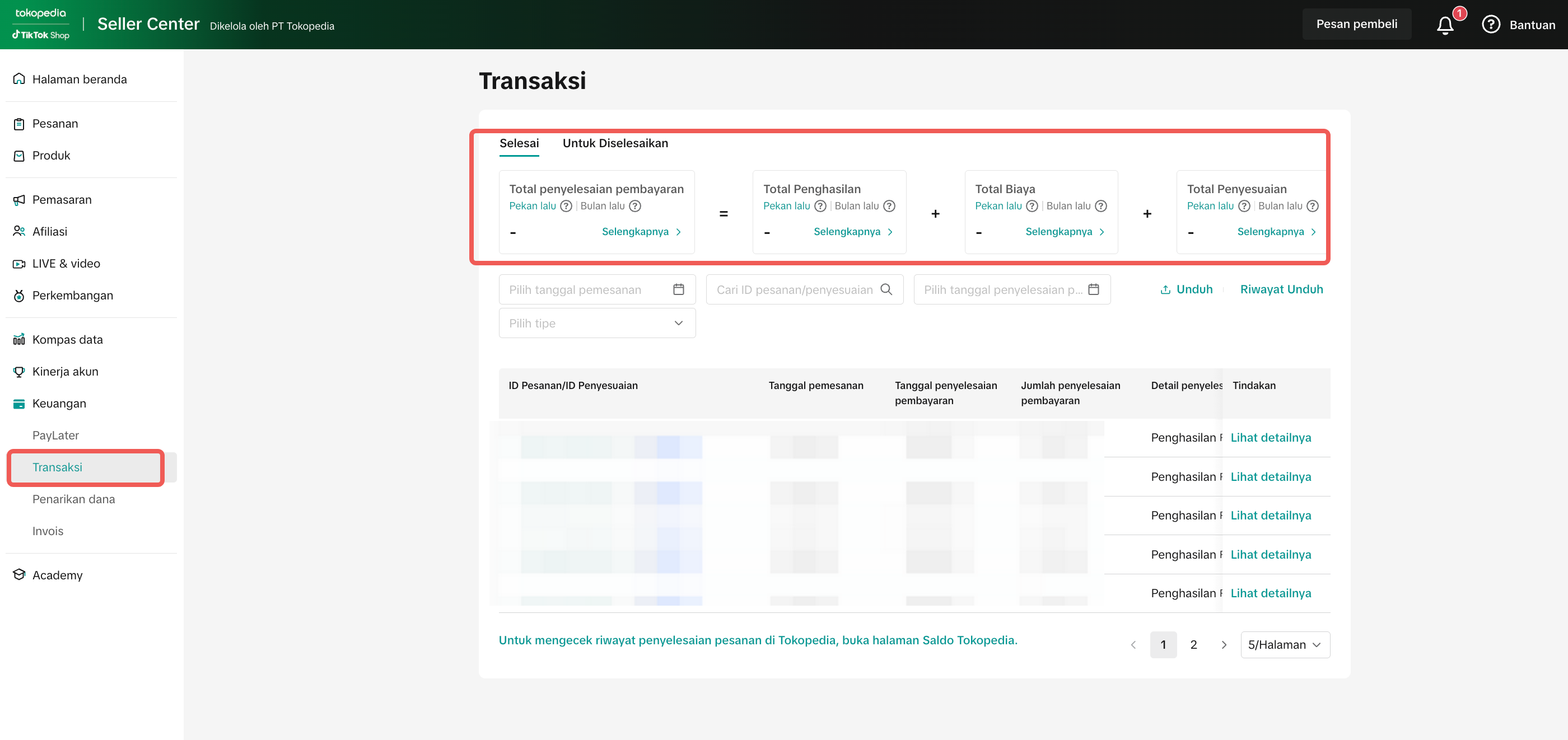 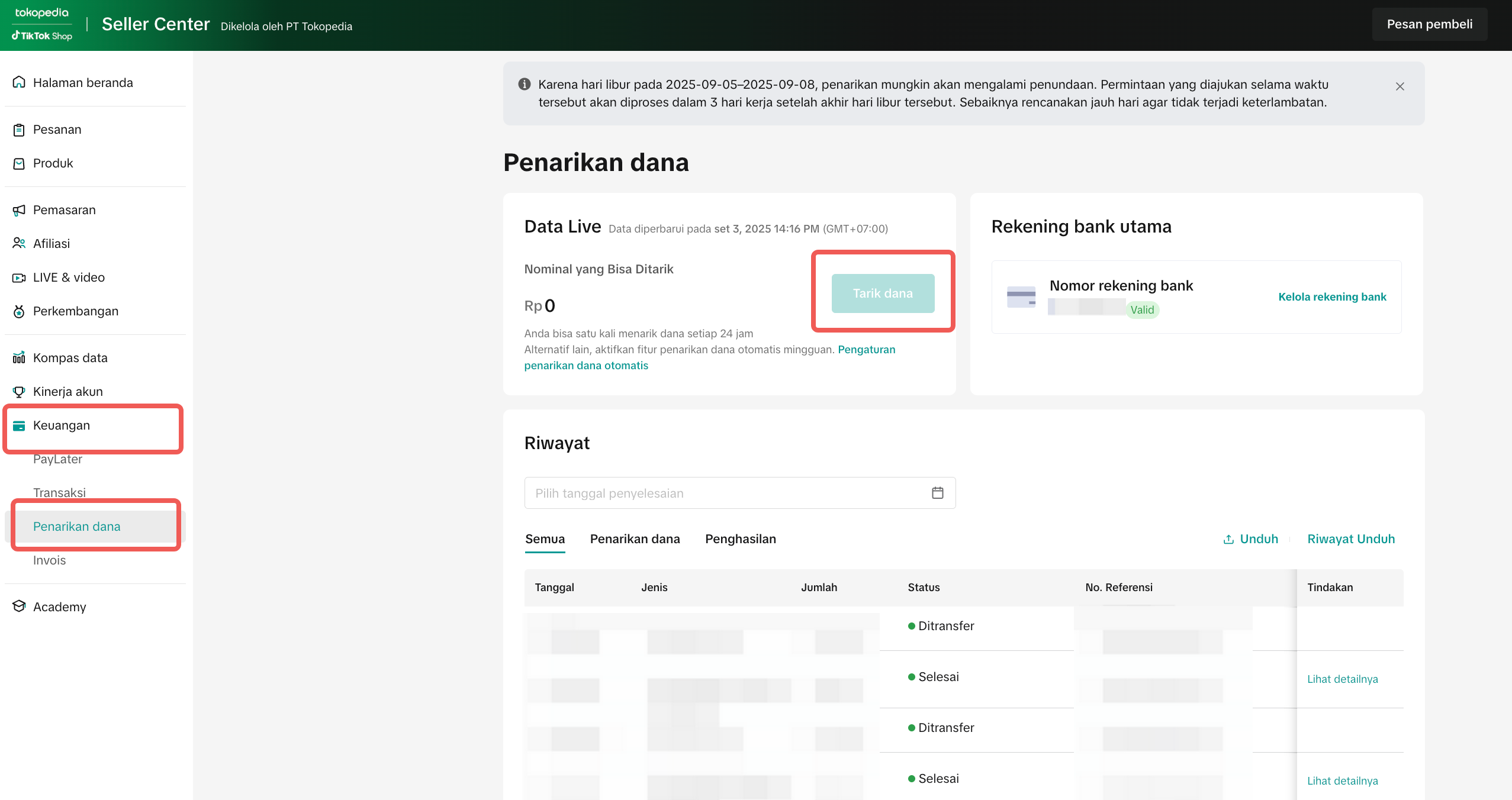 |

Dashboard vs. Payout: Why Are They Different?
The dashboard and payout sections show different numbers because they measure revenue differently—gross vs. net.| Type | What It Shows | Why It’s Different |
| Dashboard (Gross Revenue) | Total order value before any deductions | Does not account for platform fees, shipping adjustments, or refunds |
| Payout (Net Revenue) | Final balance released to your account | Includes all fees, returns, and commissions |

Common Issues & Fixes
Below are the most frequent settlement problems sellers face, their causes, and how to resolve them:| Issue | Cause | Fix |
| SLA delays: “My payout hasn’t arrived after 7 days” | Refunds or D+1 buffer pending | Wait until D+1, check refund/return status, escalate to CS if overdue |
| Negative balance amount | Shipping cost or fees exceed revenue | Review Settlement Breakdown and adjust shipping setup read full guide |
| Mismatch data (Dashboard vs Payout) | Dashboard = gross, Payout = net | Export Excel report for accurate reference, report to CS if needed |
| Refund/return deductions | Refund not closed before payout | Improve QC & confirm orders promptly to reduce risk |

Key Takeaways for Sellers
- Always track To Settle vs. Settled in Seller Center
- Understand that Dashboard = Gross, Payout = Net
- Remember D+1 is protection, not a delay
- Use Settlement Breakdown to verify fees and prevent disputes
- Escalate to CS if payout is late beyond SLA
You may also be interested in

Tokopedia & TikTok Shop Commitment for Your Integration Expe…
Thank you for the trust and constructive feedback you've shared with us. We’ve heard your feedback a…

Integration to Tokopedia App
This feature guide is intended for TikTok Shop by Tokopedia sellers, both who don't have and already…
Shop Ownership Change Process
Note: You will only be able to change ownership to corporate sellers (individual to corporate, or co…

What should I do if my account has been compromised?
If you are unable to sign in to your account or can no longer have access to the registered email or…

Late Dispatch Rate (LDR)
Note: Orders with Instant, Sameday, and Sameday 8-hour delivery are only available via Tokopedia. Cl…
What is the Seller Performance Evaluation Policy?
TikTok Shop by Tokopedia Seller Performance Evaluation At TikTok Shop by Tokopedia, we value safety,…

Inactive Seller Accounts
When will I be considered an Inactive Seller? Sellers that do not interact with their TikTok Shop by…

Access Management on Seller Center
As a shop owner, you can add sub-accounts for your employees to help manage and operate your shop. I…

Shop Marketing Account
This article will introduce a marketing account for your Shop. Shop Marketing account is TikTok acco…

Shop Official account
The TikTok account that represents the official identity of the TikTok Shop by Tokopedia official ac…