

Pengenalan Biaya Penjual
11/02/2026
Mulai 00:00 WIB, 13 Februari 2026, kami akan menyesuaikan Biaya Komisi Platform dan memperkenalkan serangkaian tarif komisi yang lebih rendah untuk produk yang menggunakan GMV Max dan LIVE.

Ikhtisar
Artikel ini memperkenalkan seller pada biaya wajib yang dikenakan untuk penjualan di TikTok Shop by Tokopedia.| Biaya Penjual Wajib | Deskripsi |
| Biaya Komisi Platform | Biaya yang dikenakan untuk setiap pesanan yang berhasil, berdasarkan tarif yang berbeda untuk setiap sub-kategori produk. Biaya Komisi berbeda untuk penjual Mall dan penjual Marketplace (Non-Mall).
|
| Biaya Layanan Mall | Jumlah yang dibebankan untuk memproses pesanan Mall yang berhasil. |
| Biaya Komisi Dinamis | Jumlah yang dibebankan untuk setiap produk yang berhasil dikirim mulai 10 Juni 2025, untuk manfaat di seluruh platform seperti Voucher Pengiriman Ekstra, dengan batas maksimum Rp40.000 per barang. |
| Biaya Pemrosesan Order | Jumlah tetap sebesar Rp1.250 yang dibebankan untuk setiap pesanan mulai 11 Agustus 2025, untuk memproses pesanan tersebut di platform. |

Biaya Komisi Platform
Setelah pesanan berhasil dikirimkan kepada pelanggan, platform akan secara otomatis memotong biaya dari penyelesaian pesanan/pembayaran akhir. Ini adalah Biaya Komisi Platform, dan dibebankan berdasarkan tarif yang berbeda untuk setiap subkategori produk. Tarif ini berbeda untuk Penjual Marketplace dan Penjual Mall.Tarif Biaya Komisi Platform per klaster produk (termasuk pajak) adalah:
Sebelum 13 Februari, 2026:
| Biaya Komisi Marketplace | Biaya Komisi Mall | |
| Electronics | 1.00% - 10.00%* | 1.00% - 8.50 |
| Fashion | 4.25% - 10.00%* | 4.00% - 8.50% |
| FMCG | 4.25% - 10.00%* | 4.00% - 8.50% |
| Lifestyle | 2.50% - 10.00%* | 2.50% - 8.50% |
| Others | 1.00% - 10.00%* | 1.00% - 8.50% |
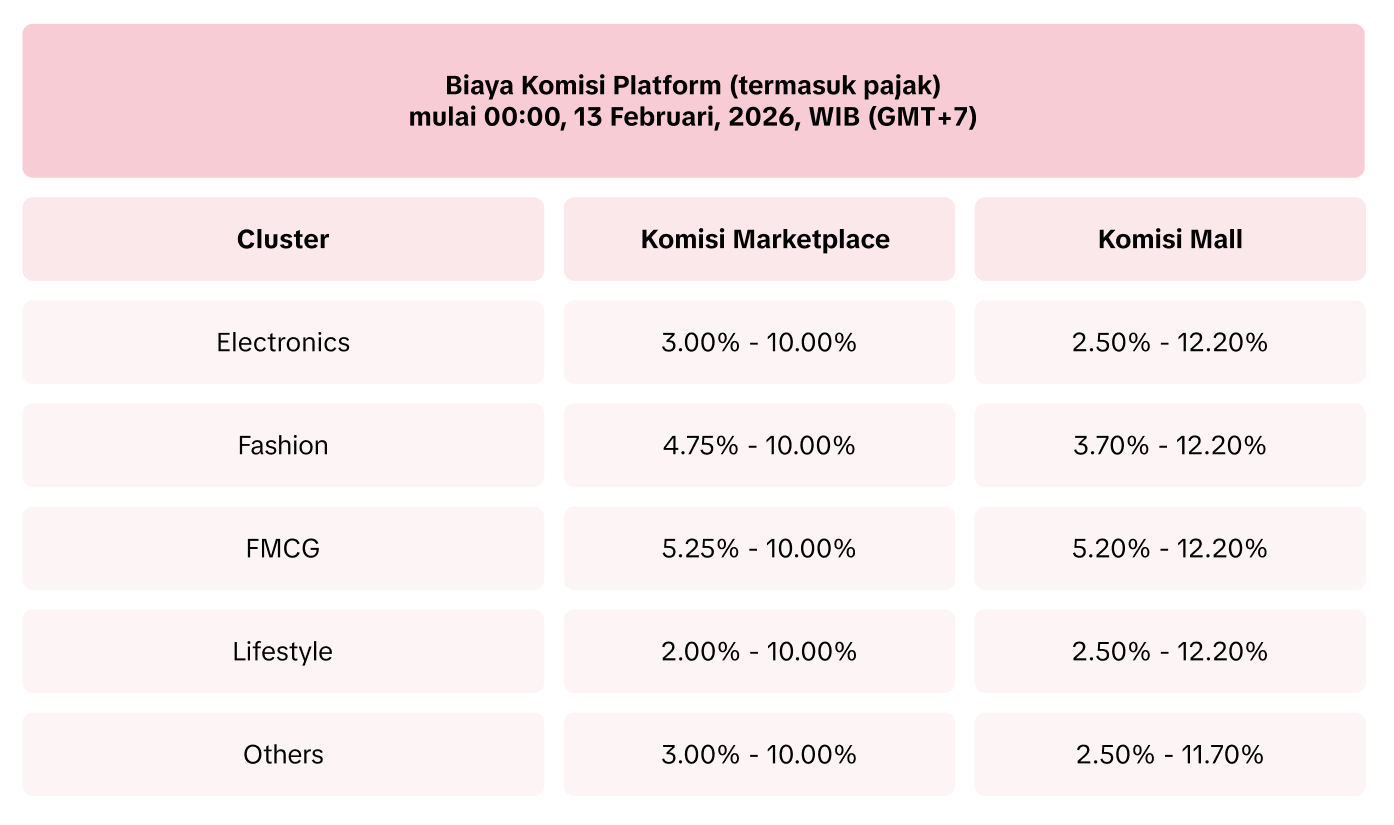
Bagaimana Biaya Komisi Platform dihitung?
Biaya Komisi Marketplace = (Harga barang - Diskon penjual) * Tarif biayaBiaya Layanan Pre-order
Selain Biaya Komisi Platform berdasarkan kategori produk, semua barang pre-order dikenakan biaya layanan pre-order sebesar 3% per produk yang terjual. Ini berlaku untuk semua produk pre-order yang dilakukan di TikTok Shop by Tokopedia.Pengurangan Biaya Komisi Platform untuk Produk yang Terjual dari LIVE
Semua produk yang dijual melalui LIVE dapat menikmati tarif komisi yang lebih rendah. Tarif Biaya Komisi Platform berdasarkan kelompok produk (termasuk pajak) untuk produk yang dijual melalui LIVE adalah: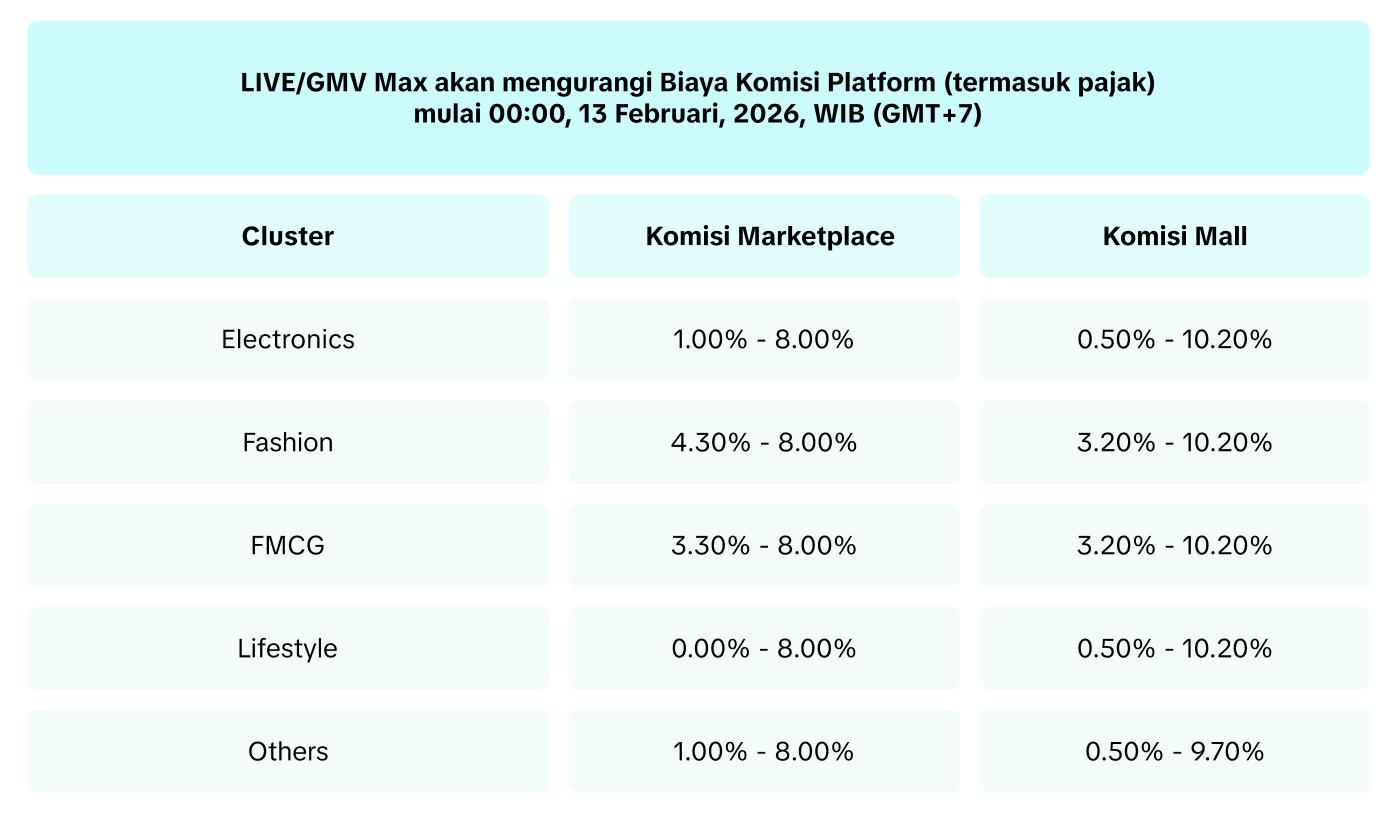
Pengurangan Biaya Komisi Platform untuk Penjual yang Menggunakan GMV Max
Mulai 13 Februari, platform memperkenalkan serangkaian tarif komisi yang lebih rendah untuk produk yang menggunakan GMV Max. Tarif Biaya Komisi Platform berdasarkan kategori produk (termasuk pajak) untuk produk yang menggunakan GMV Max adalah: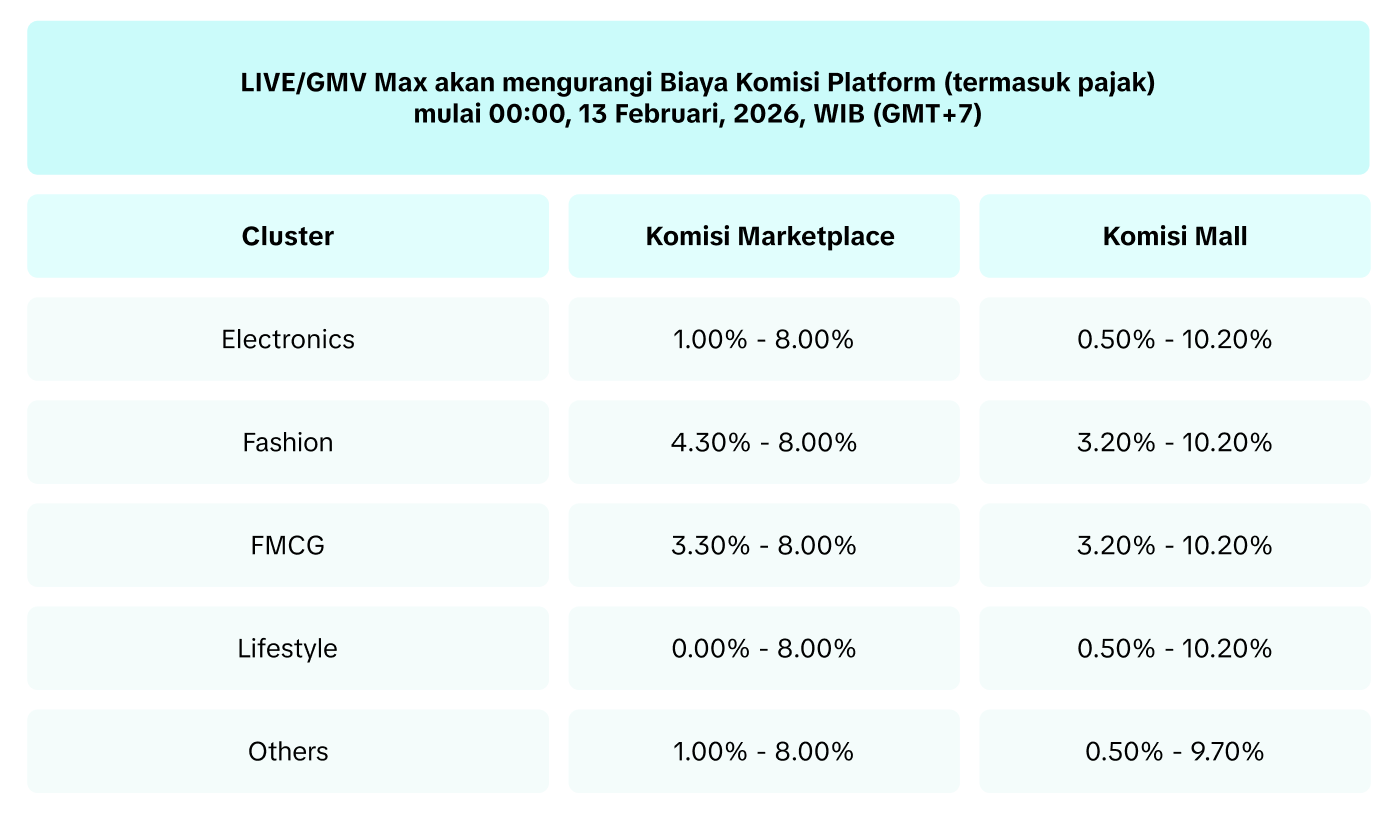
- Semua produk yang memiliki campaign GMV Max aktif dapat menikmati tarif komisi yang lebih rendah.
- Jika pengeluaran GMV Max penjual melebihi 1% dari GMV mereka di platform dalam 30 hari terakhir, semua pesanan toko mereka dalam kategori berikut, baik setiap produk spesifik menggunakan GMV Max atau tidak, dapat menikmati tarif komisi yang lebih rendah.
- Jika pengeluaran GMV Max penjual melebihi 3% dari GMV mereka di platform dalam 30 hari terakhir, semua pesanan toko mereka, baik setiap produk spesifik menggunakan GMV Max atau tidak, dapat menikmati tarif komisi yang lebih rendah.

Biaya Layanan Mall
Setelah pesanan berhasil dikirimkan kepada pelanggan, platform akan secara otomatis memotong biaya dari penyelesaian pesanan/pembayaran akhir dari Penjual Mall. Biaya ini disebut Biaya Layanan Mall, dan dibebankan untuk semua pesanan Mall yang berhasil diproses di platform.Tarif Biaya Layanan Mall adalah 1,8% (termasuk pajak) dan dibatasi hingga Rp50.000 per produk yang terjual.
Bagaimana Biaya Layanan Mall dihitung?
Biaya Layanan Mall = (Pembayaran Pelanggan - Pengembalian Dana Pelanggan) * 1,8%, dibatasi hingga Rp50.000 per produk yang terjual.Untuk detail lebih lanjut tentang Biaya Layanan Mall, silakan baca artikel ini.
Biaya Komisi Dinamis
Mulai pukul 00:00, 10 Juni 2025, waktu Jakarta (GMT+7), setelah pesanan berhasil dikirimkan kepada pelanggan, platform akan secara otomatis memotong biaya dari penyelesaian pesanan/pembayaran akhir untuk diinvestasikan kembali ke manfaat platform bagi penjual, termasuk Biaya Pengiriman Voucher Xtra. Ini adalah Biaya Komisi Dinamis, dan dibebankan berdasarkan tarif yang berbeda untuk setiap subkategori produk.Tarif Biaya Komisi Platform berdasarkan klaster produk (termasuk pajak) adalah:
| Biaya Komisi Dinamis | |
| Electronics | 4.00% - 5.50%* |
| Fashion | 4.00% - 6.00%* |
| FMCG | 4.00% - 5.00%* |
| Lifestyle | 5.00% - 6.00%* |
Bagaimana Biaya Komisi Dinamis dihitung?
Biaya Komisi Dinamis = (Harga Barang - Diskon Penjual) * Tarif biaya, dibatasi hingga Rp40.000 per barang.Untuk detail lebih lanjut tentang Biaya Komisi Dinamis, silakan baca artikel ini.
Biaya Pemrosesan Order
Mulai pukul 00.00, 11 Agustus 2025, waktu Jakarta (GMT+7), setelah pesanan berhasil terkirim ke pelanggan, platform akan secara otomatis memotong biaya dari penyelesaian pesanan/pembayaran akhir untuk pemrosesan pesanan di platform. Ini adalah Biaya Pemrosesan Order.Biaya Pemrosesan Order ditetapkan sebesar Rp1.250 per pesanan yang berhasil terkirim.
Untuk detail lebih lanjut tentang Biaya Pemrosesan Order, silakan baca artikel ini.

Biaya dan Penyesuaian Lainnya pada Platform
Berikut adalah semua jenis biaya dan penyesuaian lainnya yang mungkin dikenakan kepada seller dalam platform kami.
| Nama | Penjelasan |
| Ongkos kirim sebenarnya | Biaya pengiriman sebenarnya dihitung berdasarkan berat dan dimensi yang diukur oleh operator |
| Diskon ongkos kirim platform | Diskon biaya pengiriman yang disediakan oleh platform |
| Ongkos kirim pelanggan | Ongkos kirim ditanggung pelanggan berdasarkan berat produk yang diunggah oleh penjual |
| Pengembalian ongkos kirim pelanggan | Biaya pengiriman dikembalikan kepada pelanggan untuk pesanan yang dikembalikan |
| Ongkos kirim seller | Biaya pengiriman ditanggung oleh penjual |
| Ongkos kirim pengembalian sebenarnya | Biaya pengiriman untuk pesanan yang dikembalikan karena kesalahan penjual |
| Subsidi ongkos kirim | Subsidi yang diterima seller dari/dikembalikan ke platform |
| Komisi afiliasi | Komisi dibayarkan kepada kreator afiliasi melalui program afiliasi |
| Komisi partner afiliasi | Komisi dibayarkan kepada mitra afiliasi melalui program afiliasi |
| Biaya layanan SFP (Program Ongkir) | Biaya layanan yang dibebankan platform kepada penjual untuk peserta program SFP (Program Ongkir) |
| Penyesuaian biaya pengiriman | Penyesuaian bila terdapat perbedaan antara biaya pengiriman yang dihitung dan sebenarnya |
| Kompensasi biaya pengiriman | Kompensasi kepada penjual bila ada perbedaan antara biaya pengiriman yang dihitung dan sebenarnya |
| Tagihan Balik | Tagihan yang dikembalikan ke kartu pembayaran setelah pelanggan berhasil menyengketakan suatu barang |
| Kompensasi layanan pelanggan | Kompensasi dibayarkan kepada pelanggan setelah periode purna jual (after-sales) |
| Penyesuaian promosi | Penyesuaian bila terdapat perbedaan antara biaya promosi yang dihitung dan sebenarnya |
| Kompensasi platform | Kompensasi bagi penjual atas keberhasilan banding terhadap perselisihan pelanggan |
| Penalti platform | Hukuman atas pelanggaran kebijakan platform |
| Contoh biaya pengiriman | Biaya pengiriman untuk mengirimkan sampel melalui penyedia logistik platform |
| Penggantian biaya logistik | Penggantian biaya dari platform atas kerugian atau kerusakan terkait logistik |
| Dana kepuasan | Subsidi yang dibayarkan oleh platform untuk kepuasan platform yang buruk |
| Pengurangan yang ditanggung oleh penjual | Biaya yang ditanggung penjual karena kesalahannya sehingga menimbulkan ketidakpuasan pelanggan |
| Potongan biaya pengiriman | Potongan biaya pengiriman yang diberikan kepada penjual karena partisipasi dalam kampanye platform |
| Biaya layanan gudang | Biaya yang dikenakan untuk layanan gudang |
| Penyesuaian komisi platform | Penyesuaian bila terdapat perbedaan antara biaya komisi yang dihitung dan sebenarnya |
| Kompensasi komisi platform | Kompensasi bila terdapat perbedaan antara biaya komisi yang dihitung dan sebenarnya |
| Isi ulang iklan dari saldo yang telah diselesaikan | Pengeluaran iklan langsung dipotong dari saldo akun penjual jika penjual mengaktifkan opsi ini |
| Diskon voucher yang didanai bersama oleh seller | Bagian penjual dalam voucher yang didanai bersama |
| Pengembalian dana diskon voucher yang didanai bersama seller | Pengembalian dana kepada penjual sesuai bagian mereka dalam voucher yang didanai bersama |
| Diskon platform | Total diskon yang didanai oleh platform |
| Pengembalian dana diskon platform | Diskon platform yang dikembalikan ke platform untuk pesanan yang dikembalikan/dikembalikan |
| Diskon voucher platform yang didanai bersama | Bagian platform dalam voucher yang didanai bersama |
| Pengembalian dana diskon voucher yang didanai bersama oleh platform | Pengembalian dana ke platform dari bagiannya dalam voucher yang didanai bersama |
| Diskon ongkos kirim seller | Diskon biaya pengiriman yang diberikan oleh penjual |