Platform Commission Fee

Starting on 18th May, 2026, Jakarta time (GMT+7), to strengthen the platform's support towards the Indonesian seller community, specifically to reduce operational cost and increase exposure and sales for all dedicated sellers, the platform will introduce new Platform Commission Savings.
image

What is Platform Commission Fee

Platform Commission Fee is the amount that the platform charges to all sellers in Indonesia based on the price of a product. The Commission Fee is different for Mall sellers and Marketplace sellers.
  • On top of this, a pre-order service fee is charged if the product is pre-ordered on TikTok Shop and Tokopedia.
    image

How much is the Platform Commission Fee?

Platform Commission Fee rate by product category

The Platform Commission Fee rate is different by product category.
Additionally, sellers meeting the following criteria can enjoy platform commission savings, meaning lower commission rates:
  • Sellers using GMV Max
    • Order-level savings for GMV Max orders
    • Shop-level savings if the percentage of GMV Max spending to GMV in the last 30 days is 3% or higher
  • Sellers participating in the Growth Xtra (previously Xtra Boost) program
    • Shop-level savings for sellers in the program
    • Additional order-level savings for GMV Max orders
  • Sellers meeting both conditions: (1) having the percentage of GMV Max spending to GMV in the last 30 days at 3% or higher; and (2) participating in the Growth Xtra Program.
The Platform Commission Fee rate and savings (tax inclusive) by category for different sellers groups are as follows:

How to calculate Platform Commission Fee by product category

Formula

The commission fee is calculated from the item price, minus any seller discounts. Shipping fees and platform discounts are not included as part of the calculation of the commission fee.
Platform Commission Fee = (Item Price - Seller Discount) * Fee rate

Calculation examples

  1. Item: Guitar - Mall sellers
    1. Original Price: Rp10.000,-
    2. Seller Discount: Rp1.000,-
    3. Item Price after Seller Discount: Rp9.000,-
  2. The Platform Commission Fee calculation is as follows
Scenarios
Default rate
% GMV Max Spend to GMV <3% & Joined Growth Xtra Program - Orders without GMV Max
%Shop Ads Spend to GMV >=3% & Not Joined Growth Xtra Program
% GMV Max Spend to GMV >=3% & Joined Growth Xtra Program
Original item price
Rp10.000,-
(-) Seller discount
Rp1.000,-
Subtotal after discount
Rp9.000,-
Default Commission rate
9.20%
(-) Commission Savings rate
0.00%
1.40%
3.50%
4.00%
Final Commission Rate
9.20%
7.80%
5.70%
5.20%
Platform Commission Fee =
Subtotal after discount x Final commission rate
Rp828,-
(tax inclusive)
Rp702,-
(tax inclusive)
Rp513,-
(tax inclusive)
Rp468,-
(tax inclusive)
image

Platform Commission Savings

GMV Max Commission Savings

From 28th April, 2026, sellers using GMV Max can enjoy two levels of commission savings.
  • Any product with an active LIVE or Product GMV Max campaign can enjoy order-level platform commission savings.
    • In the same shop, products without an active GMV Max campaign follow the original standard fee rates.
  • If a seller's GMV Max percentage of ads spend to GMV in the past 30 days is 3% or higher, they can enjoy whole-shop platform commission savings.
    • GMV Max Percentage of ads spend to GMV is calculated as: GMV spending / shop's GMV
    • Sellers can see their GMV Max Percentage of ads spend to GMV on the Seller Center > Marketing > Shop Ads.
  • Note:
    • An active GMV Max campaign refers to Product GMV Max campaign whose status is active and has sufficient balance.
    • The calculation of GMV Max Percentage of ads spend to GMV only includes GMV Max (including Product GMV Max and LIVE GMV Max), and excludes Custom Ads and Brand Ads.
    • The GMV generated from ad-prohibited products, pursuant to Indonesian law, are not considered in the calculation of GMV Max Percentage of ads spend to GMV.
The Platform Commission Fee rate (tax inclusive) following the GMV Max commission savings policy are as follows:
From 13th February to before 18th May, 2026
From 18th May, 2026
Sellers can check their GMV Max savings on the Seller Center > Marketing > Shop Ads.
Order-level savings for products/LIVE with active GMV Max campaigns
Shop-level savings for sellers achieving min. 3% of GMV Max Spend to GMVin the past 30 days
Entrance
image
image
Details
image
Sellers can see all products that currently enjoy the commission savings, and check the following for each product:
  • The final commission rate after savings (compared to the original commission rates)
  • The eligibility status and time for the savings
  • The corresponding active GMV Max campaign
image
Sellers can see their shop's commission savings status by date (including for products that do not have an active Shop Ads campaign). For each date, sellers can check the following:
  • GMV, ad spend and % of GMV Max spend to GMV
  • Commission savings status:
    • Not met: no shop-level savings applied on that date.
    • Met (all): shop-level savings applied on that date
Notes
All screenshots are mockups for references only. Actual rates and figures differ.

Growth Xtra Program Commission Savings

Sellers participating in the Growth Xtra Program (previously Xtra Boost Program) can enjoy Platform Commission Savings on the whole shop. Additionally, on top of the shop-level savings, orders of Growth Xtra sellers sold via GMV Max can enjoy additional order-specific savings.
The Platform Commission Fee rate (tax inclusive) following the Growth Xtra commission savings policy are as follows:
Learn more about the Growth Xtra Program here.

Dual Stacked Commission Savings for GMV Max and Growth Xtra

The combination of GMV Max and the Growth Xtra Program can help sellers achieve the highest level of growth. Therefore, to further optimize dedicated sellers' operational cost, while maintaining growth momentum, the platform will implement a Dual Stacked saving program.
Sellers meeting both GMV Max Percentage of ads spend to GMV 3% and Growth Xtra conditions can enjoy the highest level of Platform Commission Savings, up to 8.18%.
The Platform Commission Fee rate (tax inclusive) following the Stacked commission savings policy are as follows:

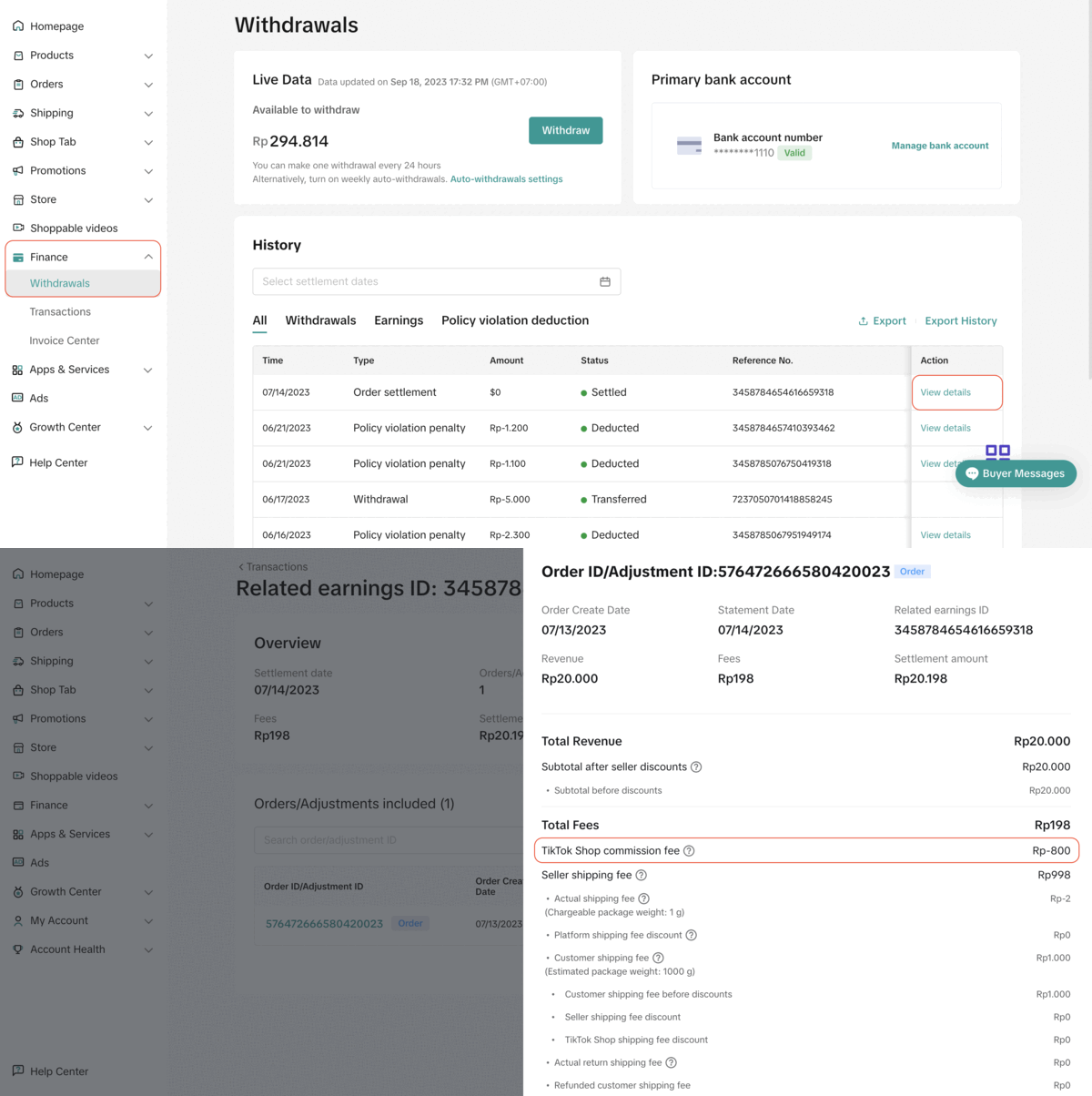
Checking Details of Platform Commission Savings Amounts

Sellers can check the saving amount for each order in the finance statement by going to the Seller Center > Finance > Transactions.
image
image

Pre-order Service Fee

On top of the Platform Commission Fee by product category, all pre-order goods are subject to another 3% pre-order service fee per product sold. This applies to all pre-order products placed on TikTok Shop and Tokopedia.
The formula for pre-order service fee is as follows
Pre-order Service Fee = (Item Price - Seller Discount) * 3%(This fee has already been applied since 2025)
image

FAQ

  1. Who will be charged the commission fee?
  • All sellers on Shop | Tokopedia in Indonesia are charged a platform commission fee. The fee rate is different for Marketplace sellers and Mall sellers.
  1. What is a "valid order"?
  • Valid orders are paid orders that have been successfully delivered to and accepted by the buyer. Cancelled or fully returned or refunded orders are not considered valid orders.
  1. How will sellers be charged the commission fee?
  • The Platform Commission Fee charges will be deducted directly from the order settlement.
  1. Is the Platform Commission Fee inclusive of tax?
Yes. The Platform Commission Fee rates stated above are inclusive of tax.
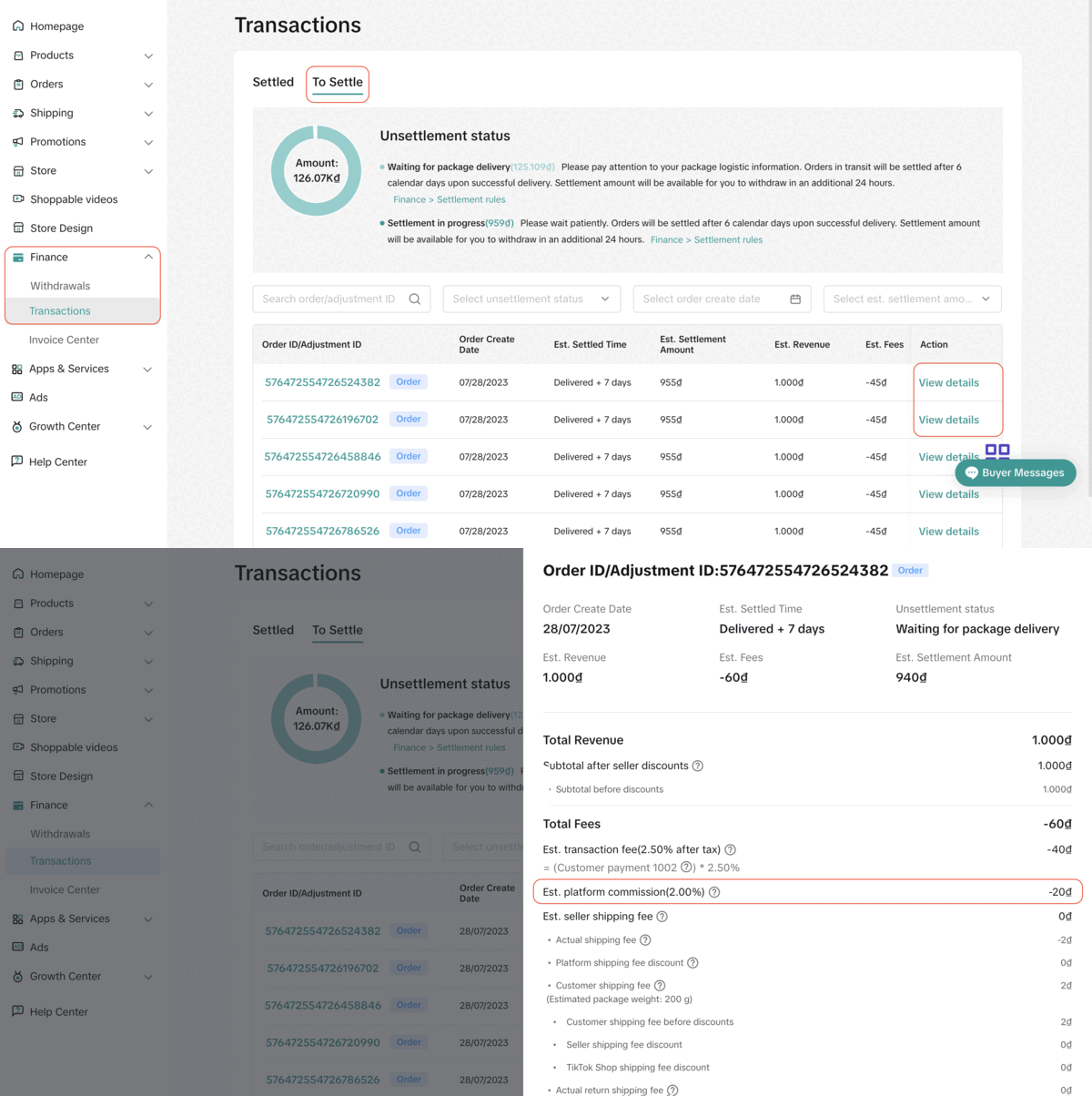
  1. Where can sellers check the details of the commission amount?
Note: The above screenshots are just mock-up examples for reference purposes. Actual interface display and rates might be different. Note: The above screenshots are just mock-up examples for reference purposes. Actual interface display and rates might be different.
  1. What does the refund process look like?
  • If the entire order is returned, the full commission fee will be refunded to the seller. If part of the order is refunded, the commission fee charged on the refunded item (s) will be refunded to the seller.
  1. Where is platform discount in the calculation of the Platform Commission Fee?
  • The calculation of the Platform Commission Fee does not consider any platform-sponsored discount.
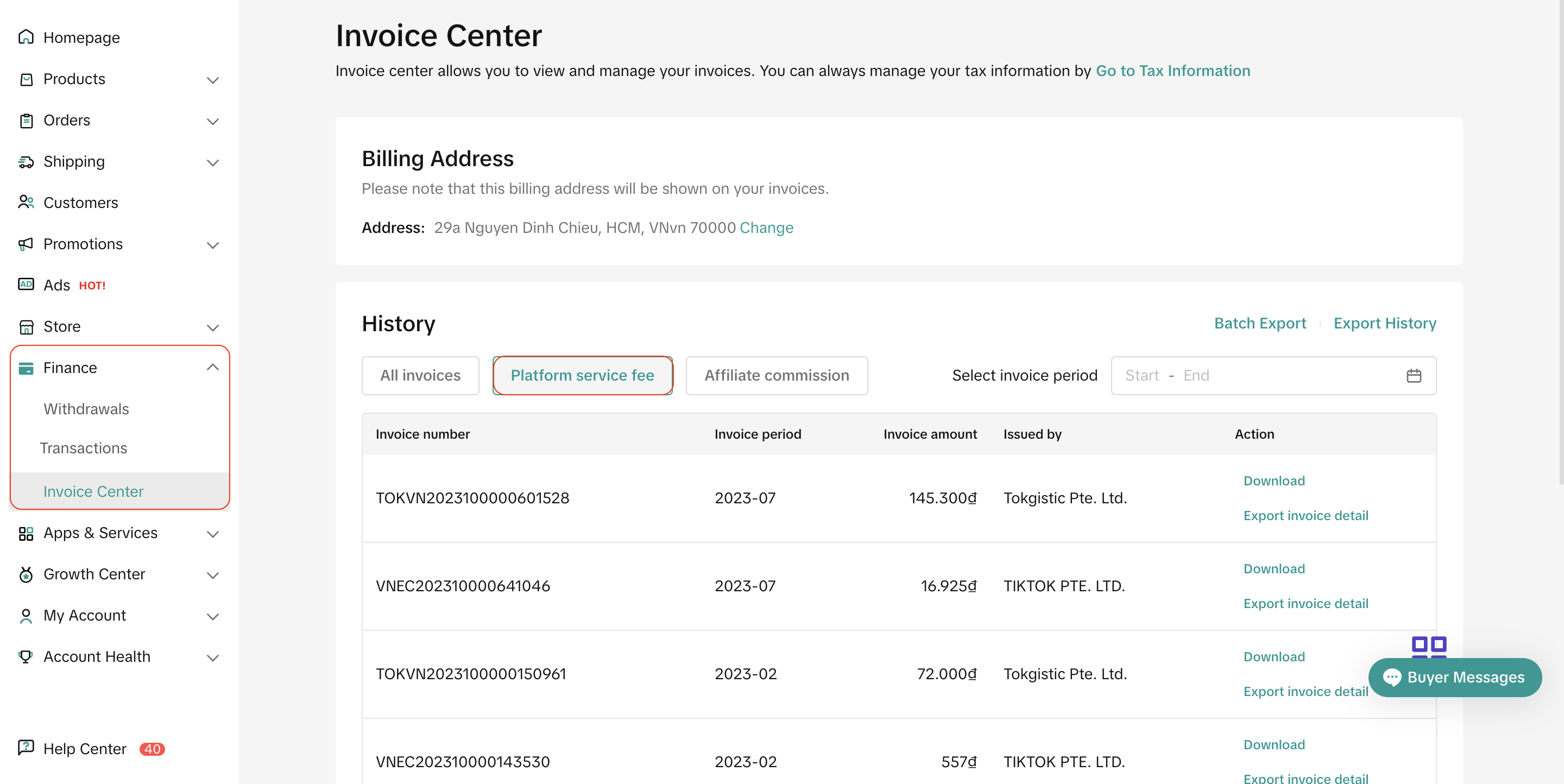
  1. Since this is a chargeable fee, will sellers receive an invoice describing the full Platform Commission Fee amount that the platform has charged for the month?
  • Yes, sellers will receive an invoice the following month for the previous month's billing period. Sellers may visit Finance > Invoice Center > Platform Service Fee to download the invoice.
    image
Note: The above screenshots are just mock-up examples for reference purposes. Actual interface display and rates might be different.
  1. What should sellers do if they have inquiries in regards to the Platform Commission Fee?
  • Sellers may reach out to the support team in Seller Center > Help Center.
  • Or sellers may also file an inquiry ticket at 'Ticket log' or please feel free to reach out and speak to support representative via 'Online Support'
    image
  1. What is GMV Max?
GMV Max is an automated ads solution aimed at increasing your store’s Gross Merchandise Value (GMV). There are 2 types of GMV Max:
  • Product GMV Max: an automated ad campaign type that chooses the products, creative assets and placement options that are most likely to encourage people to buy your products. Learn more here.
  • LIVE GMV Max: a campaign type that optimizes traffic to get you the most product sales for your LIVE event. Learn more here.
  1. Are there different commission savings for orders using Product GMV Max and LIVE GMV Max?
The amount of savings is the same for Product and LIVE GMV Max. However, whether an order qualifies for the savings is different:
  • Orders sold outside of LIVE:
    • If the product has an active Product GMV Max: it qualifies for order-level GMV Max Savings.
    • If the product does not have an active Product GMV Max: it does not qualify for for order-level GMV Max Savings.
  • Orders sold via LIVE:
    • If the LIVE room has an active LIVE GMV Max: all orders sold via this LIVE room qualifies for order-level GMV Max Savings.
    • If the LIVE room does not have an active LIVE GMV Max: no orders sold via this LIVE room, even if the product has an active Product GMV Max, qualifies for order-level GMV Max Savings.
      • This is because the sales of these orders are attributed to the LIVE organically, with no usage of nor spending on any GMV Max.
  • If the shop's Percentage of GMV Max spend to GMV in the past 30 days is 3% or higher: all orders, via or not via LIVE, with or without GMV Max campaigns, qualify for shop-level GMV Max Savings.
  1. What is Growth Xtra (Xtra Boost)?
Growth Xtra (Xtra Boost) is a bundled program available on both Tokopedia and TikTok Shop. It offers participating sellers with the most attractive vouchers under a single service fee.
Growth Xtra is an upgrade of Xtra Boost, where the platform offers more vouchers, covering all sales scenarios, especially more vouchers during LIVE.
Learn more about the program and its benefits here.
  1. Are there different levels of Growth Xtra Commission savings?
Yes.
  • Shop-level savings: All Growth Xtra sellers qualify for shop-level savings.
  • Order-level savings: If the Growth Xtra sellers use GMV Max, specific orders sold with active GMV Max campaigns get additional savings
  • Dual Stacked savings: If the Growth Xtra sellers use GMV Max, and the shop's Percentage of GMV Max spend to GMV in the past 30 days is 3% or higher, the whole shop enjoy the highest level of savings (up to 8.18%)
  1. How is the timing decided for each savings policy?
  • For GMV Max savings:
    • Order-level savings: each product is assessed on a daily basis. If on a day, it is sold with an active Product/LIVE GMV Max campaign, it will qualifies for order-level savings on that specific day.
      image
    • Shop-level savings: each shop is assessed on a 30-day rolling basis. If during the previous 30 days, the Percentage of GMV Max spend to GMV is 3% or higher, the shop qualifies for shop-level savings on the 31st day.
  • For Growth Xtra savings: on a real-time basis, the shop will enjoy shop-level savings the moment it enrolls successfully until it opts out successfully.
  • For Dual Stacked savings: as long as the shop qualifies for both Growth Xtra savings and GMV Max spend 3% savings, it will enjoy Dual Stacked savings.