

Platform Commission Fee
02/11/2026
Starting from 00:00, 13 February, Jakarta time (GMT+7), the platform adjusts the Platform Commission Fee and introduces a new set of commission rates for products sold via LIVE or using GMV Max.

From 1st October, 2025 until 10th February, 2026 (*All product sub-categories with a Marketplace Commission Rate of 10.00% will enjoy a 20% commission discount. In other words, their effective Commission Rate is 8.00%.) From 13th February, 2026, the following category fee rate table starts taking effect
Any product categories outside of the tables above are subject to a fixed 6.97% commission fee (tax inclusive) for all sellers under all scenarios.
The formula is as follows:
Platform Commission Fee = (Item Price - Seller Discount) * Fee rate
Pre-order Service Fee = (Item Price - Seller Discount) * 3%

Sellers can check whether they enjoy lower commission rates for specific products or the whole shop via the two sections on the Shop Ads page: "Create GMV Max to get commission waiver" for specific product reduction, or "Unlock commission waiver for non ads order by maintaining ads take rate daily" for whole shop reduction.
Sellers can check the reduction amount for each order in the finance statement.
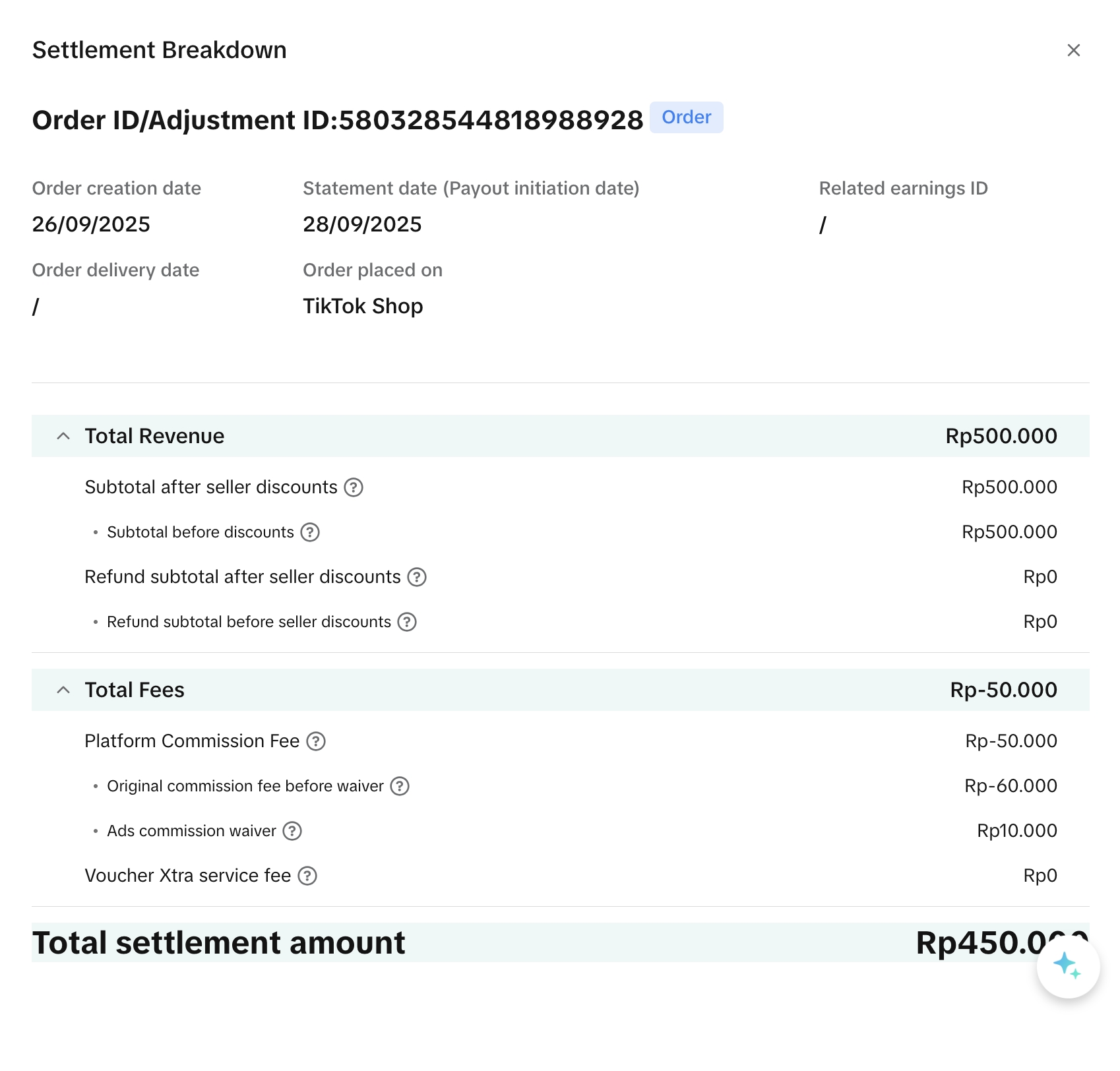 *Notes: All screenshots are mockups for references only. Actual rates and figures differ.
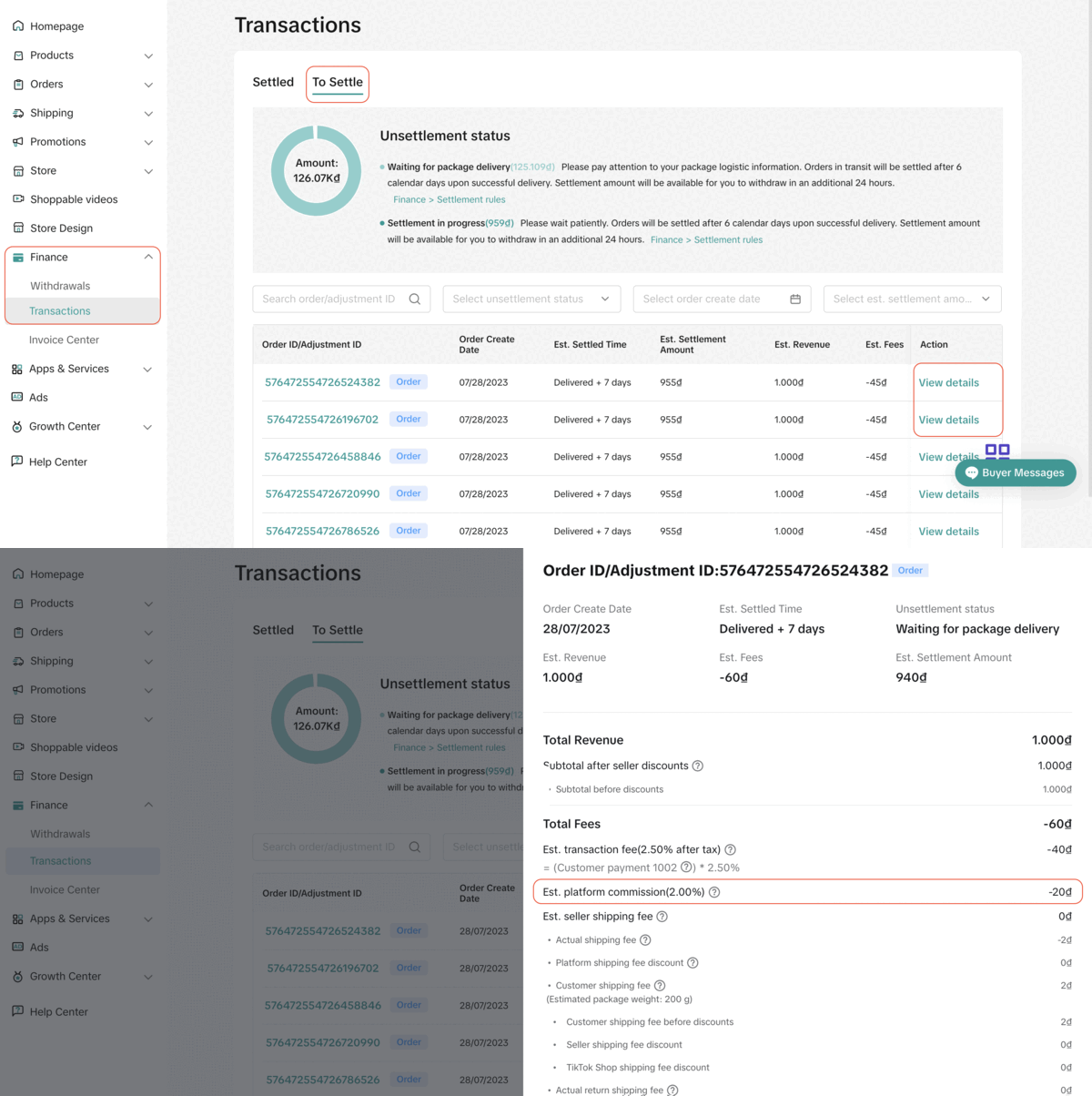 Note: The above screenshots are just mock-up examples for reference purposes. Actual interface display and rates might be different.
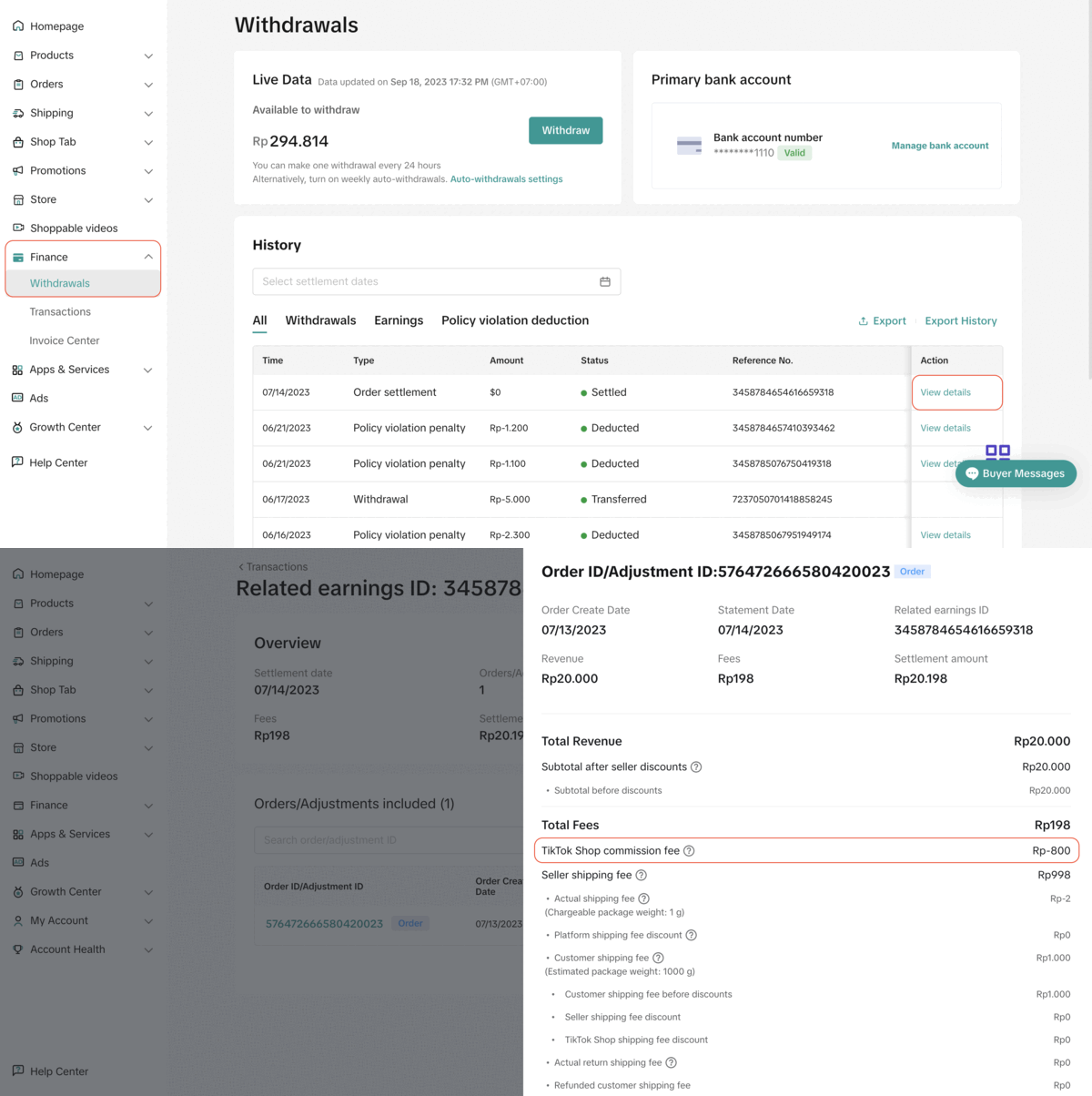 Note: The above screenshots are just mock-up examples for reference purposes. Actual interface display and rates might be different.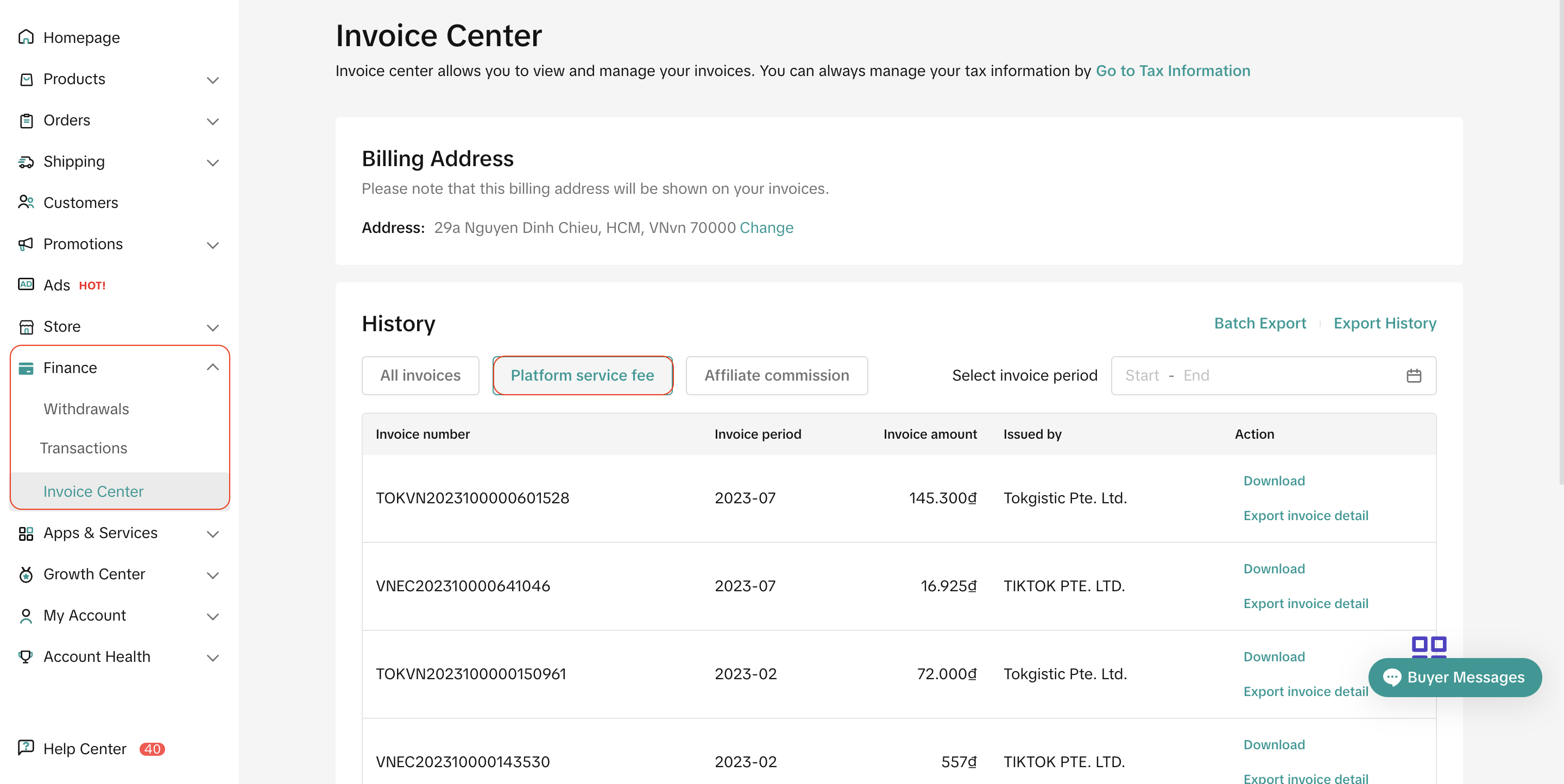
What is Platform Commission Fee
Platform Commission Fee is the amount that the platform charges to all sellers in Indonesia based on the price of a product. The Commission Fee is different for Mall sellers and Marketplace sellers.- On top of this, a pre-order service fee is charged if the product is pre-ordered on TikTok Shop by Tokopedia.
- From 13 February, sellers using GMV Max can enjoy lower platform commission fees.
How much is the Platform Commission Fee?
Platform Commission Fee rate by product category
The Platform Commission Fee Rate by product category (tax inclusive) is:From 1st October, 2025 until 10th February, 2026 (*All product sub-categories with a Marketplace Commission Rate of 10.00% will enjoy a 20% commission discount. In other words, their effective Commission Rate is 8.00%.) From 13th February, 2026, the following category fee rate table starts taking effect
Any product categories outside of the tables above are subject to a fixed 6.97% commission fee (tax inclusive) for all sellers under all scenarios.
How to calculate Platform Commission Fee by product category
Formula
The commission fee is calculated from the item price, minus any seller discounts. Shipping fees and platform discounts are not included as part of the calculation of the commission fee.The formula is as follows:
Platform Commission Fee = (Item Price - Seller Discount) * Fee rate
Calculation example
- Example 1:
| |
| Original item price | Rp10.000,- |
| (-) Seller discount | Rp1.000,- |
| Subtotal after discount | Rp9.000,- |
Commission rate | 7.50% |
| Platform Commission Fee= Subtotal after discount x Commission rate | Rp675,- (tax inclusive) |
- Example 2:
| ||
Guitar | Puzzle set | |
| Original item price | Rp10.000,- | Rp20.000,- |
| (-) Seller discount | Rp1.000,- | Rp0,- |
| Subtotal after discount | Rp9.000,- | Rp20.000,- |
Commission rate | 7.50% | 7.50% |
| Platform Commission Fee= Subtotal after discount x Commission rate | Rp675,- (tax inclusive) | Rp1500,- (tax inclusive) |
Total Platform Commission Fee | Rp2175,- (tax inclusive) | |
How to calculate Pre-order Service Fee
On top of the Platform Commission Fee by product category, all pre-order goods are subject to another 3% pre-order service fee per product sold. This applies to all pre-order products placed on TikTok Shop and Tokopedia.Formula
The formula for pre-order service fee is as followsPre-order Service Fee = (Item Price - Seller Discount) * 3%
Calculation example
| |
| Original item price | Rp10.000,- |
| (-) Seller discount | Rp1.000,- |
| Subtotal after discount | Rp9.000,- |
Platform Commission rate | 7.50% |
| Pre-order Service rate | 3.00% |
| Platform Commission Fee= Subtotal after discount x Platform Commission rate | Rp675,- (tax inclusive) |
| Pre-oder Service Fee= Subtotal after discount x Pre-order Service rate | Rp270,- (tax inclusive) |
Platform Commission Fee Reduction for Products Sold via LIVE
From 13 February, all products sold via LIVE (self and affiliate) can enjoy lower commission rates. The Platform Commission Fee Rate by product category (tax inclusive) for products sold via LIVE is:Platform Commission Fee Reduction for Sellers using GMV Max
Reduced Platform Commission Rate for the Use of GMV Max
From 13 February, the platform introduces a new set of lower commission rates for products using GMV Max. The Platform Commission Fee Rate by product categories (tax inclusive) for products using GMV Max is:- Any products that have an active GMV Max campaign can enjoy the lower commission rates.
- If a seller's GMV Max spend exceeds 1% of their GMV on the platform in the past 30 days, all of their shop's orders in the categories listed here, whether each specific product uses GMV Max or not, can enjoy the lower commission rates.
- If a seller's GMV Max spend exceeds 3% of their GMV on the platform in the past 30 days, all of their shop's orders, whether each specific product uses GMV Max or not, can enjoy the lower commission rates.
- Note:
- An active GMV Max campaign refers to Product GMV Max campaign whose status is active and has sufficient balance.
- The calculation of GMV Max spend only includes GMV Max (including Product GMV Max and LIVE GMV Max), and excludes Custom Ads and Brand Ads.
How to Check Reduced Commission
To view available platform commission fee reductions for the use of GMV Max, sellers can check their Seller Center > Marketing > Shop Ads.Sellers can check whether they enjoy lower commission rates for specific products or the whole shop via the two sections on the Shop Ads page: "Create GMV Max to get commission waiver" for specific product reduction, or "Unlock commission waiver for non ads order by maintaining ads take rate daily" for whole shop reduction.
Specific reduction for products with active GMV Max campaigns | Whole shop reduction for sellers whose GMV Max spend exceeds 1%/3% GMV in the past 30 days | |
Entrance | 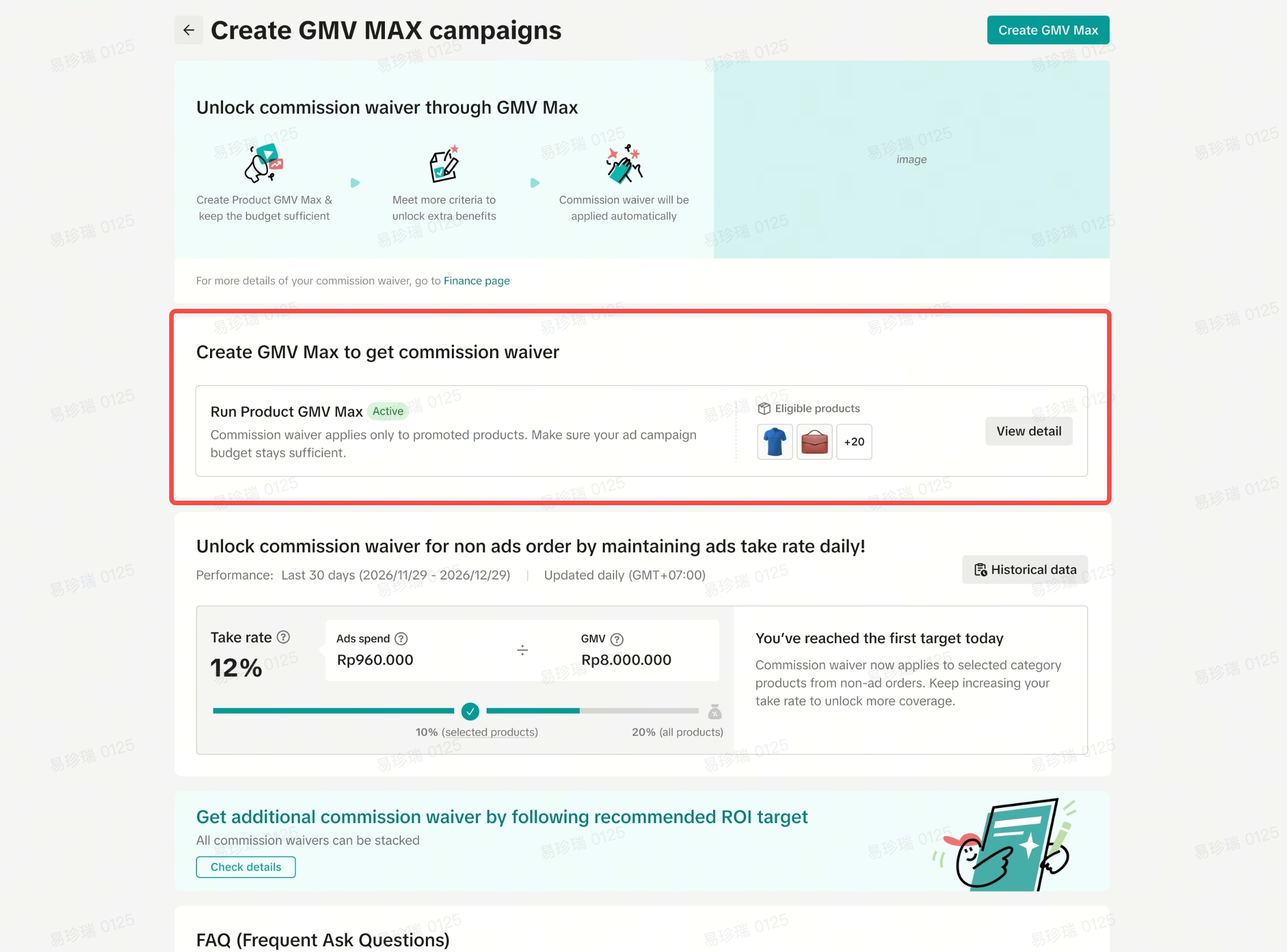 | 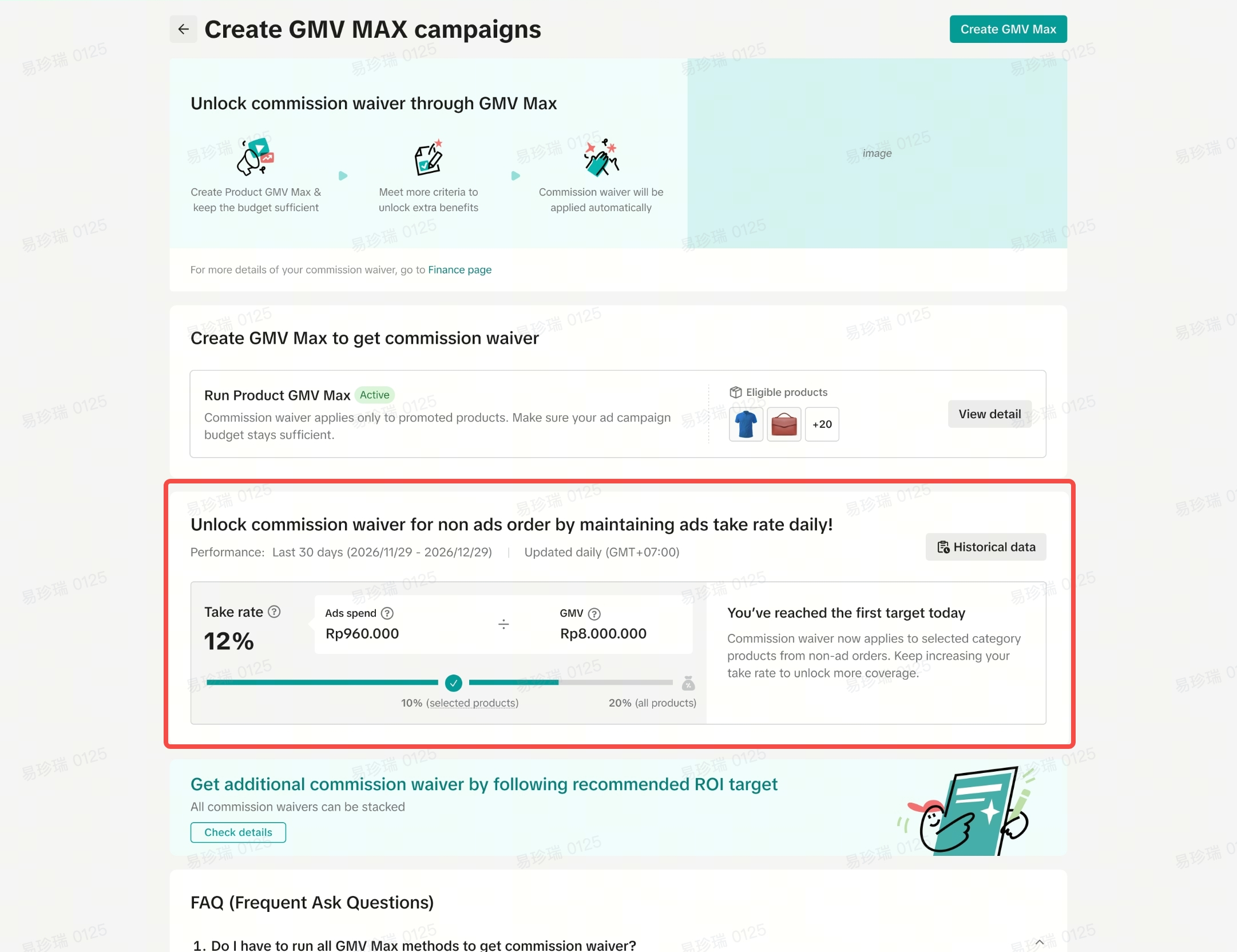 |
Details | 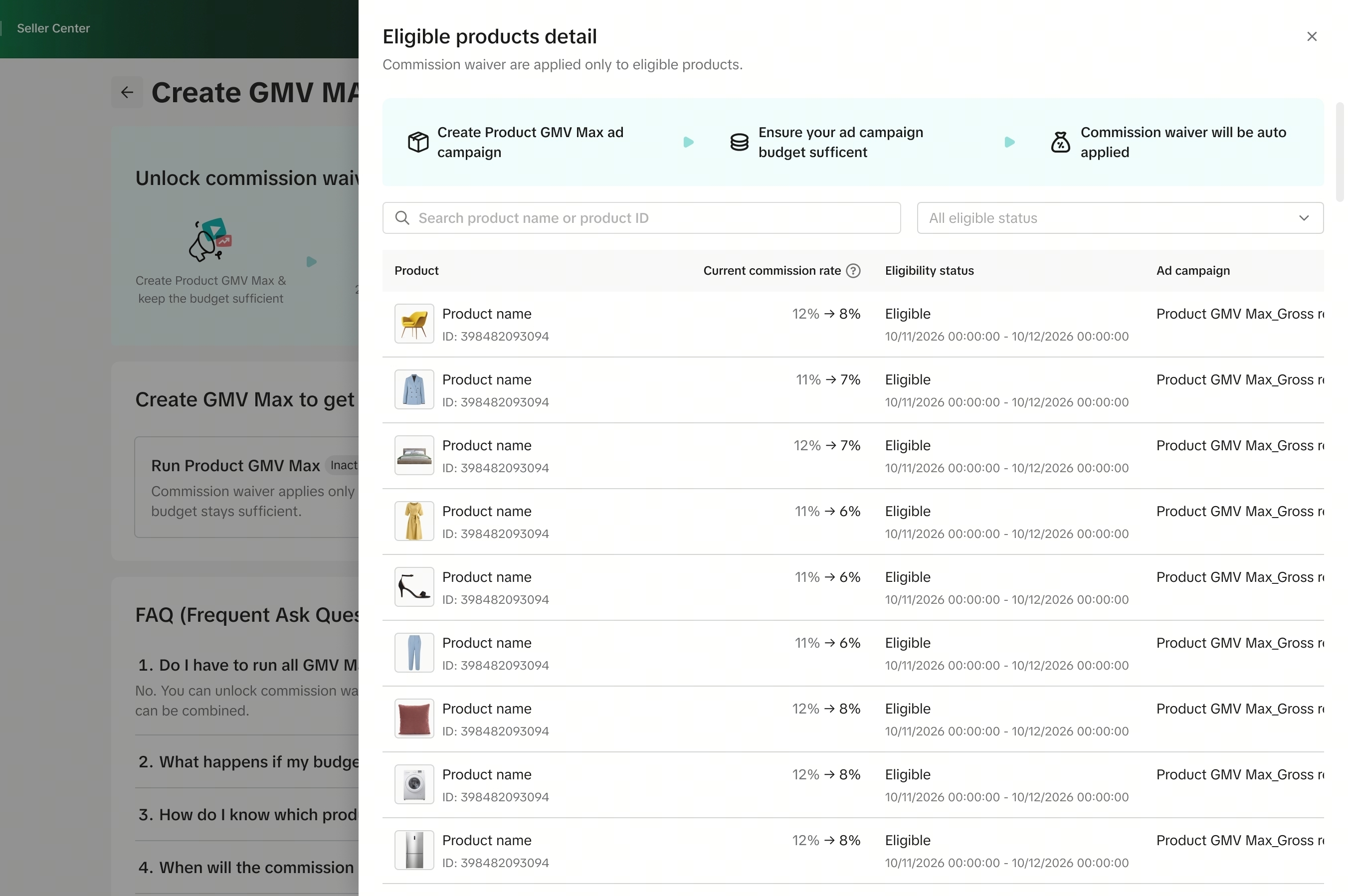 Sellers can see all products that currently enjoy the reduced commission rates, and check the following for each product: Sellers can see all products that currently enjoy the reduced commission rates, and check the following for each product:
| 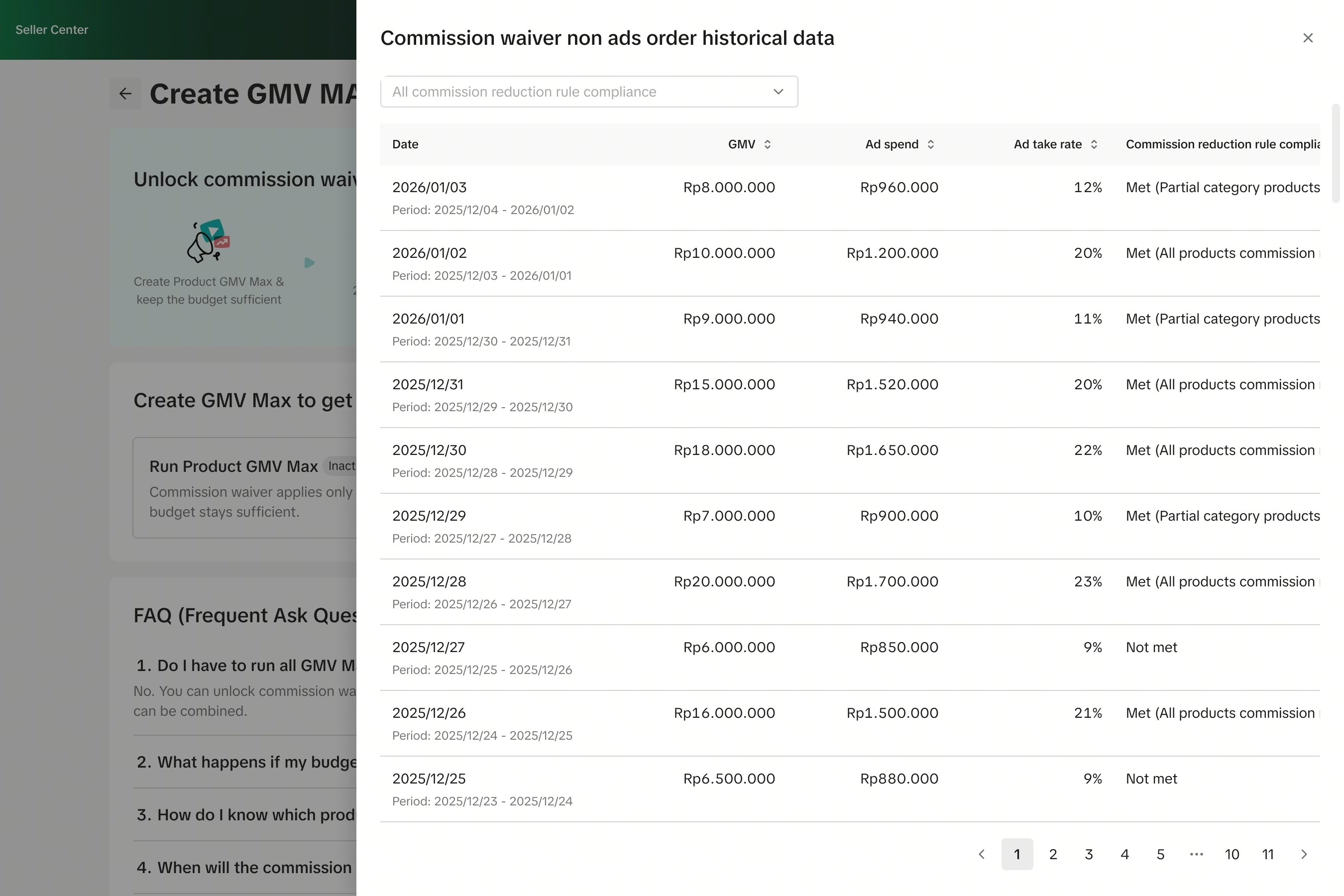 Sellers can see their shop's commission reduction status by date (including for products that do not have an active GMV Max campaign). For each date, sellers can check the following: Sellers can see their shop's commission reduction status by date (including for products that do not have an active GMV Max campaign). For each date, sellers can check the following:
|
Notes | All screenshots are mockups for references only. Actual rates and figures differ. | |
*Notes: All screenshots are mockups for references only. Actual rates and figures differ.FAQ
- Why is the Platform Commission Fee increasing?
- Shop | Tokopedia is dedicated to enhancing seller experience with platform improvements and added functionality, such as increasing our investment into campaigns and platform discount. The increased fee enables Shop | Tokopedia to maintain the platform, invest in research and development of new features, services, and campaign funding; hence contributing towards improving seller experience. Sellers may see these enhanced experiences, for example, via upcoming increases in campaign promotion, or general platform support for products in the categories of Beauty, Health and Personal Care.
- Who will be charged the commission fee?
- All sellers on Shop | Tokopedia in Indonesia are charged a platform commission fee. The fee rate is different for Marketplace sellers and Mall sellers.
- What is a "valid order"?
- Valid orders are paid orders that have been successfully delivered to and accepted by the buyer. Cancelled or fully returned or refunded orders are not considered valid orders.
- How will sellers be charged the commission fee?
- The Platform Commission Fee charges will be deducted directly from the order settlement.
Yes. The Platform Commission Fee rates stated above are inclusive of tax.
- Is the Platform Commission Fee inclusive of tax?
- Where can sellers check the details of the commission amount?
- For orders that have yet to be settled, you may see them in Seller Center > Finance > Transactions > To settle > View Details > Estimated Settlement Details
Note: The above screenshots are just mock-up examples for reference purposes. Actual interface display and rates might be different.- For orders that have been settled, you may see them in Seller Center > Finance > Transactions > Settled > View Details > Earning Details
Note: The above screenshots are just mock-up examples for reference purposes. Actual interface display and rates might be different.- What does the refund process look like?
- If the entire order is returned, the full commission fee will be refunded to the seller. If part of the order is refunded, the commission fee charged on the refunded item (s) will be refunded to the seller.
- Where is platform discount in the calculation of the Platform Commission Fee?
- The calculation of the Platform Commission Fee does not consider any platform-sponsored discount.
- Since this is a chargeable fee, will sellers receive an invoice describing the full Platform Commission Fee amount that the platform has charged for the month?
- Yes, sellers will receive an invoice the following month for the previous month's billing period. Sellers may visit Finance > Invoice Center > Platform Service Fee to download the invoice.
Note: The above screenshots are just mock-up examples for reference purposes. Actual interface display and rates might be different.
- What should sellers do if they have inquiries in regards to the Platform Commission Fee?
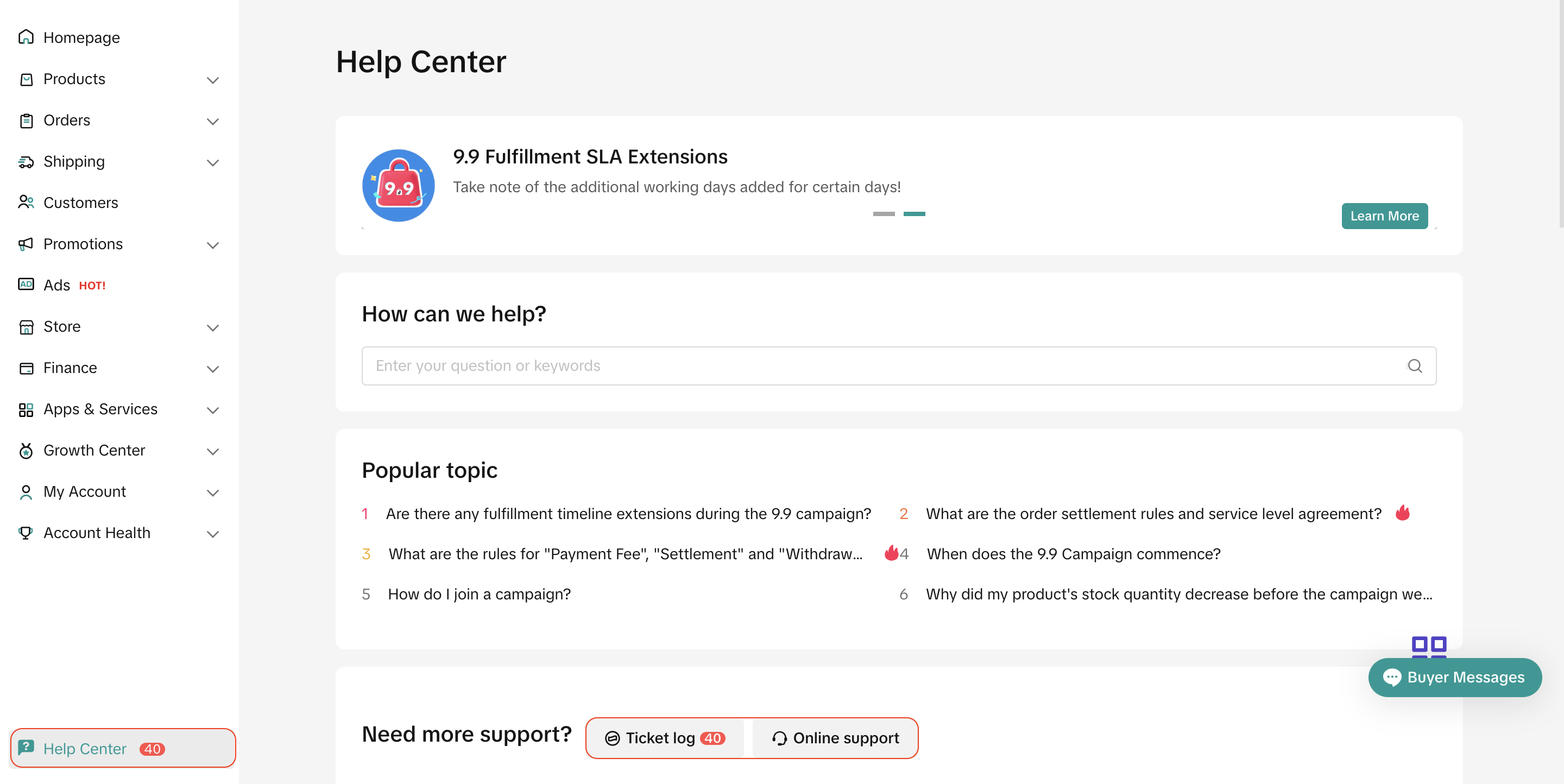
- Sellers may reach out to the support team in Seller Center > Help Center.
- Or sellers may also file an inquiry ticket at 'Ticket log' or please feel free to reach out and speak to support representative via 'Online Support'