

Shop Adjustment Period
06/12/2025
Reach More Customers and Boost Opportunities for Success. Starting Out with TikTok Shop by Tokopedia Shop Adjustment Period Program
💡All explanations regarding the Shop Adjustment Period Program in this article are effective starting December 27, 2024, for sellers who have completed the account integration process between Tokopedia and TikTok Shop. This policy doesn't apply to sellers who have not completed the account integration process.
What is the Shop Adjustment Period?
To aid new sellers with adjusting to the TikTok Shop by Tokopedia platform, all sellers will enter a "Shop Adjustment Period" after joining the platform. During this period, sellers will have certain limitations which will protect them from getting overwhelmed with orders, and allow them to get comfortable with the platform.Sellers will face limitations in the following areas:
- Number of orders a shop can accept daily (Order Volume Limits)
- Number of product listings that can be uploaded daily
- Number of active online listings the shop can have
- Number of creator accounts that can be affiliated with the shop
- Shops under individual accounts may be affiliated with 1 official account or 1 marketing account.
- Shops under corporate accounts may be affiliated with 1 official account and 1 marketing account.
When does the Shop Adjustment Period End?
Sellers will pass the Shop Adjustment Period if they meet certain performance targets after 30 calendar days. Sellers who have not met these targets will only pass after they meet them.
NOTE: All metrics will be calculated based on the performance of your shop on both TikTok Shop and Tokopedia.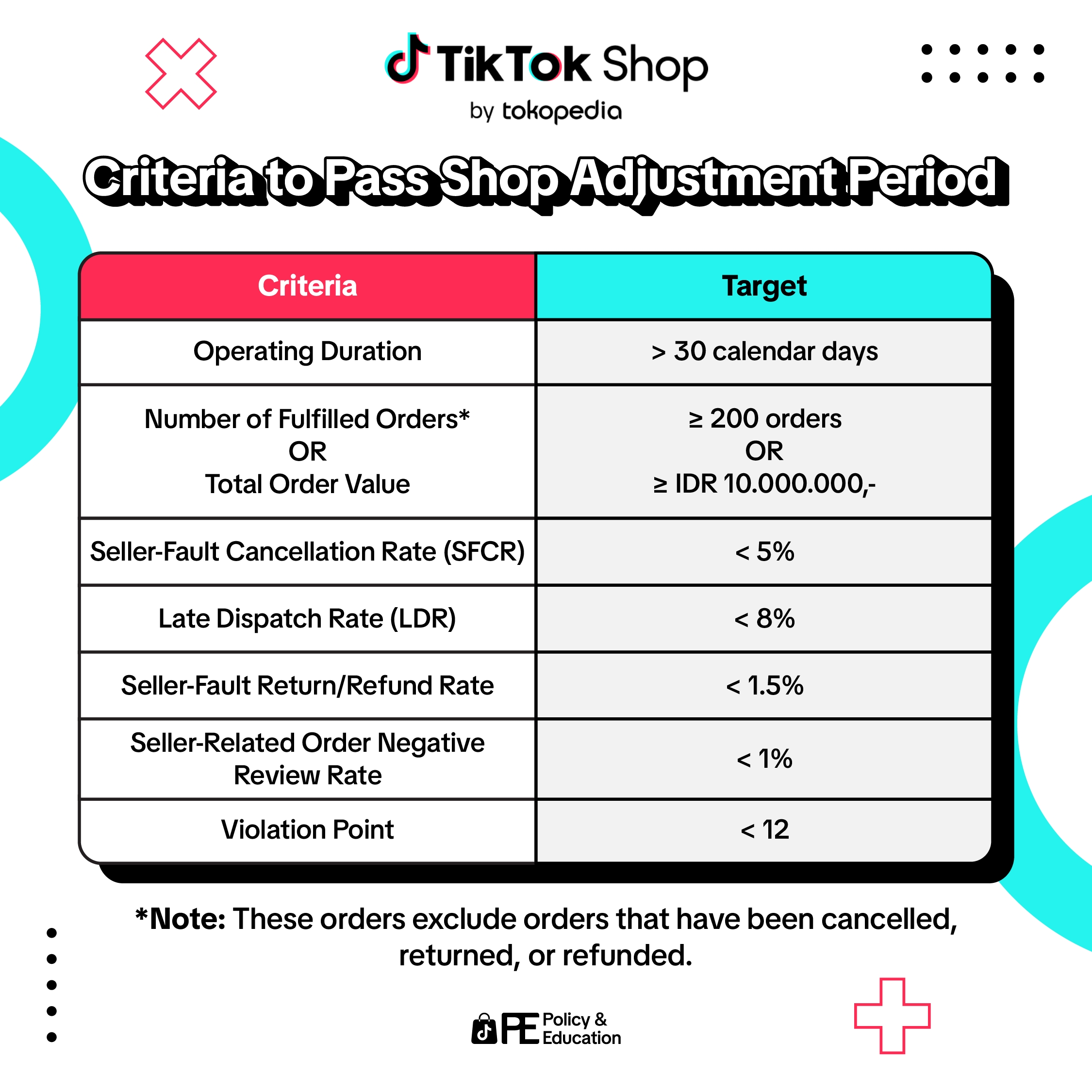
Read more:
- Seller-Fault Cancellation Rate (SFCR)
- Late Dispatch Rate (LDR)
- Seller-Fault Return/Refund Rate
- Seller-Related Order Negative Review Rate
- Violation Points
Tips & Tricks to Pass Shop Adjustment
- Prioritize Product Quality. Ensure that descriptions, photos, and product details are attractive and informative to capture buyers' interest.
- Efficient Order Management. This can be achieved by providing fast and accurate service, and proactively responding to customer inquiries.
- Stay informed regarding Platform Policies. By ensuring that you are up-to-date with TikTok Shop by Tokopedia's policies, you will be more likely to commit fewer policy violations. Explore our Tokopedia & TikTok Shop Academy to learn more!
- Monitor Performance Regularly. Use data that is available in Seller Center to track daily order and product upload limits.
- Evaluate and Adjust Strategies. Continuously evaluate performance during the Shop Adjustment Period and adjust marketing strategies, stock management, and customer service to meet market demands.
Checking the Shop Adjustment Period Status
Sellers new to TikTok Shop by Tokopedia can directly check and monitor the progress of the Shop Adjustment Period on the main page of the Seller Center.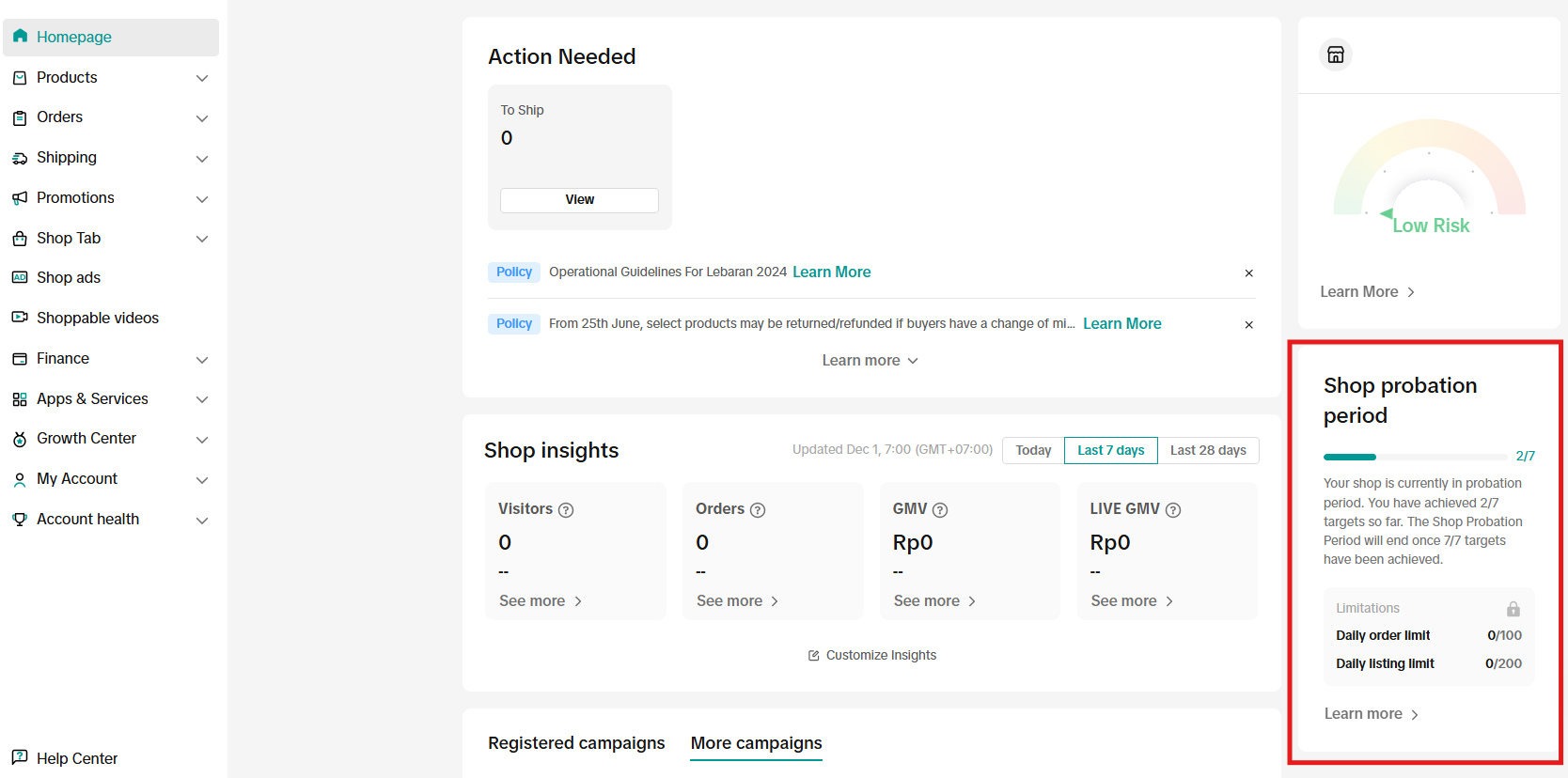
- Click on "Learn More" to see an introduction page about the Shop Adjustment Period.
- You will see a notification in the Seller Center when your daily order limit is reached. Products will be listed as "sold out" to customers until the next day.
- Once the daily listing limit is reached, additional uploaded products will not be published until the next day.
FAQ
If a seller doesn’t meet the criteria within 30 days, they remain in the Shop Adjustment Period until they meet all requirements. Sellers can continue selling while working to fulfill the criteria.
- What happens if I don't pass Shop Adjustment Period within the initial 30 days?
- How will I know if my store’s performance meets the criteria to pass?
- Can I shorten the Shop Adjustment Period by increasing orders or sales?
- Can I change my account type from individual to corporate during the Shop Adjustment Period?