

New Shop Adjustment Period
02/05/2026
This policy doesn't apply to sellers who have not completed the account integration process.
Why Shops Start in the Adjustment Period
The Shop Adjustment Period helps new shops get started smoothly on TikTok Shop by Tokopedia. It sets temporary limits to ensure:- Product listings are accurate
- Orders are fulfilled on time
- Customers have a good shopping experience
What Each Tier Allows
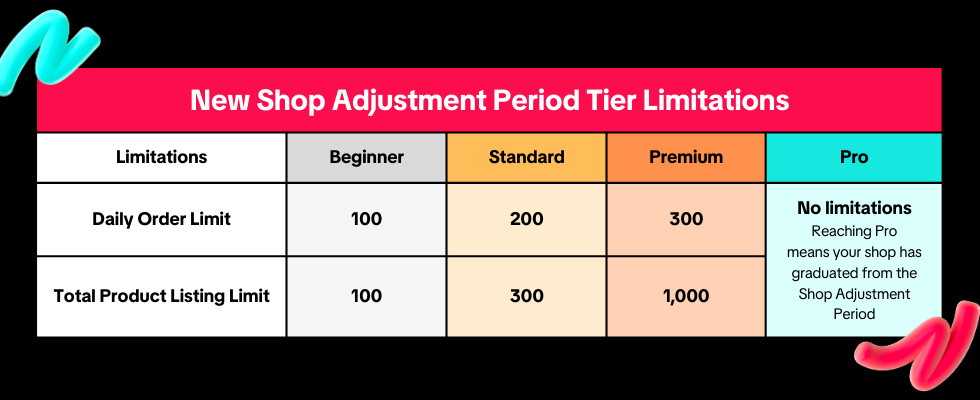
- Beginner: You can receive up to 100 orders per day and upload up to 100 products.
- Standard: You can receive up to 200 orders per day and upload up to 300 products.
- Premium: You can receive up to 300 orders per day and upload up to 1,000 products.
- Pro: Your shop has graduated from the Shop Adjustment Period and is no longer subject to daily order or product listing limits under this program.
How to Progress Through Tiers
Your shop will progress through tiers based on its performance. Tier upgrades are automatic and do not require manual application.Once your shop meets all the criteria for a specific tier, it will remain in that tier until it moves to a higher tier or completes the Shop Adjustment Period. Shops do not need to progress through every tier in sequence, meeting the Pro tier criteria completes the Shop Adjustment Period.
Beginner
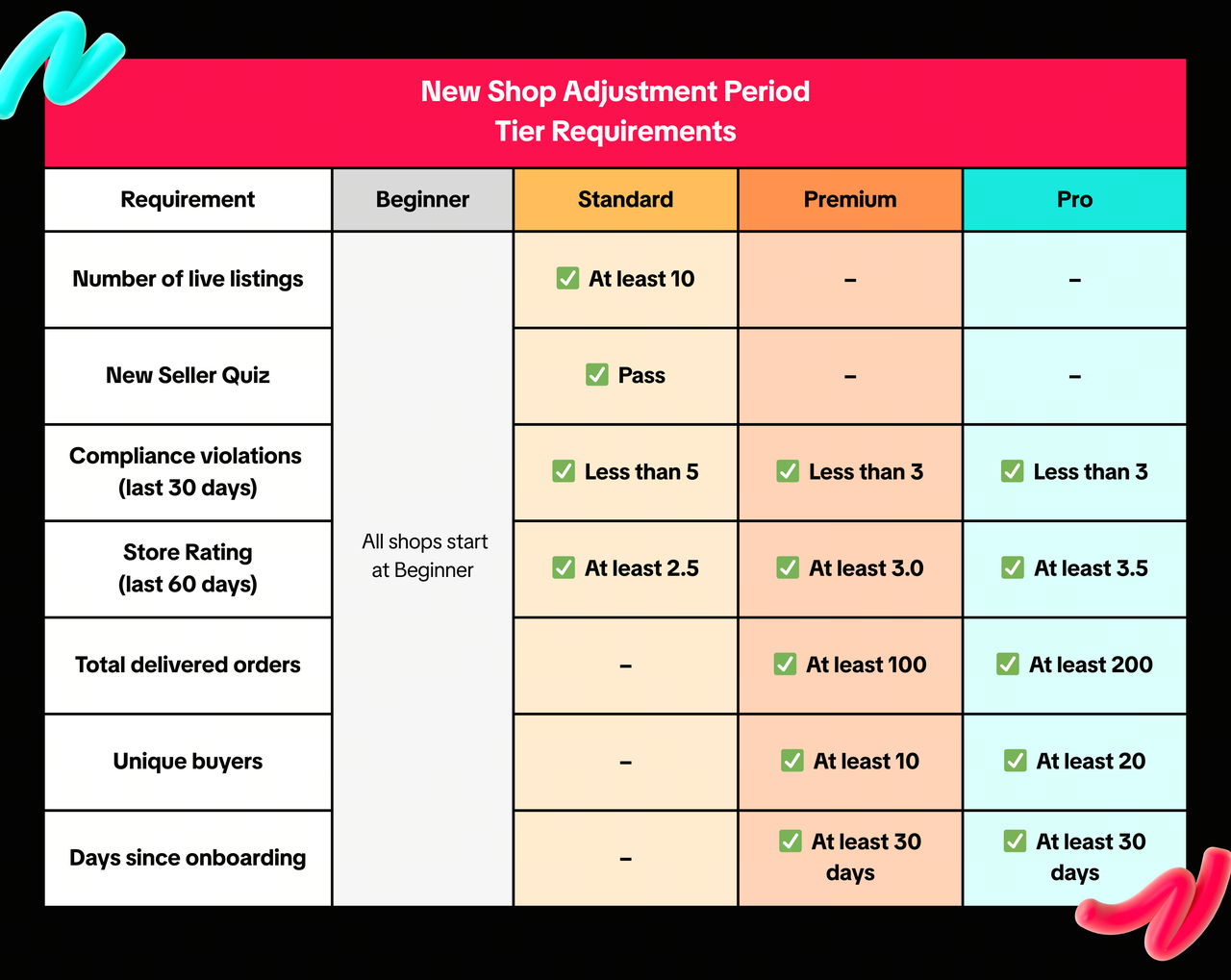
All new shops automatically start at the Beginner tier after completing shop onboarding. No additional action is required.Standard
Your shop can progress from Beginner to Standard once all of the following are met:- At least 10 live listings
- Pass the required New Seller Quiz
- Fewer than 5 compliance violations in the last 30 days
- Store Rating is at least 2.5 in the last 60 days
Premium
Your shop can progress to Premium once all of the following are met:- Fewer than 3 compliance violations in the last 30 days
- At least 30 days since shop onboarding
- Store Rating is at least 3.0 in the last 60 days
- At least 100 delivered orders in total
- At least 10 unique buyers in total
Pro
Your shop can progress to Pro once all of the following are met:- Fewer than 3 compliance violations in the last 30 days
- At least 30 days since shop onboarding
- Store Rating is at least 3.5 in the last 60 days
- At least 200 delivered orders in total
Important Notes
- Delivered orders refer to orders that are successfully completed. Orders that are cancelled, returned, or refunded are not counted.
- Compliance violations refer to breaches of TikTok Shop by Tokopedia policies, including selling counterfeit or IPR-infringing products, or listing prohibited products.
- Store Rating reflects your shop's overall performance and customer experience. It is displayed on your shop page as a score from 0 to 5. For more details, refer to the Store Rating guide.
How to Track Your Shop Status
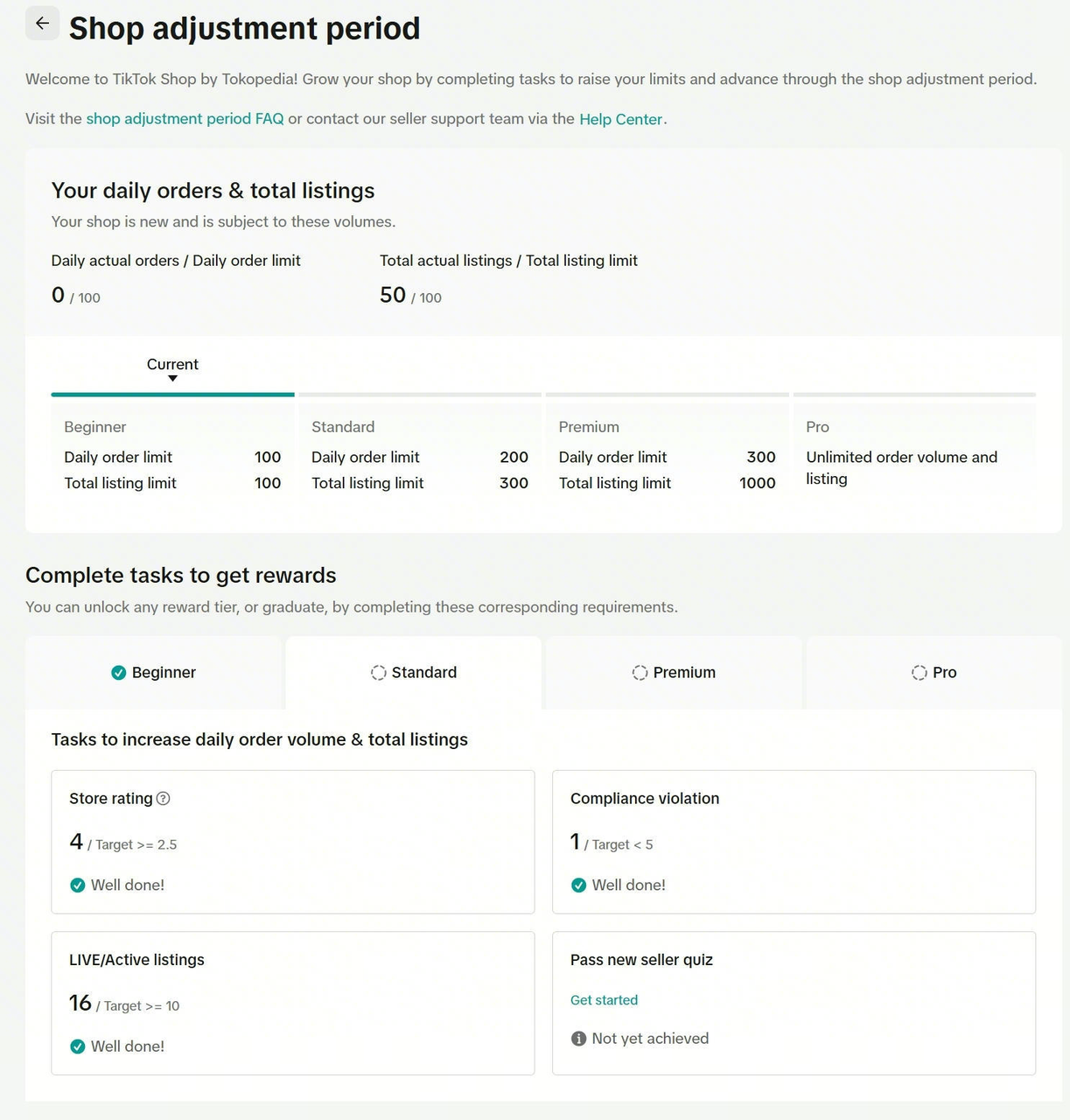
You can track your current tier and limits in Seller Center.- Go to Seller Center
- Click on the Shop Adjustment Program widget in the top-right corner
- On the page, you can view your:
- Current tier
- Daily order limit
- Listing limit
Frequently Asked Questions
How long does the Shop Adjustment Period last?
Does the Shop Adjustment Period negatively impact my shop?
When can I start receiving orders on TikTok Shop by Tokopedia?
Where can I find the New Seller Quiz?
How can I check if I have received any violations?
- Seller Center > Account Health > Shop Health
How can I check my violation records?
For more details, refer to the Store Rating guide.
Why can't I find my Store Rating?
For more details, refer to the Store Rating guide.
What happens to shops already enrolled in the previous Shop Adjustment Period?
Có thể bạn cũng quan tâm về
Registering to be a Seller
Your seller journey with TikTok Shop by Tokopedia begins with account registration. You can register…
Can I link my TikTok account with another social media accou…
Click on the Profile page, and click Edit Profile. Select either of the options under Social to link…
Why was my brand authorisation application rejected?
All submitted trademark information will be verified against the World Intellectual Property Organis…
What will happen to my existing orders while on "Holiday Mod…
"Holiday Mode" does not apply to existing orders. All existing orders, made prior to Holiday Mode be…
Which types of brand authorisation are accepted within the T…
There are 6 accepted types of brand authorisation: Trademark ownership National exclusive 1st level…
Why am I unable to sell the products of a particular brand?
The platform is committed to protecting the intellectual property rights of both organisations and i…

How to Create your Commission Account
After your successful Creator Account creation, you will need to set up your Commission Account to d…
How to register?
To become a platform seller, you need to create a Shop | Tokopedia account. Please follow the steps…
Setting Up Your Shop Profile and Name
Setting Up Your Shop/Seller Profile Setting up your TikTok Shop by Tokopedia profile is an important…
Seller Registration
Registration process in Tokopedia & TikTok Shop is very convenient. You can sign up with your existi…