

Master Your Store’s Finances and Seller Fees
09/10/2024
Hi, Seller!
Want to grow your business sustainably? It starts with knowing two things: how to manage your finances and how seller fees work.
With this knowledge, you can set the right pricing, predict your cash flow, and make informed business decisions. This guide covers everything—from tracking your balance to understanding every fee charged on TikTok Shop by Tokopedia.




Want to grow your business sustainably? It starts with knowing two things: how to manage your finances and how seller fees work.
With this knowledge, you can set the right pricing, predict your cash flow, and make informed business decisions. This guide covers everything—from tracking your balance to understanding every fee charged on TikTok Shop by Tokopedia.
Understand All Seller Fees
The platform applies several compulsory fees for each successful transaction, plus other possible charges depending on your activity and product category.Fee Type | Applies To | Rate & Formula | Notes |
| Platform Commission FeeA percentage charged by the platform for every successful sale, based on product category. | All Sellers |
| Some categories add +3% Pre-order Service Fee.Full rates per category here |
| Mall Service FeeAn additional service fee for Mall Sellers, covering exclusive benefits and services. | Mall Sellers only |
| Mall Service Fee guide here |
| Dynamic Commission FeeAn extra commission applied to all sellers, often related to shipping or promotional programs. | All Sellers |
| Dynamic Commission Fee guide here |
| Order Processing FeeA flat fee for each successfully delivered order, covering order handling and processing. | All sellers | Rp500 per order Flat rate | Effective Aug 11, 2025, for all successful deliveries. Order Processing Fee guide here |
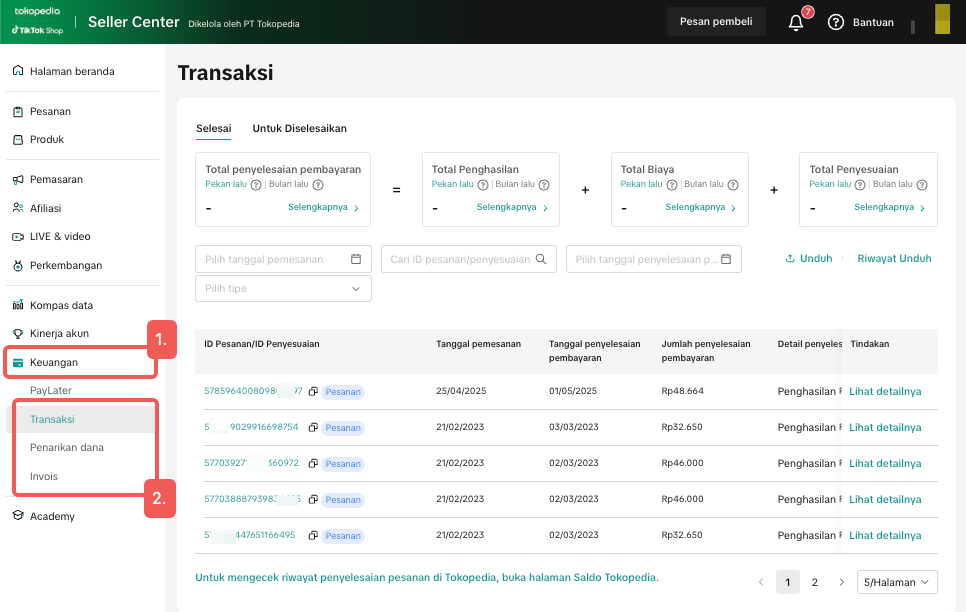
Manage Your Store’s Finance in Seller Center
All transactions, withdrawals, and payout timelines can be monitored in the Finance menu on Seller Center.Feature | Function |
| History | View your complete transaction and withdrawal history |
| Withdraw | Manually withdraw your seller balance |
| Auto Withdraw | Link your bank account for automatic payouts (usually received within 1–3 business days) |
| Available to Withdraw | Shows the amount you can withdraw at any time |
| Payout Timeline | Standard: 7 business days (H+6) + 1Express: 1–2 business days (H+1) + 1Extended: Up to 15 business days (H+14) + 1 📌 H = Shipping date, Express and Extended apply only to selected sellers |
Avoid Common Financial Mistakes
Mistake | How to Fix It |
| Not calculating platform fees before setting prices | Use the fee formulas in the table to ensure your selling price covers costs and profit |
| Forgetting category-specific fees like Mall Service or Dynamic Commission | Review the fee table before listing products in those categories |
| Ignoring payout timelines | Plan promotions and restocking according to payment schedules |
| Not tracking additional adjustments (penalties, reimbursements, etc.) | Check the Finance menu weekly for unexpected deductions |
Smart Financial Strategies & Take Control Today
Once you understand your cash flow and fees, you can:- Set prices that cover costs while maintaining healthy margins
- Optimize promotions based on performance and fee data
- Accurately track ad spend, commissions, and other expenses
- Make confident, data-driven business decisions
SebelumnyaLogistic 101: Order Fullfilment & Avoid Late Shipment!Berikutnya Preparation Before LIVE: The First Step You Must Know
Anda mungkin juga tertarik
- 1 lesson
Finance and Settlement
Track your store’s finances effortlessly and ensure smooth settlements!
- 2 lessons
Finance
Financial best practices, including managing revenue, taxes, and other financial operations of your…

How do I withdraw my seller payout?
Once money is settled to your seller account balance, you can withdraw it to your bank account. To…