

What is LIVE Setup for Creators?
05/13/2024
To address these challenges, we've introduced the LIVE Setup function. This feature empowers both sellers and creators to prepare products and scripts ahead of their LIVE sessions. With LIVE Setup, you'll gain strategic insights into which products to showcase and in what sequence. Furthermore, we've integrated a scripting tool within LIVE Setup to plan out dialogues and presentations, particularly beneficial for multi-host LIVEs.
Our primary goal with this feature is to assist you in improving your GMV!
Access for Sellers
There are 3 entrances for sellers to access the LIVE Setup page:- Entrance 1: Data compass > LIVE performance > Upcoming LIVE (located in the upper right corner) > LIVE setup
- Entrance 2: Data compass > LIVE detail page > select LIVE status filter > Upcoming LIVE > LIVE setup
- Entrance 3: Data compass > Overview > Upcoming LIVE > LIVE setup
Access for Creators
There are 2 entrances for creators to access the LIVE Setup page:- Entrance 1: Creator compass > Today's livestream > Upcoming LIVE > LIVE setup
- Entrance 2: Creator compass > Overview > Recent Livestreams > Upcoming LIVE > LIVE setup
Features within LIVE Set up page
Within the LIVE Setup page there are several different features that will allow you to setup and add products ahead of your LIVE taking place. Below we delve into what these features are and how you can use them.Product selection
You can use recommended products option to easily find and add products for your upcoming LIVE.- When you visit this page for the first time, the Shop LIVE section will be empty. Instead, you will be prompted to add recommended products:
- For creators, recommended products in their showcase will be prioritised and if there are no suitable ones from their showcase, then products from the wider available pool will be shown
- Recommended products are displayed by default, but you can switch to the below arrow next to [All] to view other filters.
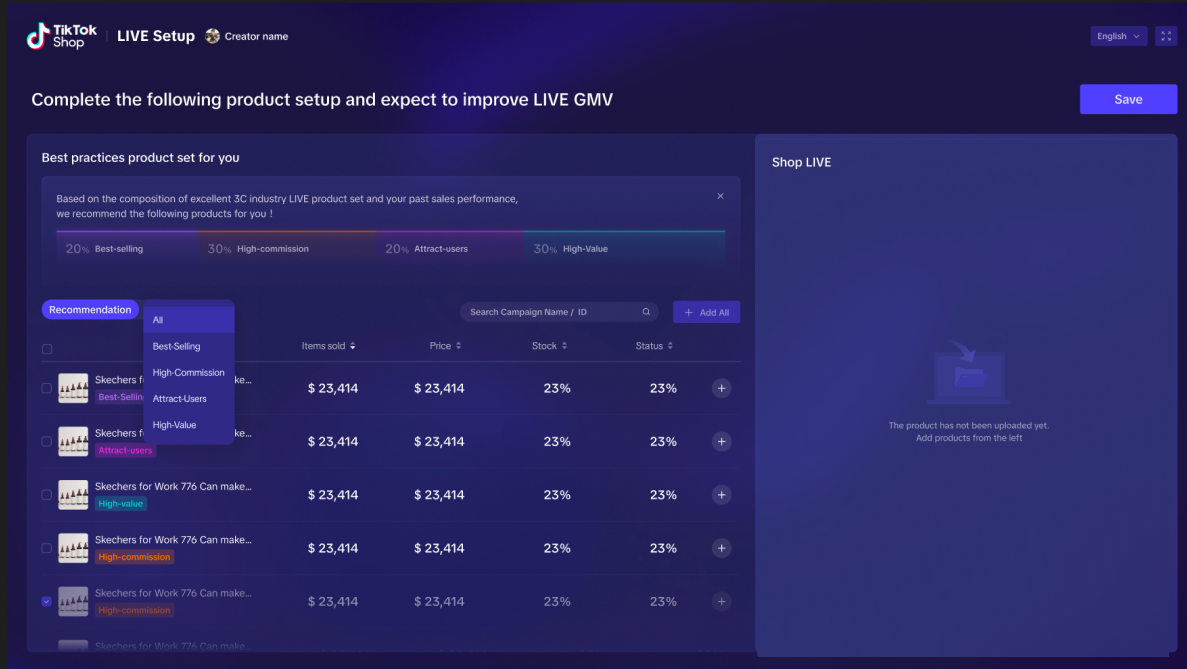
- The product list under the recommended section includes product images, product names, tags (e.g. best selling, high-value), and metrics (as listed below).
- Seller metrics: Items sold (self and market), Price, status, stock
- Creator metrics: Items sold (self and market), Price, commission rate, status, SES, stock;
- By default, the products will be sorted according to [Items sold]
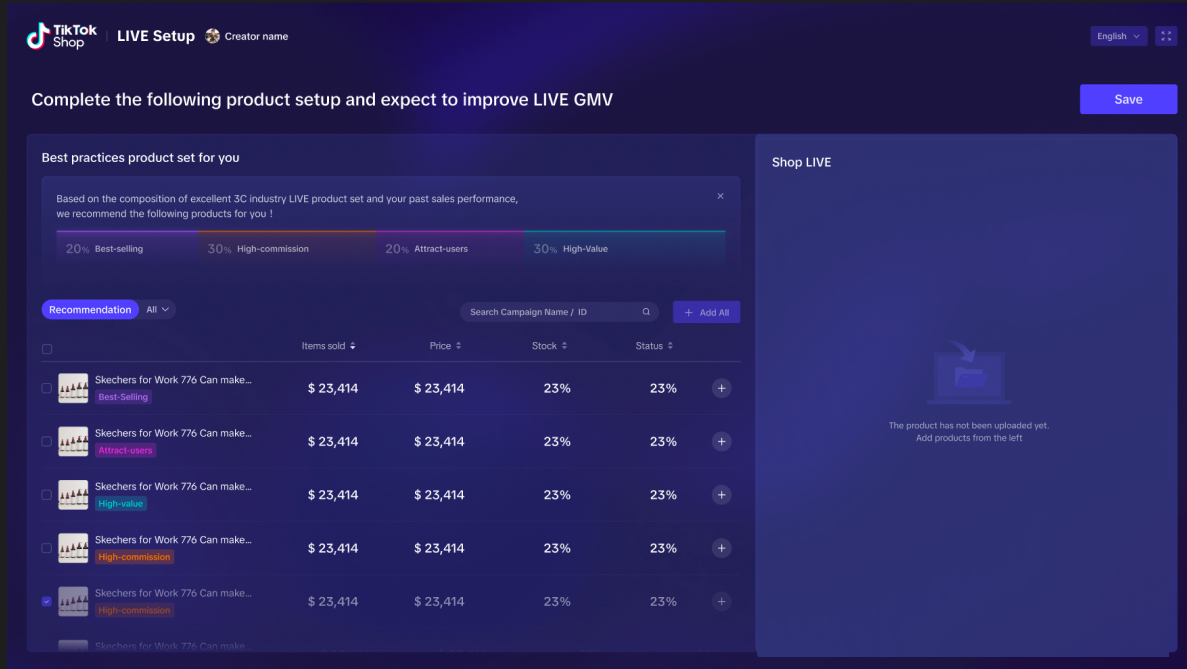
- You can add the relevant products by selecting or alternatively press the [Add all] button to quickly and easily add all the products to the Shop LIVE section on the right side.
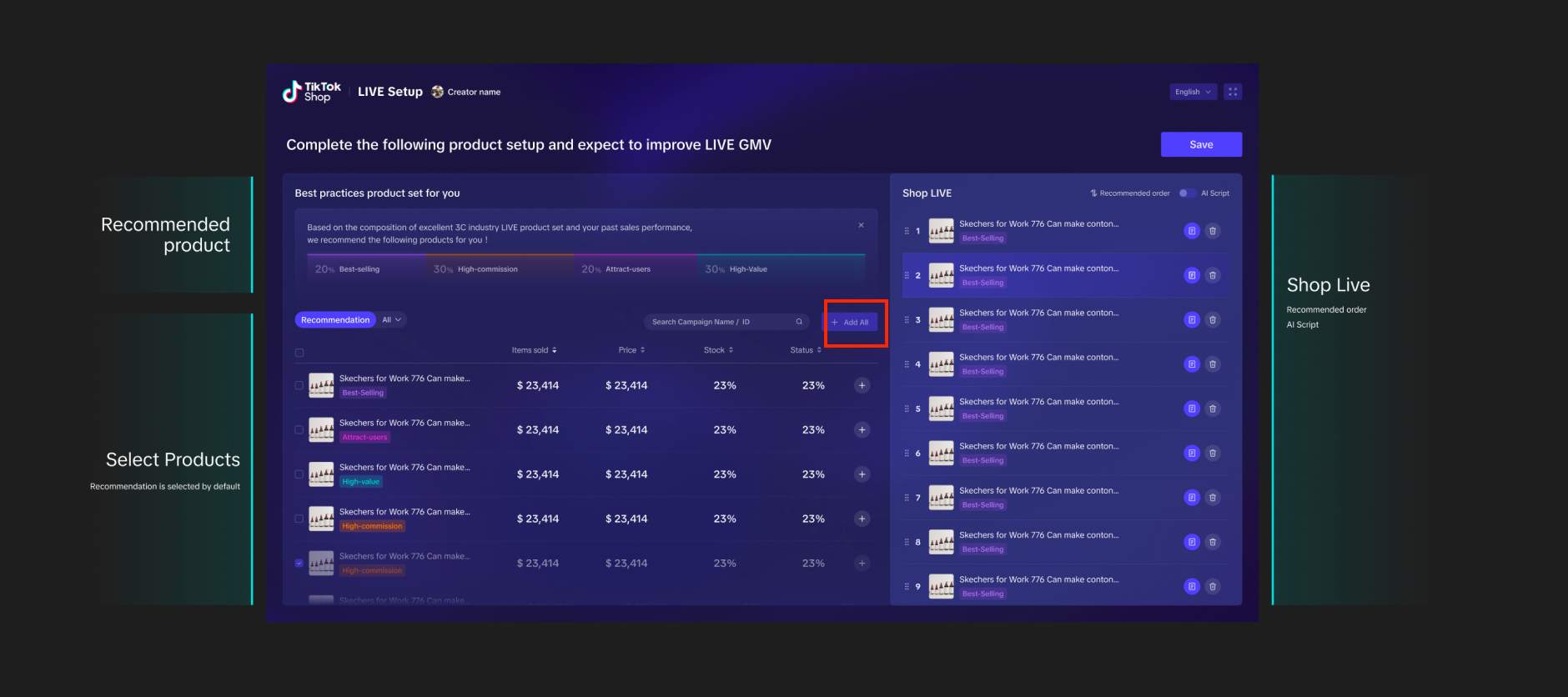
- You can use the search bar to search for product name and product ID as well.
Product order during LIVE
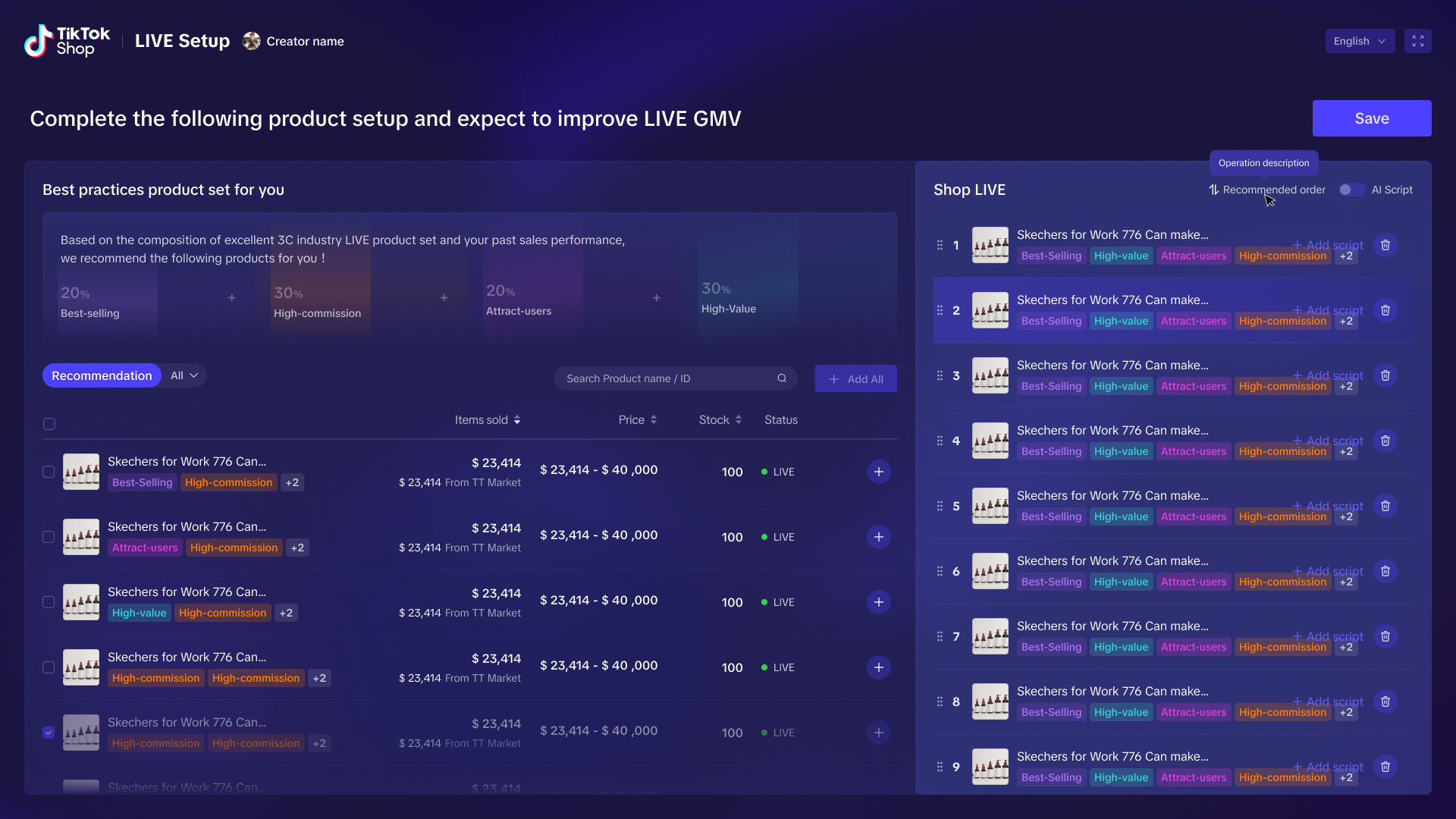
You can use the [Recommended order] feature to list products in the order you wish to display them in your LIVE.- Once products are added to Shop LIVE section, you can press [Recommended order] to easily sort products in the order based on how we would recommend you display them during your LIVE.
- Logic used for this order combines historical sales of products on the market and the level of user interest.
- You can also easily remove any products from your Shop LIVE section by clicking on the bin icon next to each product.
Add Scripts
You can use this feature to write scripts for your products to callout each product's selling points effectively, which in turn helps with product conversion.- Click on the [Add script] button which will cause a pop up to appear.
- Here you can add in the relevant information about the products that you want to recall during your LIVE.
- The script will only be visible to you, not to your viewers.
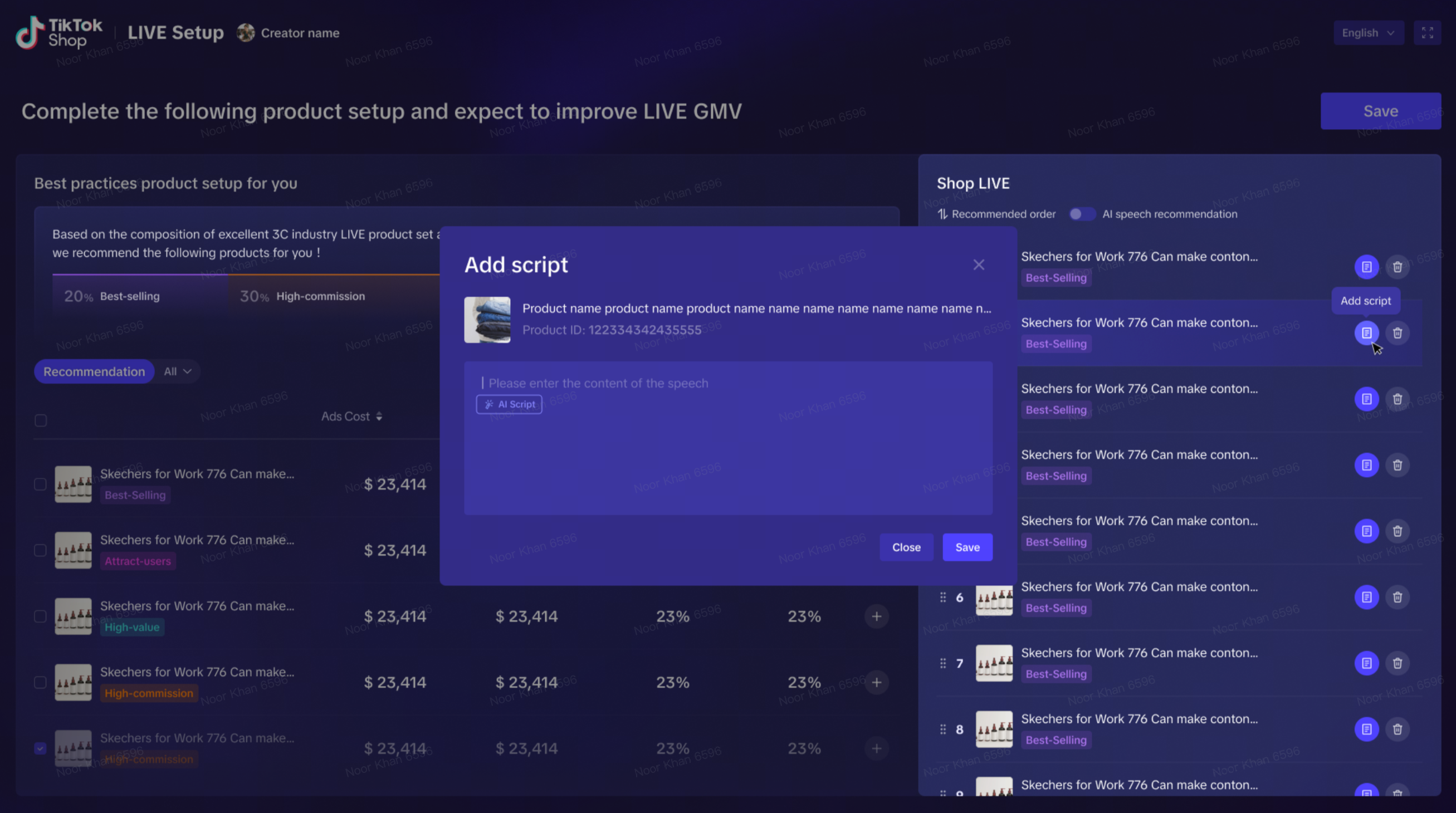
- The script will only be visible to you, not to your viewers.
- You can now click [Save] which will save the products you have selected for your upcoming LIVE, alongside the scripts you have added for the products.
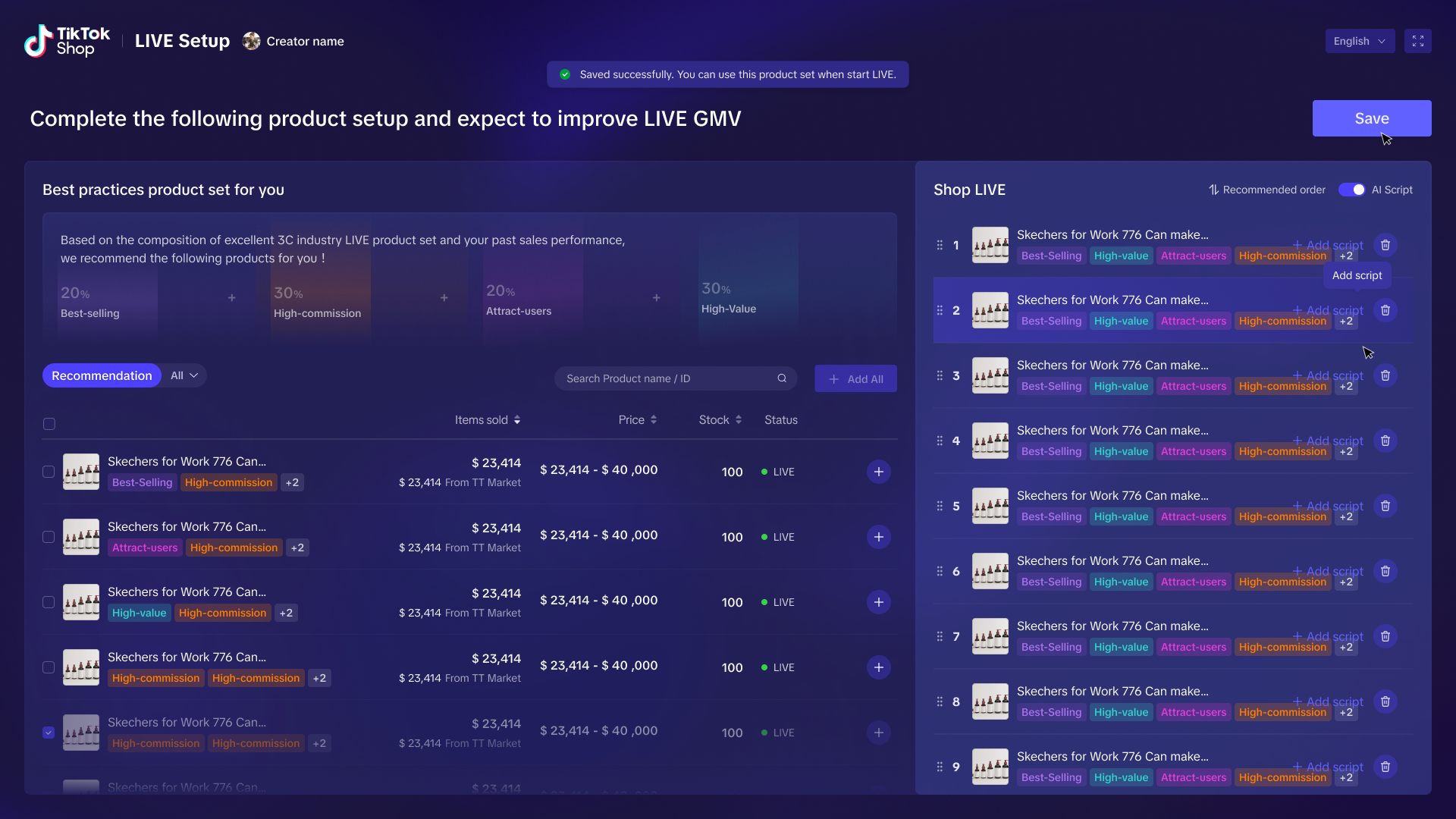
- You can stay on this page until the LIVE starts, which will allow you to jump to the LIVE Board page.
- Once you are LIVE, you will see your chosen product order and script on the LIVE Board page.
You may also be interested in
Gambling Content for Creator
To comply with local regulations and promote user protection, we strictly control game-based activit…

LIVE Manager for Creators
LIVE Manager gives you greater control over how you plan and manage your LIVE shopping streams. With…
3 Cara Menemukan Produk Trending Saat Ramadan
Test: Kerjakan Test ini untuk bisa bergabung di group START! Setidaknya ada 3 ciri produk yang pal…

4 Langkah Memaksimalkan Penjualan di Bulan Ramadan
Test: Kerjakan Test ini untuk bisa bergabung di group START! Nggak bakal ketinggalan cuan di bulan…

Strategi Membangun Personal Branding
Udah selalu ngikutin trend tapi kok nggak pernah FYP? Nah tahu nggak sih, pertumbuhan kreator di Tik…
Strategi Analisa Data Live Stream Dengan Desktop Streamer
Test: https://activity.tiktok.com/t/ZSM2ukJs4/ Apa itu desktop streamer? TikTok Streamer Desktop…

3 Jenis Produk Untuk Meningkat Performa Live Stream Kamu
Test: https://activity.tiktok.com/t/ZSMS3qXTA/ Sudah nambah durasi live stream sampai berkali-kali…
Giveaways and Purchase-Based Incentives for Creator
You may offer 'Giveaways' and 'Purchase-based Incentives' in accordance with the guidelines below. '…

Strategi Optimasi Konten di 4 Fase Penting Ramadan
Test: https://activity.tiktok.com/t/ZSM1Fv559/ Seberapa potensial sih ngonten dan promosi selama b…

3 Manfaat Mempromosikan Produk Bundling
Saat melakukan live stream, salah satu cara terbaik untuk menarik perhatian audiens dan meningkatkan…