LIVE Events
01/26/2023
LIVEs allow creators to share more of themselves with viewers in real time. They can be rewarding, exhilarating, and maybe even a little intimidating if you’re not sure how to best approach them. That’s why TikTok has tools like LIVE Events to help you plan, manage, and promote the discovery of your LIVEs before they happen.
Plan your LIVE
When you think of LIVEs as more than just spur-of-the-moment events, you can take full advantage of planning them ahead of time. With TikTok LIVE Events, creating an actionable plan for your upcoming LIVEs has never been easier.
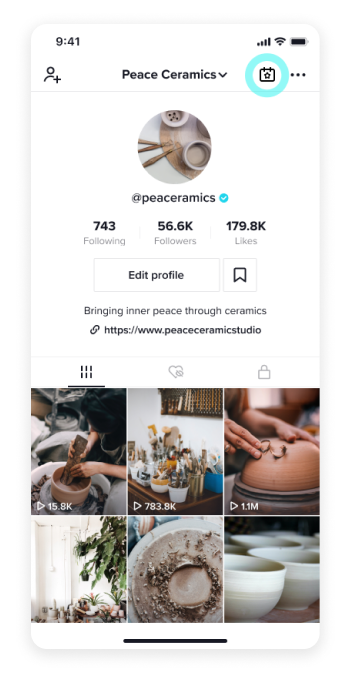
To create an upcoming event, select the LIVE Events icon from the top-right corner of your profile page. From there, you can name your event, list the start time, and give a brief description. Once you hit create, your LIVE Event will go through a brief review window before being visible to the rest of TikTok.
This is where your strategy takes shape. An authentic yet compelling title can help to pique your audience’s curiosity or persuade them to join your LIVE when the time comes. Use the description to create a captivating — but still accurate — rundown of your event, and select an event image that best encapsulates it.
Manage your event
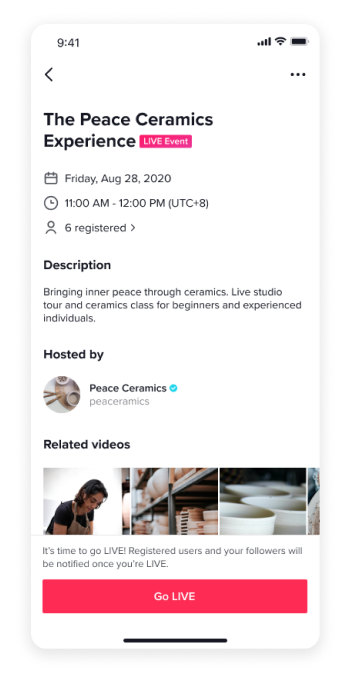
The LIVE Events icon lets you manage and review all of your upcoming events. Once you’ve created an event, you can share it through in-app messages, make any necessary changes, or even delete it altogether. You can even review the viewers already registered to attend your event by tapping on the number of registered attendees. And you can feel empowered knowing that you can create a schedule of upcoming events and manage them any time you want.
Maintain your event
Keep in mind when you create a LIVE Event, it is a scheduled commitment letting your audience know when you’ll be LIVE. Creators are encouraged to honor this commitment by going LIVE during the scheduled time, as missing your own LIVE Event multiple times may lead to potential restrictions around the LIVE Events feature.
Promote your event
There’s one more important thing to consider before your event happens: promotion. When you promote your event ahead of time, you can help ensure your audience will be there when it happens. A wonderful promotional tool you have at your disposal is to create a video to market your event, allowing audiences to discover what LIVEs you have planned right in their For You feed.
To create a video, tap the “+” icon under the “Related videos” section of your LIVE Event page. After recording your video, select “Next” and then tap “Add link” to choose the LIVE Event you want to promote. The LIVE Event link will be added to your video. You can then press “Done” and “Post” to publish.
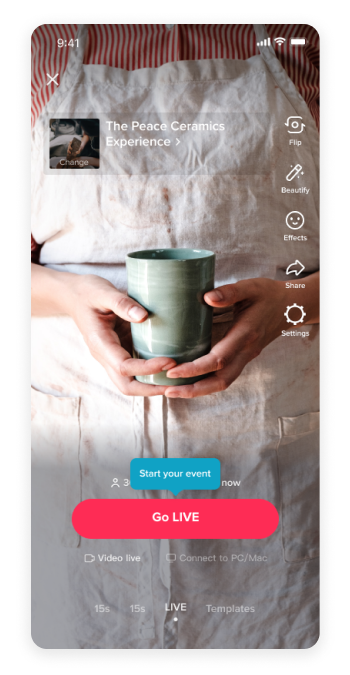
Start your event
Ready to kick off your planned event? You can initiate your event within 10 minutes of your scheduled start time by tapping “Go LIVE” on the LIVE Event page. When the LIVE starts, subscribers to the event will receive a push notification.