

Respond to Buyer Chats Quickly and Precisely!
07/11/2024
Hi Sellers! Did you know that two-way communication between sellers and buyers is very important when selling online at the ShopTokopedia! This is one indicator of good store service, you know, seller!
With the automatic opening chat feature in the ShopTokopedia, you can set the first message to be sent to buyers so that your communication experience with buyers is easier and more effective. Come on, see the following easy ways that you can set through the ShopTokopedia Seller Center application.
Easy isn't it? Come on, practice immediately!
 FAQ
FAQ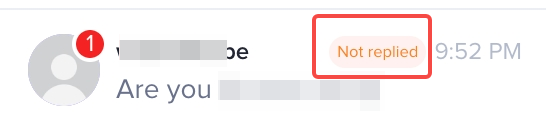
With the automatic opening chat feature in the ShopTokopedia, you can set the first message to be sent to buyers so that your communication experience with buyers is easier and more effective. Come on, see the following easy ways that you can set through the ShopTokopedia Seller Center application.
Easy isn't it? Come on, practice immediately!
FAQ- How can the seller know if a new Chat has entered?
- If a new customer message arrives, a notification will appear in the form of a red circle in the upper right corner of the avatar.
- If there is a customer message that has not been replied to, a notification will appear marked with the [Unanswered] tag.
- If it has been activated, will the chat assistant automatically reply to all chats?
- If there is a problem that cannot be resolved, the chat assistant will not send an automatic reply and the customer service agent will have to respond.
- If the same auto-reply appears several times in the same chat, this means that this feature may not be able to answer customer questions. Next, the chat assistant will stop replying and the customer service agent must respond.
- When the chat assistant stops replying, the customer service agent will receive a reminder message from the system
PreviousBuild Customer Trust and Increase Purchases by Linking Official AccountsNext Take on Seller Missions, Get Rewards and Chance to Grow Faster!
You may also be interested in
- 1 lesson
Chat Tool
Use the Chat Tool for quick communication and boost customer trust!

Customer Service Chat
Customer Service Chat The Customer Service Chat feature refers to a communication tool that can be u…

Customer Service Team Management
This article will guide you to have a clear overview of how to manage customer service features, inc…

CRM Broadcast Targeted Vouchers
Introduction: Customer Targeted Vouchers via CRM Broadcast Message This article will guide sellers t…
Customer Service Chat Assistant
We provide a powerful feature to help sellers increase customer service agent's work efficiency. Thi…

Customer Communication Guidelines
What communication channels do these guidelines cover? These guidelines cover all channels of commun…
Customer Service Proactive Messages
This article will guide you to use the Proactive Messages feature on the seller Customer Service Cha…