Promotion Performance Score (PPS)
What is Promotion Performance Score (PPS)?
The Promotion Performance Score (PPS) measures the quality of:- The products you choose to promote
- Your shoppable video and LIVE content
What PPS should I aim for?
Creators should aim for a PPS of 4.5 or above.The higher your score, the more access to additional product promotion tools and benefits.
If your PPS falls below 3.0, your content's visibility may be impacted.
Click here to learn more about the benefits:
- LIVE Giveaway
- Campaign Eligibility Requirements for Creators
- Product Marketplace - Product Qualification Criteria for Creators
Who will have a Promotion Performance Score (PPS)?
You can receive a PPS if you are an affiliate creator and have completed at least one of the following in the last 30 days:- Generated at least 5 paid orders from content posted within the past 90 days
- Posted a minimum of 10 short videos
- Hosted a minimum of 3 livestreams
Where can I find my PPS?
PPS is currently available only in the TikTok mobile app.To view your PPS:
- Go to TikTok Shop Creator Center.
- Scroll to Account Health.
- Select Promotion Performance Score.
Click here to access your PPS page on mobile: https://inapp.tiktokv.com/alliance/creator/points/overview
How can I improve my PPS?
If you do not have a PPS yet
Complete at least one of the following in the last 30 days:- Post at least 10 e-commerce short videos
- Host at least 3 e-commerce LIVE sessions
If you already have a PPS
Start by checking your PPS homepage to see which component is lowering your score.Improve your Product Selection Score
- Identify which products are affecting your score.
- Choose products with a High Product Score in the Product Marketplace.
- Link these products to your shoppable videos and LIVE sessions.
Improve your Content Score
- Check which Content Score component needs improvement.
- Review the recommendations on your PPS homepage, which may provide insight into why a LIVE session was not assessed as good quality.
- Use LIVE Diagnosis during your LIVE sessions to identify areas for improvement.
- Use the Video Pre-Check Tool before posting a shoppable video.
Click to learn more:
- Strategies to Upgrade Your Livestream Quality
- High Quality Content - Tips & Tricks
- Read the Creator Health Rating article to learn more about Video Pre-Check
Review and appeal violations
If violations have affected your score, go to your Creator Health Rating page to review the violation details. If you believe a violation was issued incorrectly, submit an appeal through the relevant violation notice.You can also view the violations through your PPS page:
- Go to PPS > Suggestions.
- Under Watch for violation warnings, select Violation content.
- Select the relevant content to view the violation details.
- If you believe the violation was issued incorrectly, submit an appeal through the violation notice.
How is Promotion Performance Score (PPS) calculated?
Your PPS ranges from 0 to 5 and is made up of two equally weighted components: Product Selection Score and Content Score.Formula:Creator Promotion Performance Score = Product Selection Score x 50% + Content Score x 50%For example, if your Product Selection Score is 4.2 and your Content Score is 4.0:
(4.2 × 50%) + (4.0 × 50%) = 4.1 PPS
Product Selection Score
Your Product Selection Score measures the quality of the products you promote.It is an order-weighted average. This means products that generate more orders have a greater effect on your score.
Formula:Product Selection Score = Sum of (Product Score x Orders Generated) / Total Orders
What is a Product Score?
The Product Score is based on the product's positive review rate compared with other products in the same category. A higher positive review rate generally results in a higher Product Score.You may see a product's Product Score when:
- Browsing products in the Product Marketplace
- Viewing products in your Showcase
- Linking products to your video or LIVE content
Products without a Product Score are excluded from the calculation and will not affect your Product Selection Score.
Which orders are counted?
The calculation includes orders that meet both conditions:- The order was placed within the last 30 days
- The content that generated the order was posted within the last 90 days
- Multiple units of the same SKU in one order count as one order for that SKU.
- If one order contains multiple SKUs, each SKU counts as one order in the calculation.
How to track your product selection score
- Go to the PPS page.
- Under Tips to Improve Your Score, select the Product tab.
- Select View Calculation or View Details to see how your score is calculated.
Content Score
Your Content Score measures the quality and policy compliance of your shoppable videos and LIVE content.Your score is calculated in three steps:
- You receive a Base Score.
- You can earn points for:
- Good-quality LIVE streams
- Shoppable videos without violations.
- Points may be deducted for content with violations.
Your Base Score
Your Base Score depends on how long you livestreamed without violations in the past 30 days.Total LIVE duration in the last 30 days:
- Less than 30 minutes: 3.5 base score
- At least 30 minutes: 3.8 base score
Earn Points: Good-Quality LIVE
Boost your Content Score by:- The number of qualifying LIVE sessions assessed as good quality
- The percentage of your qualifying LIVE sessions assessed as good quality
Percentage of Good-Quality LIVE Streams | |||
Number of Good-Quality LIVE Streams | <5% | 5 - 10% | >10% |
0 LIVE | 0 points | ||
1-3 LIVE | 1.0 points | 1.5 points | 2.0 points |
4 LIVE | 1.5 points | 2.0 points | 2.5 points |
>4 LIVE | 2.0 points | 2.5 points | 3.0 points |
Earn Points: Videos Without Violations
You can earn points by posting shoppable videos without policy violations.| Percentage of videos without violations | Points Earned |
| 5% - 20% | 0.2 |
| 21% - 60% | 0.4 |
| 61% - 80% | 0.6 |
| >80% | 0.8 |
How Points Are Deducted
Points may be deducted based on:- The number of videos and LIVE sessions with violations
- The percentage of your content that received violations
Percentage of content with violations | |||
Number of content with violations | <5% | 5-40% | >40% |
0 video | 0 points deducted | ||
1 - 2 videos | 0.5 | 0.7 | 1.0 |
3 - 6 videos | 1.0 | 1.5 | 2.0 |
>6 videos | 2.0 | 2.5 | 3.0 |
LIVE duration is also converted into content units:
- Add together the duration of all applicable LIVE sessions.
- Round the total duration to the nearest 30-minute block. If the remaining duration is exactly 15 minutes, round up.
- Each 30-minute block counts as one content unit.
How to Track Your Content Score
- Go to the PPS page.
- Under Tips to Improve Your Score, select the Content tab.
- Select View Score Calculation Details.
- Click to view examples from your actual content.
Example Calculation
Step 1: Calculate the Product Selection Score
The creator promoted the same product in two pieces of content:| Content | Product Score when posted | Orders generated |
| Content 1 | 4.5 | 20 |
| Content 2 | 4.0 | 30 |
- Content 1: 4.5 × 20 = 90
- Content 2: 4.0 × 30 = 120
- Product Selection Score = (90 + 120) ÷ (20 + 30) = 4.2
Step 2: Calculate the Content Score
The creator's Content Score is calculated as follows:| Component | Score impact |
| Base Score | + 3.8 |
| Good-Quality LIVE Score | + 2.0 |
| Videos Without Violations Score | + 0.4 |
| Content with Violations Deduction | - 2.0 |
- Content Score = 3.8 + 2.0 + 0.4 − 2.0 = 4.2
Step 3: Calculate the Final PPS
The Product Selection Score and Content Score each contribute 50% to the final PPS.PPS = (Product Selection Score × 50%) + (Content Score × 50%)
- PPS = (4.2 × 50%) + (4.2 × 50%)
- PPS = 2.1 + 2.1 = 4.2
Frequently Asked Questions (FAQs)
Why can I see both Promotion Quality Points (PQP) and Promotion Performance Score (PPS) pages?
PQP and PPS will run in parallel during August 2026 as PPS is gradually introduced.
During this transition:
- PQP will continue to determine access to benefits.
- PPS will gradually replace PQP and become the only score in use once fully launched by the end of August.
Why don't I have a PPS yet?
PPS is available to affiliate creators who meet at least one of the following requirements:
- Generate at least 5 orders in the last 30 days through content posted in the last 90 days
- Post at least 10 shoppable videos in the last 30 days
- Host at least 3 shoppable LIVE sessions in the last 30 days
What happens if a Product Score changes after I link the product?
Your Product Selection Score uses the Product Score shown when you post the content and link the product. If the Product Score increases or decreases later, the score applied to that content will not change.
ExampleYou promote the same product in two separate videos:
(4.5 × 20 + 4.0 × 30) ÷ (20 + 30) = 4.2
ExampleYou promote the same product in two separate videos:
- The Product Score was 4.5 when the first content was posted. It generated 20 orders.
- The Product Score was 4.0 when the second content was posted. It generated 30 orders.
(4.5 × 20 + 4.0 × 30) ÷ (20 + 30) = 4.2
How often is my PPS updated?
Your PPS is updated daily as long as you meet the eligibility requirements.
If you believe a violation was issued incorrectly, submit an appeal as soon as possible. If the violation is cancelled on the same day it is issued, it will not affect your PPS.
Why can't I link a product because my PPS is too low?
Some products and benefits have minimum PPS requirements. For example:
- Certain restricted product categories require creators to maintain a minimum PPS. Click to learn more: Product Marketplace - Product Qualification Criteria for Creators
- Some special vouchers require creators to have a minimum PPS of at least 3.5. If the product that you are trying to bind is eligible for these special vouchers but your overall PPS is too low, then you may not be able to bind.
What is the difference between PPS and Creator Health Rating?
Creator Health Rating reflects your overall policy compliance on TikTok Shop. Your rating can increase through eligible activities and decrease when you receive policy violations.
PPS measures the quality of the products you promote and the quality and compliance of your shoppable video and LIVE streams.
What is the difference between Store Rating and PPS?
Store Rating measures a seller's overall operational performance.
PPS measures a creator's product selection and the quality and compliance of their promotional content.
What should I do if my PPS is decreasing?
Visit your PPS homepage to check which component is affecting your score.
To improve your PPS:
- Choose products with a higher Product Score.
- Create good-quality shoppable videos and LIVE content.
- Follow TikTok Shop policies to avoid violations.
- Review any recent violations and appeal if you believe they were issued incorrectly.
Can deleting content with a violation improve my score?
No. Deleting the content will not remove the violation from your PPS calculation.
If you believe the violation was issued incorrectly, review the details on your Creator Health Rating page and submit an appeal through the relevant violation ticket.
Will products without a Product Score affect my Product Selection Score?
No. Products without a Product Score are excluded from the calculation and will not affect your Product Selection Score.
Where can I get help if I have more questions about my PPS?
Go to TikTok Shop > Help Center and submit a support ticket.
Promotion Quality Points (PQP)
Note: PQP will remain valid through August 26, 2026. From August 27, 2026, Promotion Performance Score (PPS) will replace PQP as your active score.What is
Promotion Quality Points (PQP)?Promotion Quality Points (PQP) is a score that measures a creator's effectiveness at promoting reliable shops and products to our buyers. A high PQP score means you have been successful at promoting high-quality products and convincing your viewers to buy them.
How is my PQP calculated?
Your PQP has three components which will be taken together to give you a score from 0 to 5:- The average Store Rating of the shops you promote
- The percentage of positive reviews received by the products you promote
- The order volume you successfully generate through your promotional content
What is a good PQP score, and how does it affect me?
A good PQP score shows that you have been selecting high-quality products to promote. As such, creators with higher PQP scores gain access to additional product promotion tools.Creators should aim for a PQP of 4.0 and above. Note: Creators with a PQP score below 2.0 will have restrictions placed on their content exposure.
- Live Giveaway Tool Access
- Access to Creator Campaigns
- Product Marketplace - Product Qualification Criteria for Creators
Where can I find my PQP?
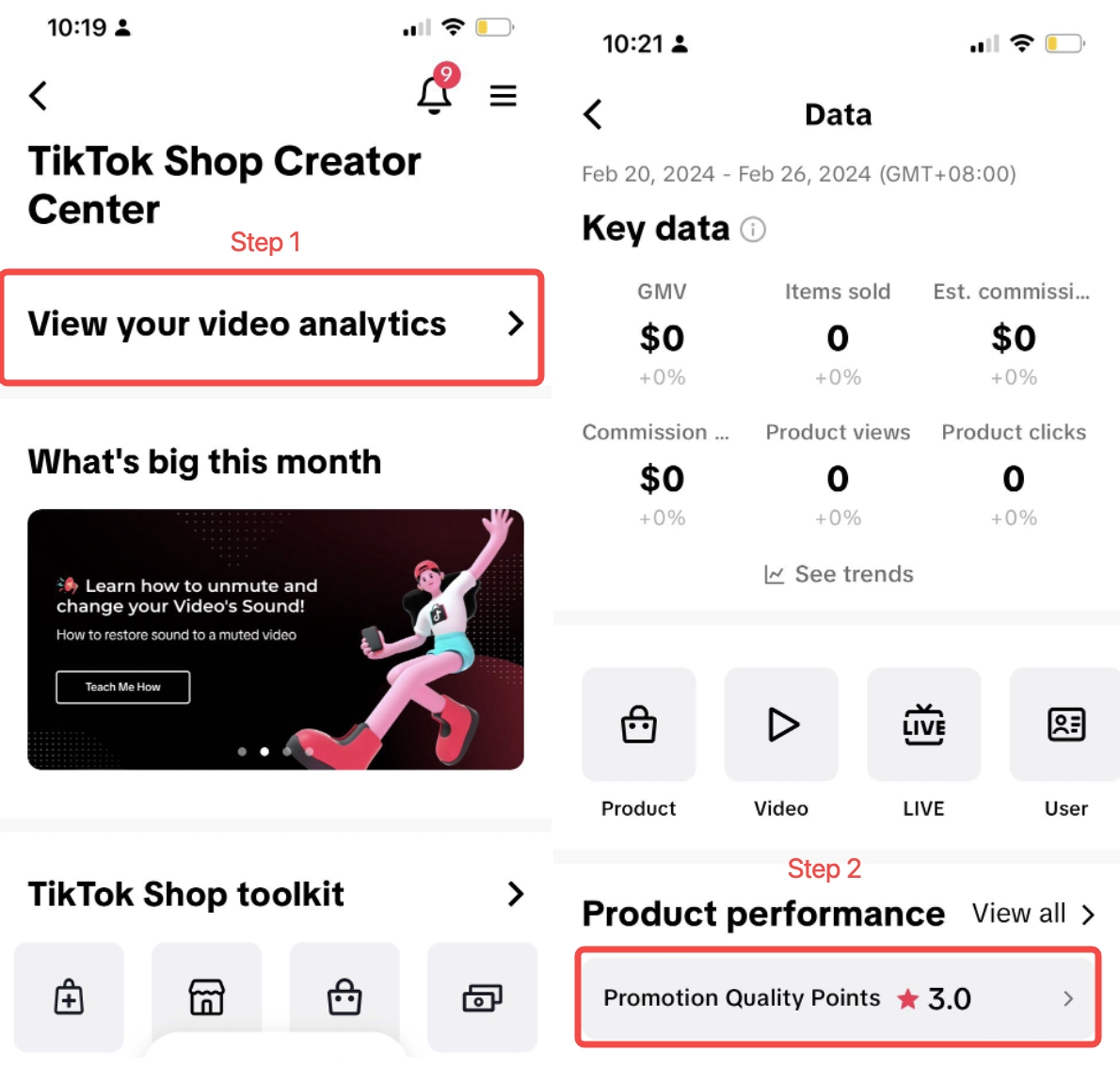
Mobile AppTikTok Shop Creator Center- Open your TikTok Shop Creator Center Page
- Scroll to the bottom to find your PQP under Account Health
- Click on "Promotion Quality Points" under "Account Health"
How can I improve my PQP?
The short answer is focus on promoting shops with high Store Ratings! You can do so by following these tips:Continue promoting top performing shops & products!
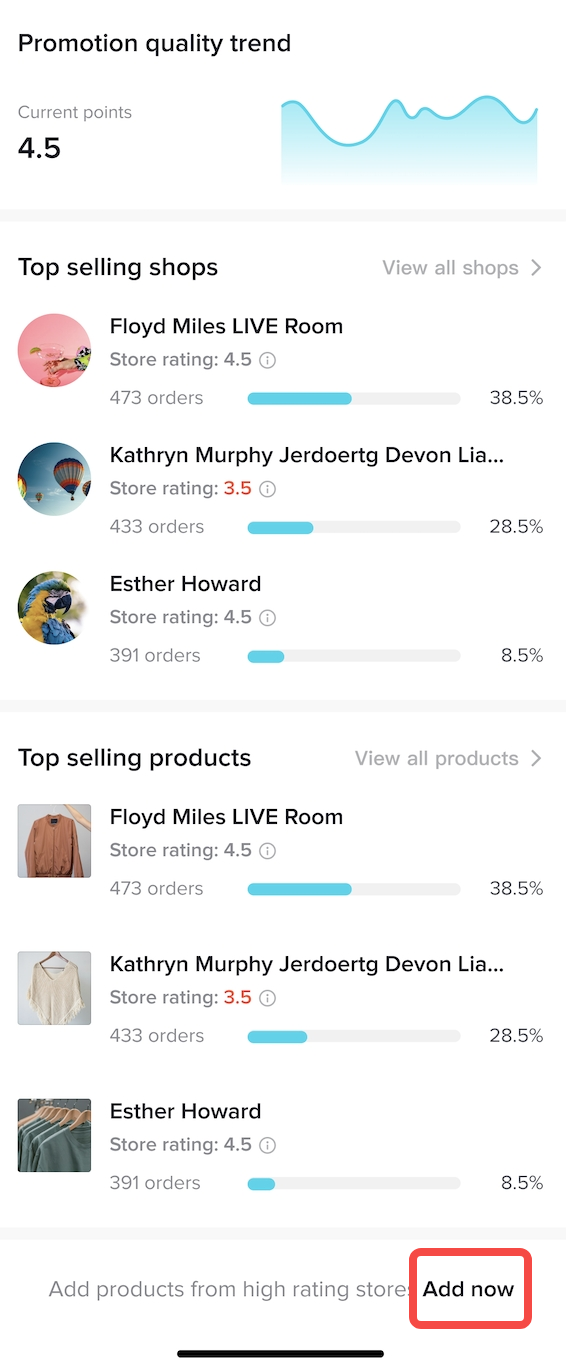
- At the top of your PQP homepage, you will see which shops and products you have been promoting that have performed well in the past month.
- You can continue focusing on promoting these shops and products.
Find more top performing shops & products!
- Click on "Add Now" (image A) at the end of the "Top Selling Shops" and "Top Selling Products" to choose other top options to promote.
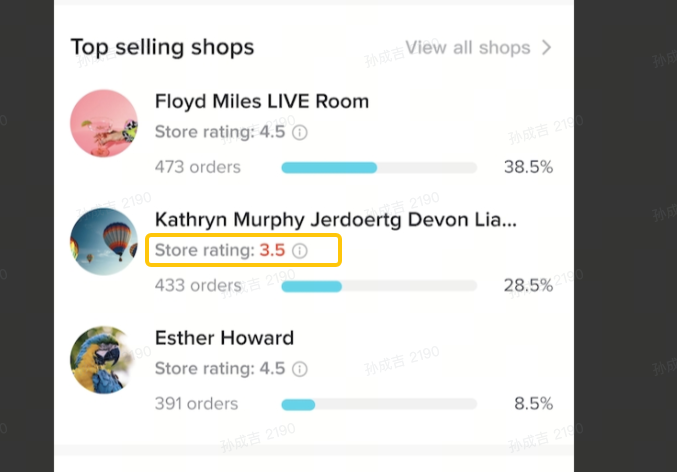
- Take note though - some shops or products may be featured as "Top Selling Shops" or "Top Selling Products" even though their Store Rating is low (image B).
Use Filters to find shops with High Store Ratings!
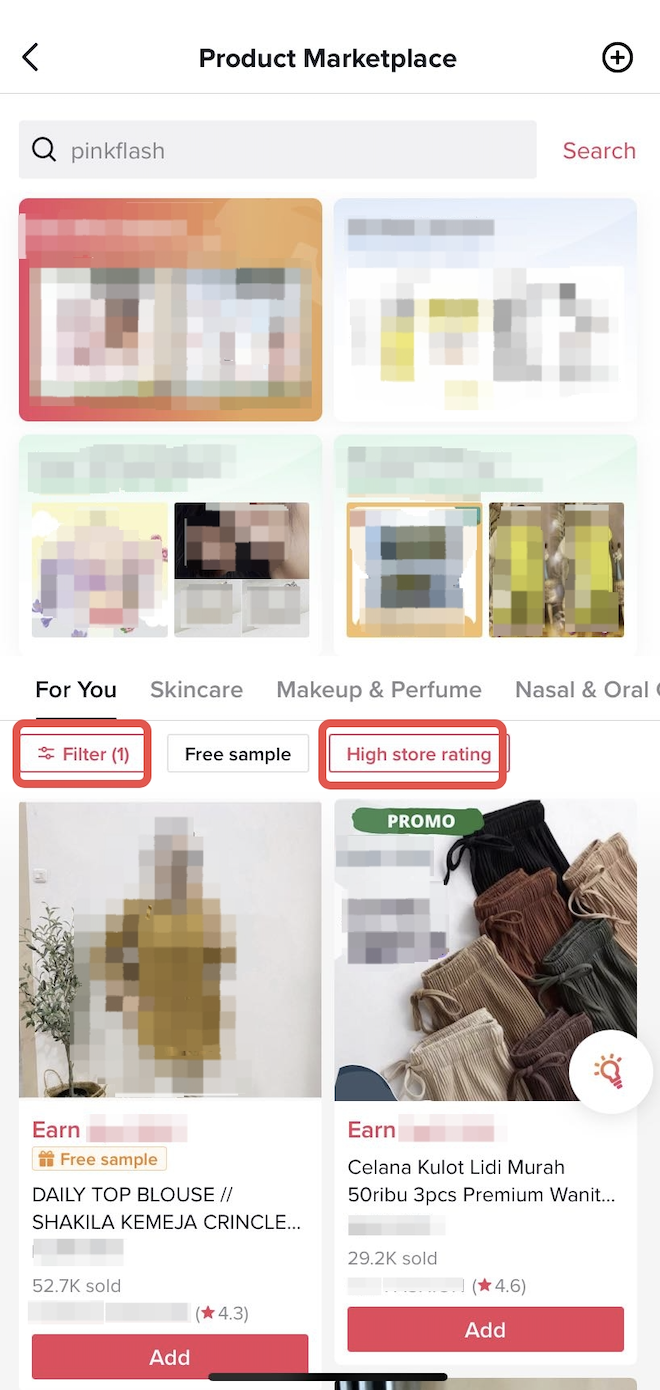
- You can also apply the "High Store Rating" filter (image C) in the Product Marketplace to filter top performing shops and products to promote.
Frequently Asked Questions
Why am I unable to view my PQP?
PQP will only be available for creators who have a minimum of 30 customer orders in one product category (generated from their promotions) over the last 90 calendar days. Creators can generate orders by getting customers to purchase products through the Shopping Cart linked to the creator's Livestream, short videos, or from their profile page.What if the Store Rating of a shop or Product Rating of a product I am promoting drops after I choose it?
Your PQP is calculated based on the Store Rating or Product Rating at the time you linked the relevant shop or product to your account. Any subsequent change, whether positive or negative, will not impact your PQP score.How frequently will my PQP be refreshed?
Your PQP is refreshed every day based on the number of orders generated by your promotions over the last 90 calendar days.Why can't I bind a product? I received a pop-up says
my PQP is too low.Here are some possible reasons:
- Some restricted categories require a minimum PQP. Click here for more details: Product Marketplace - Product Qualification Criteria for Creators
- Some vouchers require creators to have a minimum PQP score of 2.5. If the product that you are trying to bind is eligible for these special vouchers but your overall PQP is too low, then you may not be able to bind.