

Sales Accelerator: Optimize Products & Accelerate Business Growth
06/23/2025
In today’s competitive e-commerce landscape, simply listing your products isn’t enough. You need the right tools to improve visibility, boost conversions, and stay ahead of the competition. The Sales Accelerator on TikTok Shop by Tokopedia helps you identify products with strong potential, adjust your strategies, and maximize sales performance — all in one place.

Why the Sales Accelerator Matters
Imagine knowing exactly which products have the highest growth potential and being able to act on them instantly. With the Sales Accelerator, you can monitor real-time performance data, apply proven strategies, and quickly turn underperforming products into top sellers.

Sales Accelerator Setup Checklist
Before you activate Sales Accelerator, make sure you’ve completed these steps:Step | What to Do | Details | Details |
1 | Access the Sales Accelerator | Go to Seller Center > Growth Center > Sales Accelerator. | 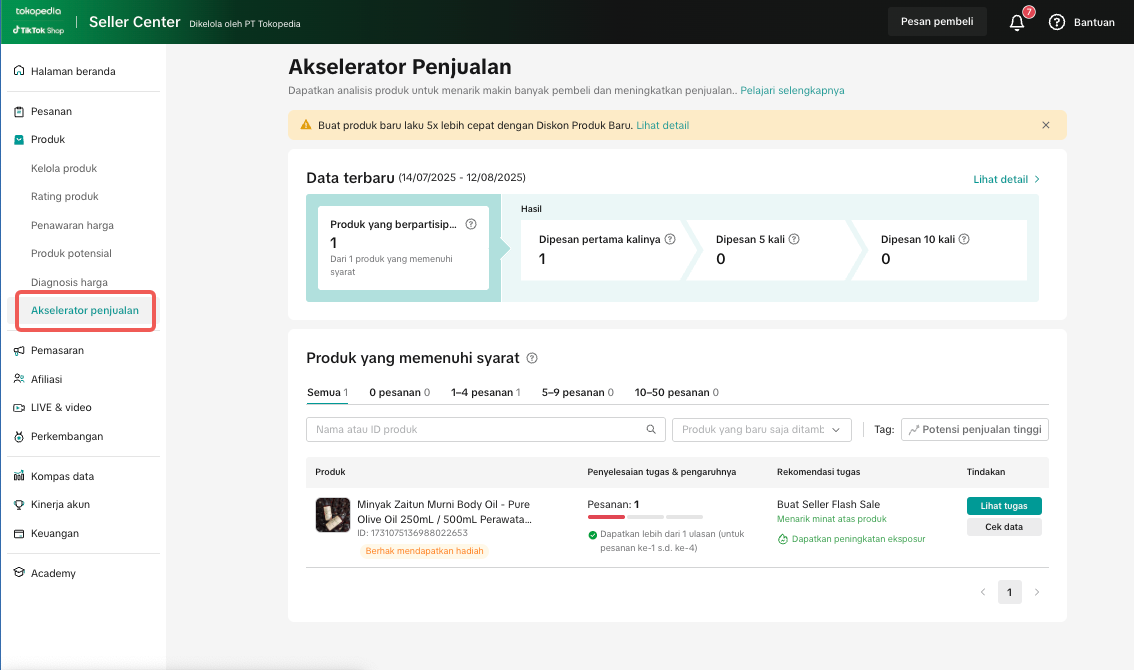 |
2 | Review Suggested Products | Identify products marked as “Potential to Grow” and check their performance status. | 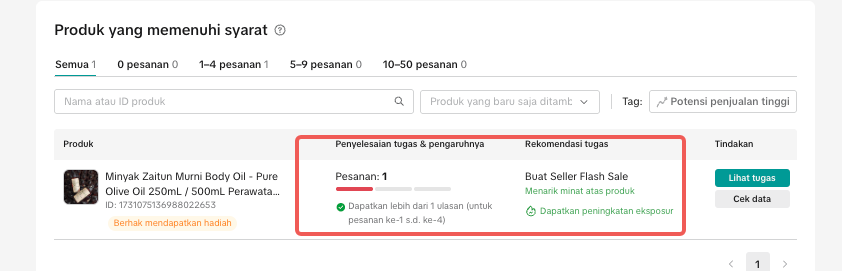 |
3 | Select Recommended Actions | Choose from options like joining campaigns, adjusting pricing, improving product content, or adding promotions. | 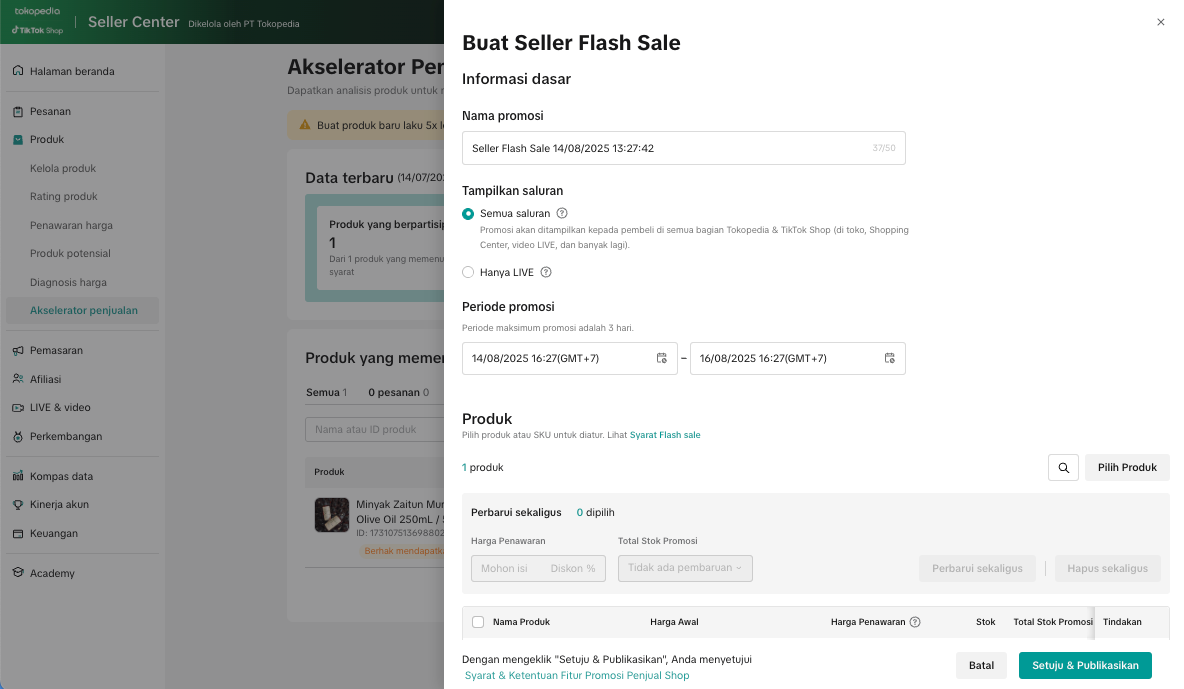 |
4 | Apply Changes Directly | Activate tools such as Discounts, Bundles, Free Shipping, Flash Sales or Product Content Optimization. | 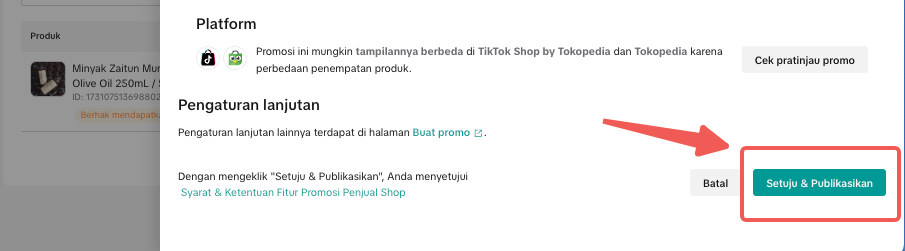 |
5 | Monitor the Results | Track sales performance after changes and adjust your strategy if needed. | 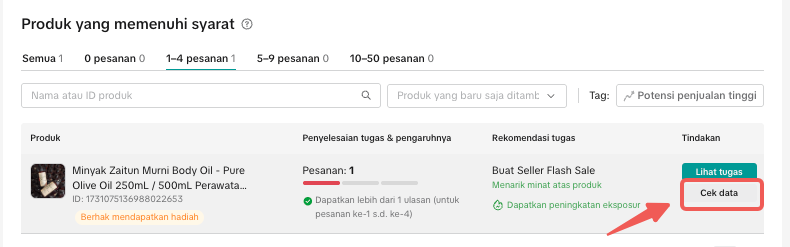 |

Common Pitfalls & How to Avoid Them
Even a great tool can underperform if misused:Common Mistake | Negative Impact | Fix |
| Only focusing on high-stock items | Missed opportunity to scale trending items | Prioritize products with both high stock and strong demand indicators |
| Ignoring product recommendations | Slower growth, competitors take market share | Check recommendations weekly in Sales Accelerator |
| Applying all promotions at once | Reduced margins without targeted impact | Start with the most relevant promotion per product |
| Not tracking performance after applying changes | Can’t measure ROI or strategy effectiveness | Use Sales Accelerator’s tracking tab to evaluate results |

📖 Read the full guide here
You may also be interested in
- 1 lesson
Product Listing
Create compelling and informative product listings to attract more buyers!
- 2 lessons
Finding the perfect product list
Discover how to choose the right products that align with current trends and buyer demands on TikTok…
What are Restricted Products?
This policy applies to products listed on TikTok Shop by Tokopedia. For products listed on Tokopedia…
Branded Products Listing Guidelines
What are Branded Products? Branded products are products bearing a brand. The brand and its features…
Product Categorisation
This policy applies to products listed on TikTok Shop by Tokopedia. For products listed on Tokopedia…

Why can't my products be purchased on the TikTok Shop platfo…
Ensure that the product is live with sufficient stock quantity enabled for buyers to purchase. Alt…

How can I edit my products?
Go to Seller Center > Products > Manage Products > Edit Once you have made the necessary changes, s…

How can I optimise my product name?
Be as accurate and concise as possible, while highlighting the main selling point. Here is a sugges…

Can I upload a product video?
It is optional to upload a video to showcase your product. If you choose to do so, kindly ensure th…
Active Product Listing Limitations
ShopTokopedia is committed to supporting every seller in creating the best product quality for sale.…