

Periodic Payments
02/25/2026
To learn more about how to register for our Marketing Benefit Packages, please click here. To learn more about all our payment methods, please click here.
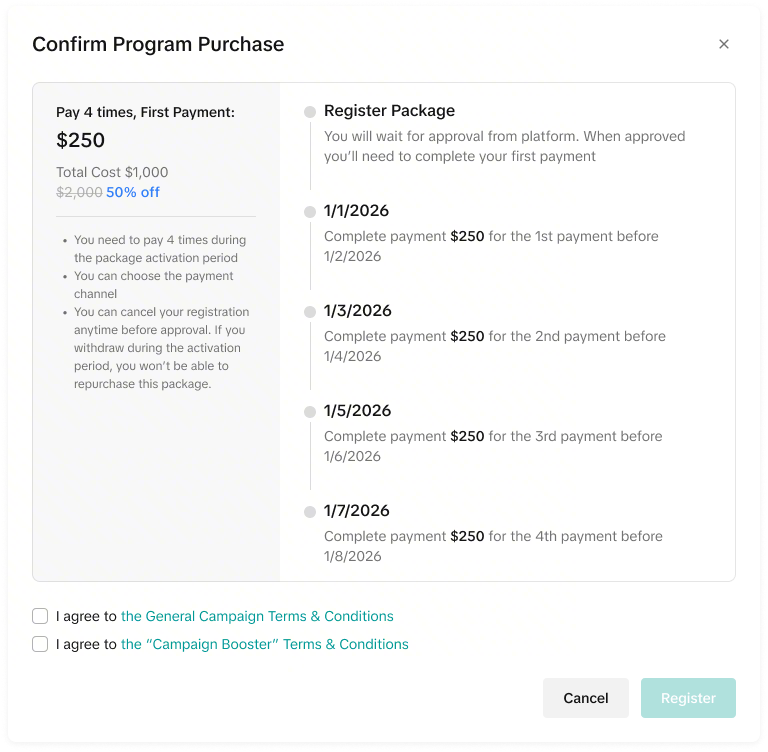
 With the Periodic payment type (Pay package fee in multiple payments/ Payment Installments), your total package fee is fixed, with the total payments being split into different payment dates.
 You can choose to pay via external payment method (Cash payment) or unsettled balance deduction. However, if the seller selects the external payment method and the payment fails, the system will auto-deduct from your unsettled seller balance when each payment deadline is passed.
Each payment deadline is 30 days after the indicated payment date.
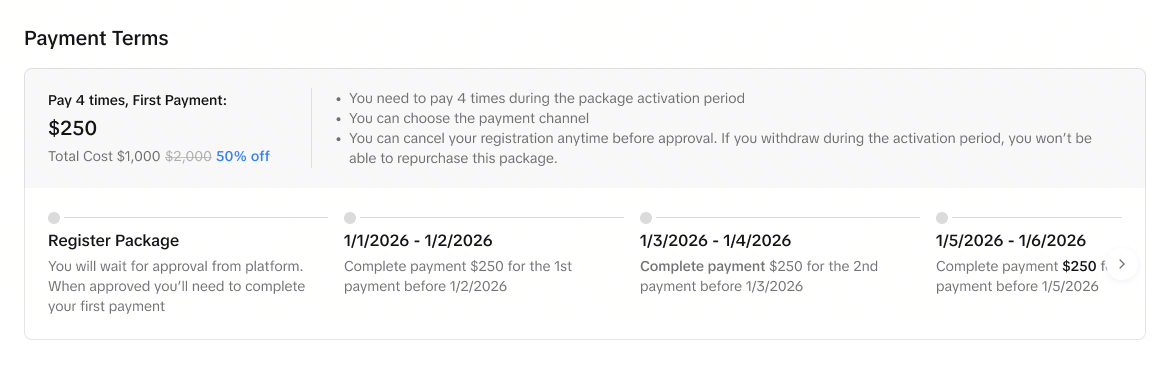
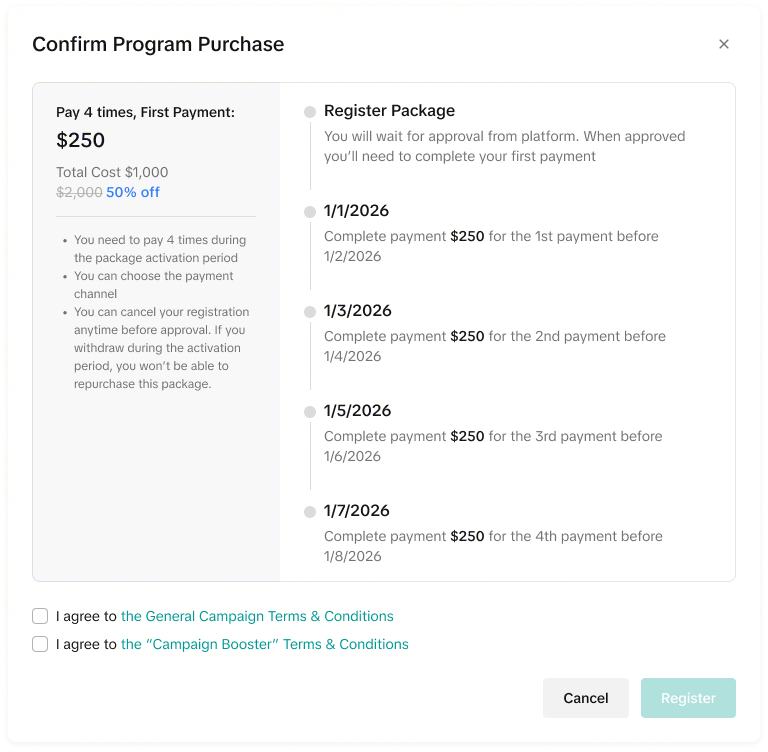 All dates shown in the image are for illustration purposes only and do not reflect actual timelines. Please refer to your specific package details for accurate due dates, timelines, and effective periods.
| How the Fee is Calculated | All payment dates are displayed in the package payment terms. There are no additional commission charges during the package period. However, there may be additional payment terms during the course of the package. Please check the package details periodically. |
| How the Fee is Deducted | For each payment date, you can choose to pay via external payment method or unsettled seller deduction. However, if you select the external payment method and the payment fails, the system will auto-deduct from your unsettled seller balance when the payment deadline is passed.The payment deadline is 30 days after the indicated payment date. |
| When Seller Pays | All payment deadlines and time will be stated in the payment terms. |

Package Registration
- Go to Seller Center > Marketing > Programs
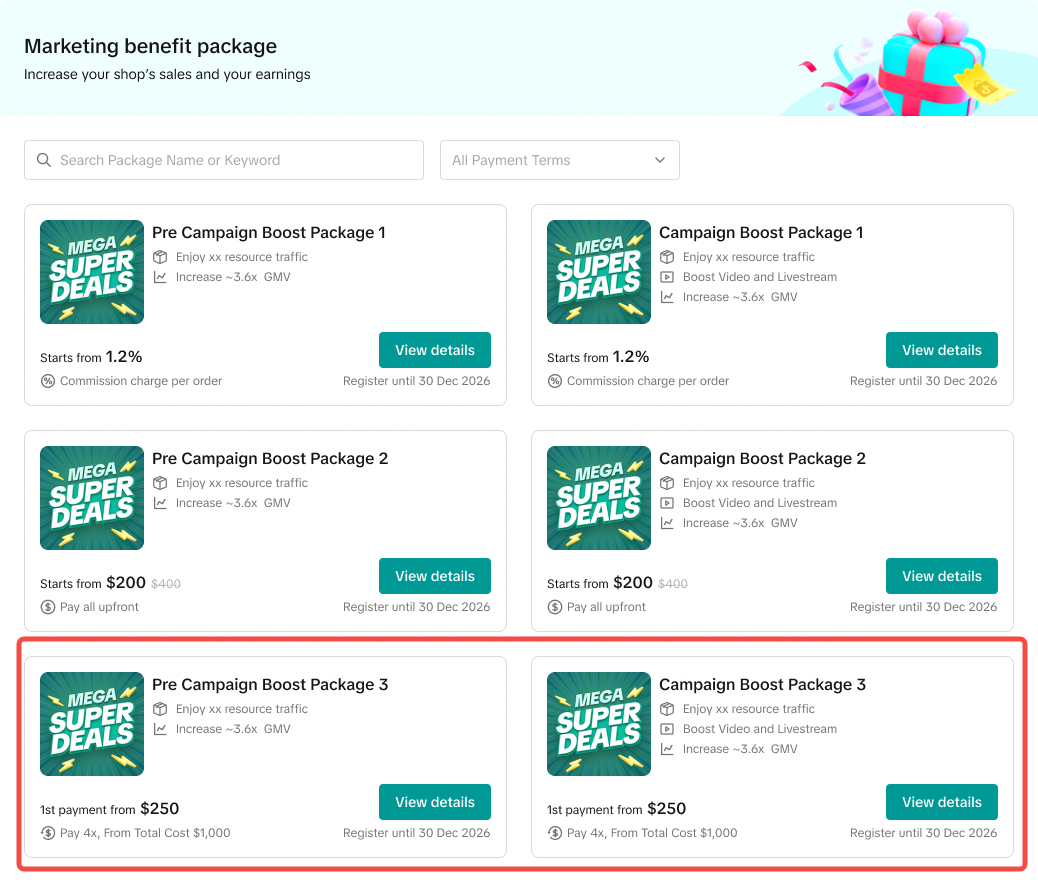
- Click "View Detail" to view the Package Tiers and Payment Details
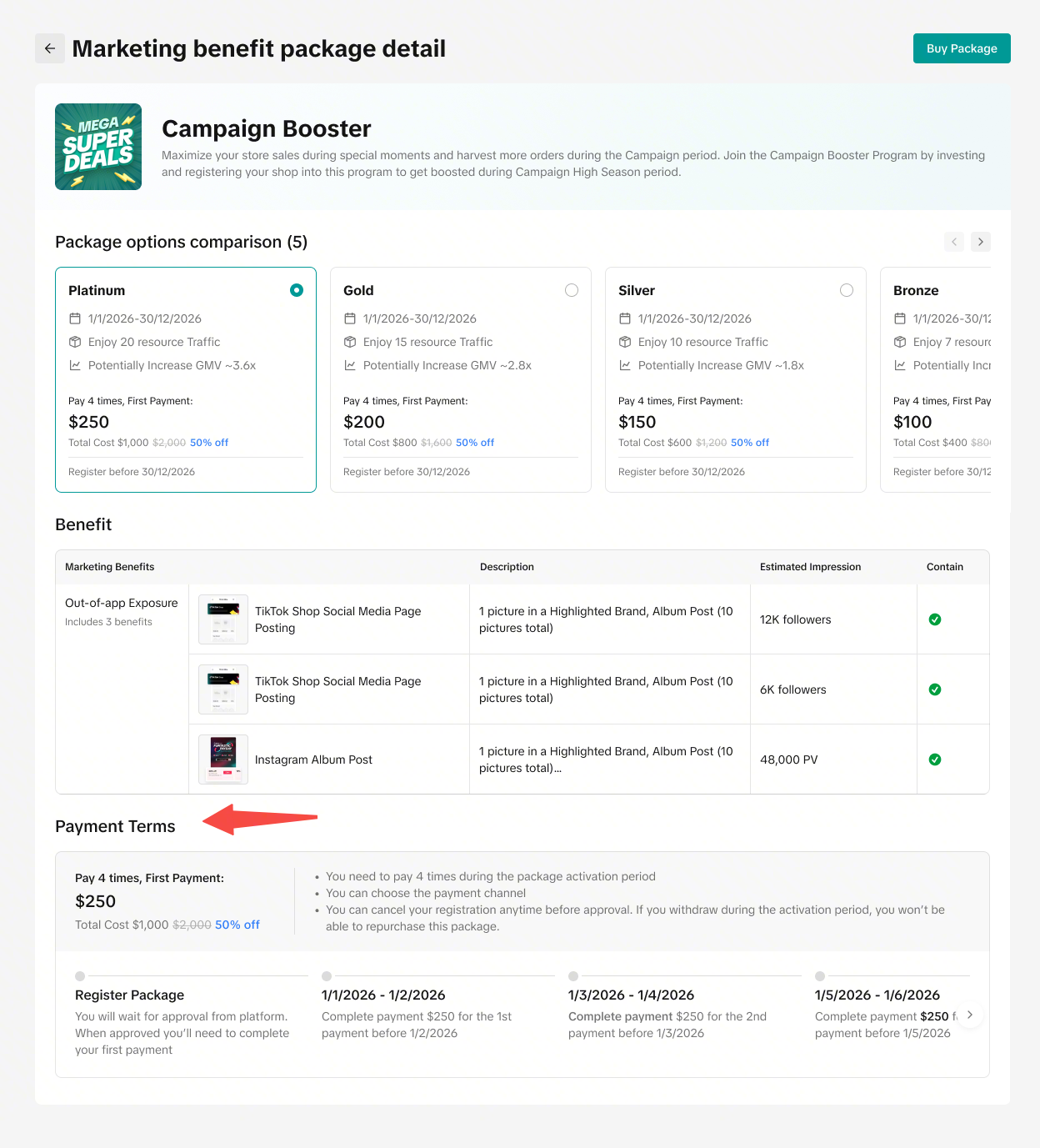
- After confirming which package to purchase, click "Buy Package" to see the payment terms confirmation.

Package Payment
- Go to Seller Center > Marketing > Program > My Programs
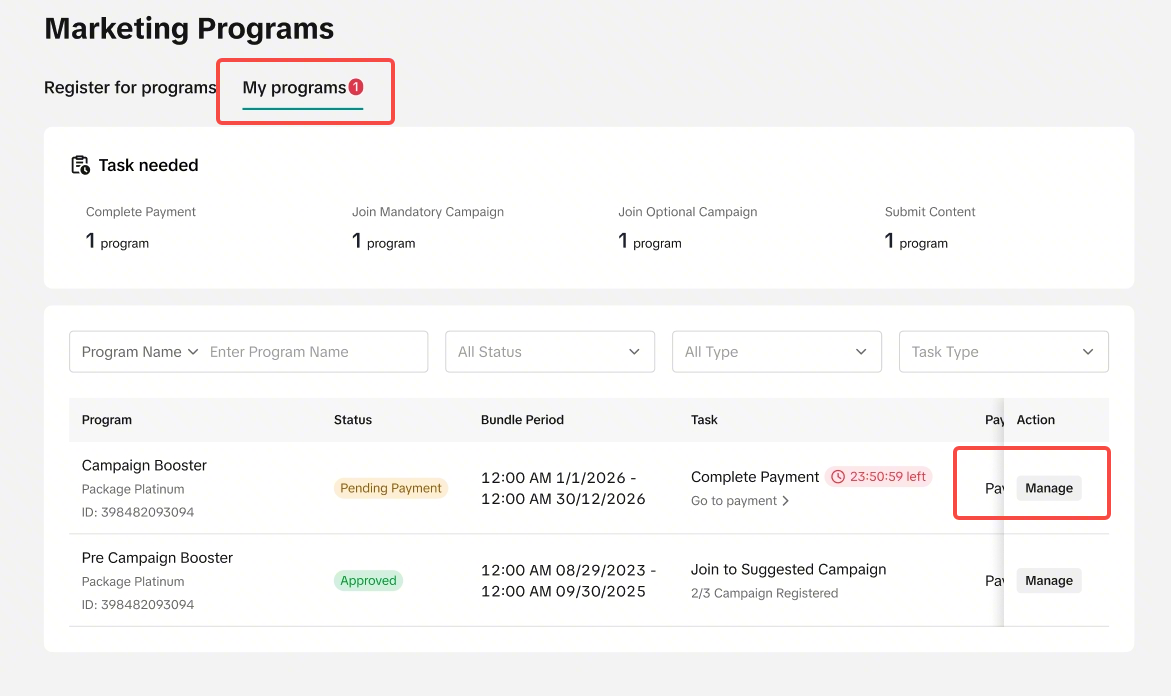
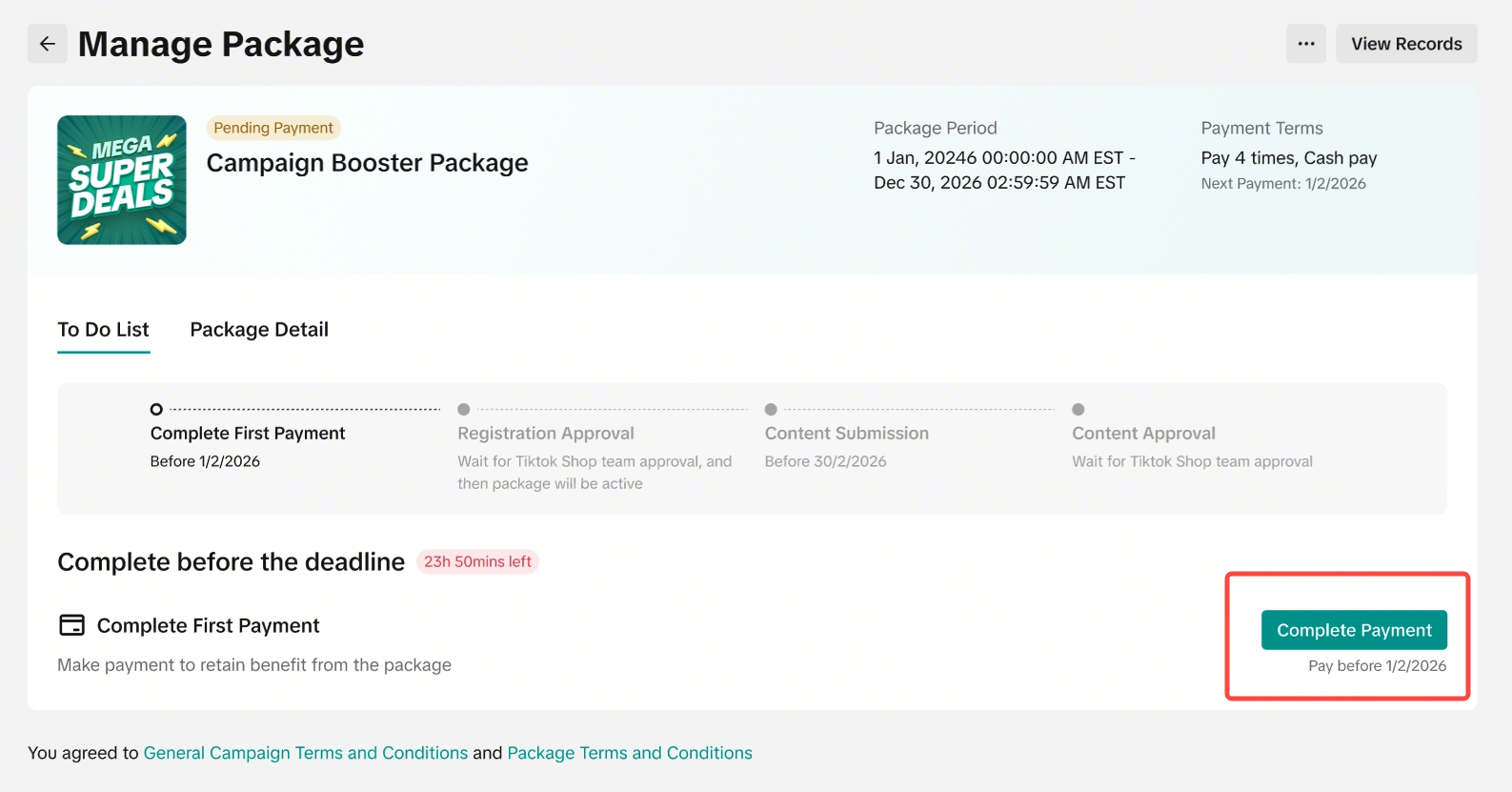
- On the Manage Package page, you can view your To-Do List. Your To-Do List will include all the actions you must take to ensure successful registration into the Package.
- Shows pending payments with "Complete Payment" buttons
- Each payment appears as a separate task with its own action button.
- Outstanding payments are not combined. If there is more than 1 payment to be made, you must pay them separately.
- Important information to take note:
- The deadline for each payment is 30 days after the payment start date. (If the payment starts on 1st January, the due date of this installment will be on 30th January)
- The seller can not pay for the whole package costs at once.
- The seller needs to remember to check the package for the next upcoming payment. There are no reminders provided by the system.

Choosing Payment Method
- After clicking "Complete Payment", you will choose your preferred payment method.
- This payment method will only be for this specific payment installment, and you cannot change the payment method after selecting.
- If you wish to change from External Payment Method to Unsettled Seller Deduction, you can just let the payment due date pass. If cash payment is not successful after the due date, the payment will be auto-deducted from seller balance.
- If you wish to change from Unsettled Seller Deduction to External Payment Method, this is not supported. Please select your preferred payment method carefully.
- Please remember to check again for the next payment installment and choose the payment method again.
- This payment method will only be for this specific payment installment, and you cannot change the payment method after selecting.
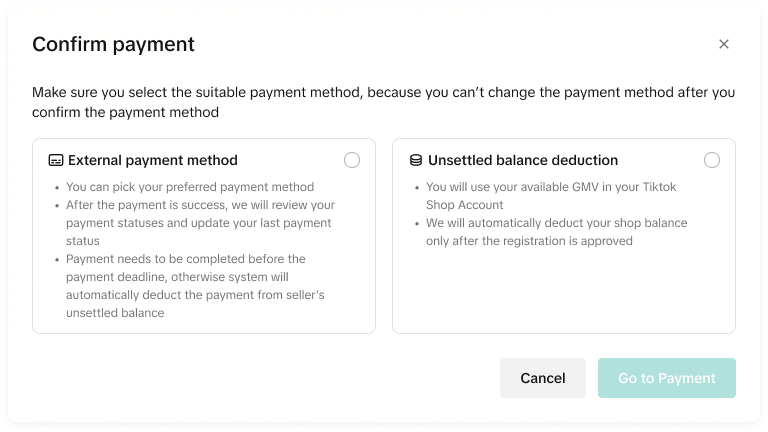 If you choose Unsettled Seller Deduction:
| How the Fee is Deducted | Each payment will be deducted from seller's unsettled seller balance account |
| When the Fee is Deducted | The payment will be deducted from your seller balance at the point of confirmation. |
| How the Fee is Deducted | The payment has to be made by deducting from the chosen payment method:
|
| When the Fee is Deducted | The payment will be deducted from your chosen account at the point of confirmation. |
| If payment Fails | If the cash payment fails, the fee will be deducted from your unsettled seller balance on the due date. |
- After clicking External payment method, you will be redirected to the payment page
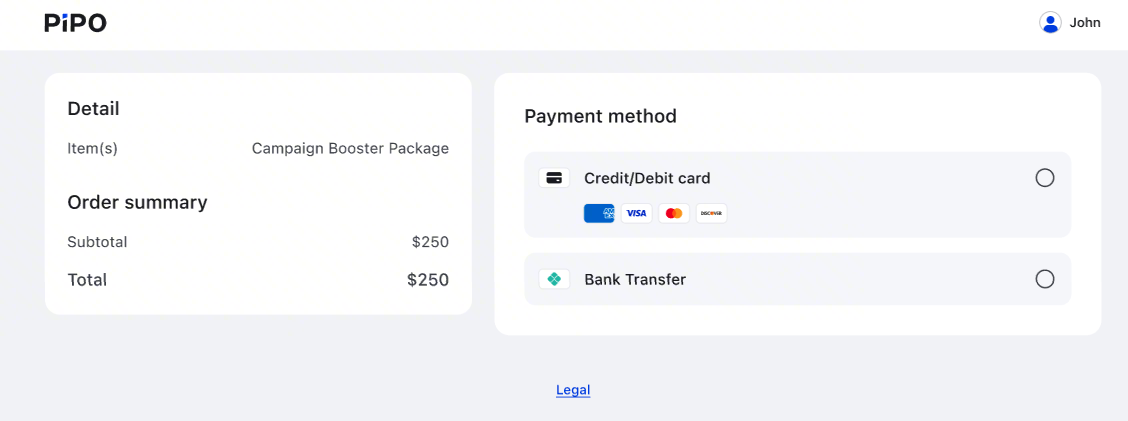
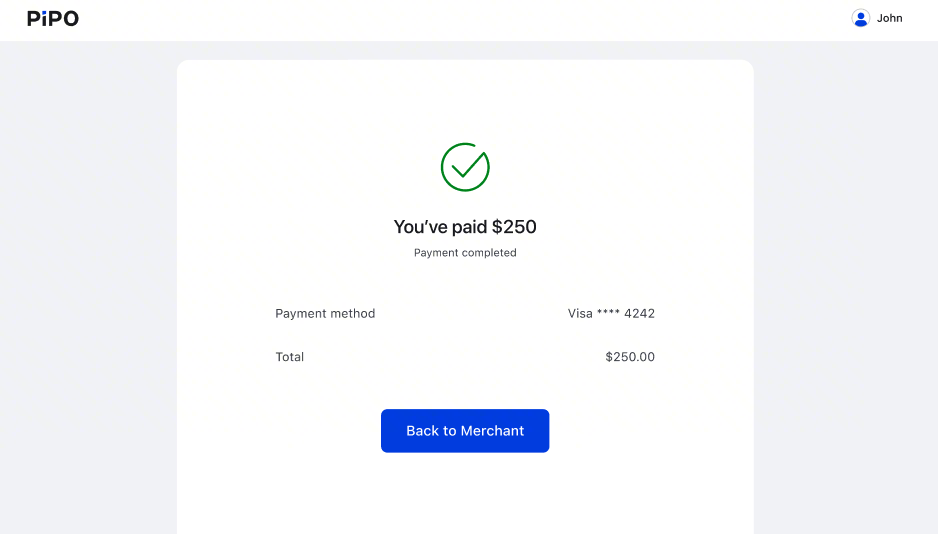
- Credit / Debit Card Payment
- After successful payment, you will see the payment confirmation page.
- Bank Transfer
- After clicking Bank Transfer, you will be redirected to view our bank details. Please follow the instructions to complete the payment.
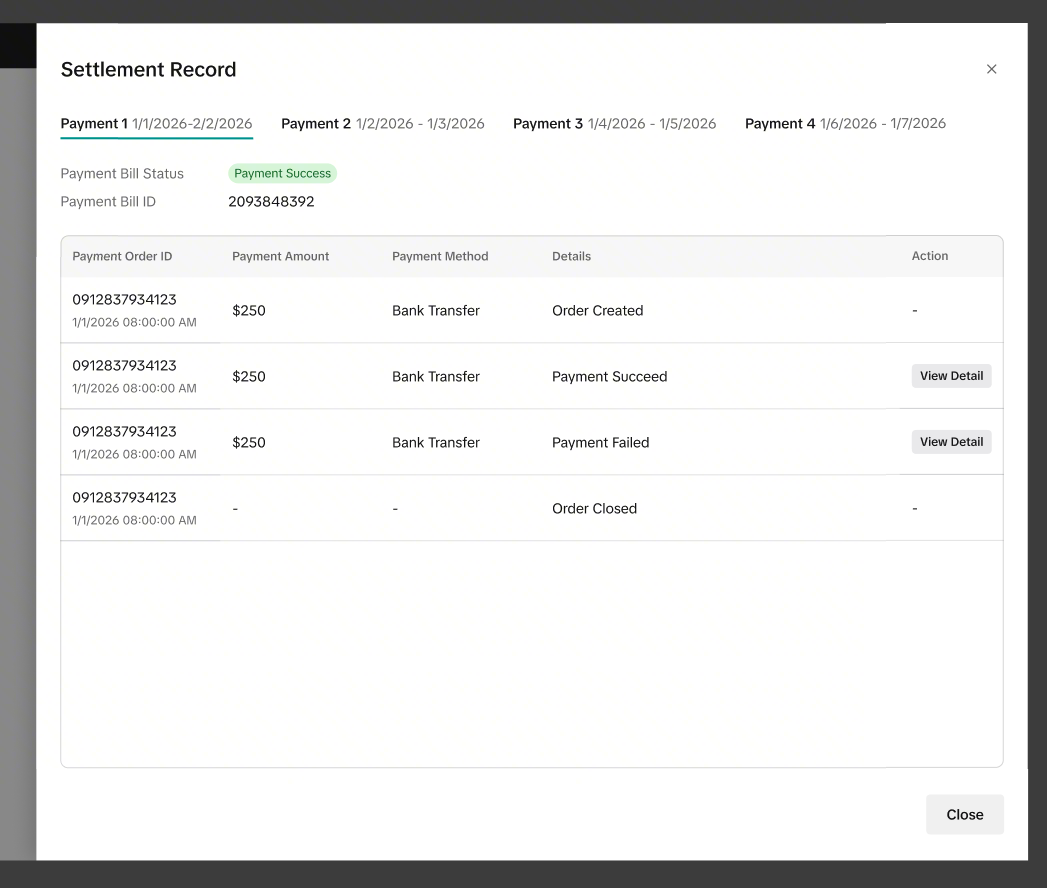
- Once we have successfully received the payment amount, you can check the 'Payment Success' status in the settlement records. (See below)

Payment Settlement Records
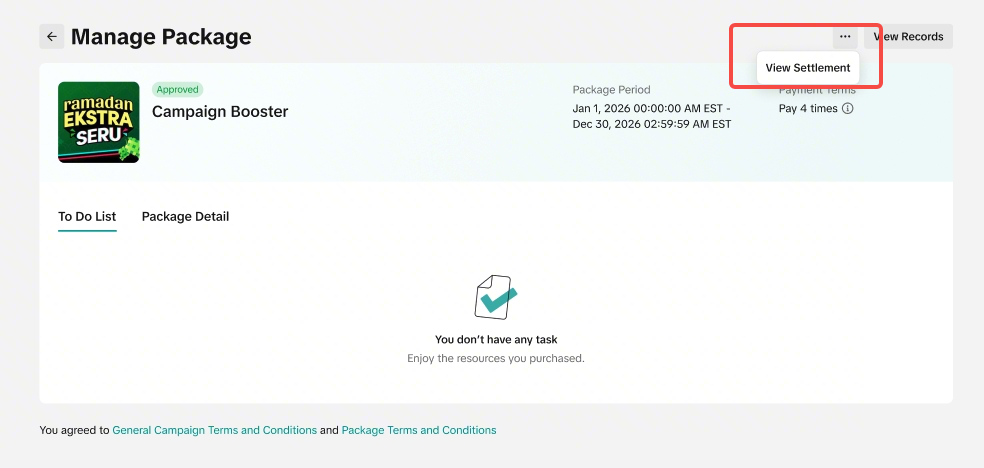
Go to Manage Package > "..." > View Settlement- Each payment has a unique Bill ID/Settlement ID. You can track the payment status by viewing the settlement page.
| Payment Method | Description |
| Unsettled seller balance |
|
| External payment method |
|
Bank Account Transaction Page
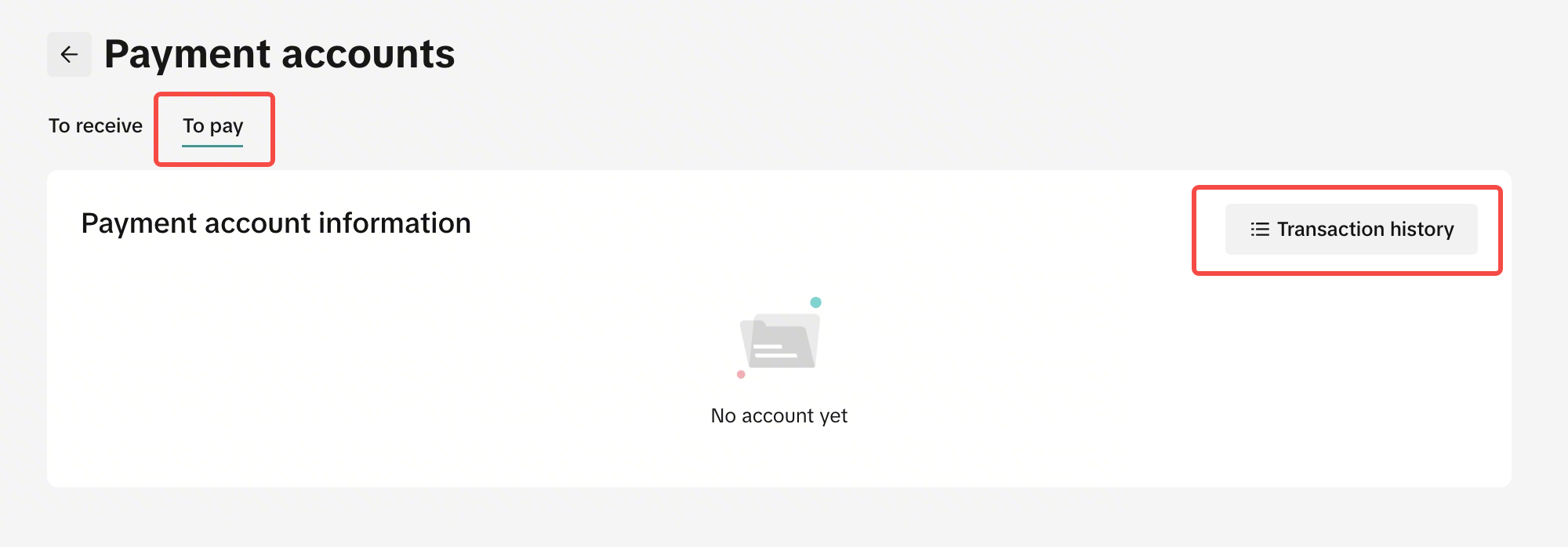
Go to Seller Center > My Account > Account Settings > Bank accounts > Payments Account (To Pay) > Transaction History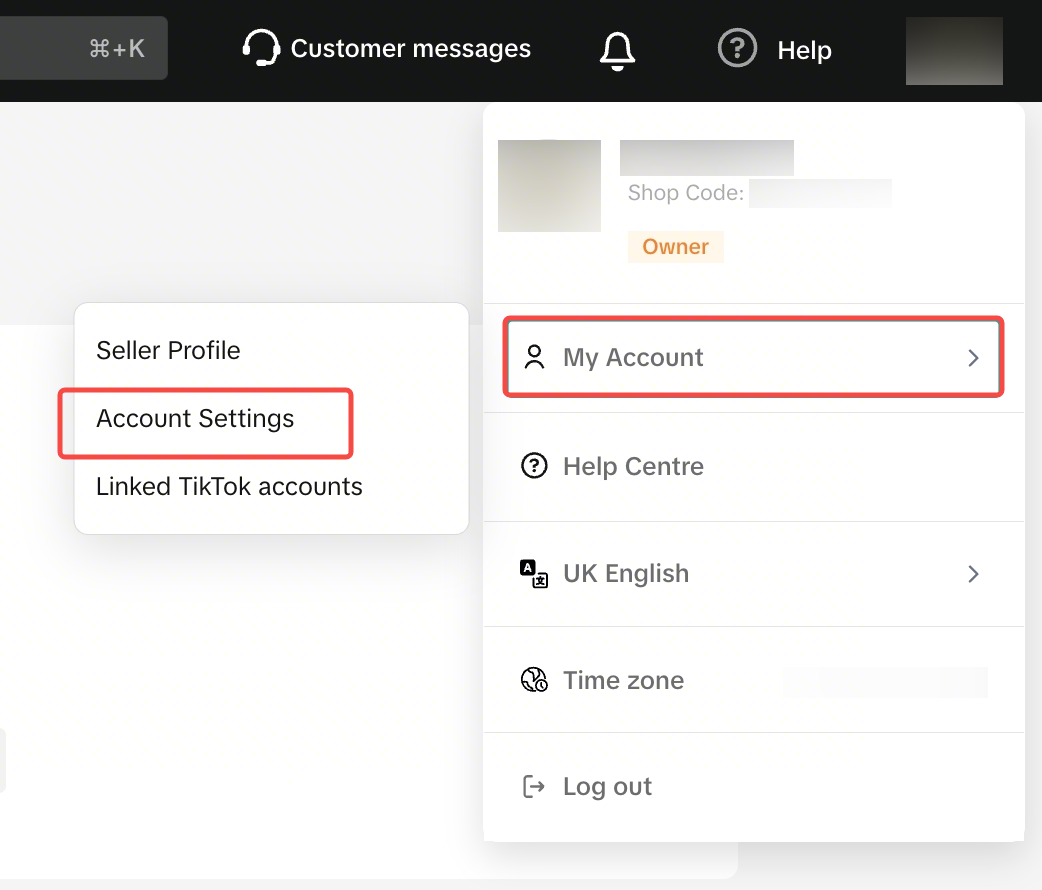 | 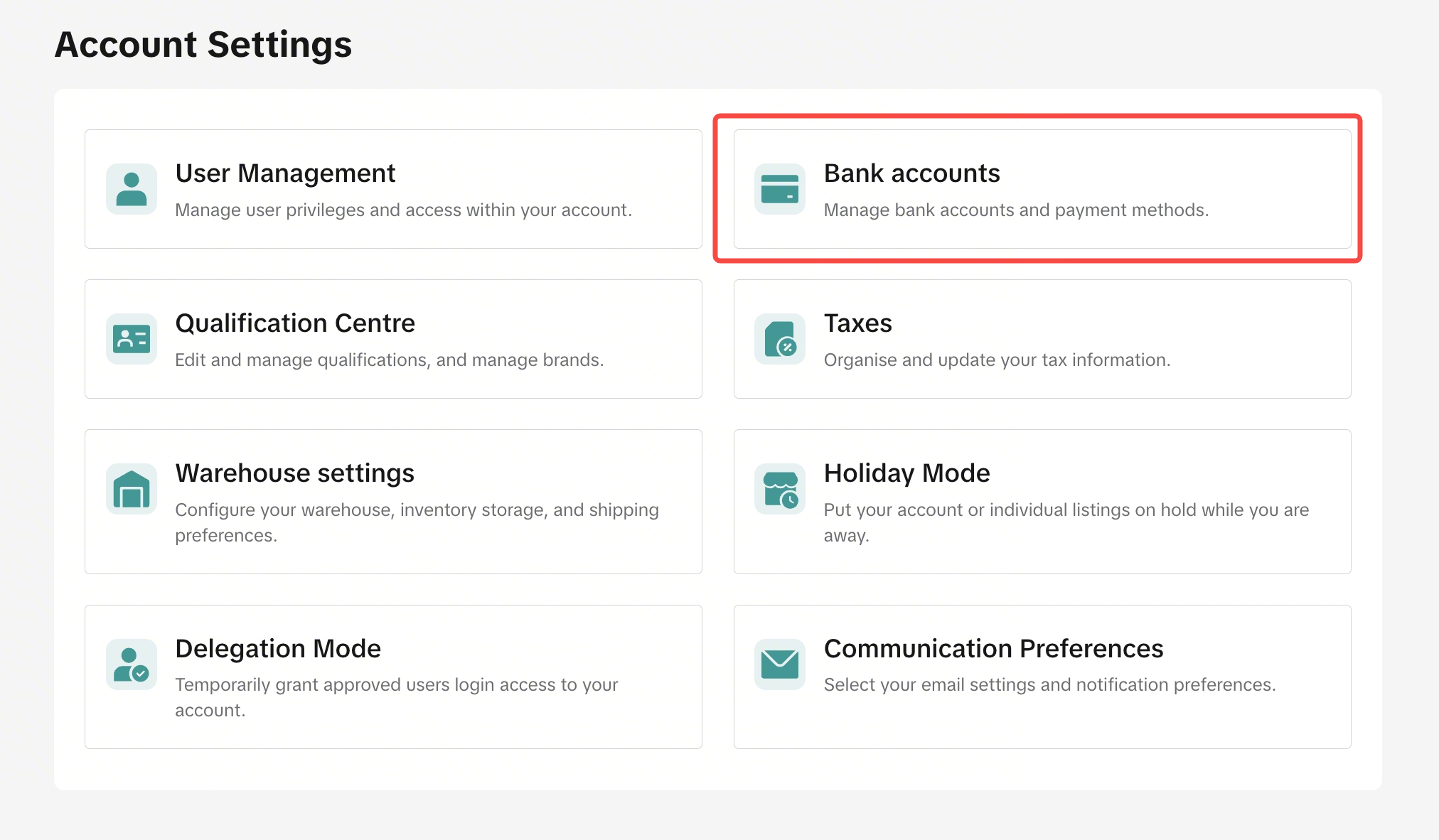 |
 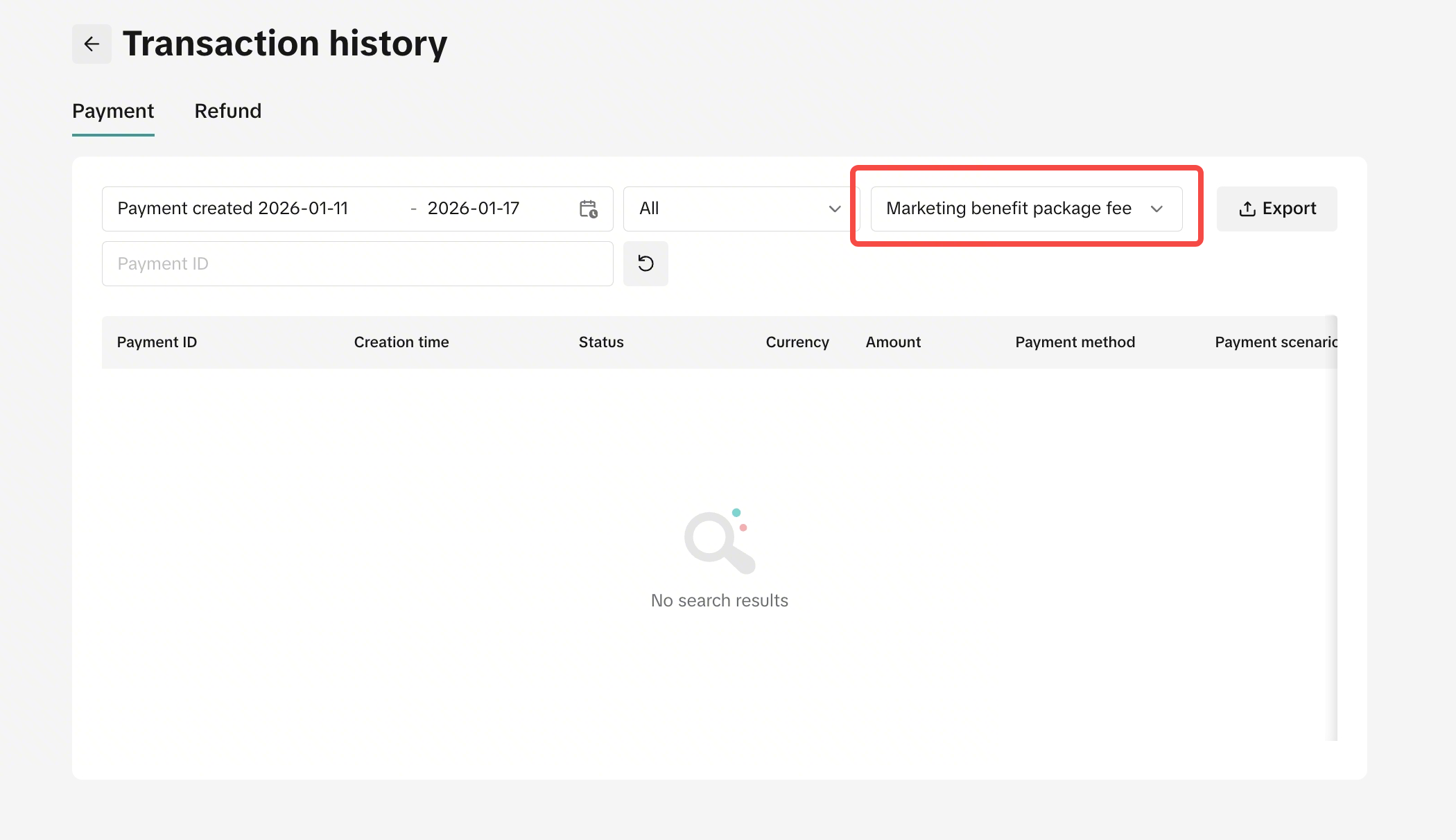 | |
- All bank account transactions and payments will be shown here.
- You can filter for "Marketing Benefit Package Fee" and find the transaction for your packages.

Important Information & Rules
Payment Deadlines
- Each payment must be completed within 30 days after the indicated payment date.
- If external payment method fails and no payment is made within 30 days, the system will automatically switch to deduct from your unsettled seller balance on the due date.
| ScenarioPayment of $100 on 1st January 2026 | Outcome | |
| Scenario 1 |
| The payment of $100 will be auto-deducted from seller balance on 30th January 2026. |
| Scenario 2 |
| The payment of $100 will be deducted from seller balance on 2nd January 2026 |
| Scenario 3 |
| The payment of $100 will be auto-deducted from seller balance on 30th January 2026. |
Late Registration
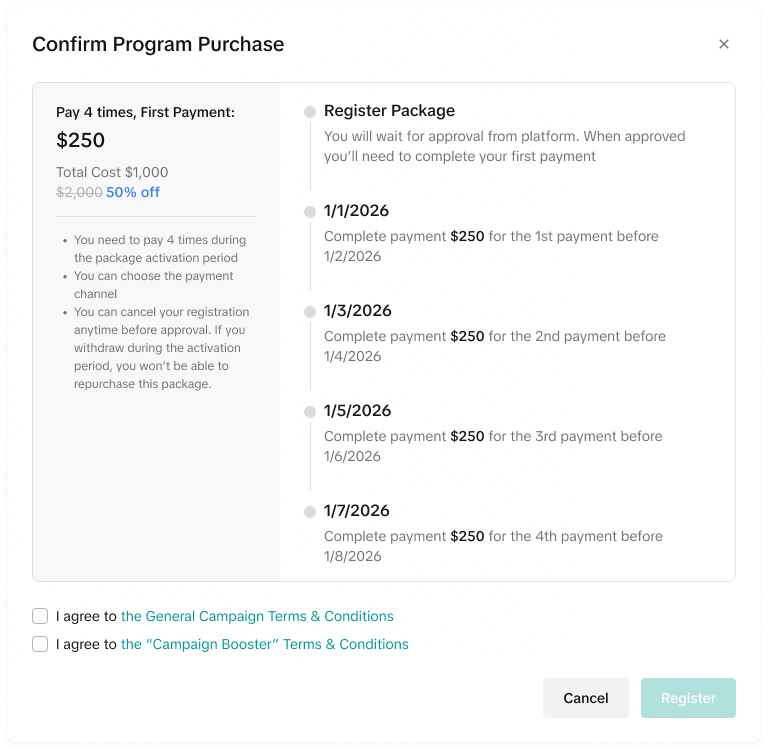
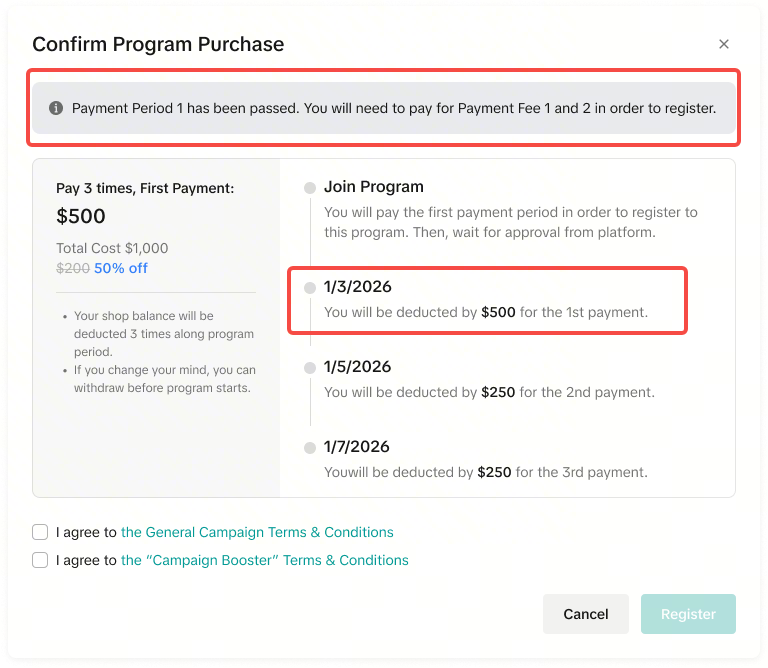
- If you register after the first payment deadline, you will pay for both the upcoming payment and the missed payment together.
- The first payment fee amount will show the sum of the missing payment fee and the upcoming payment fee.
- Total number of payments will decrease based on your registration timing.
| Regular Registration | Late Registration |
 |  |
Multiple Pending Payments
- If there is more than 1 payment that can be paid, it will appear as 2 separate payments.
- Multiple payments are not combined. Please complete the payments separately.
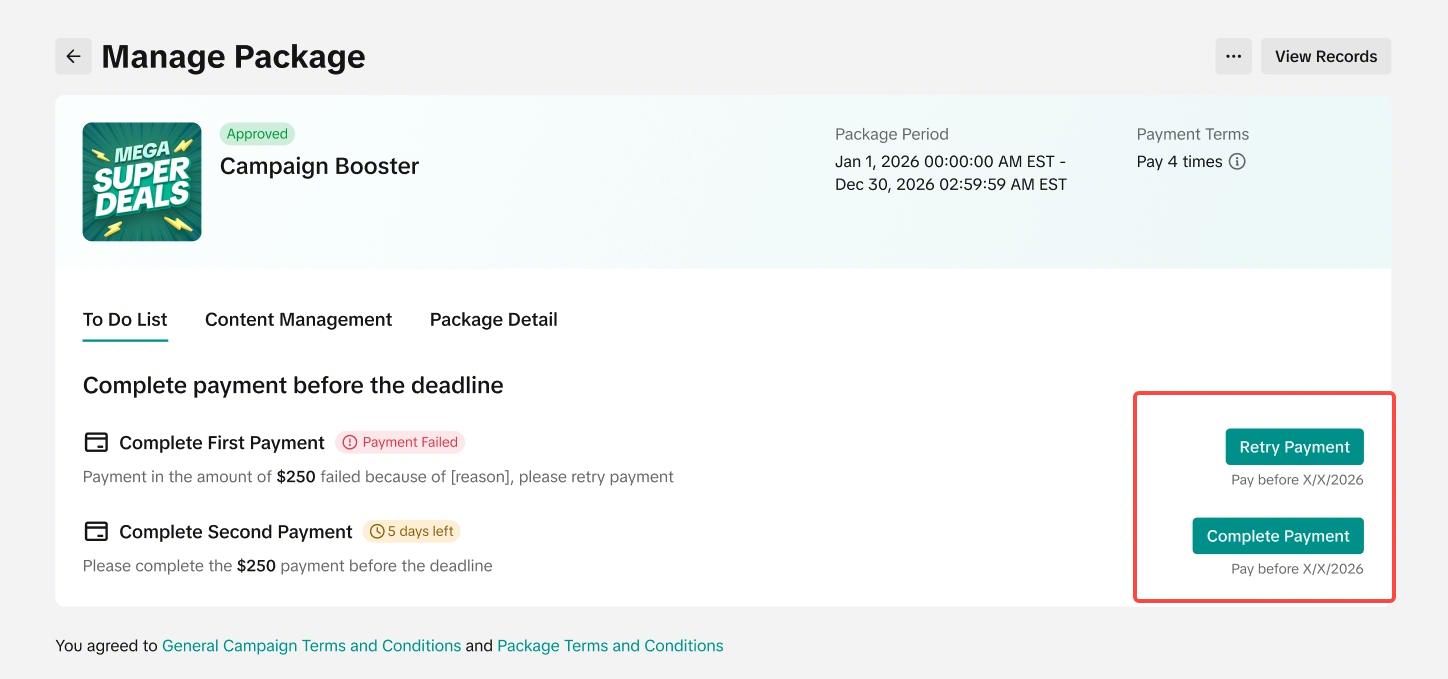 *All dates shown in the image are for illustration purposes only and do not reflect actual timelines. Please refer to your specific package details for accurate due dates, timelines, and effective periods.
FAQs
- Q: What are some of the best practices or things to take note of?
Plan Ahead: Review all payment deadlines before registering.
External payment method Preparation: Have bank or card information ready before starting payment
Monitor Status: Regularly check payment status in action records
Deadline Awareness: Note that failed payments automatically convert to shop balance deduction after 30 days
You may also be interested in
- 1 lesson
Campaign and Cofunded Program
Join campaigns and cofunded programs for greater product exposure!
- 7 lessons
Campaign
Learn how to participate in and maximize the impact of official TikTok Shop by Tokopedia campaigns.

How do campaign co-funded vouchers work?
Sellers will first need to register and add products to the respective campaign page. Once the prod…

What if the campaign period overlaps with other promotional…
After approval, the price will take effect in accordance with the campaign dates. Campaign prices ar…

Marketing Benefits Packages
This article teaches you what Marketing Benefits Packages are, how it works, as well as how you, as…

Product Campaigns
This article teaches you how to participate in platform product campaigns to increase sales in your…
Understanding Payments
This article introduces the different payment methods available for our Marketing Benefits Packages.…

Livestream Campaigns
This article teaches you how to use Livestream Campaigns to increase traffic and conversions in your…