

How do I withdraw my seller payout?
07/18/2024
Once money is settled to your seller account balance, you can withdraw it to your bank account.
To withdraw funds, we recommend making sure that you've already set up your withdrawal password and a bank account. If so, you'll be able to withdraw either manually or automatically, with no withdrawal fees.
To withdraw funds, we recommend making sure that you've already set up your withdrawal password and a bank account. If so, you'll be able to withdraw either manually or automatically, with no withdrawal fees.
Manual withdrawal
- Go to Seller Center.
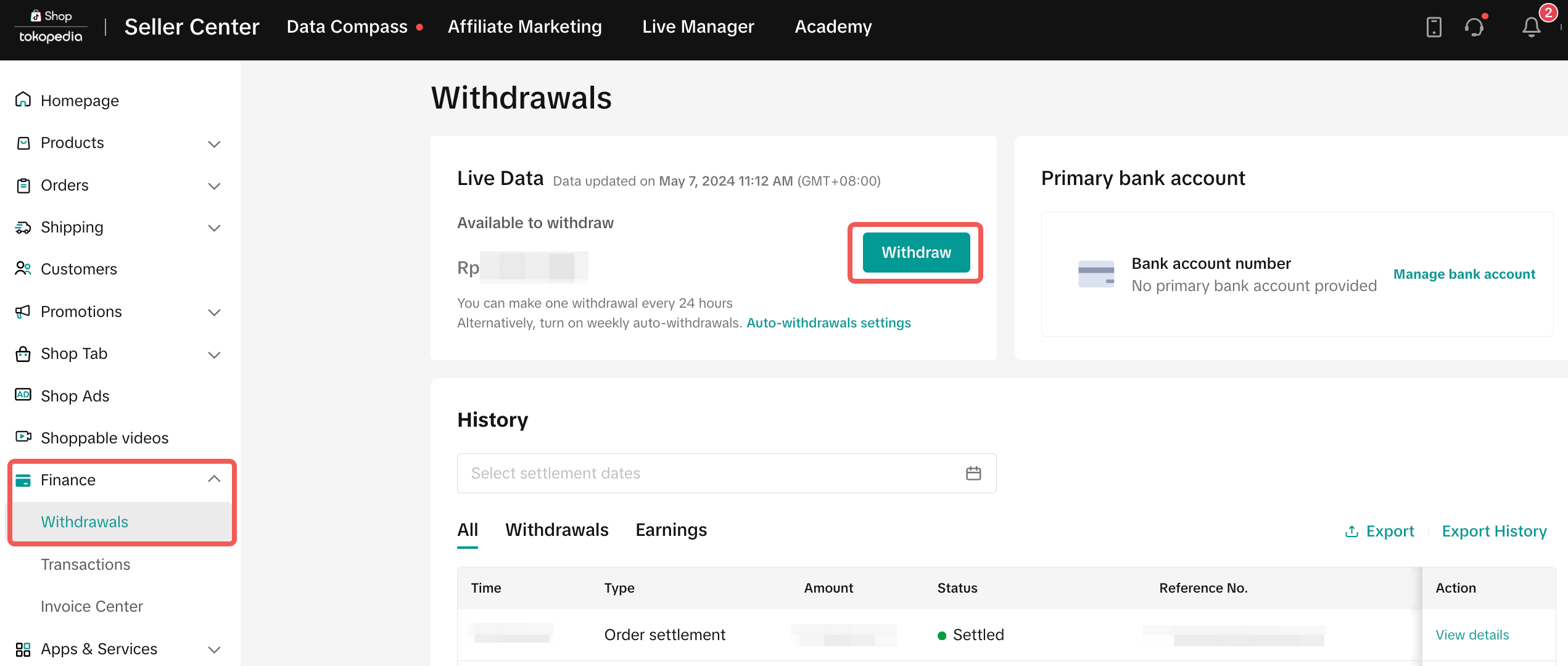
- If you are on PC, click Finance and then Withdrawals.
- If you are using the app, tap Finance.
- On the Withdrawals page, you can see the amount available to withdraw. Click Withdraw.
- Enter your 6-digit withdrawal password.
- Select the payout method.
- Click Continue on PC, or tap Withdraw now on the app.
Automatic withdrawal
You can also set a weekly auto-withdrawal by following these steps:- Go to Seller Center.
- If you are on PC, click Finance and then Withdrawals. Click Auto-withdrawals settings.
- If you are on the app, tap Finance and then Auto-withdrawals are off.
- Check if the primary bank account is the desired account for auto-withdrawals. If not, click change/update and choose the desired account.
- Toggle the Auto-withdrawals switch.
- Enter your 6-digit withdrawal password and confirm.