

Coupon Bundle with New User Reward
12/19/2024
To get you started, we will go over both sides of the Coupon Bundle experience: Creator and Buyer POV. Additionally, we will explain the CPA Reward that Creators can receive after they successfully get a new user to check out using the coupons.
The numbers indicated below are only examples and may not be the same numbers that are currently active for this feature

Sharing the Coupon Bundle
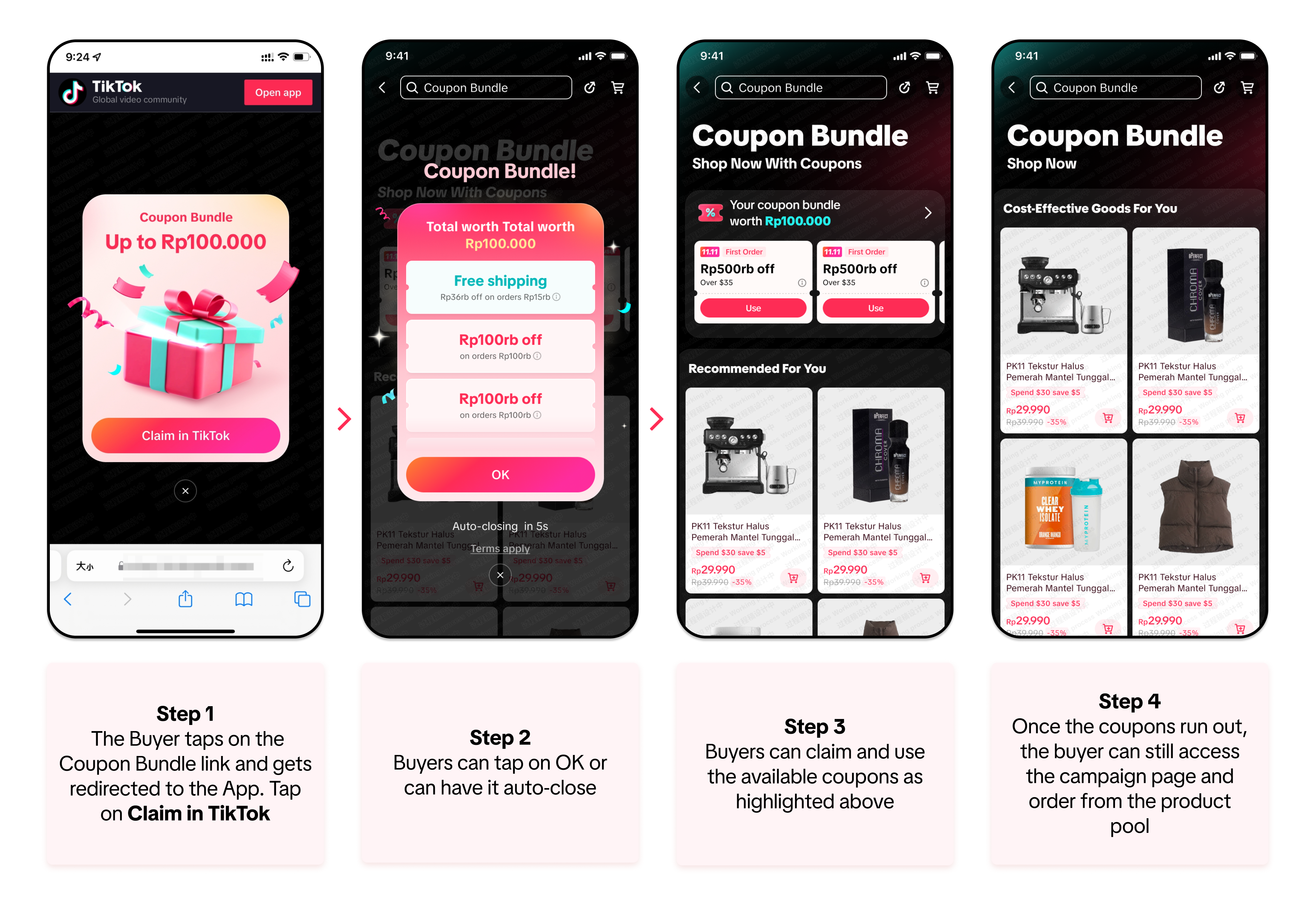
The Coupon Bundle feature is very easy to use: (1) The Creator shares the Coupon link to their followers or their social media platforms, (2) the followers then claim the vouchers and use them for their next purchase, and (3) the Creator receives commission after the Buyer's order is fulfilled.The Creator can find the Coupon Bundle link on the page as shown below:
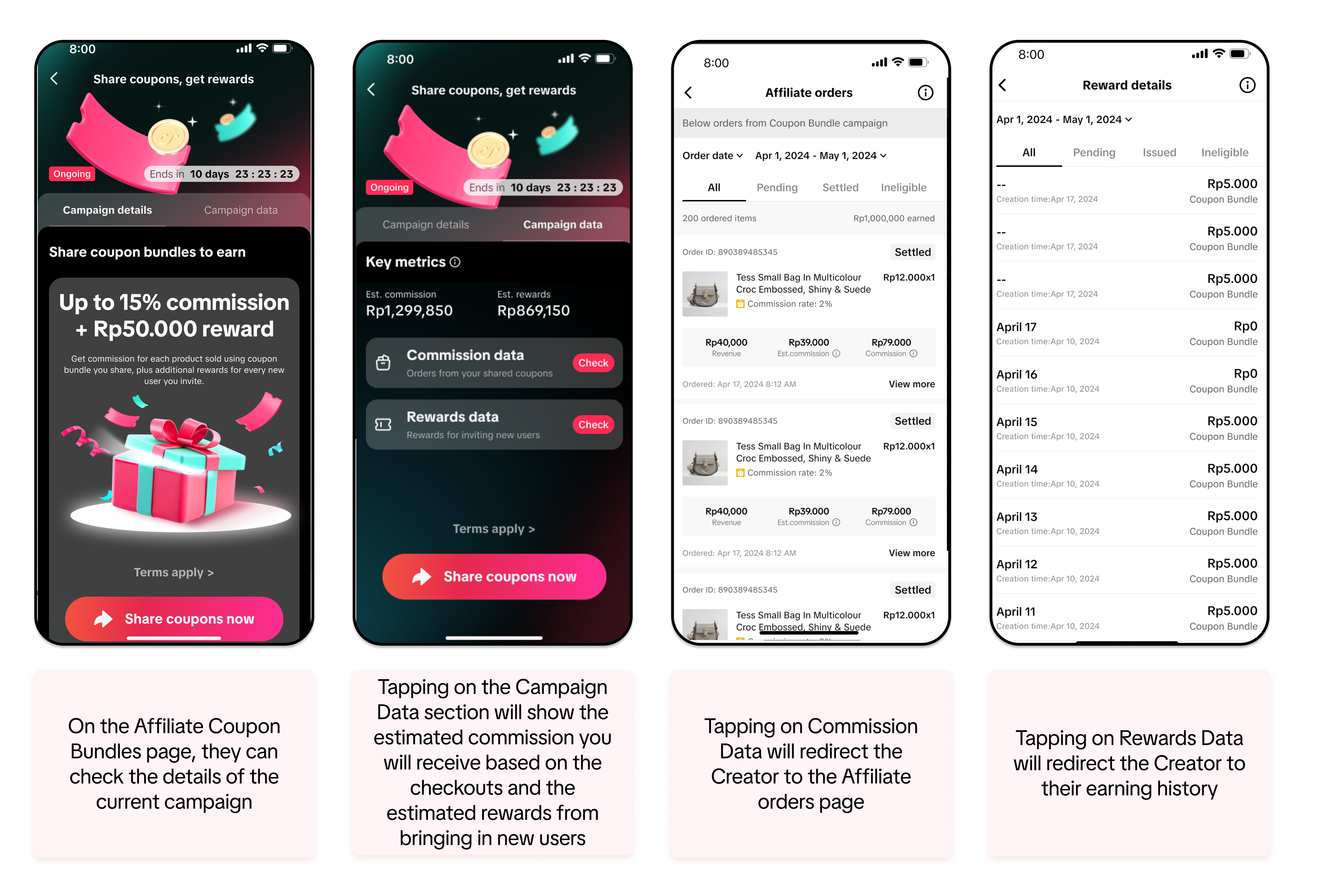
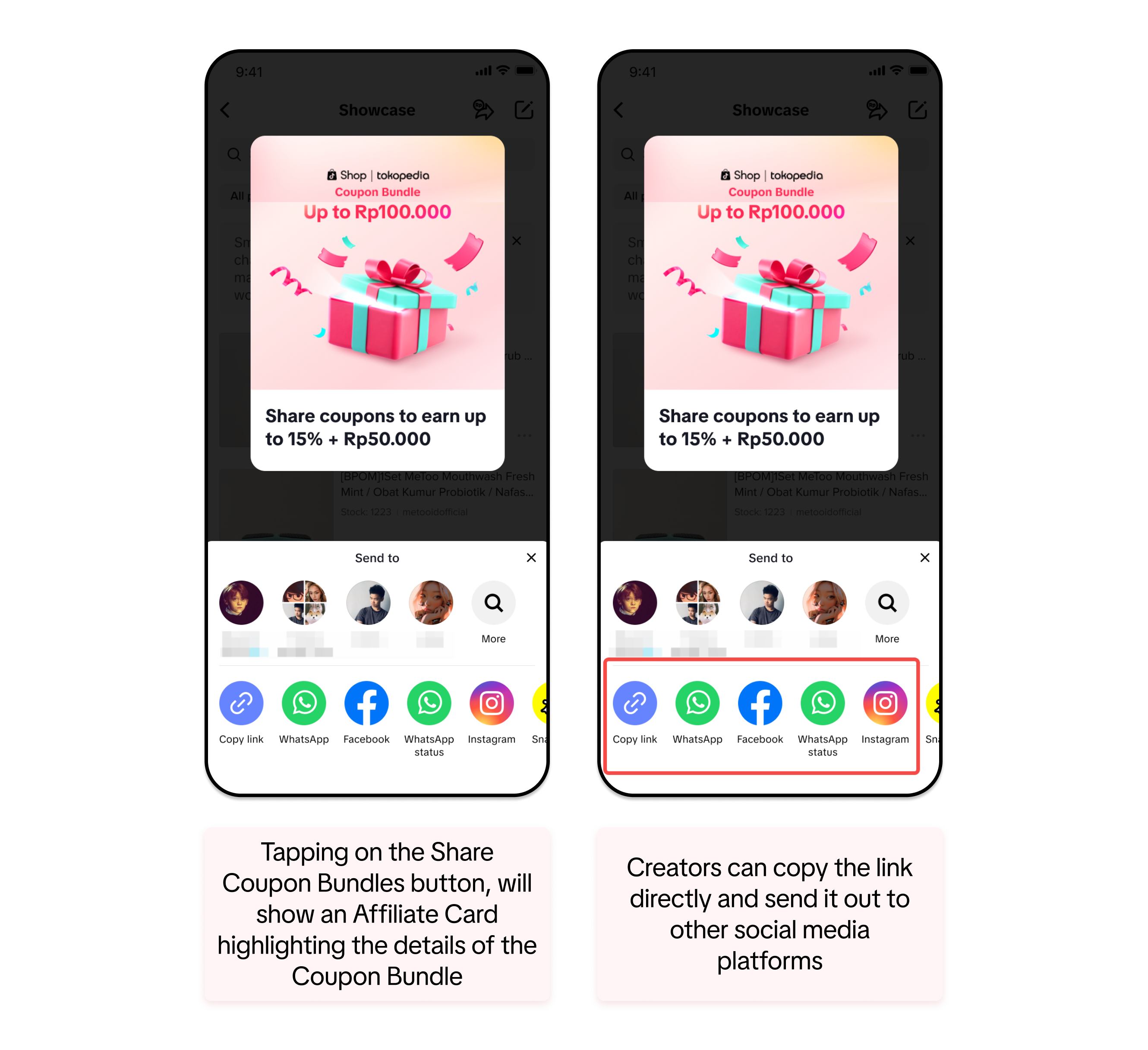
Where to find the Coupon Bundle for Sharing
The Affiliate Coupon Bundles page can be accessed by Creators inside the app through the following pathways. As a key note: The Coupon Bundle page is a campaign that may only be available during big campaign periods. Tapping through these options will redirect you to the Affiliate Coupon Bundles page.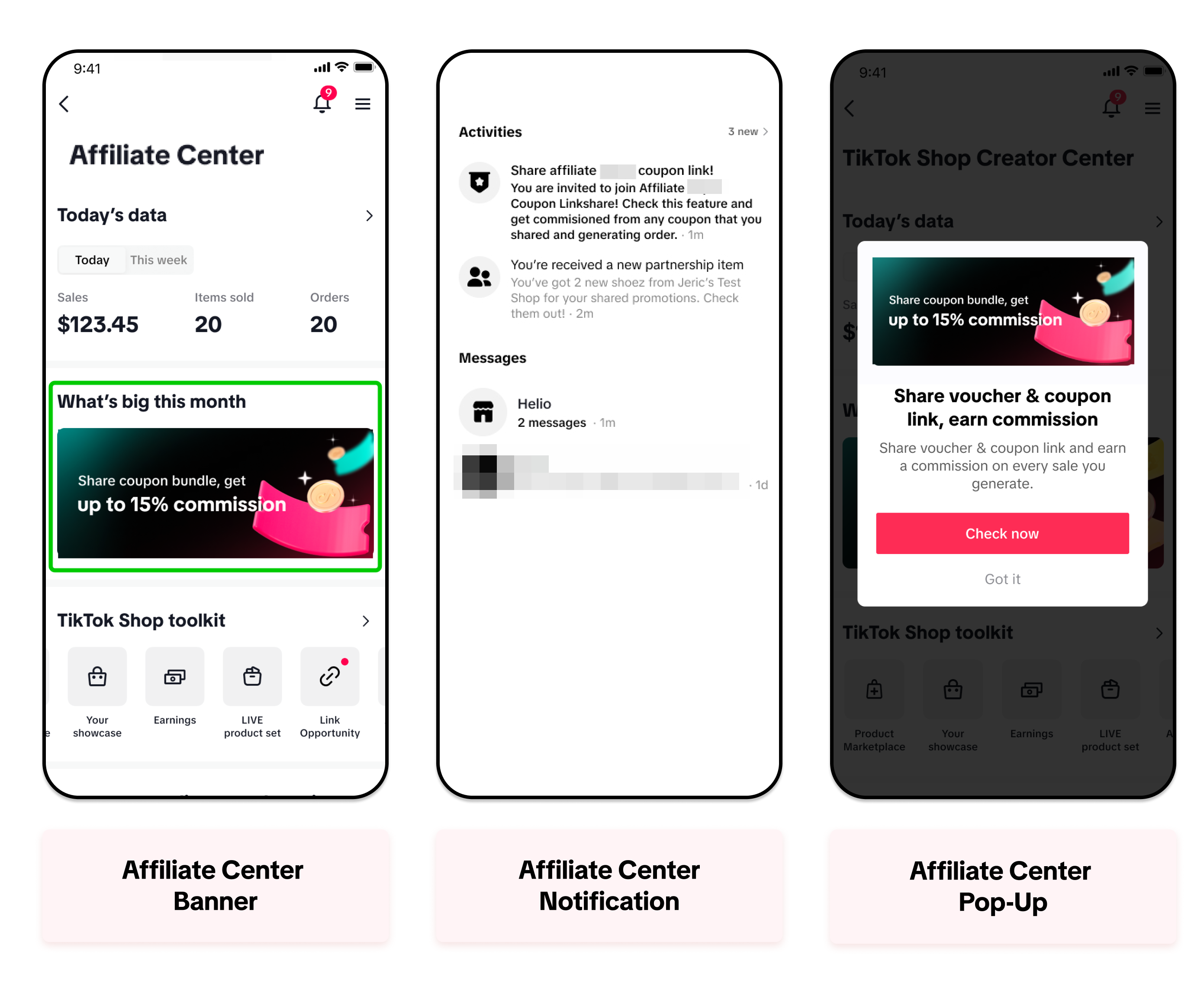
Additionally, Creators can also access the Affiliate Coupon Bundles page through sent emails or any community groups handled by ShopTokopedia.

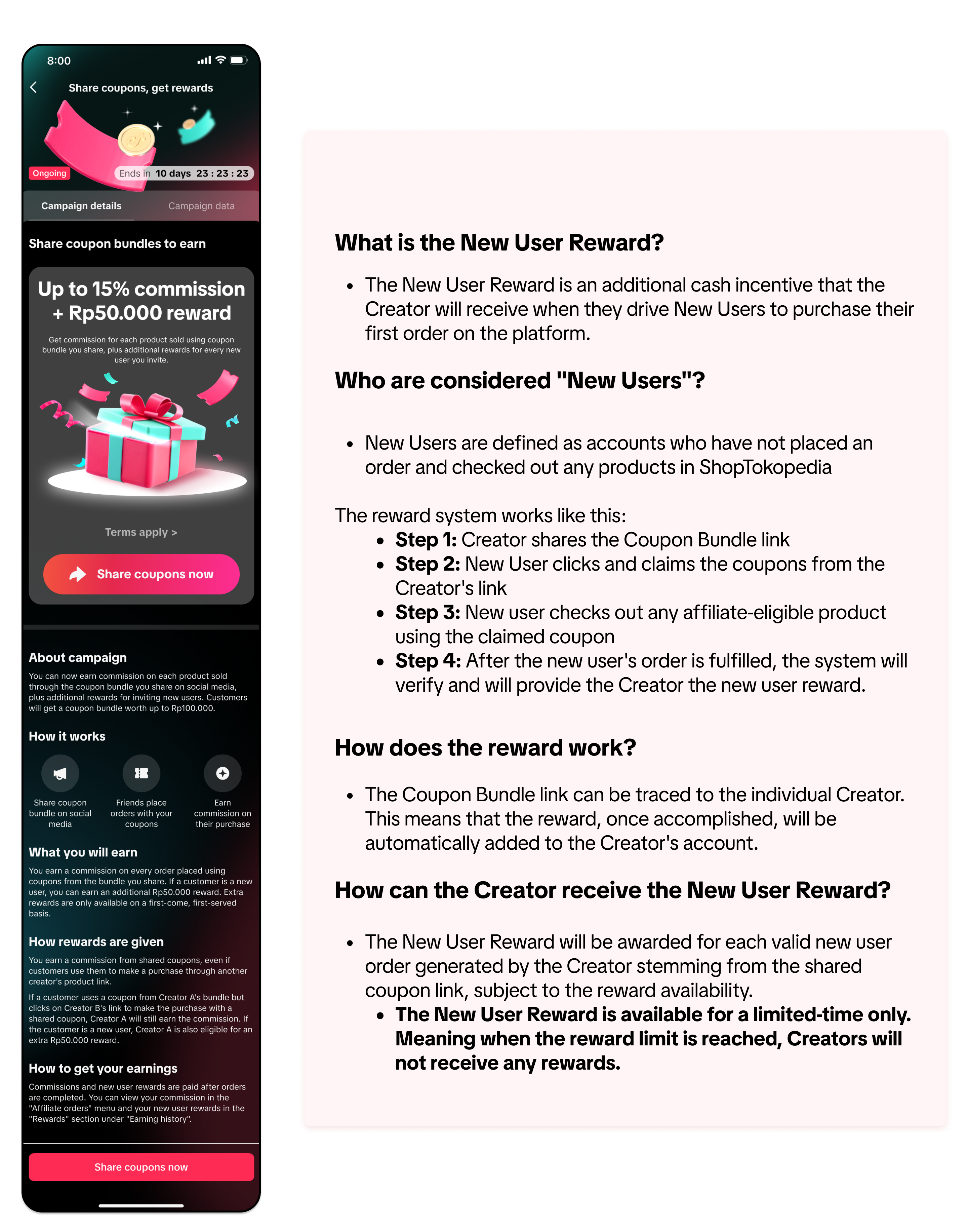
New User Reward for Creators

Buyer Point-of-View
Once the Creator has shared the Coupon Bundle link via social media platforms or direct messages, any Buyer can click and claim the coupons to use for their next purchase.The Creator can earn additional commission when the Buyer uses the coupons for their purchase. The Creator will then receive the commission after the Buyer receives the products and the order is completely fulfilled.

FAQ
- Can Creators receive commission after the Buyers claim the voucher?
- No, the Creator can only receive commission after the Buyer receives their items and fulfills the order.
- Can Creators receive commission from all the products the Buyer checked out with the coupons?
- Creators can only receive commission from affiliate-eligible products.
- Can Official or Marketing Accounts share the Coupon Bundle page and receive commission?
- No. Only Affiliate Creator with Affiliate Link access can use the Coupon Bundle feature and receive commission
- How does the commission work when buyers check out with the vouchers from the Coupon Bundle page?
- The final commission amount will be calculated by the final purchase amount and commission rate of each product
- If the Buyer claims the voucher from Creator A, clicks on Creator B's affiliate link, and checks out with the voucher: Who will receive the commission?
- Creator A will receive the commission
- If the Buyer claims the voucher from Creator A, adds a product from Creator B's LIVE or Short Video, and checks out with the voucher: Who will receive the commission?
- Creator B will receive the commission
You may also be interested in
Using Store Rating to Pick Better Sellers and Improve Buyers…
*The account used in this video is a test account. What is Store Rating and Why Should You Use I…
Where to check my free sample application status?
Please kindly note that creators have two methods to check the application details/modify the addres…
How to add basket in your videos?
How to add basket in your videos? - 8 mins Hi everyone ! In this video we’re going to talk about ho…

Refundable Sample Guide for Creators
This article will guide you on how to use the Refundable Sample feature as an Affiliate Creator. Ref…

Sample Voucher
This article teaches you how to claim your Sample Vouchers and use them as a Creator. What is a S…
Other Methods to Add Products to Your Showcase
In addition to browsing the Product Marketplace for products to promote, you can also add products t…

Free Sample Guide for Creators
This article will teach you everything you need to know about Free Samples. We will cover how to req…
How to Get Samples
Collab Invites
This article will show you how to add products to your TikTok Shop by Tokopedia Showcase after getti…

Product Marketplace
Test: https://activity.tiktok.com/t/ZS23soMmm/ This article will teach you the basics of how to n…