

Creator Growth Center
01/21/2026
What is the New Creator Growth Center?
The new Creator Growth Center is your main hub for growing on the platform! We designed it to give you a clear growth path and make it easier to join tasks and earn rewards.Follow the steps below to use the Growth page and earn rewards.
Open the Growth Center
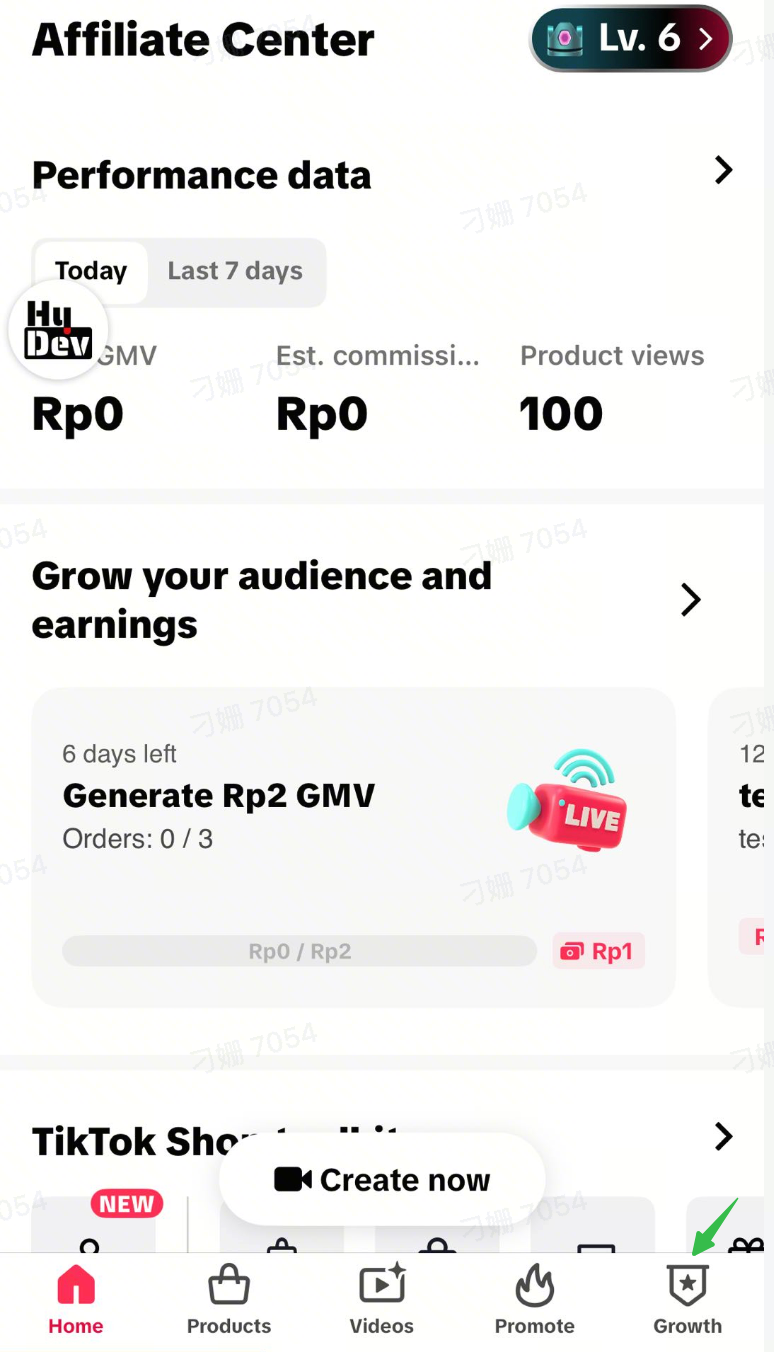
- Open the app and look at the bottom navigation bar.
- Tap “Growth” to enter the Growth Center.
Check Your Level and Benefits
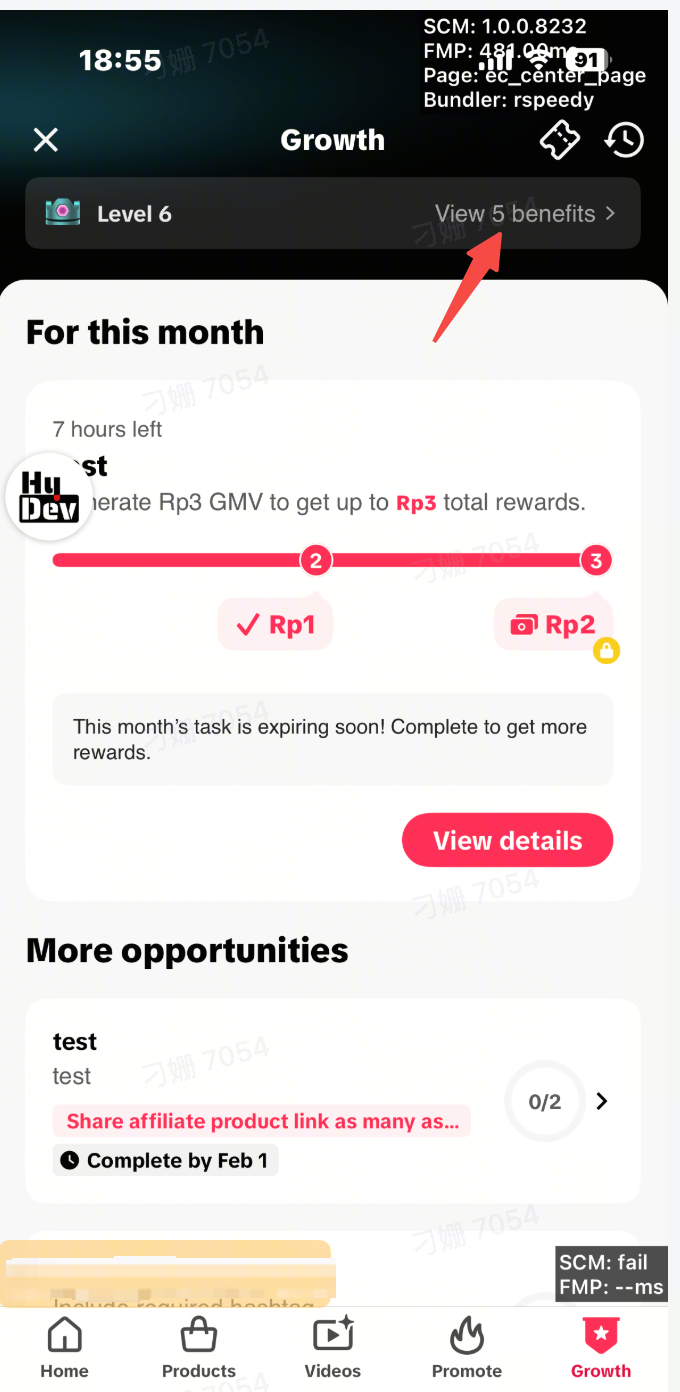
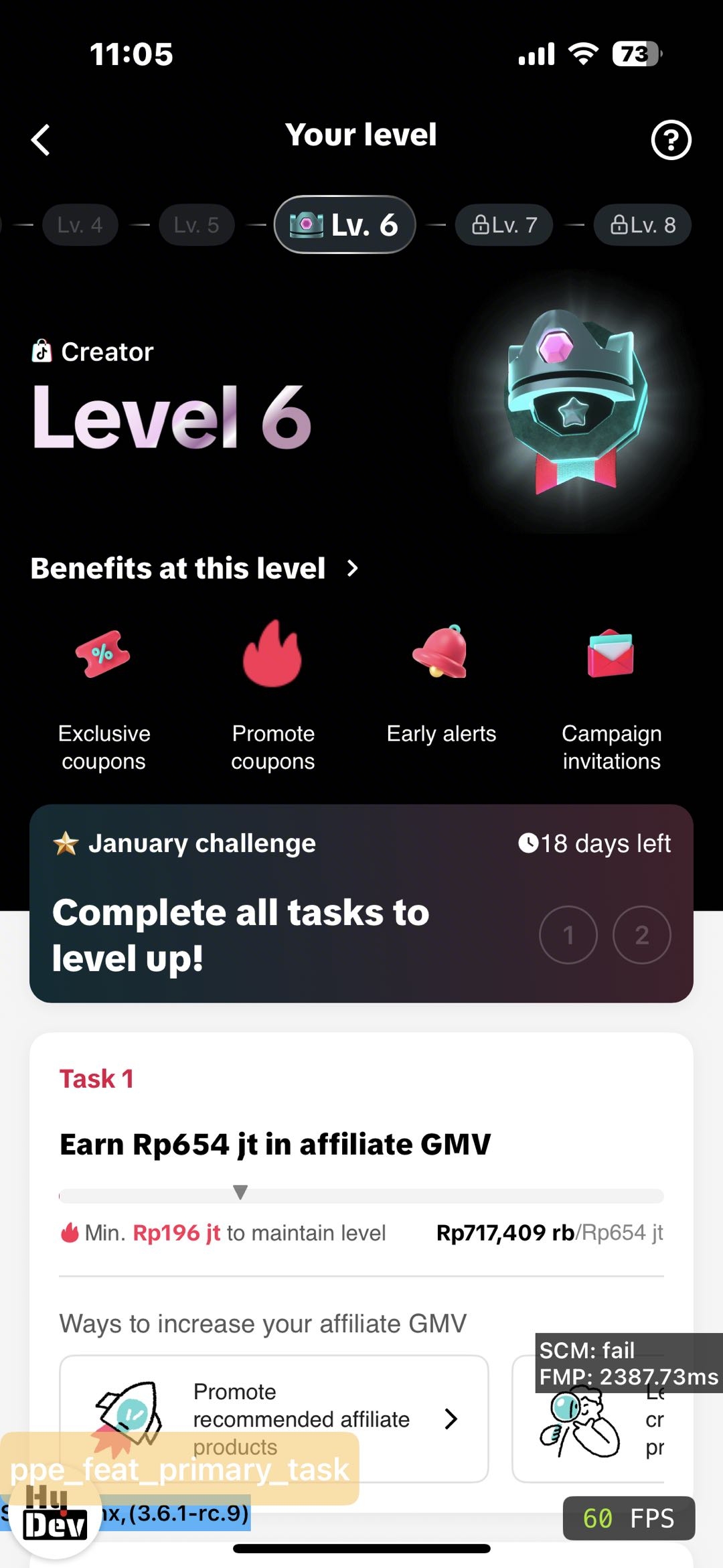
- At the top of the page, you will see your creator level (for example, “Level 6”).
- Tap “View benefits” (e.g. “View 5 benefits”) to see what privileges and rewards are available at your current level.
 |  |
Find Task for This Month and More Opportunities
- On the Growth Center homepage, look for the tasks section:
- At the top, you will see your main tasks for this month.
- These are the key tasks that are most important for your current level and benefits.
- If you want to do extra:
- Scroll or swipe to the side to explore more opportunities.
- These are additional tasks you can take to grow faster or earn extra rewards.
- Pick the tasks that match your content style and capacity.
Complete Your Selected Tasks
For any task you choose (whether it is for this month or from more opportunities), follow the same basic steps:- Find and Start a Task
- Go to the Growth page
- When you find one you like, tap the Start button to enter the challenge details screen.
- Understand the Goals and Rewards
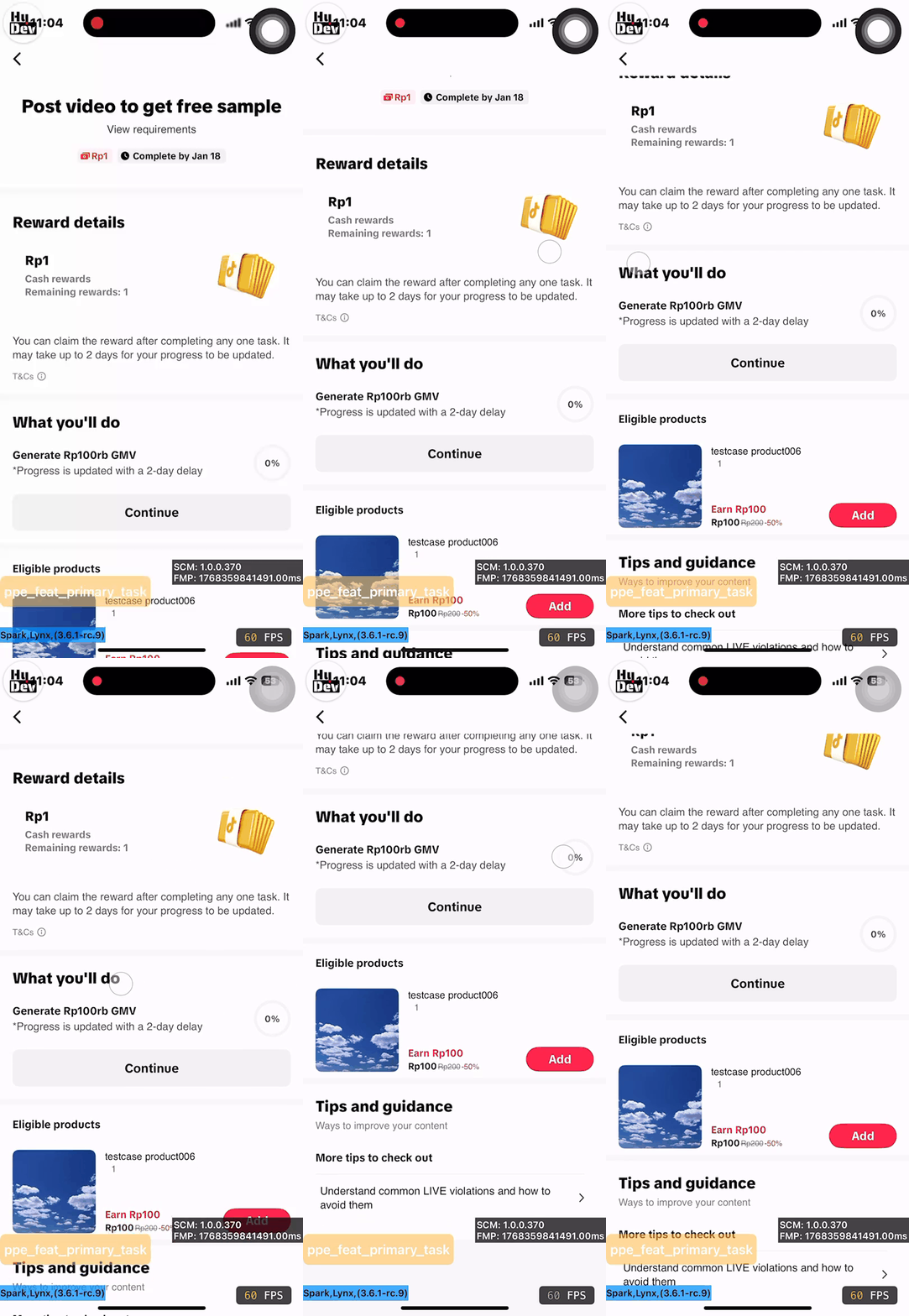
- On the Task detail Page, you'll see your progress (e.g., "Video number: 0 / 3").
- Swipe through the reward tiers to see what you can earn for each step (e.g., for your 1st, 2nd, and 3rd video).
- Pay close attention to the Video GMV requirement listed under each reward. This is the sales target your video must hit to unlock that specific reward.
- Get Prepared: Tips & Product Selection
- Scroll down to the Short video tips section.
- Here, you can choose products that are recommended for the task.
- Tap Add next to a product to link it to your content.
- Review the Guidelines for Success
- Further down, read the guidelines. These are critical for making sure your content performs well.
- Quality Checkpoint: Your content should aim for some metrics
- Post Your Content
- Once you're ready, scroll up and tap the red Post button.
- A pop-up will ask, "How do you want to promote products?"
- Choose whether you want to create a short video or go LIVE. Follow the on-screen steps to publish your content with the product attached.
- Tips and Guidance
- You can check the recomandeds content to improve your content
Track Your Progress and Rewards
- Go back to Growth Center regularly to:
- Check your task progress (how much you have already completed).
- See whether you have met the requirements for rewards.
- After you complete a task:
- Follow the task rules for claiming rewards (if there is a claim button or settlement time).
- If progress or rewards do not update as expected, review the requirements again to see if anything was missed.
By following these steps, you can use Growth Center to clearly see your level and benefits, complete your main tasks for this month, and take more opportunities to grow your account and unlock more rewards.
FAQ
- Why can't I see my reward after finishing a task?
- First, please check the reward type and its estimated arrival time. For example, cash rewards take about 2 days to appear on your earnings page. Also, because of the data delay, the system might still be confirming your completion status. If you still don’t see it after 3 days, please contact your creator manager.
- Why are all rewards claimed?
- Tasks are popular, so try to join them early in the month before the rewards run out.
- What types of tasks will I need to complete?
- You’ll need to complete single tasks, composite tasks, and progressive tasks.Single Task
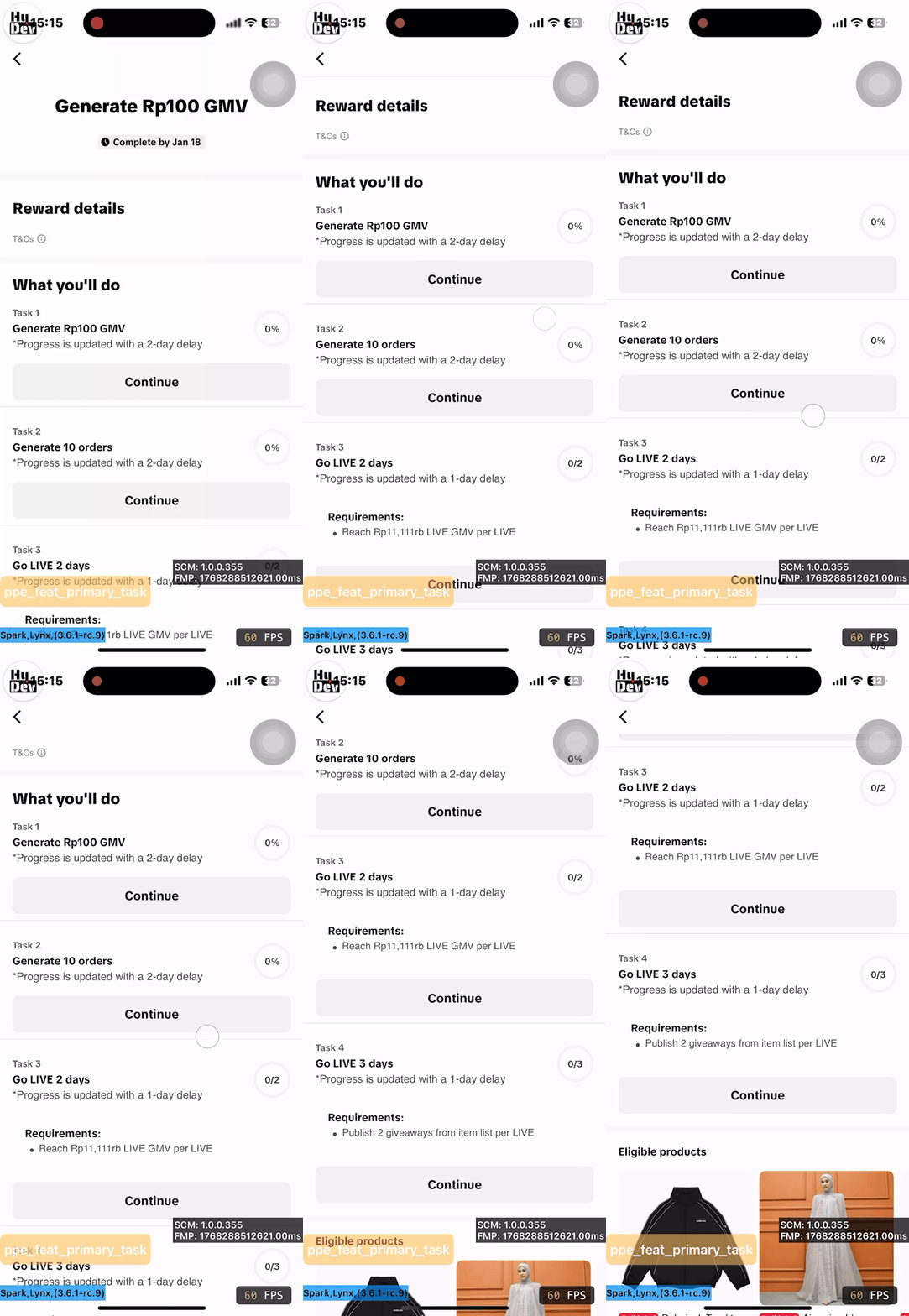
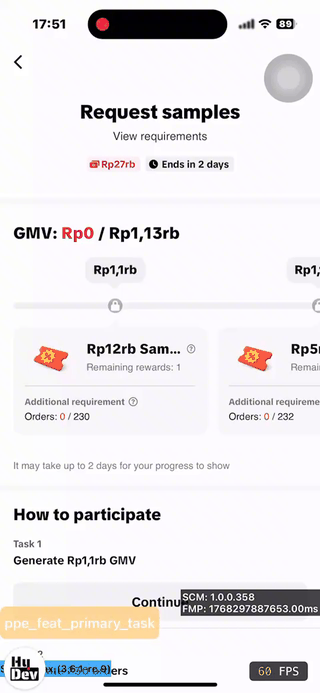 Composite TasksProgressive Tasks
- You’ll need to complete single tasks, composite tasks, and progressive tasks.
You may also be interested in
- 1 lesson
🕋 Nostalgia Bareng Euforia Ramadan!
🕋 Nostalgia Bareng Euforia Ramadan!
- 4 lessons
🕌 Mulai Perjalanan Creator Menuju Kemenangan di Ramadan Eks…
🕌 Mulai Perjalanan Creator Menuju Kemenangan di Ramadan Ekstra Seru Besar-Besaran 2026!
Tokopedia product-promoting video operation SOP (Standard Op…
Hello everyone. In this lesson, we are going to learn the step by step SOP of operating product-prom…
Common Violation Methods
Hello everyone. In this lesson we are going to learn Common Violation Methods
Violation Appeal Methods and Procedures Transcription
Welcome to the TikTok Learning Center! In the previous three lessons, we analyzed the various violat…
3 Cara Menemukan Produk Trending Saat Ramadan
Test: Kerjakan Test ini untuk bisa bergabung di group START! Setidaknya ada 3 ciri produk yang pal…

4 Langkah Memaksimalkan Penjualan di Bulan Ramadan
Test: Kerjakan Test ini untuk bisa bergabung di group START! Nggak bakal ketinggalan cuan di bulan…
Sexual Content
Content must not feature sexually suggestive actions, language, or behaviour when promoting products…
Seller-Creator Unbinding Criteria
What are the Seller-Creator Unbinding Criteria? These criteria determine whether a TikTok Shop offic…