

Tax Information Required for TikTok Shop Creators
03/10/2026
In compliance with Indonesian regulatory requirements, TikTok Shop by Tokopedia creators are required to provide tax information during onboarding and at the commission withdrawal stage.
Starting 30 January 2026, some creators will be able to submit their tax information. Tax submission will be available to all creators by 30 April 2026.
Indonesian creators must provide:
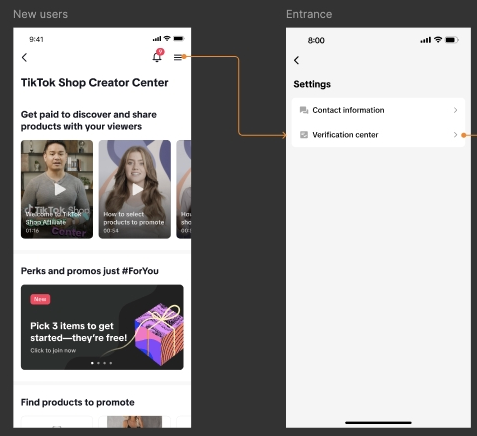
Alternatively, you may also proactively submit this information by taking the following steps:
 If you have any questions or encounter issues with submission, you can get support in the TikTok app:
TikTok Creator Center > Menu (top right) > Verification Center.
Starting 30 January 2026, some creators will be able to submit their tax information. Tax submission will be available to all creators by 30 April 2026.
Required Tax Information
TikTok Shop by Tokopedia creators are required to submit tax information based on their nationality.Indonesian creators must provide:
- KTP (Indonesian ID)
- VAT code, if available
- Here is a sample of where you can find your VAT code
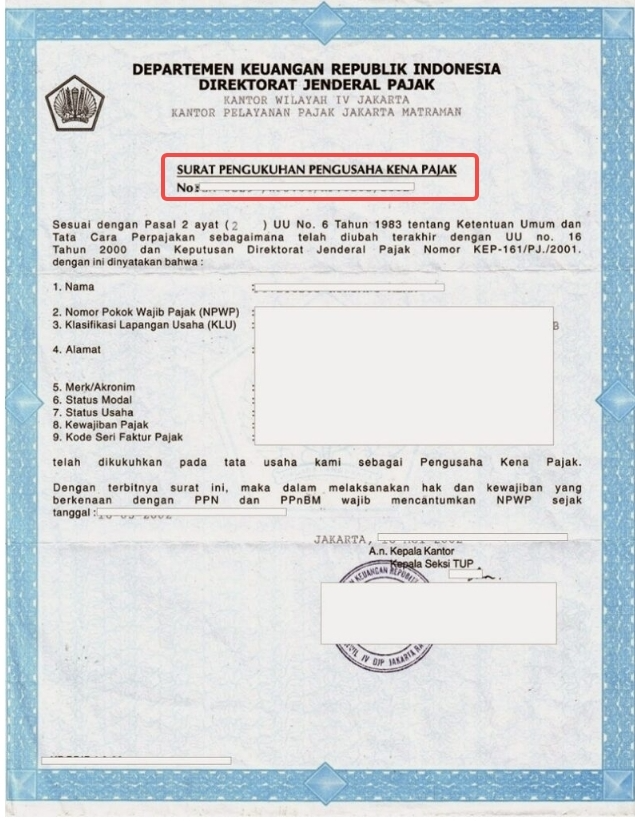
- Here is a sample of where you can find your VAT code
- Passport
- NPWP
How to Submit Your Tax Information
You may be asked to submit your tax information during onboarding or when attempting to withdraw your commission.Alternatively, you may also proactively submit this information by taking the following steps:
- Access TikTok Shop Creator Centre > Settings > Verification Center
- Go to TikTok Studio
- Under Profile, click on TikTok Shop for Creator
- Scroll to the bottom and tap on Help Center
- Start a chat or submit a help ticket
Frequently Asked Questions (FAQs)
How can I check my tax information submission status?
Go to TikTok Shop Creator Centre > Settings > Verification Center to view your status.
What if I submitted the wrong Tax Code?
You can update your details anytime in Creator Verification Center:TikTok Creator Center > Menu (top right) > Verification Center.