

TikTok Shop by Tokopedia Content Posting Limit
03/05/2026
What is a TikTok Shop by Tokopedia Content Posting Limit (CPL)?
A TikTok Shop by Tokopedia Content Posting Limit (CPL) limits the number of shoppable videos or LIVE streams you can publish within a set period. Depending on the violation, the posting limit may apply to videos, LIVE streams, or both.This limit may be applied when an account repeatedly posts low-quality content, such as content that is non-interactive or does not clearly promote the product.
If you post content after reaching the limit:
- Your video or LIVE will still be published
- Product links will be hidden
These limits help keep TikTok Shop by Tokopedia content useful, engaging, and high quality for viewers.
When are posting limits applied?
When there are too many non-interactive or misleading videos
- Non-interactive videos are low-quality videos that lack meaningful on-screen activity or real-time engagement with viewers.
- Misleading videos include content that may confuse or misinform viewers, such as:
- Inconsistent product promotion: videos that do not match the linked product listing (e.g. different product shown, incorrect price, brand, materials, or features).
- Misleading functionality and effect: videos that exaggerate product performance, show unrealistic results, or use edited or deceptive visuals that misrepresent how the product works.
- Sympathy-based promotions: videos that use emotional pressure, hardship narratives, or guilt-based messaging to influence purchase decisions instead of providing accurate product information.
- Posting limits may apply to AI-generated content (AIGC) if it includes any of the violations listed above.
- You will receive a violation ticket on your Account Health page indicating that a Content Posting Limit has been applied to your account.
- You can post up to 7 TikTok Shop by Tokopedia videos in the next 7 days.
- Once the limit is reached, additional TikTok Shop by Tokopedia videos will not show product links.
- For this violation, the limit only applies to TikTok Shop by Tokopedia videos with product links.
- LIVE streams are not affected and can be posted as usual.
- All other non-shoppable content can be posted as usual.
What happens once you hit the posting limit?
If you reach your content posting limit:- Depending on the scenario, any newly posted shoppable videos and/or LIVEs will still be published, but their product anchor links will be hidden.
- This will apply for the rest of the posting limit period.
Example: How the posting limit works
Violation: Posted 5 or more non-interactive or misleading videos in the last 7 daysPosting limit period: 1 March to 7 March (7 days)
Posting limit: 7 TikTok Shop by Tokopedia videos
- The first 7 TikTok Shop by Tokopedia videos will be published as usual, with product links
- Any additional TikTok Shop by Tokopedia videos posted during this period will be published without product links
How to check for affected content
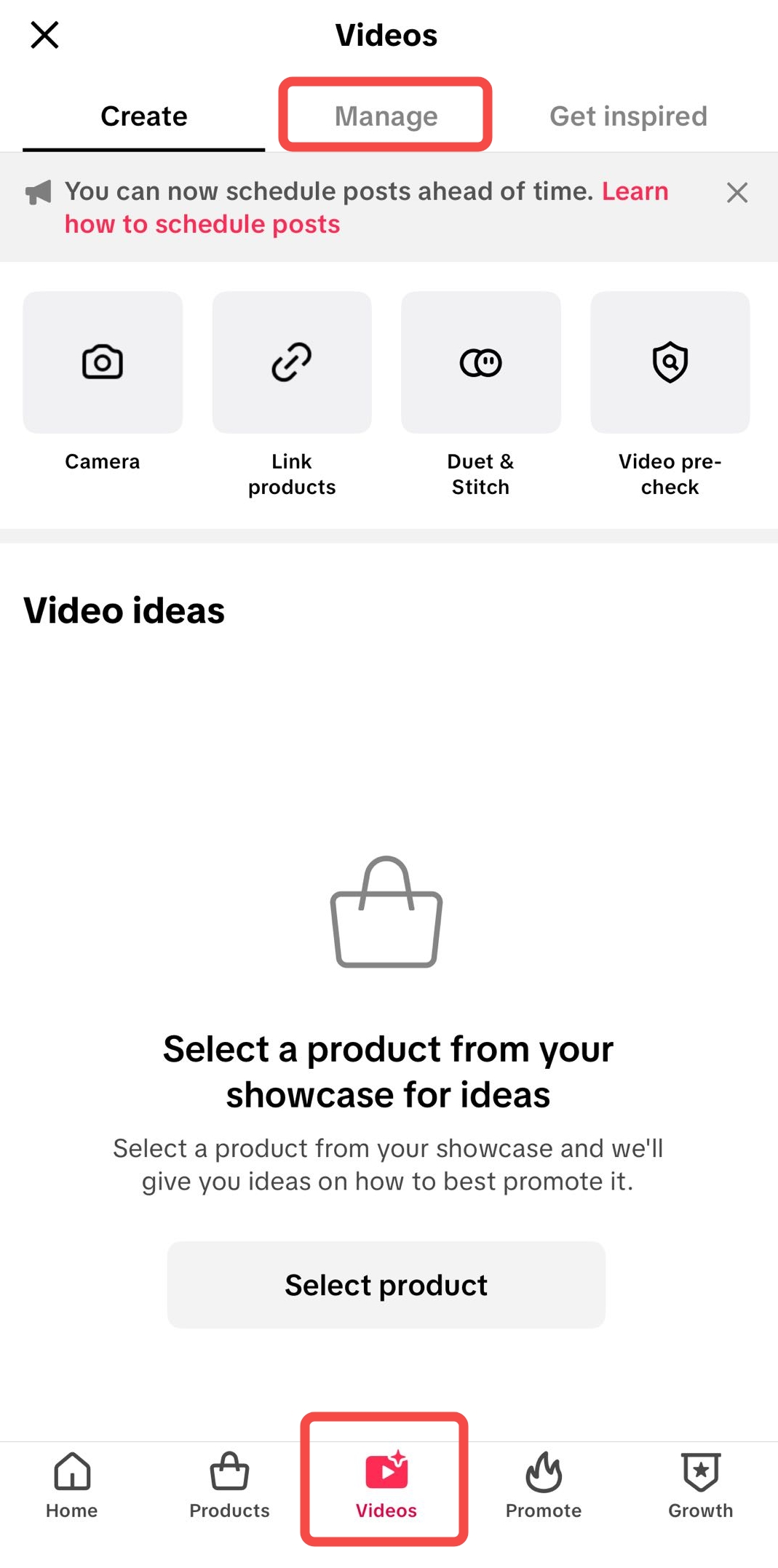
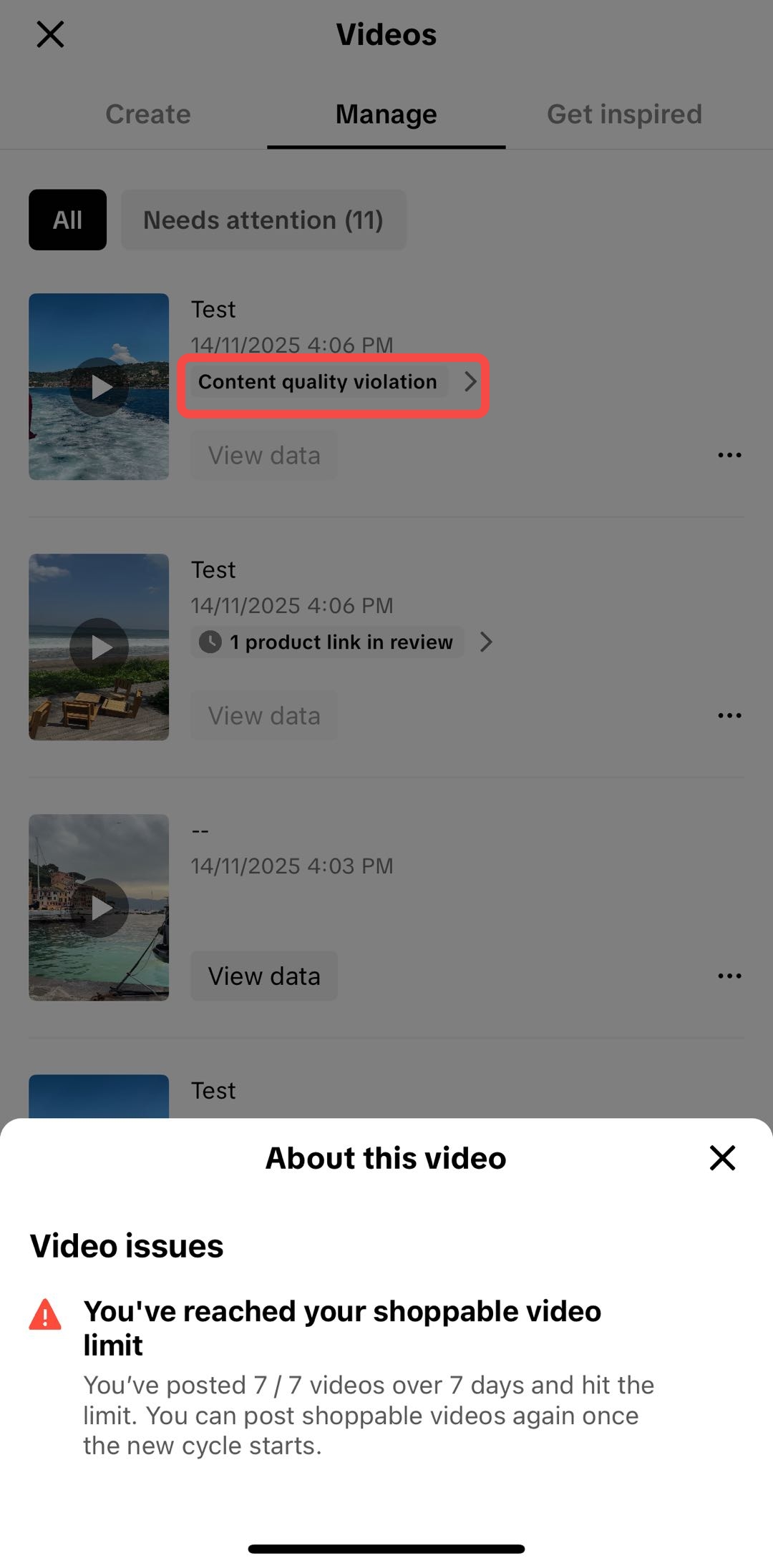
- Go to Videos > Manage.
- If your account has reached the content posting limit, a "Content Quality Violation" notice will appear. Tap it to see a pop-up explaining that your content posting quota has been reached.
 |  |
Frequently Asked Questions (FAQs)
How will I know if my account has been limited?
You will receive a violation notice indicating that your account's shoppable content posting has been limited.
How can I check my non-interactive content violations?
- Go to Account Health > Account Standing > See all violations
- Look for non-interactive content, inappropriate promotional behavior, inconsistent product promotion, misleading product claims violations
How can I avoid the content posting limit?
Focus on creating product-focused content that clearly helps viewers understand what you're promoting.
- Make sure most of your content clearly features the product
- Show the product on-screen and explain it as you present it
- Stay present and interact with viewers in real time, especially during livestreams
- Demonstrate product features using different angles or close-ups
- Avoid using still images or text-only slides
- Do not rely on rotating displays to introduce products
- Avoid looping or repeating the same visuals without meaningful interaction
How can I appeal a content posting limit?
If you believe a posting limit was applied incorrectly:
- Go to Account Health > Account Standing > See all violations
- Find the Content Posting Limit violation record
- Tap Appeal and follow the instructions