

Maximize Mega Campaign Performance with LIVE GMV Max Mission
02/10/2026
To help sellers maximize livestream performance during mega campaigns, we’re introducing the LIVE GMV Max Mission, now integrated with Auto-creation GMV Max.
By joining this mission, eligible sellers can receive exclusive campaign LIVE vouchers. To participate, you’ll need an ads account with a linked valid payment method. During the campaign, a LIVE GMV Max Ads campaign will either be created by you or automatically set up for you; making it easier to leverage ads, increase visibility, and drive more sales through livestreaming during key promotional moments.
By joining this mission, eligible sellers can receive exclusive campaign LIVE vouchers. To participate, you’ll need an ads account with a linked valid payment method. During the campaign, a LIVE GMV Max Ads campaign will either be created by you or automatically set up for you; making it easier to leverage ads, increase visibility, and drive more sales through livestreaming during key promotional moments.
How does it work?
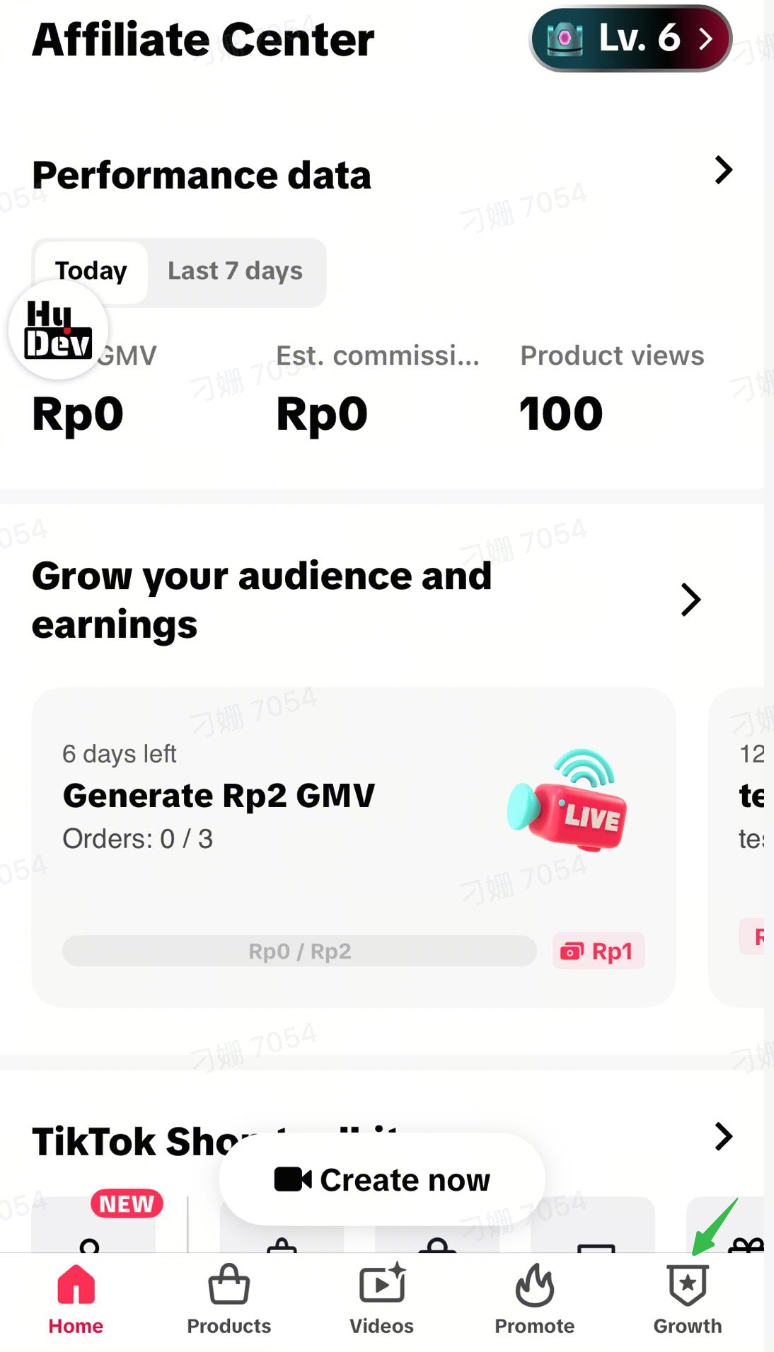
Claim a Mega Campaign LIVE Mission on Growth Center
Click to know more about this on Shop Academy (Creator Growth Center)
|
|
|
 | 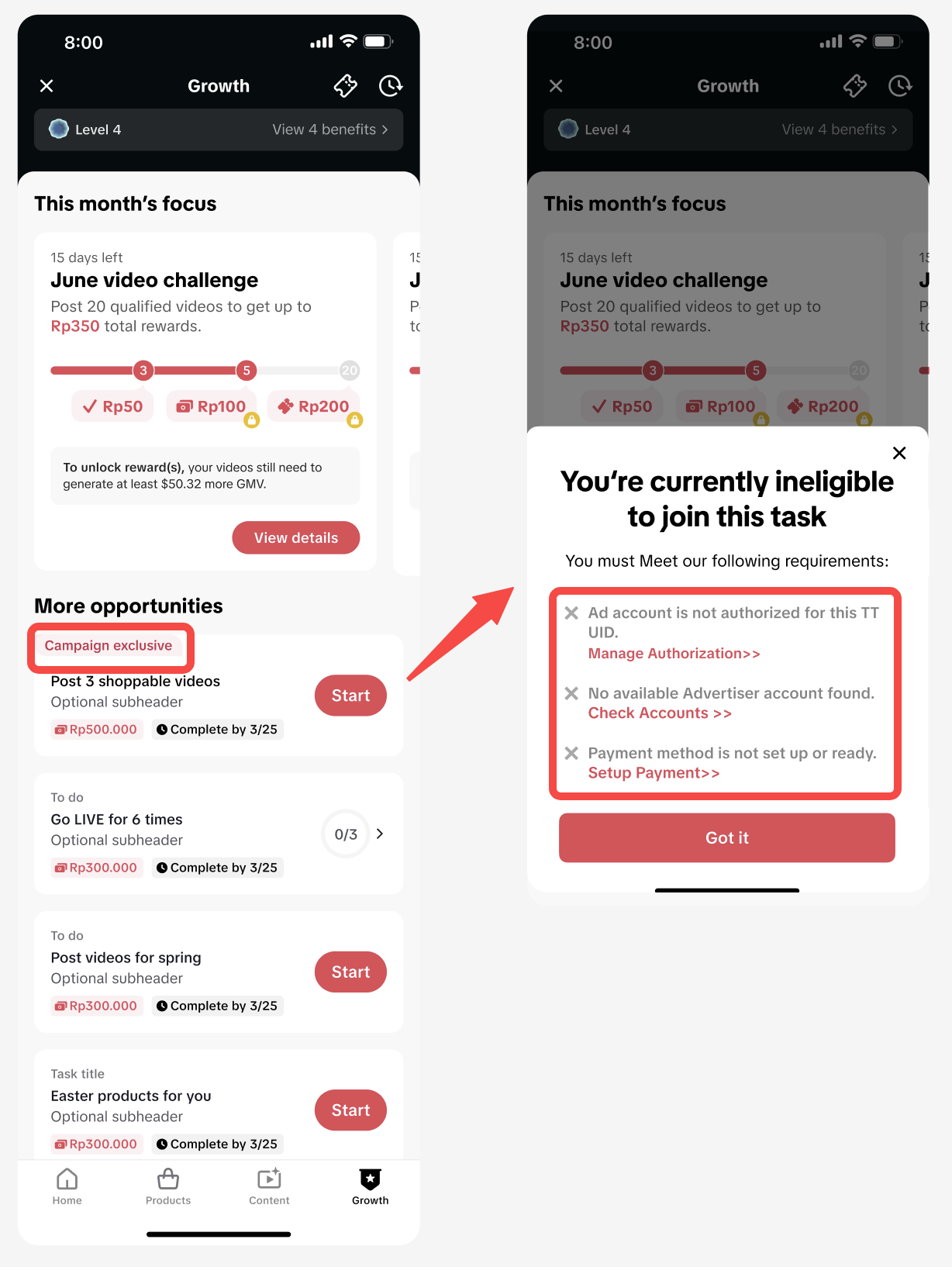 |
Got blocked? Several things to do to get successfully registered
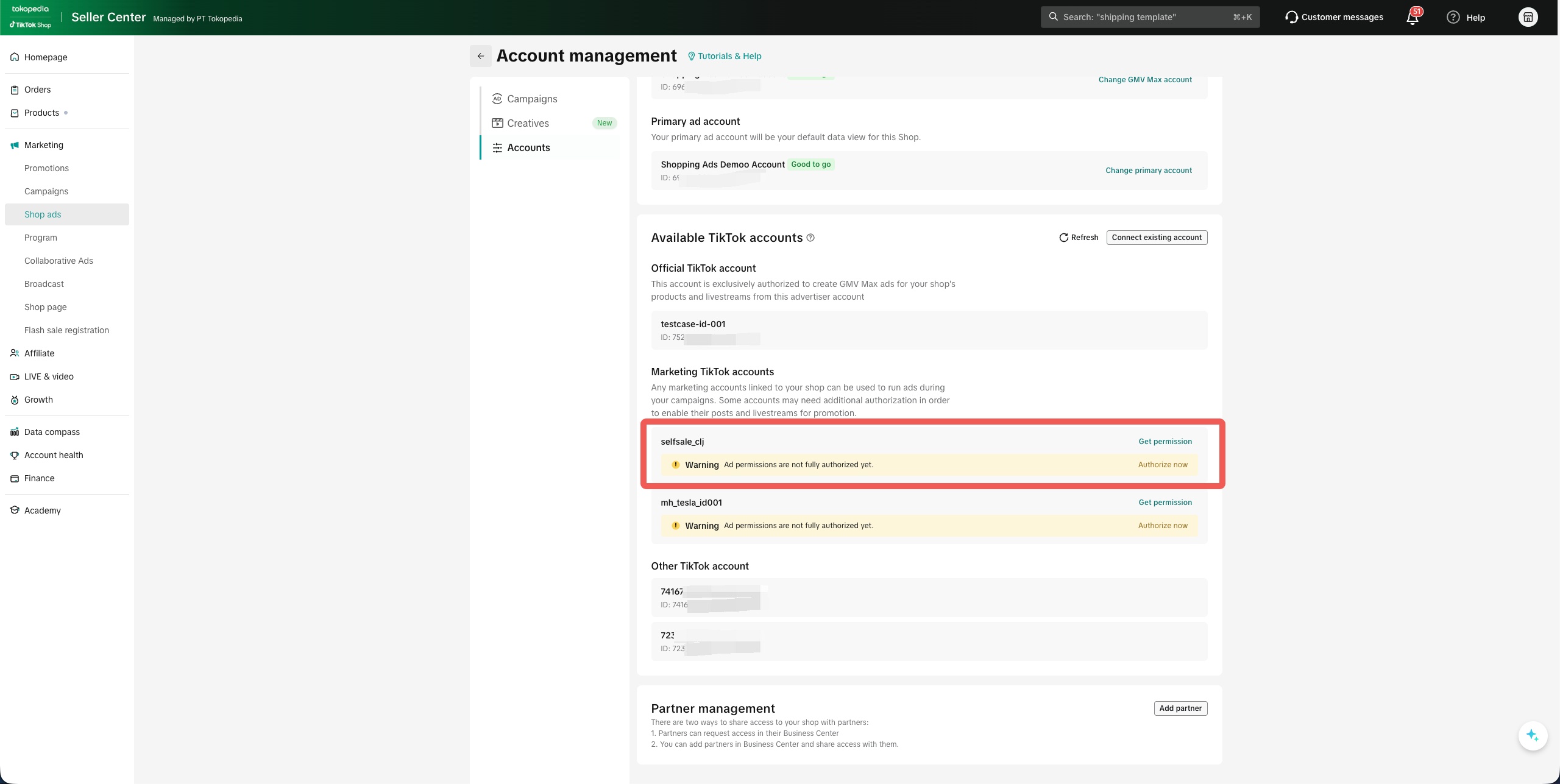
There are 3 key scenarios that will directly block you from signing up for the mission:Scenario 1. Advertising permissions have not been granted
- Please visit Seller Center via PC or Browser (link) → Shop Ads → Account Management
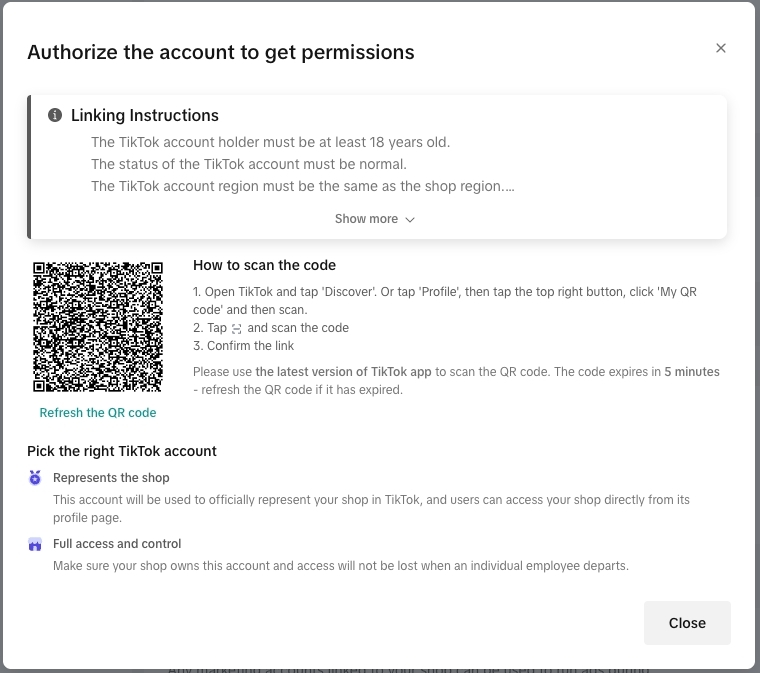
- Click "Authorize now", and scan the code to finish the advertising authorization
- Go back to the affiliate center to finish the mission sign up.
Scenario 2. No valid advertising account exists
- Please visit Seller Center via PC or Browser (link) → Shop Ads → Account Management
- Click "Add account" or "Connect existing account" to connect with a valid advertising account
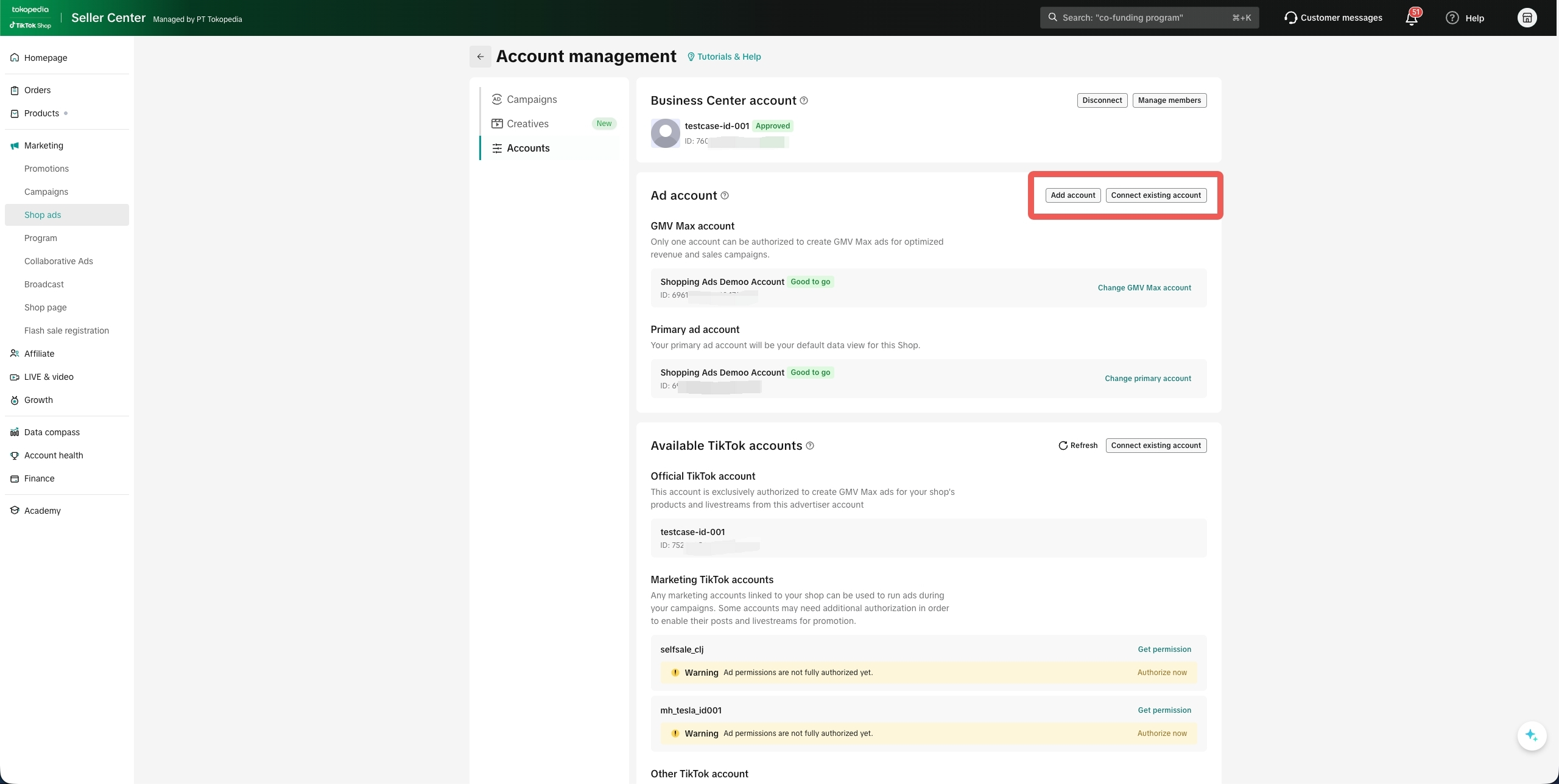
Scenario 3. Payment setup is not yet completed
- Please visit Seller Center via PC or Browser (link) → Shop Ads → Account Management
- Finish billing info setup as instructed
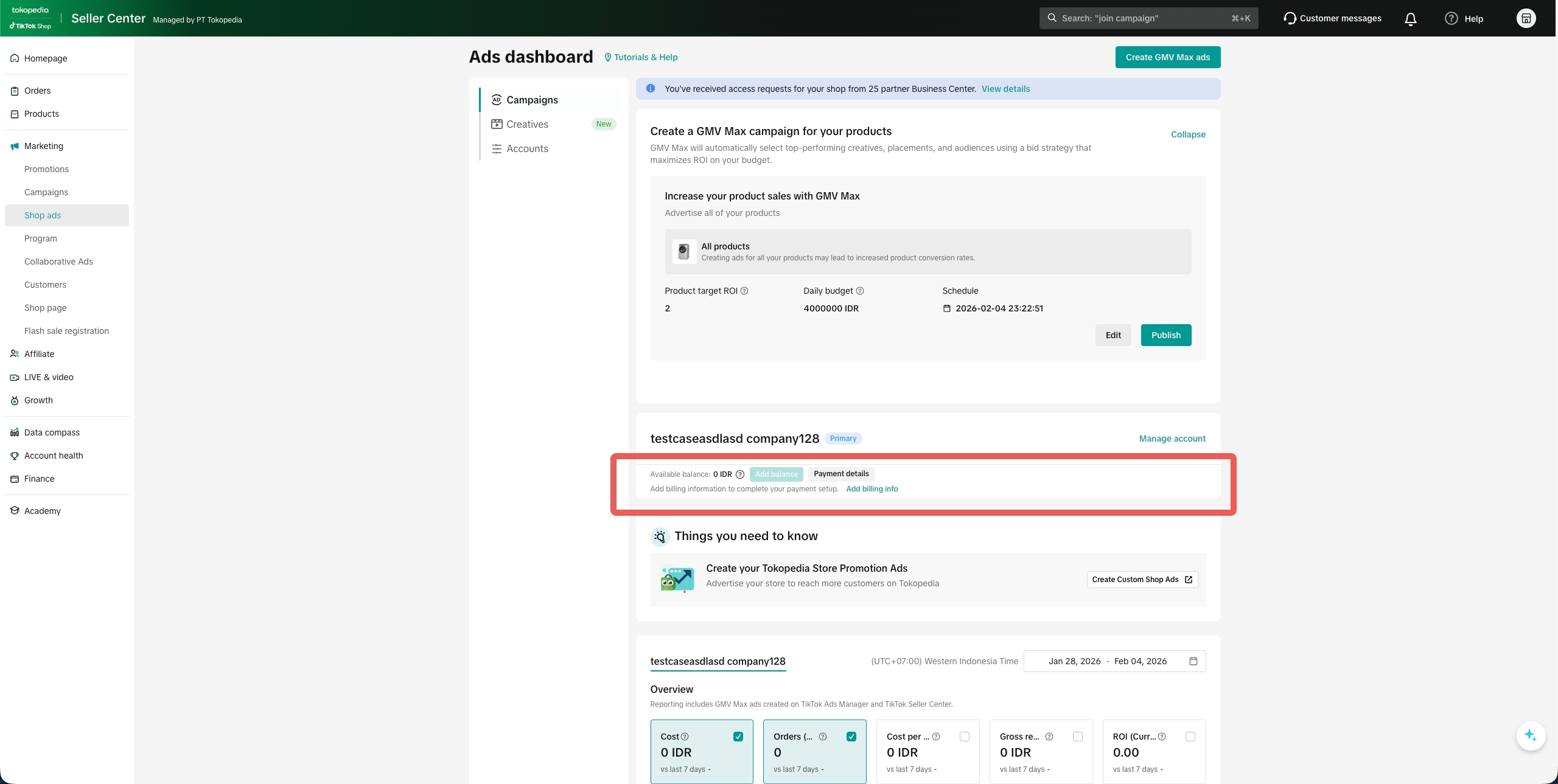
Create your LIVE GMV Max campaign
Click for step-by-step guidance on how to create a Live GMV Max campaign (LIVE GMV Max)Auto-created LIVE GMV Max campaigns Timeline, Campaign Settings and Reporting
- Ads auto creation timeline
For example: If a creator registers for the mission at 2 a.m. on February 9th with no active LIVE GMV Max campaign running, the system will automatically create a LIVE GMV Max campaign for them, which is scheduled to go live at 8a.m. on February 10th.
- Ads auto creation setting
| Settings | Auto creation logic |
| Number of Campaign to be created | 1 |
| Campaign Effective Time | Default to go live at 8 a.m. T+1, in your advertiser’s local timezone |
| Campaign target ROI | Default highest level of the three-tiered ROI recommendation or ROI = 2 |
| Campaign budget | Automatic suggestion based on historical behaviour. |
| Promotion Day mode | Mode: default onROI decreases 10%,Autobudget on: with 50% budget increase once |
| Key LIVE mode | default off |
| AIGC remix | default on for official account |
| Creative management | Default automatic capture: All videos under the TikTok account, supporting Select, Prefer, and Upload features |
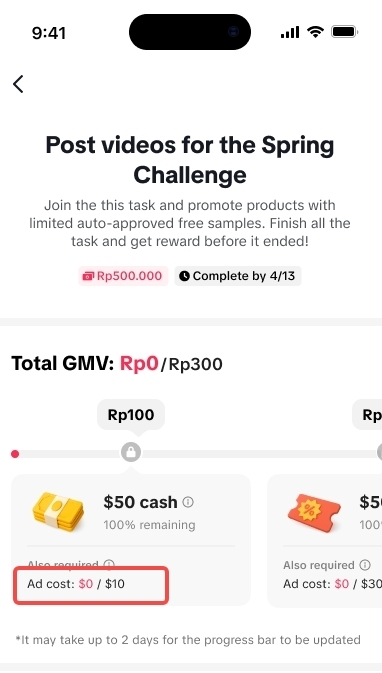
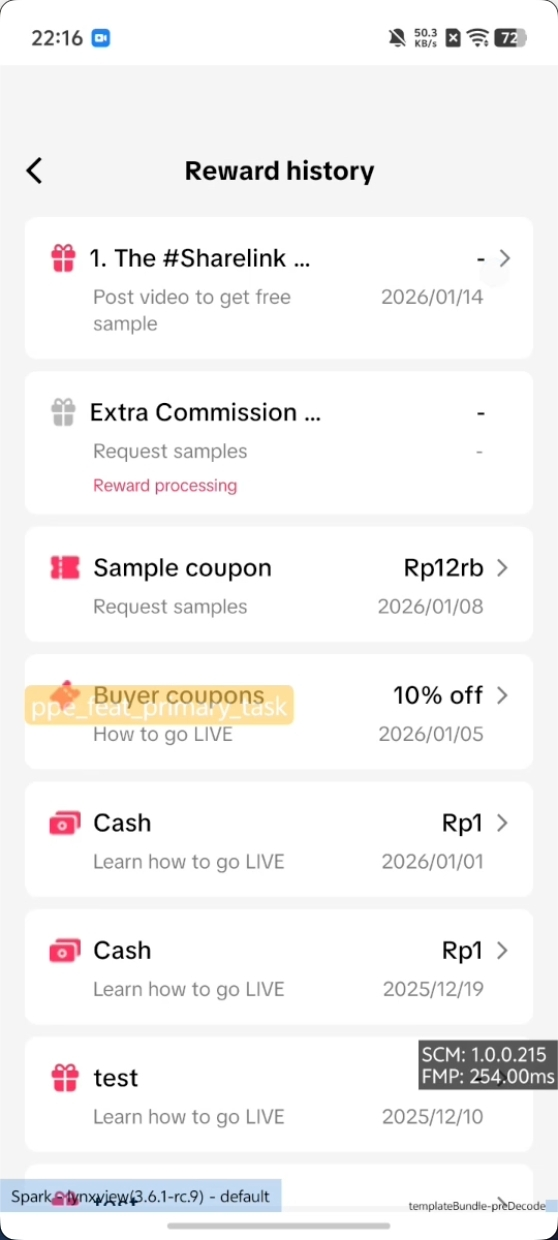
Automatically receive rewards by achieving all requirements
|  |
|  |
FAQ
No | Question | Answer |
1 | What if I don’t have an Ads account set up? | Without a GMV Max Ads account, you cannot complete LIVE mission registration. Please create or authorize your GMV Max account before proceeding, or we will redirect you to set up a new account. |
2 | What happens if my liveroom does not have LIVE GMV Max Ads or if I withdraw my liveroom from LIVE GMV Max Ads? | The platform will not allow you to claim your rewards even after you complete your GMV and duration goals, until you start to have ads spending with LIVE GMV Max. |
3 | Are ads created right after registration? | Yes, registration enables authorization, and since the mission activates during campaign time, the system will directly trigger auto-creation directly if there is no active LIVE GMV Max campaign. Additionally, the start time for all campaigns will be set to 8 a.m. T+1 (next day of your registration). |
4 | Can I opt out of automatic LIVE GMV Max Ads creation? | Yes. You can withdraw your liveroom at any time on the Shop Ads page and disable the campaign. However, you might not be eligible for rewards claiming during Ramadan.Please take note that if you have manually withdrawn your liverooms, the system will not auto-create again, and retry is not supported. You’ll need to manually create a LIVE GMV Max campaign. |
5 | What happens if automatic LIVE GMV Max Ads campaign creation fails? | If initial LIVE GMV Max ad auto creation fails, the system will retry automatic creation periodically during the day. |
6 | What if LIVE GMV Max was created but later stopped (e.g., ad authorization canceled)? | The system will not auto-create again, and retry is not supported. You’ll need to manually create a LIVE GMV Max campaign. |
7 | What happens when the mega campaign ends? | The LIVE GMV Max Ads created by the system will not automatically stop. You will need to manually manage or terminate them on the ads side. |
8 | Can I create a LIVE GMV Max campaign manually instead of using the auto-creation feature? | Yes. If the seller creates a LIVE GMV Max campaign prior to mission registration, the system will not automatically create a LIVE GMV Max campaign. If the seller does not have any active LIVE GMV Max campaign prior to mission registration and the system automatically creates one, the seller may still modify the settings or turn the campaign on or off. |
9 | Do I need to have an advertising account to use this feature? | Yes, you must have a GMV Max account to be eligible to use the LIVE GMV Max feature. Please refer to the [No valid advertising account exists] part of this document. |
10 | Who funds the auto-created ads? | Sellers fully fund these ads; the platform does not cover costs. |
11 | What is the scope of automation? | Automation only applies to sellers who claim the LIVE Mission GMV Max. A valid seller ad account or agency authorization is required. |
12 | How is the ROI recommended? | ROI target recommendation is benchmarked by country, industry, and timing (normal vs. campaign) against similar authors in the market. |
13 | What can sellers modify after ads are created? | You can adjust ROI, budget, and campaign active time in TikTok Ads Manager or Shop Ads page in seller center. |
14 | What happens to the ads when I'm not going LIVE during the ads campaign period? | The campaign will only incur spend once your LIVE room goes live. |
15 | How can I opt out of this mission? | You can opt out of the auto-created Live GMV Max campaign via Seller Center or TikTok Ads Manager at any time. |