

[CPAS] CPAS Ad Sales Metrics You Need to Pay Attention
07/11/2025
Hi, Seller! Have you started advertising using Facebook CPAS? If not, try reading more about it [here]. But if you have, let’s take a look at the following explanation of ad metrics so you can plan your marketing strategy more effectively!
You can monitor the performance of your ads directly from the Facebook Ads Dashboard.
Within the dashboard, there are several metrics you need to track to measure the success of your sales ads.
The metrics we recommend you keep an eye on include: Impressions, Outbound clicks, Purchases conversion value for shared items only, Purchases ROAS for shared items only, Add to cart with shared items, Purchases with shared items
Don’t forget to adjust the ad date range to match your campaign period so the report aligns properly.
If you want to understand your sales results, focus on the metrics related to "shared items only"—
because these metrics only reflect results from products within the catalog you used. Here's a more detailed explanation:
If you monitor these metrics consistently, it will be much easier to evaluate your performance and plan your upcoming campaigns.
📘 Don’t forget to download the guidebook below for more complete information, Seller!👉 Download Guidebook
You can monitor the performance of your ads directly from the Facebook Ads Dashboard.
Within the dashboard, there are several metrics you need to track to measure the success of your sales ads.
The metrics we recommend you keep an eye on include: Impressions, Outbound clicks, Purchases conversion value for shared items only, Purchases ROAS for shared items only, Add to cart with shared items, Purchases with shared items
Most of these metrics are not automatically shown on the Meta dashboard, so you’ll need to manually add the columns based on your needs.
How to Display Metrics on the Meta Dashboard
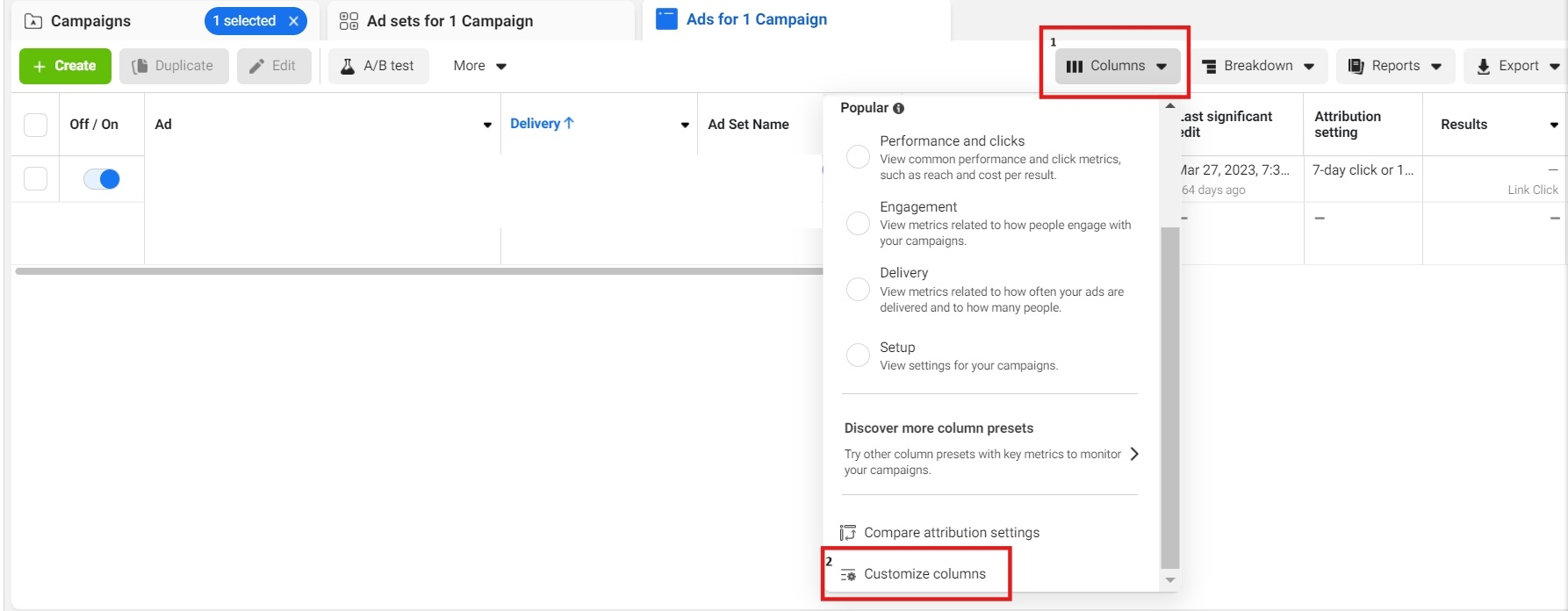
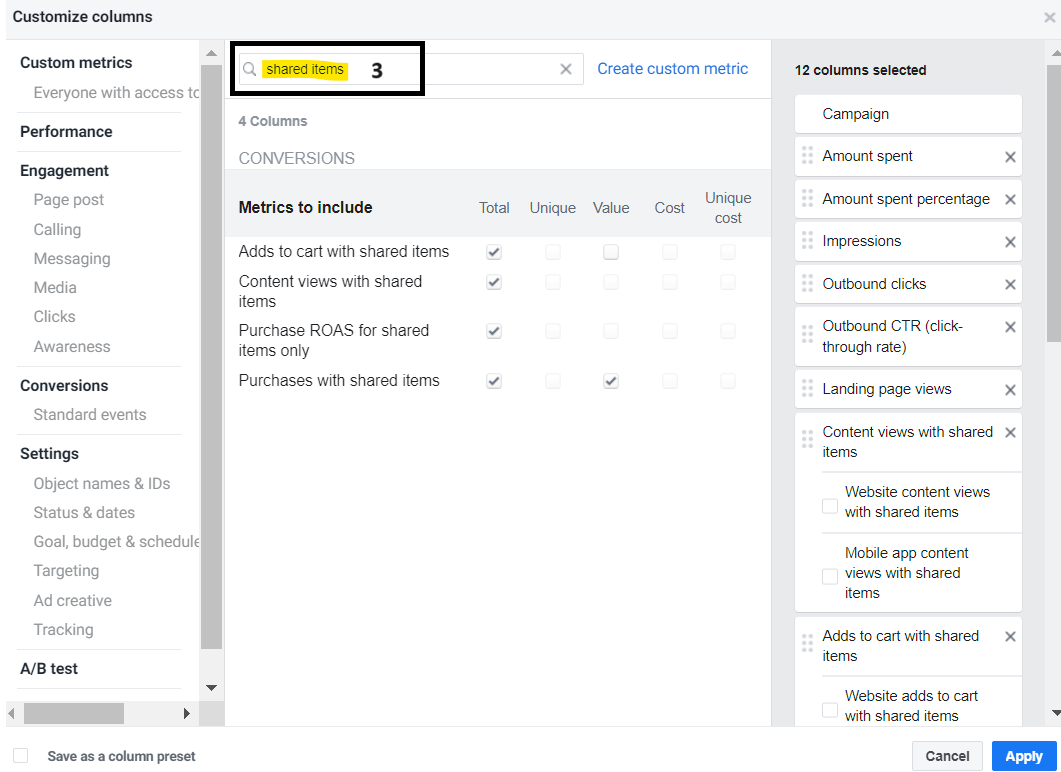
It’s easy! Simply go to your Meta dashboard, adjust the columns, type in the metric name in the search field, then select both total and value for each metric.Don’t forget to adjust the ad date range to match your campaign period so the report aligns properly.
To understand your ad reach results, the two most important metrics you should look at are:
- Impressions
The number of times your ad was shown on a screen.
- Outbound Clicks
The number of clicks your ad received when a user clicked it and was directed to a page outside of Meta’s platforms.
If you want to understand your sales results, focus on the metrics related to "shared items only"—
because these metrics only reflect results from products within the catalog you used. Here's a more detailed explanation:
- Purchases conversion value for shared items only
The total value of purchases for items within that brand's catalog.
- Purchase ROAS for shared items only
The Return on Ad Spend (ROAS) from purchase conversions attributed to your ad.
This metric is calculated by dividing the revenue generated from the ad by the total ad spend made via Meta CPAS.
- Add to cart with shared items
The number of "add to cart" conversions specifically for items in the brand’s catalog.
- Purchases with shared items
The number of purchase conversions specifically for items in the brand’s catalog.
If you monitor these metrics consistently, it will be much easier to evaluate your performance and plan your upcoming campaigns.
📘 Don’t forget to download the guidebook below for more complete information, Seller!👉 Download Guidebook