

FAQ About Facebook CPAS
07/11/2025
About Facebook CPAS
- What is the difference between Facebook Collaborative Ads (CPAS) and Facebook Ads?
Facebook Ads is a paid feature from Meta so you can advertise products using available target audiences and your ads will appear on Facebook, Instagram and Audience Network networks. In Facebook Ads, you can only create ads that can only be directed to your business website, Facebook or Instagram account. Products that you have on Tokopedia cannot be advertised using Facebook Ads.
Facebook Collaborative Ads or Facebook CPAS is part of Facebook Ads where this campaign can use products from your shop on Tokopedia as a catalog to advertise. CPAS also has the advantage where we can see how many of our products are viewed, added to cart, and purchased in real time from your Facebook Ads Manager dashboard.
Facebook Ads | Facebook CPAS | |
| Product Page | Audiences are not directed to product pages. | The audience is directed to the product page on Tokopedia. |
| Target Audience | Can only target Facebook audiences. | Can target Facebook audience and also audience that view content, add to cart, and purchase your product on Tokopedia. |
| Ad Performance | Ad performance may not be maximized for sales. | Ad performance will be maximized to generate sales to your store on Tokopedia. |
| Ad Result | Can only see non-conversion / non-sales results. | You can see the results of conversions/sales as view content, add to cart, and purchase to your store in Tokopedia. |
- Who can use Facebook CPAS feature?
Currently, only Sellers with Official Store (Mall) membership status can enjoy CPAS features.
For Sellers who want to use CPAS but have not become an Official Store (Mall), upgrade your membership status to Official Store (Mall) here.
- What are the requirements for using Facebook CPAS?
- The seller has an Official Store (Mall) membership.
- Have a Facebook Business Manager account.
- Have a Facebook Business Manager account.
- It is recommended to have at least 20 active SKUs for optimal campaign performance.
- Do not sell products or services prohibited by Tokopedia or Facebook. For information on products prohibited by Tokopedia, click here. For information on products prohibited by Facebook, click here.
- How do I register for Facebook CPAS?
For how to register for CPAS on Tokopedia, see here.
- What are the steps to register for Facebook Business Manager?
For the steps to register for Facebook Business Manager, see here.
- My store has less than 20 SKUs. Can I still use Facebook CPAS?
You can still run Facebook CPAS even if you have less than 20 SKUs. However, it is strongly recommended to have at least 20 SKUs so that your ad campaigns are more optimal.
- Can TopAds balance be used to operate Facebook CPAS?
No, because the TopAds balance can only be used on the Tokopedia platform. To use Facebook CPAS, you can use self-funded Facebook balances that can be set in currency type.
- If you still have questions about Facebook CPAS, where should I ask?
Sellers can contact AM (Account Manager), RM (Relationship Manager), or Customer Service for more information about Facebook CPAS.
About CPAS Catalog sharing
- What is the difference between Business Manager ID and Ad Account ID? Business Manager ID is identifier of your Business Manager Meta that can be used to manage business assets comprehensively, such as Facebook Pages, Instagram, Pixel, ad accounts, and catalogs. While Ad Account ID is your Ad Account identifier where you can create and manage the ad campaigns. If viewed structurally, ad accounts must be under a certain business manager.
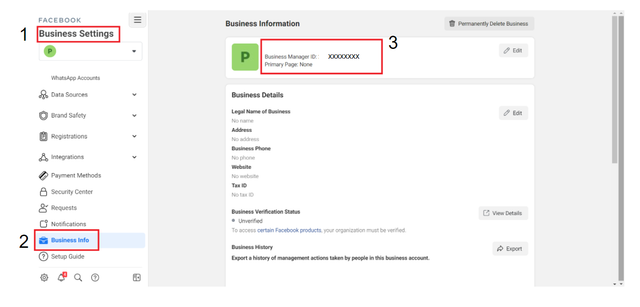
- Where can I see my Business Manager ID?
Go to Business Settings and click the Business Info menu. You should be able to see the Business Manager ID.
- Where can I see my Ad Account ID?
You can check the Ad Account ID by following the steps here
- Why can't I find my Ad Account ID?
If you already follow the steps in question #3 and the ad account in question has not appeared, there are 2 possibilities for why this is happening
- A. It is possible that you do not have admin access to that business manager. Please contact the admin of that business manager to add admin access for you, by following the steps here.
- B. Another possibility is that there is no active ad account in the business manager. To add a new ad account, please follow the steps here.
- When I click the “Create Catalog” button in the Seller Dashboard, where should the page be directed?
The page will direct the seller to fill in their Facebook Business Manager ID. If the seller is directed to another page, it is possible that their account has limited access, such as admin access. Only the store owner is allowed to create and share catalogs.
- What should i do if I already fill in the form yet haven't received the email?
Catalog making process requires 3-5 working days. If you haven't received the email confirmation on the 5th day, please reach us via email : tokopedia.collaborativeads@bytedance.com
- I have successfully connected my catalog to my Facebook account, but why is the CPAS page on my Tokopedia Seller page not updated?
The CPAS page on the Tokopedia Seller page always displays the same page. This is done as a precaution in case the seller wants to share another catalog. To check if the catalog has been linked to Facebook, the seller can check it on Facebook, not on the Tokopedia Seller page.
- If I want to use an agency or change to a new agency to work on my CPAS campaign, how can the agency use the CPAS feature with Tokopedia?
You can re-register CPAS with Tokopedia via the same form page by including the details of the agency business manager and the agency name in questions 8 and 11. Tokopedia will send a new catalog for the agency..
About CPAS UTM/Link
- What is the function of the shared UTM/URL parameter?
UTM/URL parameters function as identifiers so that traffic coming from CPAS campaigns can be counted. Each seller or brand that has shared their catalog on Tokopedia has already used the UTM/URL parameter that has been implemented automatically in the catalog.
- How to make parameter UTM/URL Facebook CPAS?
You can make your own UTM by accessing UTM Generator here, click "Use This Template" to make copies of this sheet. After copied, UTM CPAS can be made in tab "UTM Maker (CPAS Only)". Please fill in all the column with format that has been shared in every row. The guidance is accessible in row 3 and example can be found in row 4 and 5. Please make sure that the format has correctly used and follow the guidance. Please do not change the format, especially UTM Generator.

- What is the standard of CPAS UTM/URL parameters?
UUTM needs to follow this format below :
• Campaign Source: Facebook
• Campaign Medium: CPAS
• Campaign Name: (dari UTM Generator)
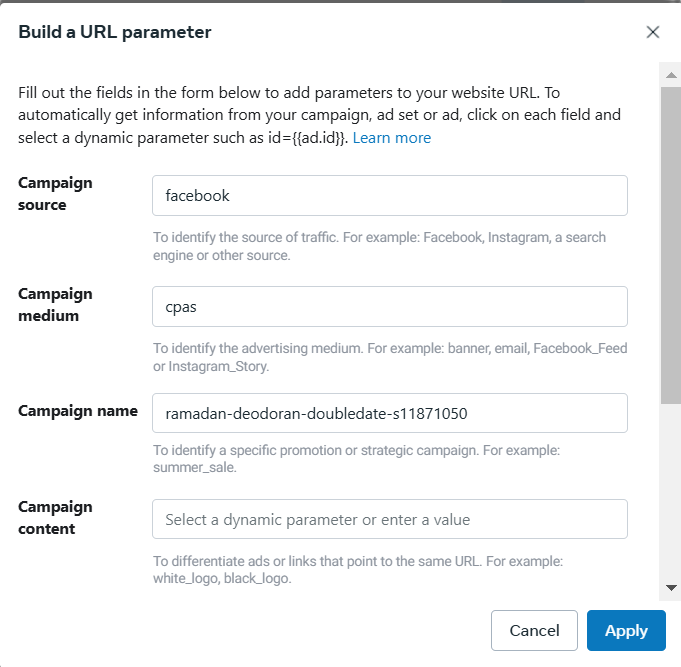
Contoh: If from UTM Generator you got the UTM as "bnnr_gempar88-broadaudience-banner_010824_080824_s456789" so the UTM format will be :
• Campaign Source: Facebook
• Campaign Medium: CPAS
• Campaign Name: bnnr_gempar88-broadaudience-banner_010824_080824_s456789
- Do I need to enter the UTM/URL parameter?
Yes. Because the parameter UTM/URL is the only way you can understand your clean shop's performance. . Especially if you are registering in specific selling package in Tokopedia, then UTM/URL will help to count reward that you will get.
- Can I reuse my CPAS link?
Yes, you can always reuse your CPAS link unless there are other needs required.
- There is an error message that says "UTM Parameter isn't set up". What should I do?
This is a bug that occurs in Facebook and this error message will disappear in a few days. As long as you can see the catalog name/catalog segment ID (on the "Collaboration Center" page under the Partner menu) and you can run ads smoothly, it shouldn't be a problem. However, if you still encounter problems, you can contact Facebook Support.
About CPAS Catalog
- How do I know if the catalog has been connected to my store?
You can check the catalog in Collaboration Center page under Partner Menu.
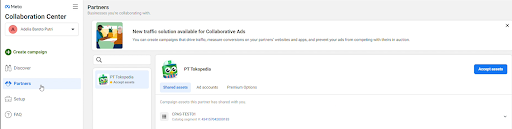
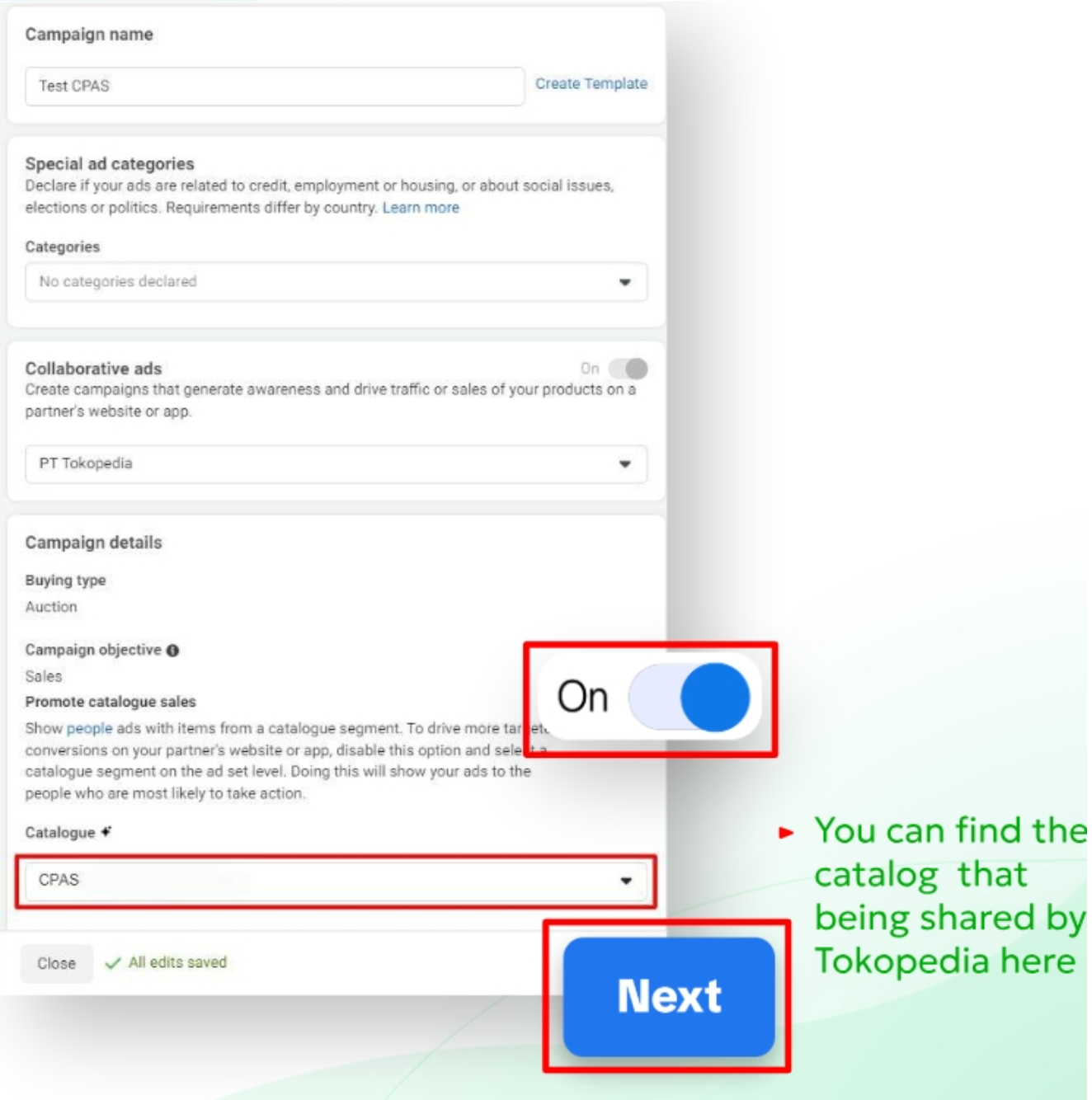
Besides that, you can see in ads setup part on campaign level. If in the catalog section you can see the catalog name that has been confirmed by Tokopedia via email, then the catalog is successfully connected to your business manager.
- I don't have access to the CPAS catalog because the "Manage Catalog" button is disabled, so I can't run my ads. What should I do?
The "Manage Catalog" button is disabled by the system. However, this will not affect your advertising activities. You can still run CPAS ads.
- Can Tokopedia share a specific catalog consisting of products that I want to advertise using CPAS?
No. However, you can create a product set from the specific products that you want to advertise. Learn how to create a product set here.
- I have shared too many catalogs on my Facebook. Can Tokopedia help me remove catalogs that I don't want to use?
Yes, you can contact the Account Manager, Relationship Manager, or Tokopedia Care by providing the name of the catalog that you want to delete.
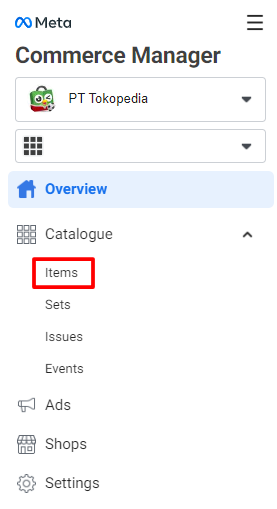
- Where can I check the products in my catalog? I can't seem to find it in the "Data Source" menu in "Commerce Manager."
You can always check it in the "Items" menu, as illustrated in the screenshot below.
- If I make changes to my store (changes in the number of products, addition of SKU, etc.), how long will these changes be updated in the Facebook catalog?
The updating process for the catalog will be done every 6 hours. For example, adding products done at 1:00 PM will appear in the catalog no later than 7:00 PM.
- Is the catalog updated manually?
No, the catalog is updated automatically. However, if you see that some of your products are not updated or included in the catalog, you can always contact the Account Manager, Relationship Manager, or Tokopedia Care and provide the name of the catalog and the product page link.
- Can the catalog be used for Instagram Shop?
According to the latest Facebook regulations, e-commerce catalogs, including Tokopedia, cannot be used for Instagram Shop. This is because Instagram Shop must direct ads to a landing page or domain owned by the brand that contains the brand name directly.
- The products in my catalog disappeared, and I can't select the product set, what happened?
You can contact the Facebook Help Center because this issue happened on Facebook. If the Facebook Help Center asks for the commerce ID, you can provide the "Catalog Segment ID" that Tokopedia has shared. To check the "Catalog Segment ID," go to the "Collaboration Center" page, then click the "Partner" menu.
About CPAS Ads Settings
- Are there any best practices for running Facebook CPAS?
Yes, when running a Facebook CPAS campaign, there are many variables that determine the success of the campaign's performance. You can learn more about it through the Best Practices Playbook guide to optimize the performance of your Facebook CPAS campaign.
- What should I do if I get an error message "You can't run ads with this catalogue segment"?
You can contact Facebook's help center page because this problem occurs on Facebook.
- Which pixel should I use? Can Tokopedia create a specific pixel for us?
No, all CPAS catalogs use the same pixel. Choose "tokopedia.com" as your pixel when setting up ads.
- Can Tokopedia share audiences outside of those who have already interacted with my products and store? For example, visitors to the "Beauty" category?
To maintain the privacy of all Tokopedia users, sharing custom audiences is not possible. You can only use audiences that Tokopedia has shared through the Facebook dashboard, namely audiences who have interacted with your products and store on Tokopedia.
- Can I access the Extended Audience Targeting feature for my CPAS campaign?
Access to the Extended Audience Targeting feature can only be used by sellers who meet the requirements. More information can be obtained from the Account Manager, Relationship Manager, or Tokopedia Care.
- Can I get information about CPAS audiences who have clicked or viewed my products?
No, since 2021, Facebook no longer provides privacy data from the Meta pixel on its platform. Tokopedia also cannot share this data because it is related to user data security. However, you can always choose Retargeting when creating ads so that your ads can always target sellers who have viewed your products.
- Can I set CPC for CPAS?
You can set CPC under the "Cost Control" option. However, we do not recommend this method because CPAS uses conversion events for optimization, not link clicks. In addition, if CPC is set too low, the ad will not perform well.
- What if I encounter performance issues in the campaign I am running?
If you have questions about campaign performance, the Account Manager or Relationship Manager can contact Facebook's help center for a solution. However, if you have problems connecting the product catalog through Facebook CPAS on the Tokopedia Seller page, you can contact the Account Manager, Relationship Manager, or Tokopedia Care for further assistance.
About CPAS Ads Report
- What kind of report do I get from Facebook CPAS?
If you run Facebook CPAS, you can understand the performance results like conversion results, numbers of purchases, and others without embeding any Facebook Pixel to Tokopedia Website. Those results can be easily access in your Facebook Business Manager which you already used when running the campaign. The right metrics to look at in a CPAS campaign can be seen here
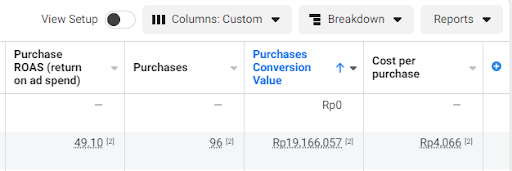
In addition, if you want to see a deeper report on Tokopedia's internal data such as GMV, the number of visitors who log in or new buyers, you can contact your Account Manager or Tokopedia Care to get a Tokopedia back-end report.
- Can I track and monitor the number of visitors and sales through external links?
You can track and monitor the performance of CPAS ads through Facebook Ads Manager and also Tokopedia's internal reports which can be obtained through Account Manager.
- Can Tokopedia provide information about products sold through CPAS every week?
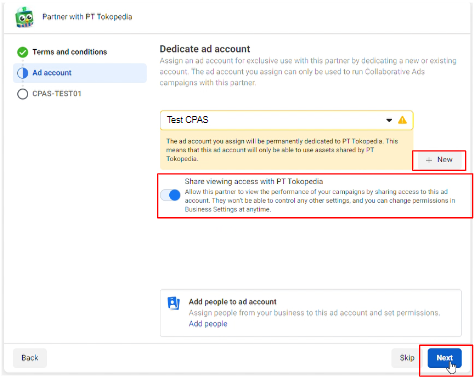
No, but you can monitor the performance of CPAS ads through Facebook Ads Manager. Make sure you have given access to your account to Tokopedia so that we can assist you when there are issues related to CPAS.
- Can Tokopedia provide a report so that I can compare it to the results in Facebook Ads Manager?
Yes! Please contact your Account Manager or Tokopedia Care to get Tokopedia's internal results.