

LIVE Plan & Hosting Skills
05/26/2025
Hi Seller!LIVE isn’t just about turning on your camera — it’s about showing up right. A dark, cluttered, or poorly executed LIVE can drive viewers away before they even hear your pitch. But with the right setup, natural delivery, and smooth hosting skills, your LIVE becomes a high-converting sales tool.
Let’s walk through how to prepare and present yourself for a successful LIVE—visually, verbally, and professionally.
Why Communication Matters for HostsStrong communication skills help hosts present products clearly, keep viewers engaged, and build trust with potential buyers. Whether you’re hosting solo or co-presenting, how you speak matters just as much as what you’re selling.



Team Roles & Responsibilities During LIVE

TikTok Shop by Tokopedia presents the Certified Livestream Host Program — connecting sellers with certified hosts through official training and certification.
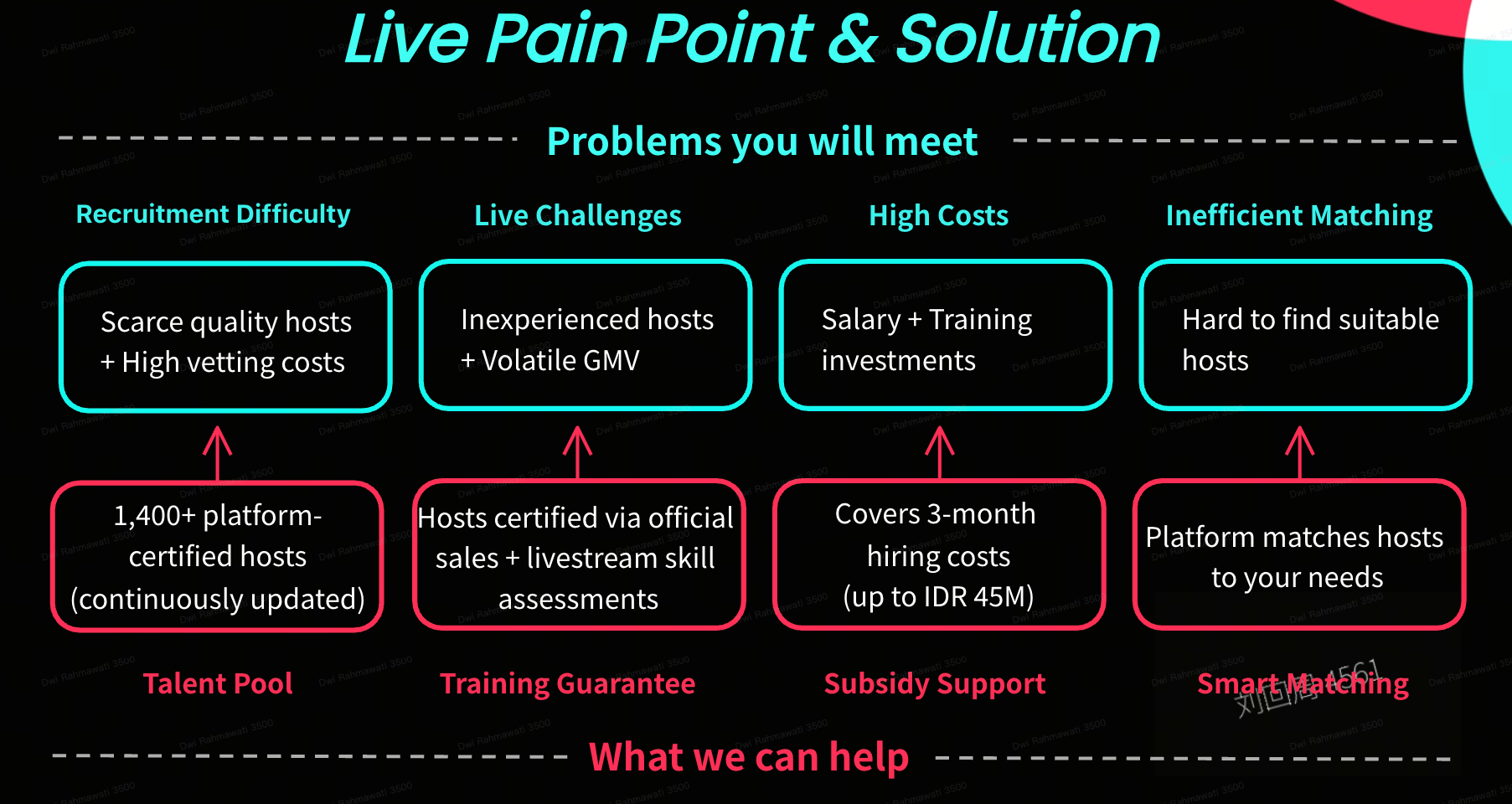 Benefit For Sellers:
 💥 Try This Today:Host a 30-minute LIVE with a clean setup, good lighting, and clear product display. Upload a teaser 3 days before, then review the replay to improve. Strong visuals drive trust and sale
Let’s walk through how to prepare and present yourself for a successful LIVE—visually, verbally, and professionally.
Why Communication Matters for HostsStrong communication skills help hosts present products clearly, keep viewers engaged, and build trust with potential buyers. Whether you’re hosting solo or co-presenting, how you speak matters just as much as what you’re selling.
Tactical Behaviors for a Successful LIVE
| Focus Area | Key Actions | Tips |
| LIVE Plan & Rundown |
| The smoother the prep, the more confident the delivery |
| Clear Product Introduction |
| Engage with your tone to hold viewer attention |
| Natural Interaction Style |
| Don’t aim for perfection—authenticity builds trust |
| Pace, Voice & Energy Control |
| Keep energy dynamic to sustain engagement |
Communication & Public Speaking Essentials for LIVE
Strong communication starts with the fundamentals. Practice consistently, understand your audience, and structure your message with confidence and clarity.- Practice regularly
- Know your audience
- Use positive body language
- Structure your message
- Manage anxiety with grounding techniques
Adaptability & Teamwork for a Smooth LIVE
Key Skills to Handle LIVE ChallengesSkill Area | What to Do |
| Stay Calm Under Pressure | Use grounding techniques like deep breathing or visualization |
| Problem Solving Mindset | Identify root causes of issues quickly and brainstorm backup solutions |
| Flexibility & Backup Planning | Prepare for equipment failures, platform glitches, or schedule delays |
| Collaborate with Your Team | Keep communication open with host, tech team, product specialist, and moderator before and during LIVE |
Team Role | Responsibility |
| Host | Lead the LIVE, interact with audience, stay energetic and clear |
| Technical Team | Manage camera, lighting, and audio setup |
| Product Specialist | Provide supporting info, answer product-related comments |
| Comment Moderator | Moderate live chat, remove spam, help steer discussion |
🎯 Certified Livestream Host Program
Want to ensure your LIVE sessions are led by professional, well-trained hosts?TikTok Shop by Tokopedia presents the Certified Livestream Host Program — connecting sellers with certified hosts through official training and certification.
Benefit For Sellers:- Access to a talent pool of 1,400+ certified hosts
- Smart Matching process to find hosts that fit your needs
- Subsidy support for up to the first 3 months (up to IDR 15mio)
- Quality guarantee through LIVE hosting skills and product knowledge assessments
- Register and fill out the Form
- Check your WhatsApp & Email messages. Platform will send the host brochure every Wednesday
- Select a host from the platform brochure
- Conduct an interview and sign a contract
- Upload the employment info → Fill in the Employment Verification Form
💥 Try This Today:Host a 30-minute LIVE with a clean setup, good lighting, and clear product display. Upload a teaser 3 days before, then review the replay to improve. Strong visuals drive trust and saleYou may also be interested in
- 21 lessons
LIVE
Master the art of LIVE selling—from planning to hosting sessions that drive real-time engagement and…
- 3 lessons
LIVE Content Creation
Learn how to create engaging LIVE content that drives sales and audience engagement.
- 4 lessons
LIVE Set-Up & Execution
Steps to properly prepare for a successful LIVE, including technical setup and event planning.
- 2 lessons
Understand LIVE Industry & Develop Host Mindset
Introduction to the LIVE industry, its importance, and how to develop an effective host mindset.

Drive More Viewers to Your LIVE for Free
This article twill help you automatically create short videos by repurposing best-performing moments…