

LIVE Highlight
08/26/2025
Hi, Seller!
Running out of content ideas? With the LIVE Highlight feature, you no longer need to start from scratch. This tool helps you turn the best moments from your previous livestreams into short, engaging videos that can attract more viewers—quickly, efficiently, and powered by performance data.
Every LIVE session has standout moments, whether it's a product that sold out quickly, a fun interaction, or a sudden spike in viewers. The LIVE Highlight feature is designed to help you capture those moments and turn them into ready-to-use promotional clips.
Here’s how it works:
The system uses smart algorithms to detect and extract high-performing segments from your past LIVE sessions, based on key metrics like:
The LIVE Highlight feature helps you:
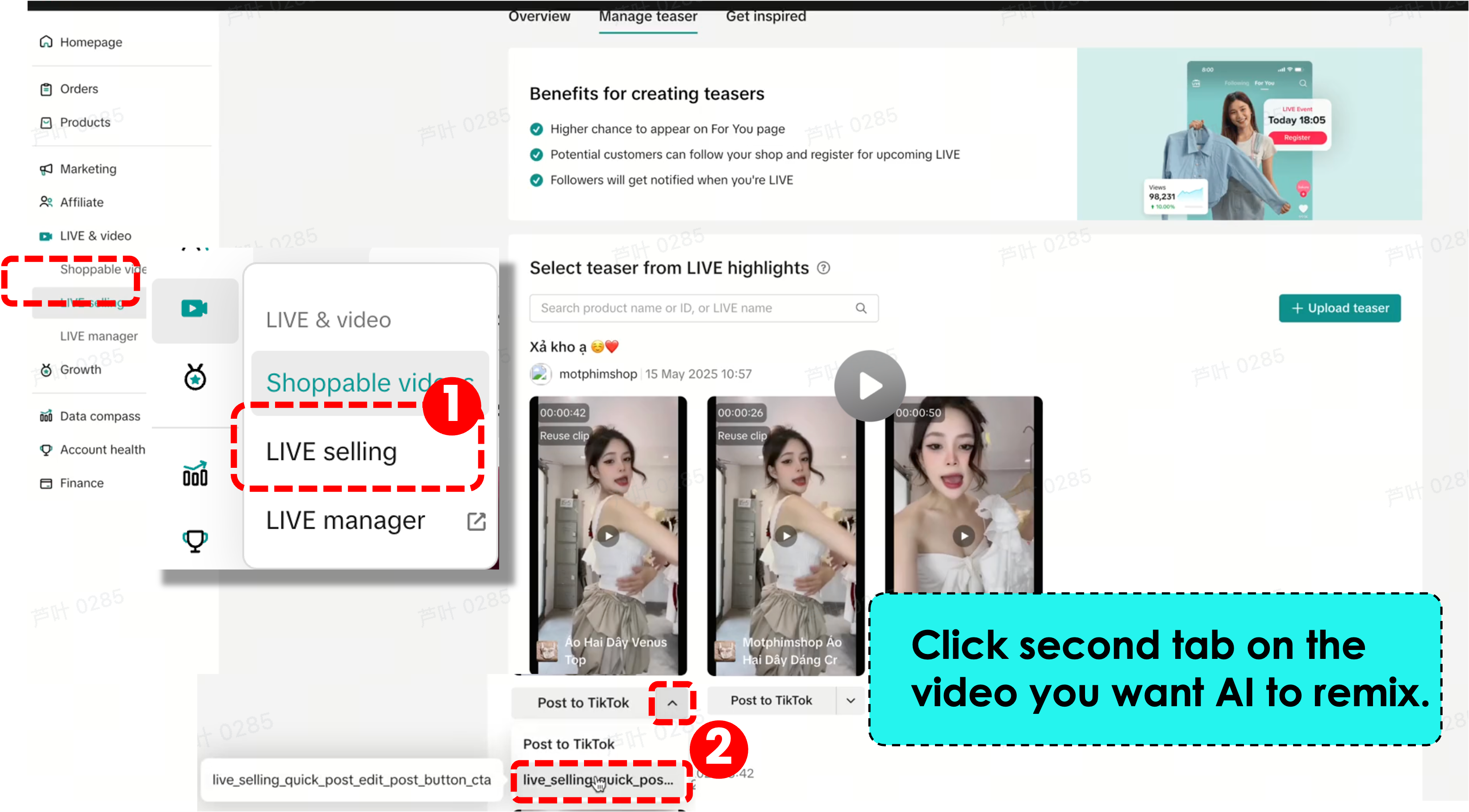
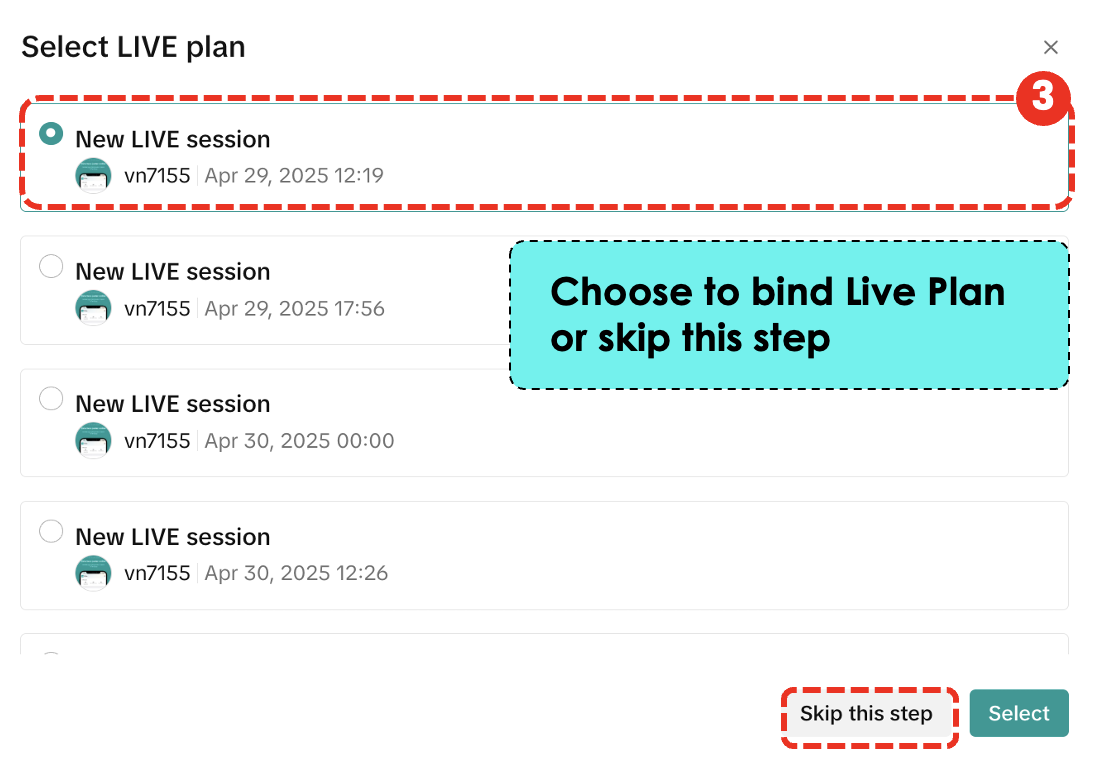
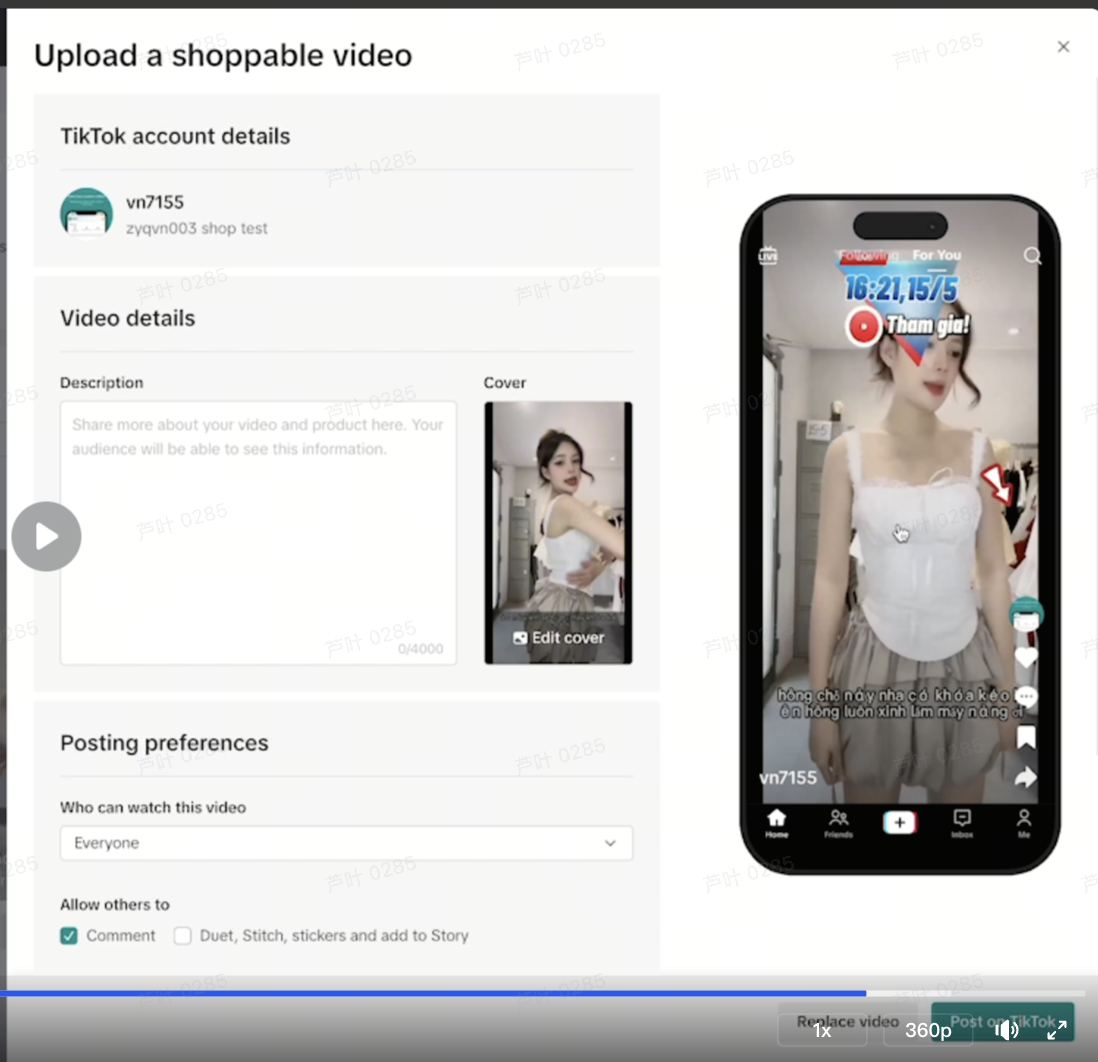
 If you want to AI remix raw highlights👇(option) Step1: click the button 「quick post edit」 Step2: Select live plan to bind or skip,when waiting 30s to complete , then post
✅ Basic Standard: The Minimum RequirementAt a minimum, LIVE Highlight clips must meet the following basic criteria:

✅ Basic Standard: Minimum ComplianceAt a basic level, any product shown in a teaser or highlight clip must also appear in the actual LIVE session. If the product was not featured during the original broadcast, it cannot be used in highlight content.
This rule ensures consistency between promotional clips and the actual livestream experience.
✅ High Standard: For Maximum ImpactTo meet high-quality standards, sellers should go beyond the basics. Here’s what’s required:
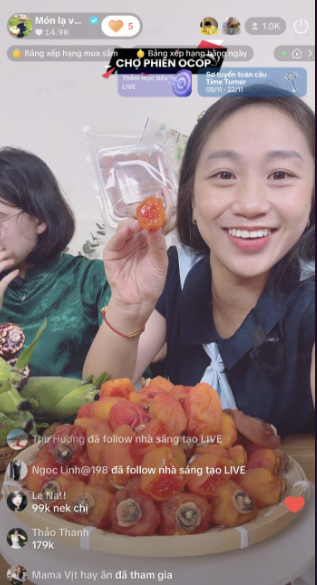
 ✅ Basic Standard: State the Key Selling PointsAt the very least, your highlight should mention the product’s key benefits or features. This gives viewers a basic understanding of what makes the product worth buying—but often isn't enough to keep attention or drive immediate action.
✅ High Standard: Combine Selling Points with Visual EngagementTo truly elevate your content, go beyond just stating the product details. Here’s how to meet the high standard:
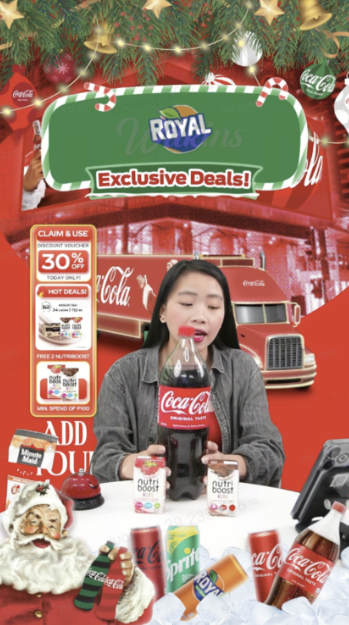
✅ What a Good Case Looks LikeA strong example of a good case shows a host actively demonstrating the product while surrounded by supporting visuals: promotion stickers, discount info, brand logos, and clear product placement. This kind of clip is engaging, informative, and encourages viewers to take action immediately.

You have already created the content, now let it work for you again & increase your conversion!💡
Running out of content ideas? With the LIVE Highlight feature, you no longer need to start from scratch. This tool helps you turn the best moments from your previous livestreams into short, engaging videos that can attract more viewers—quickly, efficiently, and powered by performance data.
Every LIVE session has standout moments, whether it's a product that sold out quickly, a fun interaction, or a sudden spike in viewers. The LIVE Highlight feature is designed to help you capture those moments and turn them into ready-to-use promotional clips.
Here’s how it works:
The system uses smart algorithms to detect and extract high-performing segments from your past LIVE sessions, based on key metrics like:
- GMV (Gross Merchandise Value)
- GPM (Gross Profit Margin)
- Traffic
- Engagement (likes, comments, viewers)

Why the LIVE Highlight Feature Matters
In today’s fast-scrolling world, viewers decide in seconds whether to engage or skip. Having teaser-style highlight clips helps you showcase your best content upfront—without having to record new material.The LIVE Highlight feature helps you:
- Build excitement ahead of your upcoming LIVE
- Re-engage viewers who missed your last session
- Increase your presence on the Shop Tab or Short Video feed
- Strengthen your brand recall with consistent, impactful content

How to Create a LIVE Highlight
- On Seller Center Web
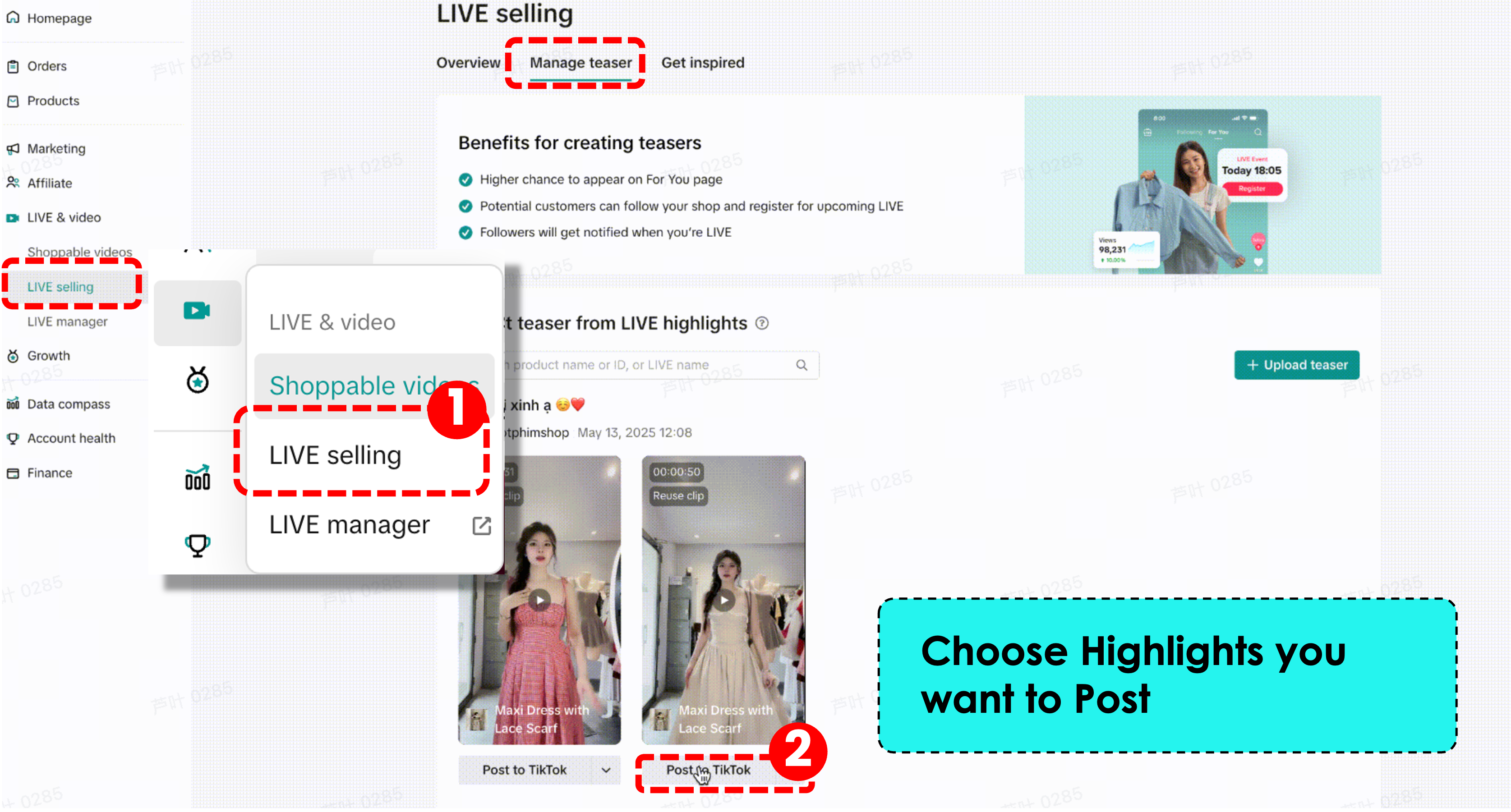
- Step 1: In Seller Center and go to Live & Video-> Live selling-> Manager teaster
- Step 2: Select previous highlights, choose 「post to TikTok」to post
「post to TikTok」-Post highlights directly
「quick post edit」-AI remix highlights clips,add effects such as music,arrow,stick,etc
- On TikTok App
- Before going LIVE
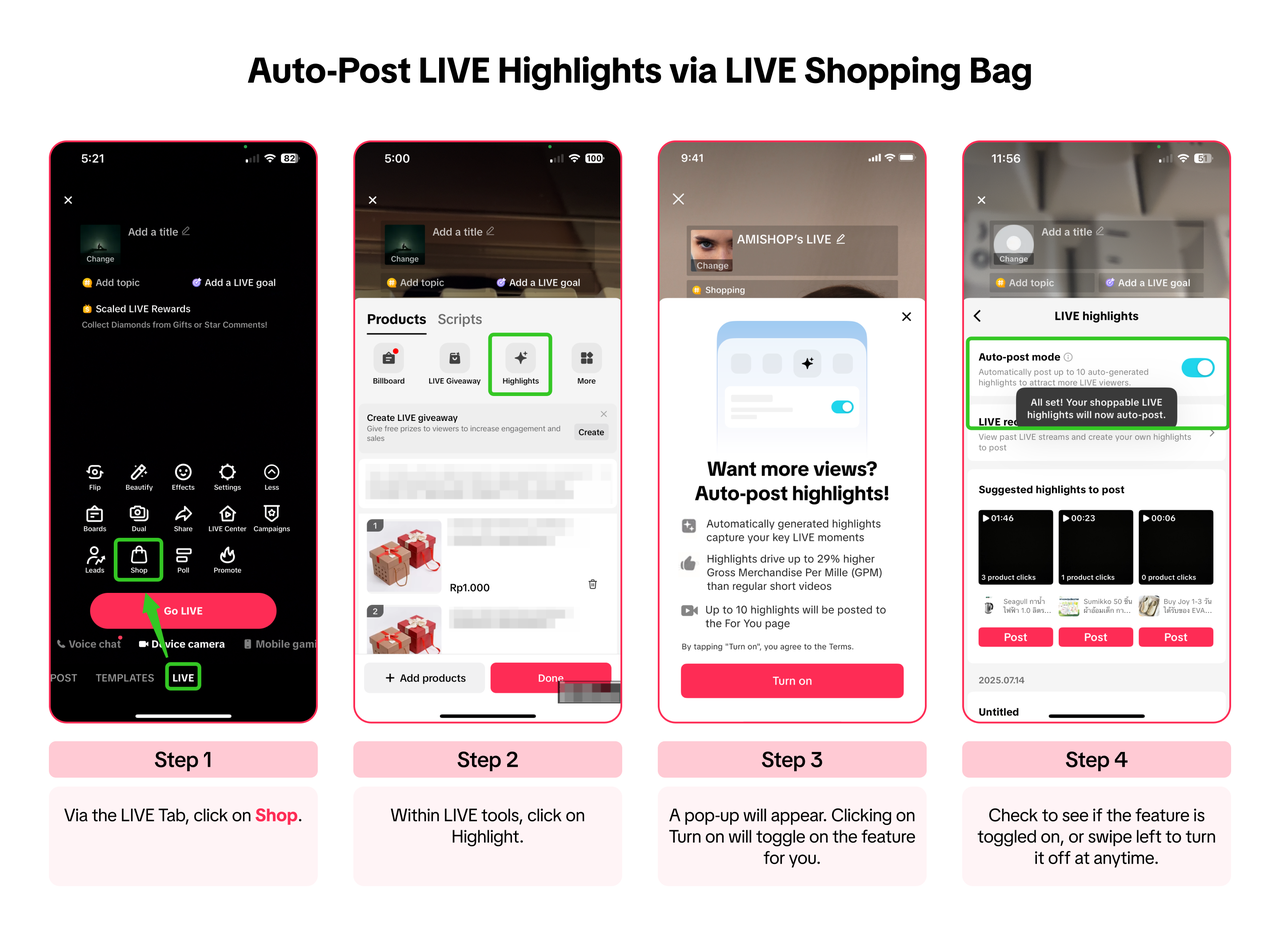
- After going LIVE
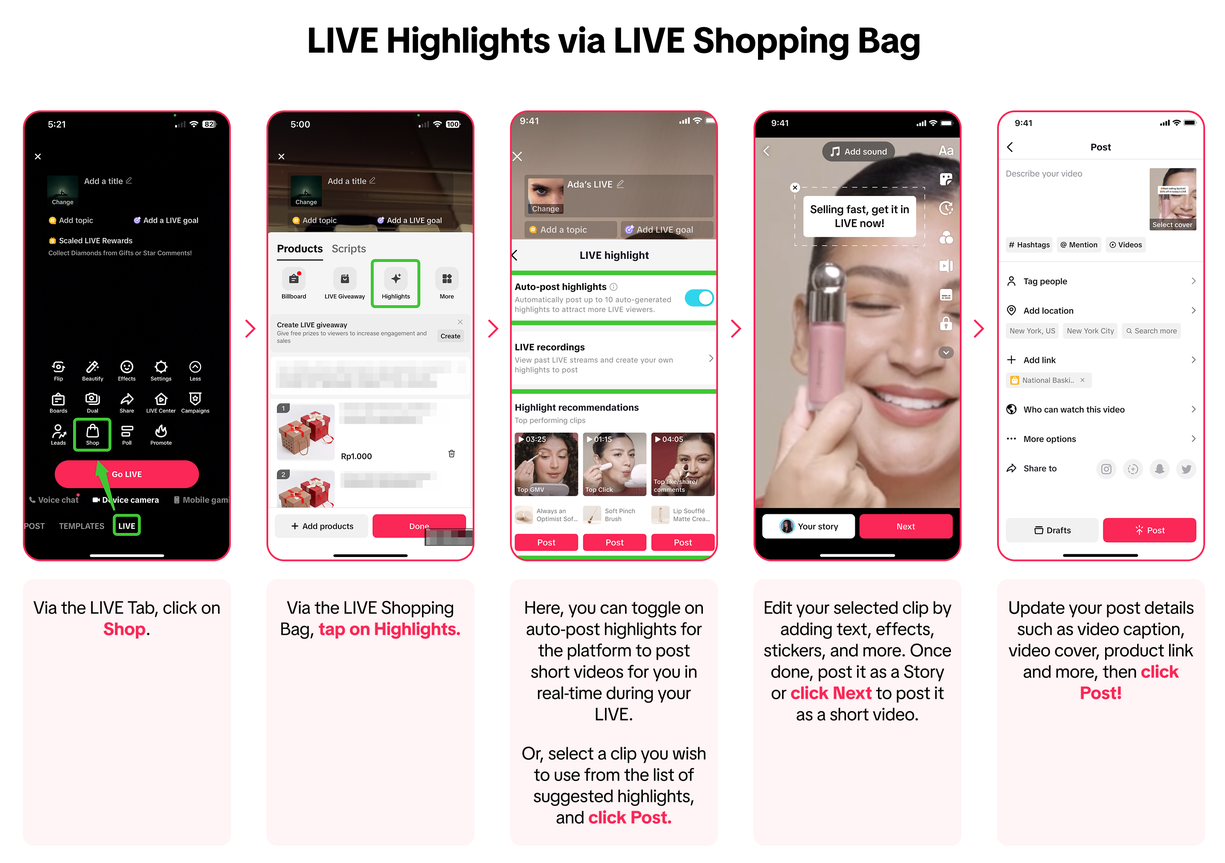

- Before going LIVE
LIVE Highlight Best Practice
High Quality
What Does a Good LIVE Highlight Look Like?To ensure your LIVE Highlight videos meet platform standards and deliver strong performance, there are three levels of quality to consider: Basic Standard, High Standard, and an ideal example we call a Good Case. Here’s how to make your clips stand out.✅ Basic Standard: The Minimum RequirementAt a minimum, LIVE Highlight clips must meet the following basic criteria:
- Video Clarity: The resolution should be at least 720p, with no lagging, freezing, or black screens.
- Video Compliance: Avoid using any third-party logos, watermarks, or QR codes. The ideal clip length is between 5 to 60 seconds, with under 40 seconds being the most effective.
- Video Comprehension: Original LIVE audio must be preserved, no muted or overdubbed content unless it's part of the live session itself.
- Visual Quality: Maintain at least 720p resolution for clarity.
- Audio Quality: Use strong, decision-oriented voiceover content. Make sure the sound is clean and free of background noise, with consistent volume. Whenever possible, use the local language to improve understanding and relevance.
- LIVE Room Quality: Clips should be taken from real LIVE sessions, not staged or artificial settings. Authenticity is key.
Consistent
Product Visibility Standards for LIVE Highlight ClipsTo ensure clarity and relevance, all products featured in your LIVE Highlight clips must appear clearly and accurately in the original LIVE session. The platform applies tiered standards to define what qualifies as acceptable and what makes a great example.✅ Basic Standard: Minimum ComplianceAt a basic level, any product shown in a teaser or highlight clip must also appear in the actual LIVE session. If the product was not featured during the original broadcast, it cannot be used in highlight content.
This rule ensures consistency between promotional clips and the actual livestream experience.
✅ High Standard: For Maximum ImpactTo meet high-quality standards, sellers should go beyond the basics. Here’s what’s required:
- The product featured in the highlight must exactly match what was shown in LIVE. No product swaps or mismatches.
- The product should be clearly shown from the front, so viewers immediately understand what it is.
- The product must appear within 1 second after the video starts, avoiding any delay or irrelevant intro.
- It must be fully visible within the first 5 seconds—ideally by being held up by the host or highlighted using a zoom-in shot.
Strong Benefit
How to Deliver Product Selling Points in Your LIVE HighlightGreat LIVE Highlight clips don’t just show the product, they sell it. To create compelling content, sellers must communicate product benefits clearly and engagingly. The platform provides three levels of standards to guide how product information should be delivered within each highlight clip.✅ High Standard: Combine Selling Points with Visual EngagementTo truly elevate your content, go beyond just stating the product details. Here’s how to meet the high standard:
- Highlight the product’s unique selling points clearly and confidently
- Include visual enhancements like animated video stickers or text overlays
- Show product try-ons (e.g., beauty or fashion) or real-time demonstrations
- Add merchant action cues—such as pointing to the product, encouraging viewers to tap, or showing time-sensitive offers
✅ What a Good Case Looks LikeA strong example of a good case shows a host actively demonstrating the product while surrounded by supporting visuals: promotion stickers, discount info, brand logos, and clear product placement. This kind of clip is engaging, informative, and encourages viewers to take action immediately.
Ready to Get Started?
Head over to your PC Seller Center, explore your past livestreams, and start turning powerful moments into traffic-driving videos.You have already created the content, now let it work for you again & increase your conversion!💡
You may also be interested in
- 3 lessons
LIVE Content Creation
Learn how to create engaging LIVE content that drives sales and audience engagement.
- 4 lessons
LIVE Set-Up & Execution
Steps to properly prepare for a successful LIVE, including technical setup and event planning.
- 2 lessons
Understand LIVE Industry & Develop Host Mindset
Introduction to the LIVE industry, its importance, and how to develop an effective host mindset.

Drive More Viewers to Your LIVE for Free
This article twill help you automatically create short videos by repurposing best-performing moments…